Digital Picture Frame That Rotates To Match Image Orientation

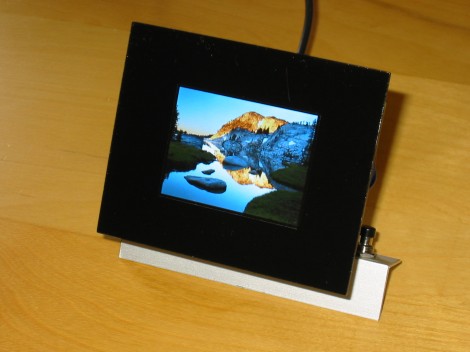
This digital picture frame physically rotates in order to match the image’s orientation. [Markus Gritsch] built the frame, including a Python script to translate the photos to a format which makes the best use of the 2.4″ LCD screen.

The screen is addressed in 8-bit parallel by a PIC 32MX120F032B processor. Image are read from an SD card in a raw format, with 16-bit colors pushed to the display for each pixel. To get them into this format [Markus’] script converts the JPEG files to RAW, resizes them, uses dithering to reduce to 16-bit color, then applies a sharpening filter to improve the final look. During this process it also includes orientation information. That is parsed by the microcontroller and used to drive the servo motor to which the screen is attached.

To finish off the project he spray painted a piece of acrylic to act as a bezel for the frame. Check out the demo after the break and we think you’ll agree the rotating feature, along with image scrolling, really makes this a piece you’ll want on your own desk.

Continue reading “Digital Picture Frame That Rotates To Match Image Orientation”
PhilRobokit Anito Is Not An Arduino

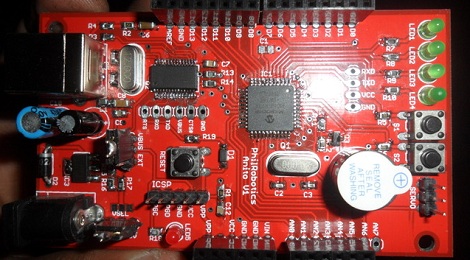
A few people over at the Philippine hackerspace PhilRobotics a PIC-based dev board that takes a lot of cues from ‘the microcontroller board everyone loves to hate,’ the Arduino.

There are a few differences between the PIC16F877a used in the Anito and the ATMega328 used in the Arduino: The PIC has a little less than half the Flash memory of the ‘Mega and less RAM, but has a slightly higher clock rate. It would have been nice to have a dev board with Arduino style headers powered by one of those new PIC32MX chips, if only because of a few really, really awesome projects we’ve seen. We’ll take whatever we can get, though, even if it provides a little more ammo for the PIC/AVR holy war.

One really interesting aspect of the Anito is the IDE. Written in Python, the PhilRoboKit IDE has all the features of everyone’s favorite IDE that is written in Wiring, plus a few extra features: autocomplete is a huge bonus, as is the ability to upload programs over Pickit2 ISP header. The IDE is available for Windows and Linux (no Mac port yet), and should be enough to get you off the ground in the PIC dev world.

Energia Brings Arduino IDE To The TI Launchpad

The Arduino IDE is an abstraction layer for the AVR chip which the board is based around. So it’s no surprise that it is now possible to use the Arduino IDE with the TI Launchpad board. This makes it dead simple for beginners to play around with the inexpensive and low-power MSP430 platform. This is all thanks to a lot of hard work on part of the Energia developers.

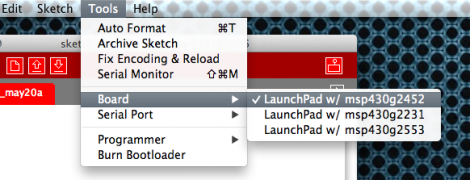
The project branches from Arduino so the look, feel, and function are all about the same. Most notably, the color scheme has migrated to red to match the board color of the Launchpad. You can configure the hardware the same way by selecting a COM port and target board. Almost everything is already working, but you should check the known issues page so that you don’t try to use a function that hasn’t been ported. Right now the list includes the random and random seed functions, as well as tone, notone, and micros. There is also an issue with analogWrite; it will only produce half the requested frequency and duty cycle can only be set from 0-50%. Still this is a great development if you’re most comfortable working from this IDE.

Logic Analyzer Add-on For The MSP430 Launchpad

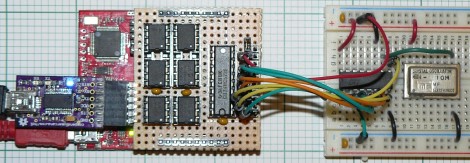
Here’s a 6-channel logic analyzer shield for the MSP430 Launchpad. It manages an eyebrow-raising 16 million samples per second. The prototype seen above is made on a hunk of protoboard with point-to-point soldering. [oPossum] did lay out a PCB — which is just 50mmx50mm — but has not had any produced quite yet.

He calls it the LogicBoost, and based it on the the LogicShrimp design. The sextuplet of 8-pin chips are all SPI RAM. These are responsible for storing the samples, with a 74HC573 latch routing the traffic. The MSP430 chip provides the SPI clock, and the Launchpad’s virtual com port can be used to push the data to a computer for graphing. That’s a bit slow so [oPossum] also included an optional header for an FTDI board that will do a faster job. The sample rate can be adjusted by tweaking the internal oscillator setting of the chip; there’s plenty to choose from so it will work for just about any purpose (as long as you don’t surpass the 16 Msps speed limit).

[via Dangerous Prototypes]

Using Your Bench Tools To Test A New Display

It usually takes a bit of work to gain confidence when it comes to using new parts. [Glitch] got his hands on this OLED display which is manufactured by Sabernetics and wanted to give it a whirl before building a project around it. He grabbed his Bus Pirate to help learn the ins and outs of the new part.

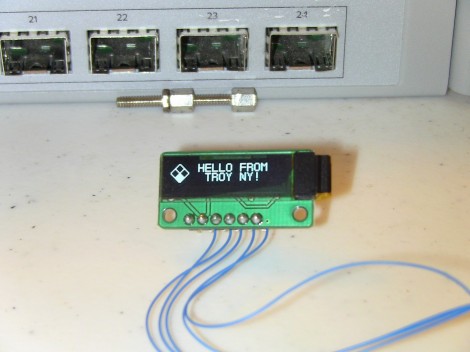
The 96×16 Dot-Matrix display uses the i2c protocol, keeping the pin count really low (six pins for: ground, reset, clock, data, chip select, and voltage). Since the Bus Pirate gives you command-line-like access to i2c it’s a natural choice for a first test. In fact, the tool has been our go-to device for that protocol for most projects.

The first commands sent are configuration values for the SSD1306 that drives the display. These configure contrast, voltage conversion, and other important values necessary to power on the display. It sprung to life, showing random pixels since the RAM had not yet been initialized. With that success [Glitch] moved on to the Bus Pirate’s scripting capabilities and ended up with a Python script that drives the demo seen above. Now that he knows the commands he needs, it’ll be a lot easier to write code for a microcontroller driver.

Quick Look At The Soldercore Dev Board

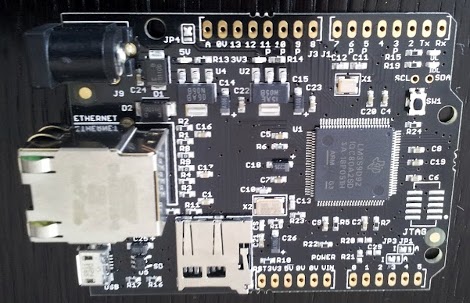
It seems like hacker-friendly ARM development boards are just exploding into the market right now. Here’s one we haven’t looked at yet. The SolderCore is made by Rowley Associates and is packed with features which help to explain the $80 price tag. [CharlieX] just ordered one and posted a bit about his first day with the device.

First off, it’s obviously the Arduino form factor. We think that’s a nice touch in a development board, but we still wish the Arduino folks hadn’t offset that one header way back when. That chip at the center packs quite a wallop; an 80 MHz ARM Cortex-M3 (from TI) with 512 kb of Flash memory and 96 kb of RAM. The in-built Ethernet jack is hard to miss, but right below it in this picture you can also see the USB On-the-Go connector. There’s a microSD card slot and both 3V and 5V regulators. [CharlieX] does a little hacking on the networking features offered, then takes a look at firmware upgrading. For that you’ll need an SD card formatted to FAT 16.

Taking A Dump From Some Old Hardware

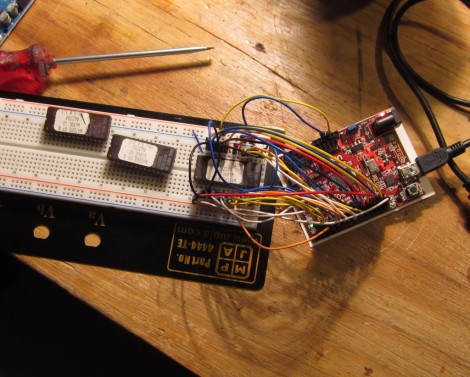
NYC Resistor shows you how to have some fun with electronics from the junk bin. Their post called The Joy of Dumping encourages you to look around for older memory chips and see what they’ve been hiding away for all these years.

The targets of their hunt are EPROM chips. Note the single ‘E’. These are Erasable Programmable Read-Only Memory chips, and predate EEPROM which adds “Electrically” to the beginning of the acronym.  You used to use a UV light source to erase the older types of memory. In fact we’ve seen some EPROM erasers as projects from time to time. These shouldn’t be too hard to find as they were prevalent as cheap storage back in the 1980’s.

If the quartz window on the top of the chips has been shielded from ambient UV light, you should still be able to read them and it’s as easy as hooking up your Arduino. Is it useful? Not really, but it still can be neat to interface with what might otherwise never make its way back out of the junk box.