Get Neck-deep Into ZigBee

Here’s a bulky tutorial that will round-out your understanding of ZigBee wireless communications (translated). The protocol is great for hobby electronics projects because it uses low-power short range wireless devices to build a mesh network. The guide covers both hardware and software, but also takes the time to explain what that hardware is doing in the background.

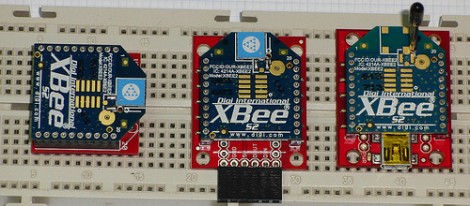
As you can see, several different renditions of an XBee module are used as examples. They pretty much all rely on a series of SparkFun breakout boards that each serve different purposes. Once you’ve acquired these modules, there’s a fair number of choices needed to configure them to play nicely with each other. We read most of the tutorial (we’ll save the rest for later enjoyment) and had no problem following along even without owning the hardware or being able to use the interface as we learned.

Whenever we cover XBee modules we always like to mention that it’s quite easy to use these for remote sensors with no additional microcontroller needed.
512k SRAM Board For Your Next Prototyping Run

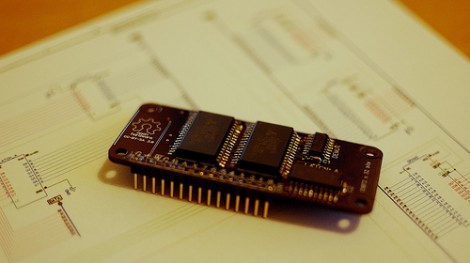
Find you’re running out of memory and paying for more expensive chips just to plug this feature gap? Many of the upper offering of chips have the option of adding SRAM thanks to an on-chip hardware feature, but if you don’t have that this 512k SRAM add-on board can be used with any chip that has 13 extra I/O pins available.

That use of pins may sound crippling if you usually use low pin count chips. But thanks to a write protected state option with the memory chips, nine of those thirteen pins can serve a dual use when not reading or writing from the memory. Speaking of, the address scheme is designed to access the memory in 32-bit blocks but individual bytes are accessible too if need be. [Wardy] has been testing his design using a Propeller chip running at 75 MHz so we know it’s built for speed, but he also mentions there’s no minimum clock speed for the board to function either. He used the Open Hardware guidelines when sharing his work, and if you want one for yourself you could always give the DorkBot PDX service he used for the prototypes to get your own boards too.

[via Dangerous Prototypes]

Gold Leaf Circuit Board

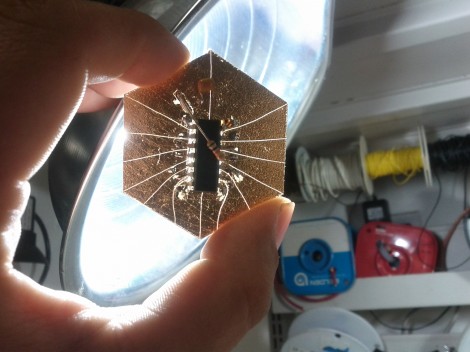
Ah, the glitter of gold… or fake gold, we’re not really sure. But [Mike Hogan] and [PJ Santoro] have been working with faux gold leaf as a conductor on circuit boards. The device you see above is mounted on metal-covered paper substrate and it really works.

They started by applying spray adhesive to heavy paper to make the gold-clad they needed. This was cut down into hexagons in homage to their hackerspace, Hive76 in Philadelphia. From there the shape of the microcontroller (an MSP430 G2211 in this case) to prevent shorts under the chip. The leads were flattened to interface well with the gold contacts, and a hobby knife was used to score the traces. Some careful soldering made up the final connections, and they were in business.

Oh, wait; chip on board but nothing on chip. They forgot to program it first! Since there’s no header they needed an easy way to interface with the board. The clever guys used the power of magnets to hold alligator clips in place. See how they did that in the demo video after the break.

They’re also working on some boards that use conductive ink similar to this hack but we haven’t seen a write-up from these two about those experiments… yet.

Continue reading “Gold Leaf Circuit Board”

Puncher Tracks Your Freelancing Hours, Time Spent In TSA Patdowns

freelance-puncher

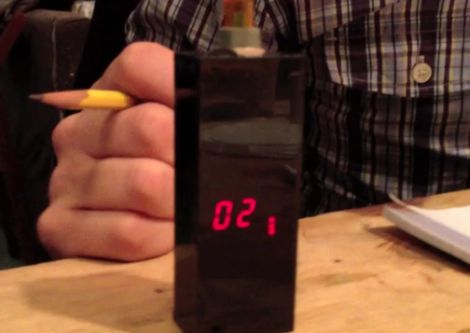
[Raphael Abrams] does a lot of freelance work, but he has trouble accurately keeping track of the hours he has put in for his clients. After trying various applications and methods of logging his time, he finally decided to build a device that worked just the way he liked.

He calls his device the “Freelance Puncher”, though it already has been nicknamed the detonator, as it looks like something you would find in the hands of a [James Bond] villain. The device uses a PIC16LF1827 to track the time, saving his logged hours to the built-in EEPROM when powered off. A pair of 7-segment displays are used to display the accumulated hours upon power-on, and a set of seven SMT LEDs separated into two banks keep track of quarter and hundreds of hours worked.

[Raphael] has made his code and schematics available on Github, so you can easily replicate his work if you are looking for a better way to track your time. We think it looks great, though it could be the sort of thing that traveling freelancers might want to keep in their checked luggage, unless they want to spend some quality time with the TSA! Be sure to stick around to see a short video where [Raphael] shows off and explains how his Freelance Puncher works.

Continue reading “Puncher Tracks Your Freelancing Hours, Time Spent In TSA Patdowns”

JTAG Dongle Pushes Code To FPGA After Bootup

This gnarly beast has near-magical qualities. [Sprite_TM] patched it together as a dongle which attaches to a JTAG header (we’re fairly certain this is not a standard footprint for that interface though). He uses it to push code to an FPGA after that device boots. Why? Well, there’s several reason, but the most generic answer is that some boards will not boot unless there is a chain of trust that validates the code which will be running.

In this case, [Sprite_TM] is using a knock-off board he acquired from a Chinese supplier. It’s a hardware network terminal (thin client), and as you can see in the video after the break, it works just fine. But that’s pretty boring and he wanted to use it for his own purposes. When he plugs in the dongle and powers up the board the network terminal is nowhere to be found, replaced with the code to play Pac-Man as if were a full arcade cabinet.

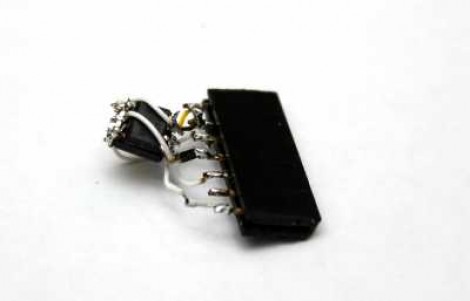
The dongle is simply a female DIL header, an ATtiny85, and a flash memory chip. The AVR has a software UART that speaks XSVF, the protocol used to push data to the FPGA. The data to be written is stored in the memory chip, and with that header in place reprogramming the AVR is just a matter of connecting an ISP programmer. Brilliant!

Continue reading “JTAG Dongle Pushes Code To FPGA After Bootup”

Using A Cheap Accelerometer With Arduino Comes With A Catch

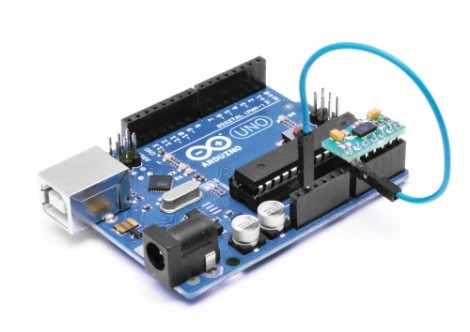
[Boris Landoni] put together a guide to using an inexpensive 3-axis accelerometer with Arduino. The chip that he chose for the exercise is an MMA7455L made by Freescale. It’s got a lot of nice features packed into it, using hardware to do some of the things you’d need software for with other chips like reporting in which direction the chip is moving, detecting when movement has stopped, and few others. It’s an I2C device, so the examples he provides will be super simple to port to your uC of choice.

But as the title says, there’s a catch. The chip is extremely versatile and you can get your hands on one for under $2. But check out the size of it. That’s a DFN (dual flat no-lead) package which means there are no pins on it. The package has solder contacts on the bottom which do not protrude out the sides. If you want to do some at-home prototyping with the chip you’ll need a hot air pencil or reflow gear as hand soldering is unlikely to be successful. We’re not saying it’s impossible, but it is quite tricky.

Of course, if you’ve got the secret to getting this done with a quality soldering iron we’d like to hear about it.

ultimate-breadboard

The Ultimate Breadboard – A Prototyping Station That Has It All

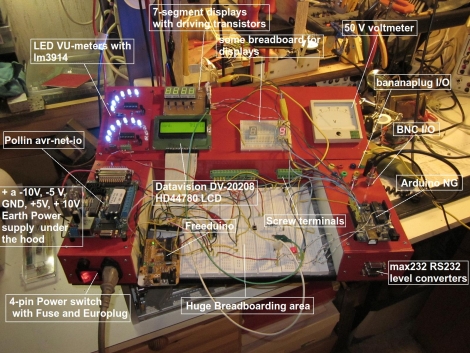
[Claudio] was working on a homebrew oscilloscope project when he started thinking about how unsuitable a standard breadboard is for a large-scale project. Rather than adding components on top of components until they became what he lovingly calls a “fragile, unforgiving crapstack”, he decided to build himself the Ultimate Breadboard.

He packed so much into his design, that it’s honestly hard to know where to begin describing it. Aside from an appropriately large breadboarding surface embedded in the center of the console, he added a power supply to the left hand side, which sits just below an Avr-Net-IO board. The right side of the console features an Arduino NG, and a pair of level converters. He also added some LED-based VU meters, a couple of 7-segment displays, an LCD display, an analog voltmeter, along with plenty of I/O connectors.

The Ultimate Breadboard might look a bit daunting at first, but it seems like an awesome setup on which to do any sort of prototyping. Be sure to check out the video below for more details and to see [Claudio] give a tour of the device.

Continue reading “The Ultimate Breadboard – A Prototyping Station That Has It All”