Give KiCAD A Try. Here’s How

Up to this point we’ve used Eagle CAD as our exclusive PCB design and schematic layout tool. But [Brian] has inspired us to try something different thanks to his KiCAD tutorial.

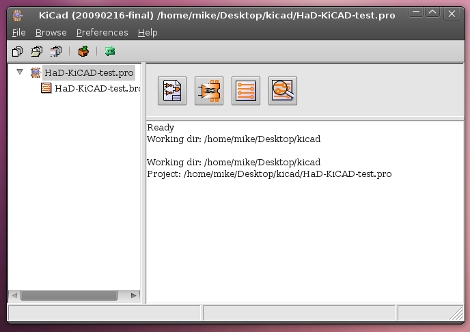
KiCAD is an open source printed circuit board design tool. Since we like to rock the Linux here at Hackaday getting our hands on this was as easy as:

 sudo apt-get install kicad

The version in the Ubuntu 10.04 repositories is a bit older but seemed to work just fine. [Brian] jumps right in with one of our most dreaded tasks on Eagle, designing your own parts. He knows of a nice online tool for automatic KiCAD part generation and walks through the process of building a voltage regulator and importing it for use in your own personal library From there it’s off to layout a power supply schematic for a breadboard PSU. The lesson continues with board layer, as well as the process used for exporting data for PCB fab house. We think this tutorial works well if you’re already familiar with PCB layout using a different software package but it moves a bit fast if this is your first time.

KiCAD seems like a nice tool and we’ve heard from many advocates in the comments over the years. Look for our next PCB design to be on KiCAD as we just need to use it for a while before passing judgement.
Keyboard Converter 2 Pack

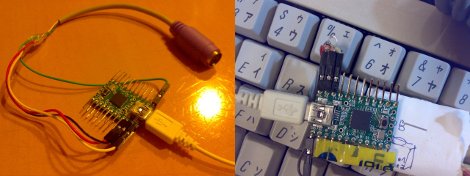
[REVENGE] pointed out a couple cool little project posts from the geekhack fourms converting vintage keyboards to USB with a Teensy. They both have VUSB support, so any avr micro controller that meets VUSB’s requirements in theory could be used.

First up is a PS/2 to USB keyboard converter, and while yes this has been done many times before, this one sports some extra features not often seen, like mouse keys, system and multimedia keys, and keymap customization. Instructions are also provided for use with a non USB enabled avr controller (like a mega 168, or 328) through the VUSB library (though with not all features available).

Next is pretty much the same thing, but it converts Apple Desktop Bus to USB, which is not exactly rare, but its lack of a clock serial signal, somewhat variable timing, and the fact that you wont find a bucket of Apple keyboards for a buck at the thrift store makes any ADB converter worth mentioning.

VUSB instructions seem to be the same for either, source is available and there are some cool pictures and info listed, and besides what is more fun than being able to plug your Model M into your netbook, or your Apple Extended Keyboard into your mac mini.

Simple Fluidyne Engine

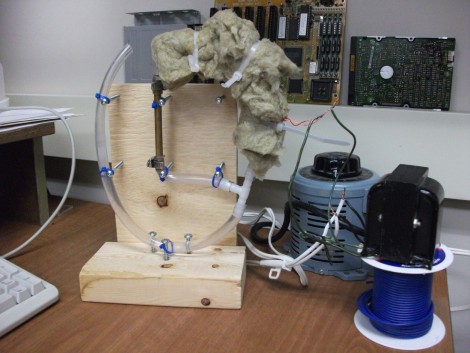
[Mirslav] built this fuidyne engine himself. This is a single piston model but you won’t find any precision milled cylinders here. That’s because fluidyne engines use columns of water as the pistons. In the rig shown above you can see one metal pipe which serves as the cold side of the loop. There’s another hot pipe underneath the insulation that completes the circuit. When that pipe is heated it causes the air inside the loop to expand, forcing the liquid on the open side of the plastic tubing (to the left) to rise. Once that air escapes to the other side of the circuit the water piston in the open tube falls back again. This results in continuous oscillation that can be used to drive a pump using a pair of check valves.

We’ve embedded a couple of videos after the break. You’ll see the system tested by heating one pipe with a hot air gun. But the example seen above uses an induction coil to bring the heat.

Continue reading “Simple Fluidyne Engine”

Mechanical Engineering Primer

So you’re master of electrons; able to program multiple chip architectures without batting an eye. Good for you. The only problem is that blinking LEDs gets boring after a while and you’re going to want to do something else. Here’s a chance to expand on your physical construction skills. Make: Skill Set is sharing the first chapter from the book Making Things Move by [Dustyn Roberts].

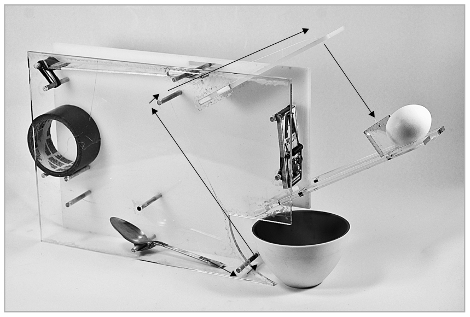
This chapter, which comes in PDF form, covers simple machines. It’ll guide you through the three different types of levers, including examples of how you use these in your everyday life. Next it’s on to pulley systems, wheels and axles, inclined planes and wedges, screws, and gears. [Dustyn] rounds out the chapter by talking about how these concepts are combined into machines like the Rube-Goldberg device seen above. Take some time to look this chapter over and then put it on the holds list from your public library if you’re interested in reading more.

Lightweight Robosuit Is Like Stilts On Steroids

What would you do if you were a foot or two taller? How about if you had an arm span two times as wide as you have now?

A group of Japanese engineering students asked themselves the same question and built a wearable chassis that does just that. Their project is called “Sukerutonikusu”, which we believe roughly translates to: “This is freaking awesome, we’ll take two!”. [Thopter] however informs us that it translates to “Skeletonics”, a fusion of the words “skeleton” and “mechanics”.

The suit is comprised of lightweight aluminum pipes and sheeting, allowing for it to be powered solely by the person wearing it. Stepping inside the chassis looks like it lifts the wearer about a foot and a half off the ground, while increasing their wingspan by nearly 6 feet! In the video embedded below you can see that while in the suit, the wearer is quite agile, and even has the ability to run at a decent tick.

If this ever comes to market, you can bet we will buy one in a heartbeat – until then, we will have to settle for making RoboCop sounds as we walk about the office.

Continue reading “Lightweight Robosuit Is Like Stilts On Steroids”

Twittering Wall Switch Lets Dutch Hackers Know When It’s Time To Play

hackerspace_open_switch

Hack42, a hackerspace in Arnhem, Netherlands recently moved into some new digs, and they wanted an easy way to let their members know whether they were open or not. Fixed hours of operation typically do not fit this sort of organization, so that was out of the question. Instead, they built a switch into the wall** that will let their members know when they are open for business.

The switch separates the TX and RX pins of two Ethernet ports that reside in an old access point embedded in the wall. When the hackerspace is open, the switch is thrown and the circuit is closed. A cron job checks the state of the eth1 port once a minute, sending the “Open” status message to Twitter and IRC once it notices the status change. When the switch is thrown again and the eth1 port goes down, a “Closed” message is broadcast.

It is a simple but cool hack, and quite befitting of a hackerspace.

**No direct Google Translate link is available, though Chrome will translate it for you without issue.

[Thanks, _Danny_]

Coming Soon To A Store Near You: Remote-control Cockroaches

roboroach

Given a box full of cockroaches, the first thing most of us would do is try to locate the nearest source of fire. Lucky for the roaches, the team over at Backyard Brains look at things a bit differently than we do.

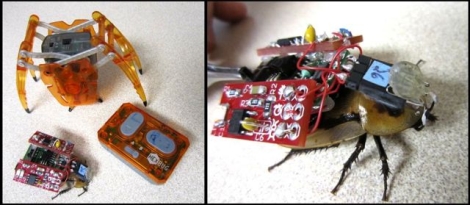
Their latest effort combines cockroaches and electronics to create a bio-electrical hybrid known as the RoboRoach. Using control circuitry donated from a HexBug inchworm and some 555 timers to create properly timed pulses, they have been able to control the gross movement of cockroaches. Stimulation is directly delivered to the antennae nerves of the cockroaches, enabling them to tell the roach which direction to turn and when.

Currently there are some ahem, bugs in the system, which they are working diligently to resolve. Only about 25% of the roaches they wire up can be controlled at present. Once that ratio improves however, they will be looking to offer RoboRoach as a beta product. If you are aiming to add a beetle air force to supplement your remote-controlled cockroach army, be sure to check this out.

Continue reading to see a video of the RoboRoach in action.

Continue reading “Coming Soon To A Store Near You: Remote-control Cockroaches”