
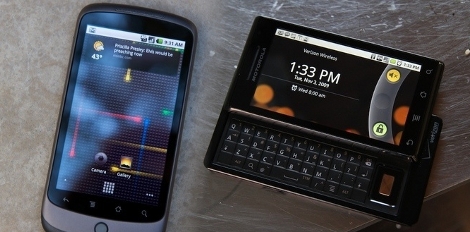
Unlocking Multitouch For Droid And Nexus One

We’re fans of pinch-zooming and that means multitouch. Although the interface is natively supported by both the hardware and operating systems of the Nexus One and Droid phones, it is locked out of the stock installation. You can make multitouch work on both handsets if you’re willing to do a little firmware alteration.

The coding has already been done for you, it’s a matter of loading a custom kernel. Both the Nexus One and the Droid have been rooted, and that’s what you’ll need to do to unlock multitouch with new firmware. In addition to gaining full access to the device OS, you’ll need to load up some different apps that support pinch zooming, etc. Luckily, these are readily available and you may like them better than the stock browser, maps, and photo applications.
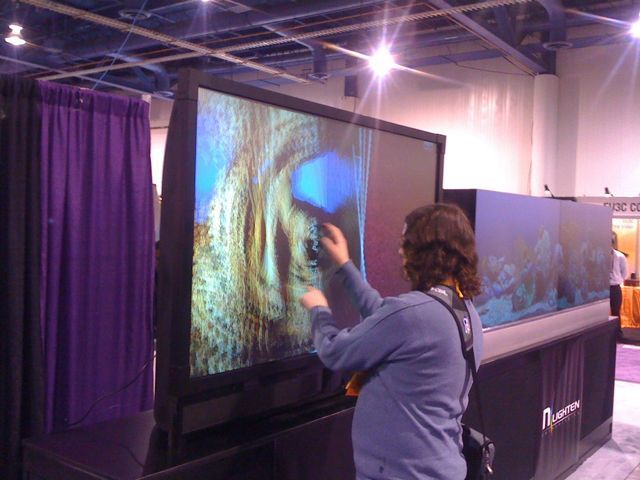
CES Multitouch


Here, [Devlin] can be seen playing with a multitouch setup. We inspected it and found 4 lasers, located in the corners. We are pretty sure we have seen this exact setup before.  There wasn’t really much of a booth there, so we played with the TV and then kept moving.

We also ran into a reader of Hack A Day and totally forgot to take his picture. Sorry man, if you run into us again, we’ll get you.

Subcycles: Multitouch Music Controller

[vimeo=http://vimeo.com/7000376]

Subcycles is a sound controller application that [Christian] is using on the third multitouch display that he built. The screen is a sheet of acrylic in an aluminum frame. The image is rear projected onto an area covered with Digiline dispersion film. As with other projects that use the Community Core Vision package, a PS3 eye camera captures the touch information.

This build does a great job of including the audience in what the musician on stage is doing. [Chris] points out that the sight of artists staring at laptops on stage is becoming more and more common. The ‘Minority Report’-like interface that Subcycles uses makes not just for interesting music, but for an added visual reinforcement to the live part of the performance.

[Thanks Mark]

BiDi Screen, On (and Off) Screen Multitouch

[youtube http://www.youtube.com/watch?v=kXuxK6IeQfo&feature=player_embedded%5D

MIT is debuting their latest advancement in technology, a multitouch screen that also functions as a gestural interface. The multitouch aspect is nothing new, the team explains how traditional interfaces using LEDs or camera systems do work, but fail to recognize gestures off-screen.

Gestures are a relatively recent highlight with the introduction of projects like Natal or perspective tracking, but fail to work at closer distances to the screen. MIT has done what seems the impossible by combining and modifying the two to produce the first ever multitouch close proximity gestural display.

And to think, just a couple of months ago the same school was playing with pop-up books.

[via Engadget]

The Harlequin Project

This impressive little mod is quite fantastic really. [pakkei] has constructed the Harlequin, a home-made version of the Microsoft courier. This was a stock Dell mini9. Now, coupled with a display link touch screen monitor that happens to be identical in size and resolution to the original, it has become a new device. He has loaded Windows7 and is currently working on a case that can hold all the bits a little more organized than what you see above. We can’t wait to see this finished.

[via engadget]

(Remote Controlled Robot) Car Vs (solar Charged) Tank

[youtube http://www.youtube.com/watch?v=WKFECpQ8asI%5D

[Matthias] sent in his team’s iPhone Robot (CAR) project in response to yesterday’s iPhone controlled solar charged tank. Unlike the tank, the iPhone car is controlled via Bluetooth BTnode and BTstack, and also isn’t solar-powered. However, both projects utilize iPhones and readily available components. We particularly liked how it not only used a multi-touch input, but also the accelerometer within the iPhone. It seems some competition is stirring, lets see who wins out.

Five Concept Mice Add Multi-touch Control

[youtube=http://www.youtube.com/watch?v=SLw1MXTDlAE]

Microsoft is showing off five concepts for added mouse functionality. All of them seek to replace traditional move-and-click with touch sensitivity through either capacitive sensing, video recognition, sensor articulation, or laser scanning. We’re excited about the prospects of some of these features but at the same time wonder what this does to the price of this much-abused peripheral. After the break we’ll touch on each of the devices, along with time references for the video embedded above. Continue reading “Five Concept Mice Add Multi-touch Control”









