Make The World Takes On Crowdsourcing Prosthetics

adafruit-make-the-world-prosthetics

Tonight marks the launch of a new program from Adafruit focused on improving the availability of prosthetic designs. The program will be highlighted in four Google+ Hangouts over the coming month. Mark your calendars for 8pm Eastern Time to join in on the one-hour launch.

We’ve seen a fair number of prosthetic hacks over the years, and every time one is featured we try to drive home the importance of sharing information in order to build upon the advances of others. The power of this is clear, shown in a $150 3D printed hand for a child, hackers that are replacing their own limbs or digits, and the sharing of diy fabrication techniques to help bring prostheses to the developing world. So get excited, get involved, and get hacking!

Safety Warning: Arduino GSM Shield May Cause Fires

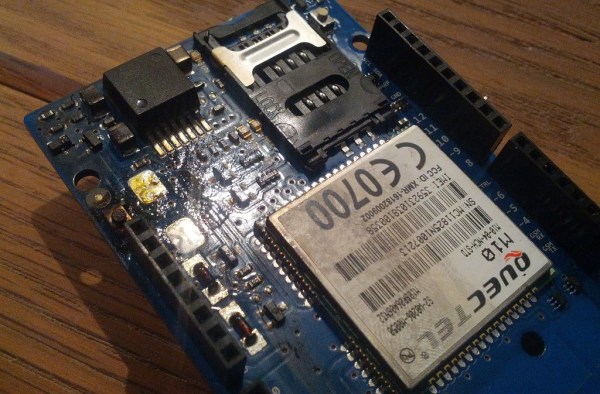
Be careful with those Arduino GSM cards. As [James] reports, they may turn into fire starters. One person has reported a small explosion and fire already on the Arduino forums.
Now before we go any further – You may be asking yourself who the heck [James] is, and what gives him the ability to second guess the Arduino team. Well, here is [James’] blog disclaimer:  “James is a Senior Technical Expert for Technology and Applications at KEMET Electronics, a capacitor manufacturer. The content of this post are his and in no way reflects opinions of his employer.”

Senior Technical Expert?  That’s a good enough reason for us to believe him.

[James] states the problem is a tantalum capacitor used to decouple the GSM radio power supply from the main Arduino supply.
Tantalum capacitors are great for their low ESR properties. However, they have a well known downside of getting very hot, or even exploding when stressed. It’s not the Tantalum Anode that is burning. The Manganese Dioxide used as a cathode in some Tantalum capacitors is the culprit. Continue reading “Safety Warning: Arduino GSM Shield May Cause Fires”

Announcing Adafruit’s Bluefruit

adafruit_2098

You always meet the most interesting people wandering around Maker Faire, but by far the most interesting was Hackaday’s founder, [Phil Torrone] and bubblegum-haired compatriot [Limor] from Adafruit. They were out in full force checking out the sights and gave us the scoop on a new piece of hardware they’re releasing called Bluefruit.

Bluefruit is a very tiny and very cheap Bluetooth module breakout board that allows anyone to take 12 digital inputs and turn them into a Bluetooth HID device. If you’re planning a portable battery-powered arcade controller, just plug in a Bluefruit, set up your keypresses in your software, and rock out.

On board the Blufruit are an FTDI programming connector, 12 input pins, a few power pins, a custom FCC and CE certified CSR Bluetooth module, and that’s about it. If you’re looking for a simple GPIO to Bluetooth adapter without an overwrought Arduino setup, this is the best solution we’ve seen by far. Adafruit is also rocking their own custom firmware for the device, so this will be extremely hacker-friendly.

The price will be $20 and should be available in the Adafruit store in a bit. If you’re looking for an easy way to put a Bluetooth HID controller in your next project, this is the one.

Pictures of the Bluefruit and Adafruit crew below.

Continue reading “Announcing Adafruit’s Bluefruit”

$25 Coupon Code For Texas Instruments Store

ti-25-buck-coupon

If you’ve been coveting a piece of Texas Instruments hardware you should put in an order before September 30th. A coupon code for $25 off a purchase was posted to the Stellaris ARM Community forums and it should work until that date. Above is the overview of an order placed yesterday for two Tiva Launchpads (apparently TI has rebranded the Stellaris chips as Tiva for some odd reason). After applying the coupon code “National-1yr” the total price of [BravoV’s] order is just under one dollar (including shipping). The coupon code can be entered into a box on the right hand column of step #3 (payment) when placing an order.

UPDATE: There are now multiple comments reporting that the coupon code no longer works.

We’re pretty sure you can use this coupon code on anything in the TI store. But if you don’t have a Stellaris/Tiva Launchpad yet we highly recommend getting one. We picked ours up about a year ago. It’s a great way to try your hand at ARM programming. We have had some issues with how the breakout headers are organized — there’s some gotchas with multiple pins being connected (read the last five paragraphs of the project write up linked in this post for more). But for the price and ease of programming this will get you up and coding in no time. If you need some ideas of what to do with the board look at our posts tagged as “Stellaris”.

[Thanks Vlad]

Team Van Gogh Uses OpenXC To Create Art From Your Drive

vangogh

In this video, [Joe Grand] takes us through [Team Van Gogh’s] entry in the OpenXC hackathon event. In what could possibly be the greatest road trip in history, [Joe Grand, Ben Krasnow, TechNinja, and Super Awesome Sylvia] all pile into a car. With them they bring a host of dev boards, wires, a CB Radio, and of course Sylvia’s WaterColorBot.

As their name implies, [Team Van Gogh] took a more artistic approach to the challenge than other teams.  OpenXC steering, gear shift, accelerator and brake data is sent through a ChipKit to an RS-232 link into [TechNinja’s] laptop. The laptop translates the data into commands for the WaterColorBot. With this system, a simple Sunday drive can become abstract art.

The team also showed the concept of what could be done if OpenXC was extended to send data back to the vehicle – something Ford doesn’t support. Their example works when a phone call comes in by using the system to lower the volume on a CB radio standing in for car’s Bluetooth system.

Most of this challenge was completed with simulated data from the OpenXC vehicle interface. The team only had a few minutes to work the bugs out in a real vehicle. However, they proved their concepts well enough to win the grand prize.

Continue reading “Team Van Gogh Uses OpenXC To Create Art From Your Drive”

The Arduino YUN. YUN Means Cloud.

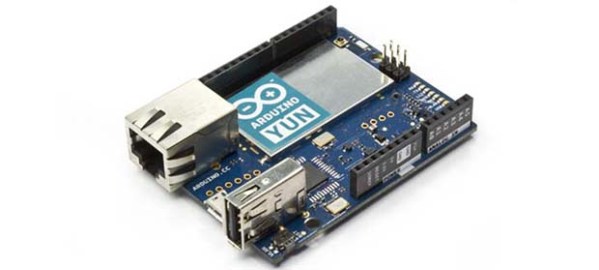
For the longest time, the creators of the Arduino have been looking at how to bring the Arduino platform into the cloud. Ethernet and WiFi shields technically work, but if you’re processing data scraped from a web page, a lowly microcontroller really isn’t the best option. Enter the Arduino YUN. At its core, it’s a regular old Arduino Leonardo. Underneath that metal plate on the board? That’s an SoC running Linux.

Basically, the Linux side of the Yun is pretty similar to a WiFi router running OpenWRT. There’s a USB port for plugging in peripherals, native WiFi support (802.11n, even!), an Ethernet connector, and enough RAM to do all the interesting stuff a small computer connected to the Internet can do.

To make all this web programming easier for Arduino neophytes, the YUN also includes a ‘bridge’ library that automates HTTP transactions between the Linux and microcontroller sides of the YUN. There’s also support for Temboo, an SDK for dozens of APIs that interact with Facebook, Dropbox, FedEx, and hundreds of other web services.

Below you can check out [Massimo] and [David] showing off their wares and going over how the YUN connects to the Internet and interacts with the microcontroller over the ‘bridge’. It’s an interesting device, and something we’ll surely check out at the World Maker Faire.

Continue reading “The Arduino YUN. YUN Means Cloud.”

Cooling Fan Speed Controllers Do It By Generating Heat

cooling-fan-speed-controllers

We’ve never torn one apart ourselves, but it boggles the mind just a little bit to learn that these cooling fan controllers generate heat to do their job. We’d bet we’ll get shouted down in the comments, but doesn’t this seem counter-productive?

At any rate, we enjoyed reading two posts on this topic. [Göran’s] first adventure with the hardware started when he was trying to design his own speed controller. He saw a reference design in the LM7805 linear regulator datasheet which allows the adjustment of the output by changing the ground reference. When fed with 12V this ends up putting off some heat but it is a simple and reliable solution. He was a bit surprised to crack open a Zalman module and find the exact same circuit inside.

The controller in the background is an eBay purchase. He cracked that one open as well (that’s the link at the top) and found a circuit with a linear regulator in it, but this time it was a TL431 adjustable regulator. So here are our questions: Which one of these two is better and why. And can you do it relatively inexpensively without generating as much heat?