Robo Car Via 3G

[Emil Kalstø] has a pretty solid remote control car. We don’t mean a little car with a handheld remote you can drive around the neighborhood. [Emil’s] car has a camera and a cell phone so that it can go anywhere there’s 3G or 4G networking available.

The video (see below) shows the results (along with [Emil’s] little brother acting as a safety officer). The video offers tantalizing detail you might find useful if you want to reproduce a similar vehicle. However, it stops short of providing complete details.

The two batteries onboard will power the vehicle for over 20 hours of continuous use. The 30W motor is reduced with a chain drive to go about “walking speed.” There’s a Raspberry Pi with a Huawei 3G USB dongle onboard and [Emil] uses an XBox controller to do the steering from the warmth of his living room. Of course, a Pi can’t handle a big motor like that directly, so a Phidgets USB motor controller does the hard work. The software is written using Node.js.

The camera mount can swivel 230 degrees on a servo so that the operator can scan the road ahead. The video mentions that steering the car required a heavy-duty servo with metal gears (an earlier attempt with nylon gears didn’t work out).

Overall, it looks like a solid build. We hope [Emil] will share code and more details soon. If you can’t wait (and your insurance is paid up), you might have a go at an even bigger car. Surprisingly, there’s more than one example of that.

Continue reading “Robo Car Via 3G”

New Angle On Raspberry Pi Zero Hub

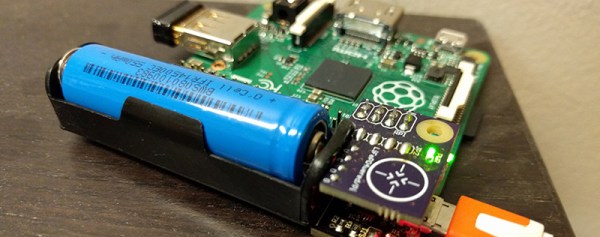
Collectively, the Hackaday readers sigh, “Not another Pi Zero hub!!!”. But [Sean Hodgins’] hub is different. It has a new angle, literally. Besides, it’s an entry in the Hackaday and Adafruit Pi Zero Contest .

1514291454445337873[Sean Hodgins’] acute approach is orthogonal to most of the other hubs we’ve seen. He’s mating the hub at right angles to the Zero. The hub plugs into both the on-the-go USB port and the USB power port. No extra cables or wiring needed. [Sean] plans to release the design on GitHub after his Kickstarter campaign ends. He’s supplying bare boards for those who like the smell of solder paste.

This project nicely triangulates the issues of adding a hub to the Zero. The physical connection is solid with the boards connecting via the USB connectors. Power is supplied through the hub the way the Pi expects, which means all the protections the Pi Foundation built into the onboard conditioning are left in place. This also reduces surge problems that might occur when back powering through a hub and hot swapping USB devices. Another neat feature is the notched corner leaving the HDMI port accessible. Similarly, the Pi’s GPIO pins are free of encumbrance. One drawback is the hub is fused at 2 amps, just like the Pi. It would be nice to have a little more headroom for power hungry USB devices. Maybe another 0.5 amp to allow for the Zero’s usage.

[Sean] snaps the two together after the break.

Continue reading “New Angle On Raspberry Pi Zero Hub”

Code Craft: Cross Compiling For The Raspberry Pi

Sometimes there’s just no place like your desktop. You’ve already got your favorite development tools and references setup or installed and it’s a pain when you’re trying to work on an unfamiliar, or simply uncustomized, system. On your desktop everything is at your fingertips. If you want to search the web, the browser is just an alt-tab away. If you need a calculator, it’s right there to run. Your editor highlights syntax in your favorite colors already.

When developing on a Raspberry Pi, you leave all these creature comforts behind unless you spend the time to configure the Pi to your liking. Then it all gets wiped when you install a new distribution, like the recent change from Wheezy to Jessie. Even then it’s frustrating to switch back and forth between the desktop and the Pi because there is always something on the other system that you need. My usual comment is, “dirty word”, literally.

Cross-developing on your desktop is a very workable solution. We’re going to walk through setting up your desktop and a Pi to do this. This means loading a Pi ARM toolchain on your desktop and a debugging server on the Pi. This’ll let you develop and debug from in the comfort of your desktop. An added advantage is when you put that Pi in a robot you can debug over a wireless link.

Continue reading “Code Craft: Cross Compiling For The Raspberry Pi”

Cramming A Pi Zero Into A USB Hub

We kinda feel bad posting all these awesome hacks you can do with a Raspberry Pi Zero when we know most of our audience here probably doesn’t have one due to the backlog of orders… but regardless — here’s another one you can try — if you have one anyway. A Raspberry Pi USB Hub!

In case you didn’t know, Amazon has a series of electronics accessories called Amazon Basics — and they’re actually pretty good quality accessories. One of them is a 7-port, 4A USB hub. Looking at this [gittenlucky] figured he might just have enough room to fit a Pi Zero inside… and as it turns out. He did.

Continue reading “Cramming A Pi Zero Into A USB Hub”

Turning A Lapdock Into A Laptop With The Pi Zero

Do you remember the Motorola Lapdock 100? It was a CPU-less laptop designed for plugging in your smartphone that enabled you to use your phone as a computer! Perhaps a bit ahead of its time, they never really caught on — but now you can buy them pretty cheap, and with the release of the Raspberry Pi Zero, it was only a matter of time before someone combined the two.

The Lapdock 100 has long been a useful accessory for the Raspberry Pi, but until the Zero came out, it was always a messy bundle of wires running to and from the devices, making it a less than ideal solution. The Zero changes everything. [Ax0n] knew he had to try combining the two.

Continue reading “Turning A Lapdock Into A Laptop With The Pi Zero”

Raspberry Pi Zero Cluster Packs A Punch

If you could actually buy 16 Raspberry Pi Zeros, you might be able to build your very own Raspberry Pi Cluster for only $80! Well… minus the cost of the board to tie them all together…

A Japanese company called Idein is developing a Raspberry Pi module called the Actbulb for computational sensing and data analysis. In order to perform internal testing they decided to make things easier for themselves by developing a board to allow them to plug in not one, not two, but sixteen Raspberry Pi Zeros:

Since we will use Pi’s GPU for image processing, deep learning, etc. We need real Pis but not just Linux machines. Another reason. It can be used for flashing eMMCs of our devices via USB ports when we have to do that by ourselves.

Continue reading “Raspberry Pi Zero Cluster Packs A Punch”