Investigating The Strength Of The 4-digit PIN

If we wanted to take a look at the statistics behind 4-digit pin numbers how could we do such a thing? After all, it’s not like people are just going to tell you the code they like to use. It turns out the databases of leaked passwords that have been floating around the Internet are the perfect source for a little study like this one. One such source was filtered for passwords that were exactly four digits long and contained only numbers. The result was a set of 3.4 million PIN numbers which were analysed for statistical patterns.

As the cliché movie joke tells us, 1234 is by far the most commonly used PIN to tune of 10% (*facepalm*). That’s followed relatively closely by 1111. But if plain old frequency were as deep as this look went it would make for boring reading. You’ll want to keep going with this article, which then looks into issues like ease of entry; 2580 is straight down the center of a telephone keypad. Dates are also very common, which greatly limits what the first and last pair of the PIN combination might be.

We’ll leave you with this nugget: Over 25% of all PINs are made of just 20 different number (at least from this data set).

[Thanks Awjlogan]

Self Monitoring A Home Alarm System

[Lior] wanted to cancel the monitoring system for his home’s alarm, but he didn’t want to stop using the alarm all together. The trick is to rig up some way to monitor it himself. It would have been simple to have it just call him instead of the alarm company since the system just uses a telephone connection. But this would require that he have a land line for it to connect to, and when it calls him he would have no idea what part of the system had been set off. He developed a way to have the system text message him with all of the available details.

An Arduino controls the system, with a SIM900 GSM shield to hand the cell side of things. The board to the left emulates the standard telephone line, with an M8870 DTMF touch tone decoder to figure out what the alarm system is telling him. He also needed to implement touch tone generation to talk back to the system. His write-up includes links to other articles he posted about hardware, software, and protocol specifics.

QR Code Opens Doors To You

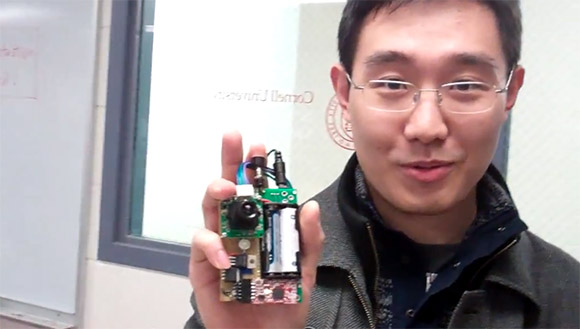
[Jeremy Blum] wrote in to share his LibeTech QR Code Door Lock project. He developed it during his Senior year at Cornell University along with three of his classmates. It seeks to move away from magnetic card locks in favor of optical locks that authenticate based on a QR code.

The hardware he’s using here is definitely cost prohibitive, but we’re sure the concept could be greatly simplified. In this case a BeagleBone running embedded Linux monitors a feed from a webcam. When it detects a QR code it compares it with a database of approved keys and will unlock the door for you.

There are problems with this technique, one being that an attacker might be able to get a usable photograph of your key without you knowing. But the majority of hotel locks in use right now are even less secure than that. On the upside, the key to your room can be emailed to you for use on just about any device with a screen, or printed out on a piece of paper.

You can find [Jeremy’s] presentation video embedded after the break.

Continue reading “QR Code Opens Doors To You”

Tracking A Stolen Laptop Triggers A Drug Bust

When then folks from the MakerShed had a laptop and iPad stolen from their vehicle in Detroit, they found out several important things.

  • The Detroit police have more important things to pursue.
  • Tracking services are awesome.
  • You never know how your adventure will end.

Luckily they were using an online backup system that offered location services as well. While many may disable these prying eyes as a matter of principle when they join, this is one scenario where you’d be happy you had it.

As it turns out, the Detroit police were fairly busy with other things and left the laptop owners to their own devices tracking the stolen goods via the internet. Some fun and interesting detective work involving Google maps, craigslist,  and backed up images ended up leading them to the stolen goods.

Once they had a physical address, the police were available to check things out… well, a few days later. When they went to the address with a search warrant… and a battering ram, they found the house lacking tenants, but containing several forms of ID, a stolen laptop, and some Marijuana meant for distribution.

The entire story is interesting, especially the fact that the amateur detective work was capable of providing enough information for a search warrant. This actually makes me wonder how easily one could fabricate all of this information falsely to cause trouble to an innocent person. It looks like it would only take about 15 minutes and some photoshop. Maybe that’s a conversation best left for another time.

Knock Lock Balks Knock, Uses CapSense Without Shock

[Rob Hemsley] sent in an update to an RFID-based door lock. Previously, if you wanted to enter the MIT media lab, a RFID-enabled card was required to get in. Now, with [Rob]’s update, you only need to tap the door handle in a ‘secret’ pattern.

The earlier RFID-enabled build used about $80 in hardware, not a very economical solution. The new touch-based solution only uses an Arduino and servo, making the build much cheaper.

The touch sensitive lock uses the CapSense Arduino library. By turning the door handle into a touch sensor, [Rob] allowed a secret code to be saved in the EEPROM. Repeating this sequence when the door is locked sends power to the servo, unlocking the door.

A very cool build that’s also a little more secure than the traditional, audible knock lock. Check out the video after the break.

Continue reading “Knock Lock Balks Knock, Uses CapSense Without Shock”

Home Security Anyone Can Build And Install

We’ve been seeing quite a few home security hacks around here lately and we think they’re a lot of fun. This is one that we missed a few weeks ago. [Sharpk] used his existing home security system as inspiration for a completely DIY security system. Above you can see the tiny models he used to help visualize how the system would be installed.

The board at the center is a JeeNode, a development board that pairs an ATmega328 with a wireless module. There are three magnetic door sensors which you can easily find at the home, hardware, or electronics store around the corner. They’re basically a reed switch and a magnet; one mounts on the door, the other on the jamb. There is also a panic button and a PIR motion sensor. [Sharpk] has even been working on a UI for the system. He crafted a 3D model of his home’s floor plan in SketchUp and uses it to indicate which part of the system has been triggered.

Now he just needs to add a keypad for arming and disarming the system.

Getting Connected With Your Home Security System

This simple device, paired with some creating code will let you become your own home security monitoring service. It’s called the PhantomLink and [Adam] started the project as a commercial venture. He recently decided to go open source with the hardware and will soon be posting a guide on how to program your own web interface too.

We just looked in on a project which takes control of a security panel using an Arduino. The PhantomLink is focused on not just reusing the input hardware, but monitoring the whole system. It sounds like several different protocols are supported.

The DB9 jack is intended for use with an adapter you can wire yourself. Basically just tap into the terminal block on the alarm controller for your house, then route those connections to the proper pins. A PIC 12F683 monitors the alarm system, pushing data via the WiFi module mounted on the board. With that web connection you can do anything you want by catching and formatting the data.