DIY Probe Clamps To Ease Your PCB Work

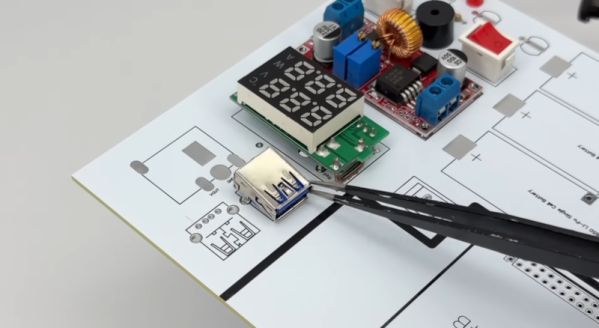
Those of us familiar with PCB work would agree that anything that helps hold probes secure and hands-free to components, traces, or test points is worth looking at. That’s where [2048bits]’ snap probe design comes in. With a little additional and inexpensive hardware, one can have all the hands-free probe clamps one’s workbench can fit!

That first link is where you’ll find a list of required hardware and the CAD files (in .step format) for the probe itself. The obvious approach to making the pieces would be to 3D print them, but we notice the design — while attractive — looks like a challenging print due to the features. We’re not the only ones to see that, and happily there’s already a remix by [user_2299476772] aimed at keeping the essential features while making them easier to print.

If you’re taking a DIY approach to PCB probes, we’d like to remind you that one of our readers discovered dental burrs make absolutely fantastic, non-slip probe tips. This seems like a good opportunity to combine two ideas, and having the CAD files for the probe clamp means modification is straightforward. Let us know on the tips line if you get something working!

[via Hackster]

A Low Voltage Solder Gun From Scratch

We’re used to those high voltage projects which use a self-oscillating transformer circuit with a TV flyback winding, and we have even at times railed against them for their inefficiency compared to a real flyback circuit using the same parts. But what happens if the same idea is used to create a low voltage instead of a high one? [D. Creative] has a soldering gun project doing just this, making a low voltage at a very high current.

The video of the project is below the break, and while electrically it’s nothing unexpected, we’re taken by the quality of the build. All the parts come from scrap electronics, the main transformer is three ferrite cores with a piece of copper busbar as the secondary. The circuitry is built dead bug style, and it’s housed in a gun-style case made by hand from sheet Perspex. It takes 12 volt power from a laptop power supply, and feeds it to the oscillator which is perched up at the back of the device. The transformer fits in the “barrel”, and a pair of large capacitors fit in the handle. We expect it to get hot, but the duty cycle on these devices in use is probably low enough to keep it from melting.

We like anything that uses scrap parts to make something useful, and we’re particularly taken with the casing of this one. It looks as though the parts come from old switch mode power supplies, something we’ve been known to rob ourselves.

Continue reading “A Low Voltage Solder Gun From Scratch”

Modulathe Is CNC Ready And Will Machine What You Want

Once upon a time, lathes were big heavy machines driven by massive AC motors, hewn out of cast iron and sheer will. Today, we have machine tools of all shapes and sizes, many of which are compact and tidy DIY creations. [Maxim Kachurovskiy]’s Modulathe fits the latter description nicely.

The concept behind the project was simple—this was to be a modular, digital lathe that was open-source and readily buildable on a DIY level, without sacrificing usability. To that end, Modulathe is kitted out to process metal, wooden, and plastic parts, so you can fabricate in whatever material is most appropriate for your needs.

It features a 125 mm chuck and an MT5 spindle, and relies on 15 mm linear rails, 12 mm ball screws, and NEMA23 stepper motors. Because its modular, much of the rest of the design is up to you. You can set it up with pretty much any practical bed length—just choose the right ball screw and rail to achieve it. It’s also set up to work however you like—you can manually operate it, or use it for CNC machining tasks instead.

If you want a small lathe that’s customizable and CNC-ready, this might be the project you’re looking for. We’ve featured some other similar projects in this space, too. Do your research, and explore! If you come up with new grand machine tools of your own design, don’t hesitate to let us know!

Thanks to [mip] for the tip!

img showing terminal and pico

I3C Bit-banging Fun For The RP2040

The RP2040 has quickly become a hot favorite with tinkerers and makers since its release in early 2021. This is largely attributed to the low cost, fast GPIOs, and plethora of bus peripherals. [xyphro] has written the I3C Blaster firmware that helps turn the Raspberry Pi Pico into a USB to I3C converter.

The firmware is essentially a bit-bang wrapper and exposes an interactive shell with a generous command set. But it is a lot more than that. [xyphro] has taken the time to dive into the I3C implementation standard and the code is a fairly complex state-machine that is a story on its own.

[xyphro] provides a Python script in case you feel like automating things or drawing up your GUI. And finally, if you are feeling adventurous, the I3C implementation is available for your project tinkering needs.

We loved the fact there is a branch project that lets you extend a Saleae Logic Analyzer to decode I3C and associated protocols by adding a Pico on the cheap. The last update to the project log shows the addition of a MIPI I3C High Data Rate Mode which operates at 25 Mbps which is right up the RP2040s.

[xyphro] gave us the Home Brew Version Of Smart Tweezers a decade ago and we expect there is more to come. If you are interested in reading more about the I3C bus, have a look at I3C — No Typo — Wants To Be Your Serial Bus.

Learn New Tools, Or Hone Your Skill With The Old?

Buried in a talk on AI from an artist who is doing cutting-edge video work was the following nugget that entirely sums up the zeitgeist: “The tools are changing so fast that artists can’t keep up with them, let alone master them, before everyone is on to the next.” And while you might think that this concern is only relevant to those who have to stay on the crest of the hype wave, the deeper question resounds with every hacker.

When was the last time you changed PCB layout software or refreshed your operating system? What other tools do you use in your work or your extra-curricular projects, and how long have you been using them? Are you still designing your analog front-ends with LM358s, or have you looked around to see that technology has moved on since the 1970s? “OMG, you’re still using ST32F103s?”

It’s not a simple question, and there are no good answers. Proficiency with a tool, like for instance the audio editor with which I crank out the podcast every week, only comes through practice. And practice simply takes time and effort. When you put your time in on a tool, it really is an investment in that it helps you get better. But what about that newer, better tool out there?

Some of the reluctance to update is certainly sunk-cost fallacy, after all you put so much sweat and tears into the current tool, but there is also a real cost to overcome to learn the new hotness, and that’s no fallacy. If you’re always trying to learn a new way of doing something, you’re never going to get good at doing something, and that’s the lament of our artist friend. Honing your craft requires focus. You won’t know the odd feature set of that next microcontroller as well as you do the old faithful – without sitting down and reading the datasheet and doing a couple finger-stretching projects first.

Striking the optimal balance here is hard. On a per-project basis, staying with your good old tool or swapping to the new hotness is a binary choice, but across your projects, you can do some of each. Maybe it makes sense to budget some of your hacking time into learning new tools? How about ten percent? What do you think?

JTAG & SWD Debugging On The Pi Pico

[Surya Chilukuri] writes in to share JTAGprobe — a fork of the official Raspberry Pi debugprobe firmware that lets you use the low-cost microcontroller development board for JTAG and SWD debugging just by flashing the provided firmware image.

We’ve seen similar projects in the past, but they’ve required some additional code running on the computer to bridge the gap between the Pico and your debugging software of choice. But [Surya] says this project works out of the box with common tools such as OpenOCD and pyOCD.

As we’ve cautioned previously, remember that the Pi Pico is only a 3.3 V device. JTAG and SWD don’t have set voltages, so in the wild you could run into logic levels from 1.2 V all the way to 5.5 V. While being able to use a bare Pico as a debugger is a neat trick, adding in a level shifter would be a wise precaution.

Looking to get even more use out of those Pi Picos you’ve got in the parts bin? How about using it to sniff USB?

A Field Expedient Welder Only MacGyver Could Love

If you needed to weld something in a pinch, what’s the minimum complement of equipment you could get away with? In [Professor Bardal]’s case, it’s a couple of motorcycle batteries and a roll of flux-core wire, and not much else.

We suspect this one is going to elicit quite a few comments, not least by the welding fans who no doubt will be triggered by just about everything in the video below, especially by characterizing this as MIG welding; it’s FCAW, or flux-core arc welding. But it bears some superficial similarities to MIG, at least insofar as there’s a consumable wire electrode through which a high-current DC supply flows, creating enough heat to melt it and the base metal. In this case, the current is provided by a pair of 12-volt motorcycle batteries hooked together in series. There’s also a torch of sorts — a short length of copper capillary tubing with a 1-mm inside diameter clamped in the jaws of a stick welder stinger, or a pair of locking pliers if you’re really in a pinch. The torch is connected to the negative terminal on the battery with a jumper cable, and the positive terminal is connected to the workpiece.

To create the weld, a piece of 0.8-mm flux-core welding wire is threaded through the capillary and into the joint, and fed by hand as it’s consumed. It’s awkward and awful, but it works. Of course, there’s no control over amperage as there would be with a legit welding machine, which would make it hard to adapt this method to different materials. Weld quality appears poor, too. But we suspect that if you were in a position to need a welder like this, you wouldn’t really care about any of that.

Fabricobbled welding rigs seem to be [Professor Bardal]’s thing — witness this much more professional MIG welder, complete with a baking soda and vinegar shielding gas generator.

Continue reading “A Field Expedient Welder Only MacGyver Could Love”