PROFS: The Office Suite Of The 1980s

Today, we take office software suites for granted. But in the 1970s, you were lucky to have a typewriter and access to a photocopier. But in the early 1980s, IBM rolled out PROFS — the Professional Office System — to try to revolutionize the office. It was an offshoot of an earlier internal system. The system would hardly qualify as an office suite today, but for the time it was very advanced.

The key component was an editor you could use to input notes and e-mail messages. PROFS also kept your calendar and could provide databases like phonebooks. There were several key features of PROFS that would make it hard to recognize as productivity software today. For one thing, IBM terminals were screen-oriented. The central computer would load a form into your terminal, which you could fill out. Then you’d press send to transmit it back to the mainframe. That makes text editing, for example, a very different proposition since you work on a screen of data at any one time. In addition, while you could coordinate calendars and send e-mail, you could only do that with certain people.

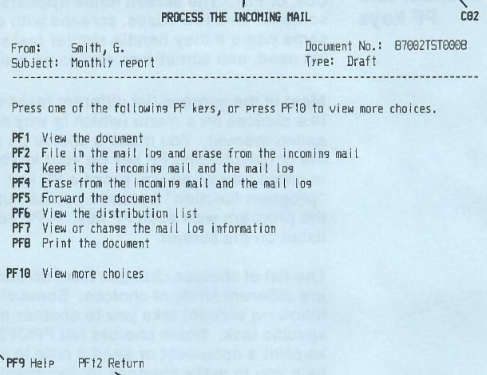
A PROFS message from your inbox

In general,  PROFS connected everyone using your mainframe or, perhaps, a group of mainframes. In some cases, there might be gateways to other systems, but it wasn’t universal. However, it did have most of the major functions you’d expect from an e-mail system that was text-only, as you can see in the screenshot from a 1986 manual. PF keys, by the way, are what we would now call function keys.

The calendar was good, too. You could grant different users different access to your calendar. It was possible to just let people see when you were busy or mark events as confidential or personal.

You could actually operate PROFS using a command-line interface, and the PF keys were simply shorthand. That was a good thing, too. If you wanted to erase a file named Hackaday, for example, you had to type: ERASE Hackaday AUT$PROF.

Styles

PROFS messages were short and were essentially ephemeral chat messages. Of course, because of the block-mode terminals, you could only get messages after you sent something to the mainframe, or you were idle in a menu. A note was different. Notes were what we could call e-mail. They went into your inbox, and you could file them in “logs”, which were similar to folders.

Continue reading “PROFS: The Office Suite Of The 1980s”

Restoring The Soul Of A 1940s Radio

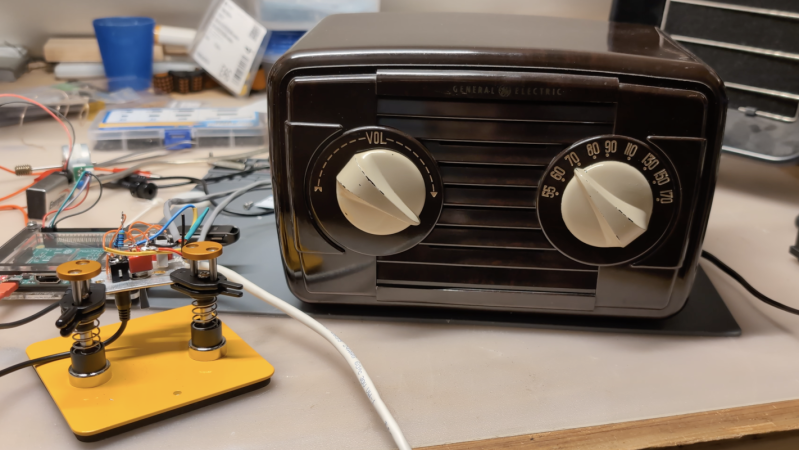
Although we do often see projects that take antiques and replace some or all of their components with modern equipment, we can also sympathize with the view that (when possible and practical) certain antique electronics should be restored rather than gutted. [David] has this inclination for his 1948 GE radio, but there are a few issues with it that prevented a complete, period-correct restoration.

The main (pun intended) issue at the start of this project was safety. The original radio had a chassis that was just as likely as not to become energized, with the only protection being the plastic housing. [David] set up an isolation transformer with a modern polarized power cable to help solve this issue, and then got to work replacing ancient capacitors. With a few other minor issues squared away this is all it took to get the radio working to receive AM radio, and he also was able to make a small modification to allow the radio to accept audio via a 3.5mm jack as well.

However, [David] also has the view that a period-correct AM transmission should accompany this radio as well and set about with the second bit of this project. It’s an adaptation of a project called FieldStation42 originally meant to replicate the experience of cable TV, but [Shane], the project’s creator, helped [David] get it set up for audio as well. A notable feature of this system is that when the user tunes away from one station, it isn’t simply paused, but instead allowed to continue playing as if real time is passing in the simulated radio world.

Although there are a few modern conveniences here for safety and for period-correct immersion, we think this project really hits the nail on the head for preserving everything possible while not rolling the dice with 40s-era safety standards. There’s also a GitHub page with some more info that [David] hopes to add to in the near future. This restoration of a radio only one year newer has a similar feel, and there are also guides for a more broad category of radio restorations as well.

Continue reading “Restoring The Soul Of A 1940s Radio”

Restoring A 1924 Frigidaire B-9 Refrigerator Back To Working Condition

Before the refrigerator became a normal part of any kitchen, those with enough money to throw around could get an icebox, which used melting ice to cool food and drinks in a second compartment. As refrigerators became available for sale in the 1920s, this created somewhat awkward transition models, like the 1924 Frigidaire B-9 that [David Allen] recently got offered for a restoration. This was part of the restoration of a 1926 house, which foresaw putting this venerable unit back into operation.

As [David] explains, this refrigerator was still in use until about 1970 when it broke down, and repairs proved tricky. Clearly, the fault wasn’t that severe as [David] got it working again after a number of small repairs and a lot of maintenance. The running unit with its basic elements can be seen purring away in the completion video, with the journey to get there covered in a video series starting with the first episode.

What’s fascinating is that during this aforementioned transition period, the vapor compression electric cooling system was an optional extra, meaning that the basic layout is still that of an icebox. Correspondingly, instead of ice in the ice compartment, you find the low-side float evaporator, with the basement section containing the condensing unit, motor, and compressor. The temperature sensor is also a miracle of simplicity, using bellows that respond to the temperature and thus volume of the evaporator coolant, which trigger a switch that turns on the compressor.

Despite a hundred years having passed since this refrigerator was constructed, at its core it works exactly the same as the unit we have in our kitchens today, albeit with higher efficiency, more electronics, and with the sulfur dioxide refrigerant replaced with something less toxic to us humans.

Continue reading “Restoring A 1924 Frigidaire B-9 Refrigerator Back To Working Condition”

A 1970s Electronic Game

What happens when a traditional board game company decides to break into electronic gaming? Well, if it were a UK gaming company in 1978, the result would be a Waddingtons 2001 The Game Machine that you can see in the video from [Re:Enthused] below.

The “deluxe console model” had four complete games: a shooting gallery, blackjack, Code Hunter, and Grand Prix. But when you were done having fun, no worries. The machine was also a basic calculator with a very strange keyboard. We couldn’t find an original retail price on these, but we’ve read it probably sold for £20 to £40, which, in 1978, was more than it sounds like today.

Continue reading “A 1970s Electronic Game”

The Mini PC. Without a banana for scale, you might be fooled.

Jam Like It’s The 1980s With A Mini-IBM PC

A lot of retrocomputer enthusiasts have a favourite system, to the point of keeping up 40 year old flame wars over which system was “best”.   In spite of the serious, boring nature of the PC/AT and its descendants, those early IBMs have a certain style that Compaq and the Clones never quite matched. Somehow, we live in a world where there are people nostalgic for Big Blue. That’s why [AnneBarela] built a miniature IBM PC using an Adafruit Fruit Jam board.

If you haven’t seen it before, the Fruit Jam board is an RP2350 dev board created specifically to make minicomputers, with its two USB host sockets, DVI-out and 3.5mm jack. [Anne] loaded a PC emulator by [Daft-Freak] called PACE-32 that can emulate an IBM compatible PC with an 80386 and up-to 8 MB of RAM on this particular board. The video is VGA, 640×480 — as god intended– piped to a 5″ LCD [Anne] picked up from AliExpress.

That display is mounted inside a replica monitor designed by [giobbino], and is sitting on top of a replica case. Both are available on Thingiverse, though some modification was required to provide proper mounting for the Fruit Jam board. [giobbino] designed it to house a FabGL ESP32 module– which has us wondering, if an RP2350 can be a 386, what level of PC might the ESP32-P4 be capable of? We’ve seen it pretend to be a Quadra, so a 486 should be possible. It wasn’t that long ago that mini builds of this nature required a Raspberry Pi, after all.

Speculation aside, this diminutive IBM build leaves us but with but one question: if you played Links386 on it, would it count as miniature golf?

ARCTURUS control panel

The ARCTURUS Computer Developed At Sydney University In The 1960s

[State of Electronics] have released their latest video about ARCTURUS, the 14th video in their series The Computer History of Australia.

ARCTURUS was a research computer system developed on a shoestring budget at Sydney University in the 1960s, and was in service until 1975. Particularly the system was developed by [David Wong] as a part of his PhD thesis: The design and construction of the digital computers snocom, nimbus and arcturus (PDF). [David] worked in collaboration with [Kevin R. Rosolen] who is interviewed in the video.

Continue reading “The ARCTURUS Computer Developed At Sydney University In The 1960s”

A 1990s VNA Gets An LCD

A Vector Network Analyser, or VNA, is the ultimate multi-tool of RF test equipment. They can now be had in not very capable form for almost pocket money prices, but the professional-grade ones cost eye-watering sums. Enough to make an older VNA for a few hundred on eBay a steal, and [W3AXL] has just such a device in an HP 8714C. It’s the height of 1990s tech with a floppy drive and a green-screen CRT, but he’s homing right in on the VGA monitor port on the back. Time for a colour LCD upgrade!

There are two videos below the break, posted a year apart, because as we’re sure many of you will know, events have a habit of getting in the way of projects. In the first, we see the removal of the CRT module and safe extraction of its electronics, followed by the crafting of a display bezel for the LCD. Meanwhile, the second video deals with the VNA itself, extracting the VGA signal and routing it forward to the new module. Continue reading “A 1990s VNA Gets An LCD”