Illustrated Kristina with an IBM Model M keyboard floating between her hands.

Keebin’ With Kristina: The One With The QWERTY Drum Set

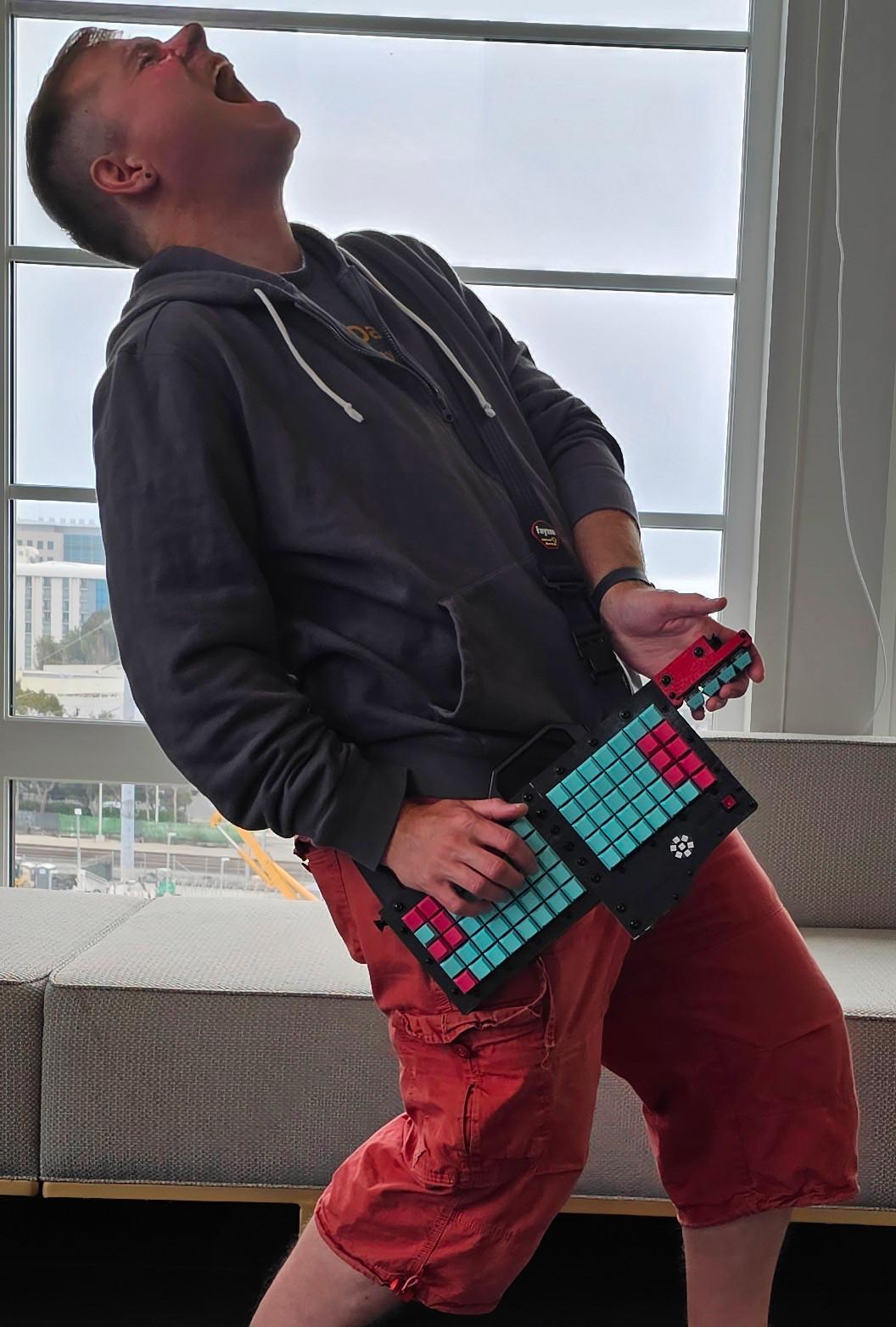
What does portability in a keyboard mean to you? For Hackaday’s own [Brian McEvoy], the image evokes that quintessential 80s instrument, the keytar.

But those left-hand keys aren’t just for show — they’re macro keys. It runs on an Adafruit Feather 32u4 Bluefruit, so [Brian] can forego the cord and rock out all over the room.

I love the construction of this keyboard, which you can plainly see from the side. It’s made up of extruded aluminum bars and 2 mm plywood, which is stacked up in layers and separated with little wooden donuts acting as spacers. Unfortunately, [Brian] accidentally made wiring much harder by putting the key switches and the microcontroller on different planes.

Although you could theoretically use any key switches for this build, [Brian] chose my personal and polarizing favorite, browns. If you’re going to use a travel keyboard, you’re probably going to be around people, so blues are probably not the best choice. With browns, you kind of have yourself a middle ground, best-of-both-worlds thing going on. The keycaps are among the best parts of this build, and it seems [Brian] chose them because the legends are on the sides, which makes it much easier to type on while wearing it. Kismet!

Continue reading “Keebin’ With Kristina: The One With The QWERTY Drum Set”

Illustrated Kristina with an IBM Model M keyboard floating between her hands.

Keebin’ With Kristina: The One With The Mouse-cropad

Okay, so you built a macropad or even a keyboard. What now? Well, most people use some kind of mouse to go along with it, but no one uses a mouse like this creation by [Joe_Scotto].

This is the mouse no one asked for, and yet I think it’s pretty awesome for something that’s supposed to be a joke. Maybe it’s in the great execution, I don’t know. I will ignore the suggestion that MX Browns are part of the joke, however. *cries in OG tactility*

Essentially, this is a macropad that uses QMK mouse keys to emulate a mouse. The build itself couldn’t be more straightforward — it’s six MX browns wired up to six pins on a Pico, and they all share a common ground. Keep the joke going by commissioning one from [Joe] or building it yourself.

Via [r/cyberdeck]

News: Microsoft Discontinues Natural Keyboard

Image via Wikipedia

It’s often people’s first ergonomic keyboard — some variation of Microsoft’s Natural keyboard, that 90s split that took up so much real estate on the desk with it’s built-in wrist rest.

I’ll admit that despite using one for years at the office, I went back to whatever clicky rectangles I could get from the IT department. Then came the pain, and I got a Logitech Wave. Then came the surgery, and the Kinesis Advantage.

Well, now it seems that after 30 years and several ergonomic models, Microsoft are exiting the keyboard game. While I don’t personally understand why when there are so many fans, [Jeff Atwood] believes it’s because keyboards are exploding in popularity and tons of people are building their own. While that may be true, there are legions of normies trying to stave off carpal and cubital tunnel syndrome and have absolutely no interest in building anything, much less a keyboard. So, get these things while they’re hot, I guess.

Continue reading “Keebin’ With Kristina: The One With The Mouse-cropad”

Illustrated Kristina with an IBM Model M keyboard floating between her hands.

Keebin’ With Kristina: The One With The Music Typewriter

This edition’s community build comes from the Yes They Could, But Should They Have? file. Well, I ultimately say yes, this is intriguing. Redditor [dj_edit] looked at the venerable Model M and thought, this buckling-spring masterpiece can yet be improved upon. Yeah! Well, to each their own. I must say that it does sound great, especially with the solenoid feedback enabled via rotary encoder. Just check out the typing test.

To be clear, this is essentially a new keyboard that fits inside a Model M case, but that alone is quite a feat, especially if you consider the curvature of the backplate. Because of this hurdle, [dj_edit] went with 1 mm FR4 for the switch PCB, which is a nice compromise of sturdiness and flexibility.

Underneath those stunning reproduction keycaps are Kailh box white switches, which are pretty chonky-sounding on their own. But turn on that sweet solenoid action and you really get noisy.

Those box whites are sitting in hot-swap sockets, a design decision that kind of made things difficult because of the curvature. [dj_edit] ended up using an acrylic plate that gets bent to match the curvature by the switches themselves.

Continue reading “Keebin’ With Kristina: The One With The Music Typewriter”

Illustrated Kristina with an IBM Model M keyboard floating between her hands.

Keebin’ With Kristina: The One Where Shift (Really) Happens

Hooray, the system works! [Sasha K.] wrote to let me know about their Thumbs Up! keyboard, which is the culmination of a long journey down the DIY rabbit hole to end game. (Seriously, it’s kind of a wild ride, and there’s a ton of pictures).

Thumbs Up! comes in both monoblock and full split versions, but both are designed for Kailh chocs. Fans of the Kinesis Advantage will dig the key wells and possibly the thumb cluster, which in this case is raised up a bit from the mainlands. I’m pretty fond of the naked PCB approach to keyboard building, especially when they’re stacked and look as good as these do.

While the full split only comes in RP2040 (not that there’s anything wrong with that), the monoblock split is available in Pro Micro, ATmega Mini, and RP2040 versions. You can find the STL for the tilt stand and other goodies on Thingiverse.

Continue reading “Keebin’ With Kristina: The One Where Shift (Really) Happens”

Illustrated Kristina with an IBM Model M keyboard floating between her hands.

Keebin’ With Kristina: The One With The Breadboard Macropad

For their first custom, hand-wired keyboard, [terryorchard] aka [70rch] didn’t want to mess with making a total split, and we don’t really blame them. However, as you can see, they ended up with a monoblock split, which aside from being our own personal preference, looks fantastic, and also happened to be what fit on the print bed.

What you’re looking at is a 40% remix of the Alice layout with a columnar stagger. It’s also a bit 6×3 Corne-inspired on the ergonomic front. Brain-wise, it’s got an exposed Elite Pi driving a matrix of Kailh Choc pinks and an EC11 encoder. The encoder scrolls by default, and then becomes a volume knob on the numbers and symbols layer. One super cool thing about this keyboard is the secret third layer, which is unlocked by pressing the rotary encoder. This leads to some home row mods and disables the outside columns, culminating in a test 3×5 with two layers.

Via KBD #112

Continue reading “Keebin’ With Kristina: The One With The Breadboard Macropad”

Illustrated Kristina with an IBM Model M keyboard floating between her hands.

Keebin’ With Kristina: The One With The Pumpkin Keyboard

Oh, the places plastic has taken us. One of the arguably better inventions might be the fake carve-able pumpkin, which is more or less guaranteed not to shrivel up and rot on your porch, though it might get smashed by wily teenagers along with its organic brethren next door.

Though they will be around much longer, the fake kind lend themselves to all kinds of creations, including this one from [BunkEbear] which was “a nightmare” to build. Yeah, we bet it was along the lines of [Aaron Rasmussen]’s spherical keyboard, except inside out, since that one’s concave.

This tasty keyboard is modeled after the Malling-Hansen writing ball, which is arguably the first commercial typewriter and dates to 1865. [BunkEbear]’s pumpkin version features the 54-key layout, plus two additional for Shift and Escape to suit modern needs. Since the inside of the pumpkin is pretty small, [BunkEbear] wired all the connections close together on the protoboard, and used JST extension cables between the Glorious Panda switches themselves and the Arduino Pro Micro.

Continue reading “Keebin’ With Kristina: The One With The Pumpkin Keyboard”

Illustrated Kristina with an IBM Model M keyboard floating between her hands.

Keebin’ With Kristina: The One With The Hexagonal Keyboard

Well, I didn’t mean to take the whole summer off from Keebin’, it just kind of happened that way. You’d think it would have been #13 that tripped me up, but we ain’t even there yet — this is only the twelfth edition. I kept thinking I should write one and it just wasn’t happening, until I got a tip from [s.ol bekic] about their stunning hexagonal keycaps and the journey toward making an open-source 12-key macropad featuring same.

But let’s back up a bit. Originally, [s.ol] designed a totally sick hybrid MIDI-and-typing keyboard from scratch, which you can see in this short video. It glows, it splits in half, and it snaps back together again quite satisfyingly. And you probably noticed the hexagonal keycaps that look like they might be printed or milled, or perhaps even printed and then milled.

In actuality, [s.ol] threw all the processes at this keycap project — milling, molding and casting, and 3D printing. None of them worked well enough to get much past the prototype stage, but in the end, [s.ol] joined forces with fkcaps.com to create and offer an injection-molded version that I’d really, really like to rock my fingertips around in. Good thing I can pick some up for cheap.

Of course, the real process was all the learning [s.ol] did along the way — both in the early days of making the hybrid keyboard, and after teaming up with fkcaps to make the keycaps and the accompanying macropad into real products. And that was after all the design work it took to get this newfangled honeycomb configuration right.

In case you’re wondering, these are meant for only Kailh chocs, but no matter the switch, the spacing is really important because of all the possible points of friction introduced by the design. Be sure to check out the keycap docs page, macropad docs page, and this gallery of keycaps and macropads.

Continue reading “Keebin’ With Kristina: The One With The Hexagonal Keyboard”