A Holographic Seven-Segment Clock

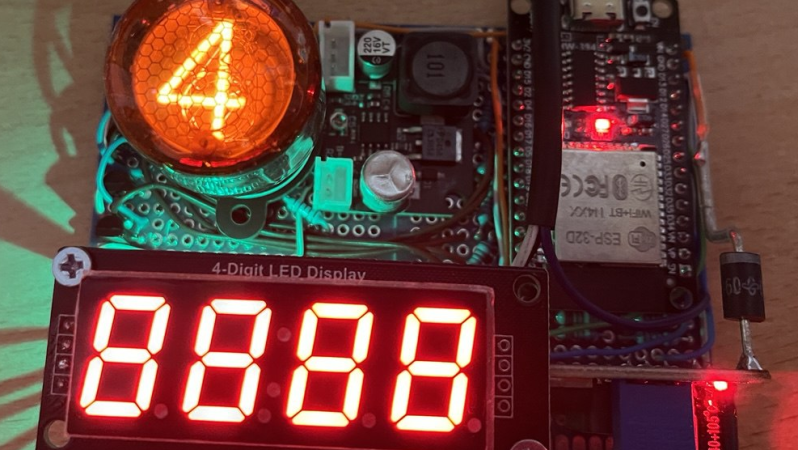
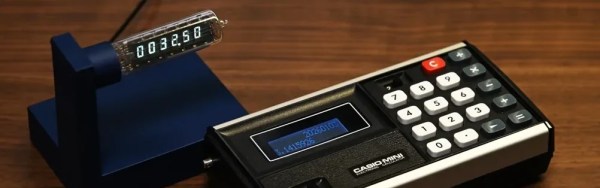
Seven-segment displays are one of the most ho-hum ways to display the time. They were cool for a little bit in the 70s, but by now, they’re a little bit old hat. That is, unless you get weird with it. This holographic seven-segment clock from [mosivers] qualifies neatly in that category.

The first step was to make the holographic segment displays, because they’re not really something you can just buy off the shelf. [mosivers] achieved this by using a kit from LitiHolo, which enables you to create holograms by shooting a laser at special holographic film. Only, a few upgrades were made to use the kit with a nicer red diode laser that [mosivers] had on hand for better performance. The seven-segment layouts were carefully recorded on to the film to form the basic numerals of the clock, such that illuminating the films from different angles would light different segments of the numeral. It’s quite involved, but it’s explained well in the build video.

As for the timekeeping side of things, an ESP32 was used, setup to query a network time server to stay accurate. The microcontroller then commands a series of LEDs to light up as needed to illuminate the relevant segments of the holographic film to show the time.

Ultimately, [mosivers] built a cool clock with a look you won’t find anywhere else. It’s a lot more work than just wiring up some classic seven-segment LEDs, but we think the result is worth it. If you fancy other weird seven-segment builds, though, we’ve got plenty of others in the till.

Continue reading “A Holographic Seven-Segment Clock”

DIY Light Panels Work With Home Assistant

There are a few major companies out there building colorful LED panels you can stick on your wall for aesthetic purposes. Most commercial options are pretty expensive, and come with certain limitations in how they can be controlled. [Smart Solutions For Home] has whipped up a flexible DIY design for decorating your walls with light that is altogether more customizable.

In this case, the DIY light panels ape the hexagonal design made popular by brands like Nanoleaf. In this case, each hexagon panel runs an ESP32 microcontroller, which controls a series of WS2812 addressable LEDs. This allows each panel to glow whatever color you like, and they’re arranged in an XY grid to enable you to light individual panels with a range of different geometric effects. The benefit of having a full microcontroller on each panel is that they can act quite independently—each one able to be used as a smart light, an notification display, or even as a physical button, all integrated with Home Assistant.

If you’re a fan of DIY smart home products, these might be right up your alley. They’re supremely flexible and customizable, and can do a lot of things that commercial versions can’t easily replicate. Just don’t ignore the fact that they require a considerable amount of assembly, what with the custom PCBs, 3D printed enclosures, and front diffusers to deal with. That’s just the way the LED wall crumbles.

We’ve seen other similar builds before, too. Why? The simple fact is that a lot of people want cool glowy panels on their wall without having to pay through the nose for them.

Continue reading “DIY Light Panels Work With Home Assistant”

Live Train Departure Screens Keep You Abreast Of Transit Developments

If you want to know when the train is coming, you could pull up a webpage on your phone, or walk all the way to the station to look at the displays there. Or, like [eastfamilyreddish], you could build a neat little train info display to decorate your desktop instead.

The build is based on the work of [gadec-uk]—who developed a train information display some time ago. It’s based around an ESP32 D1 Mini, paired with a 256 x 64 OLED screen to display relevant train information. It accesses a National Rail API for train status information—known as the Darwin LDBWS (Live Departure Board Webservice). Configuration is via a web GUI hosted by the ESP32 itself.

[eastfamilyreddish] took the concept further by adapting this hardware into a more pleasing form. The ESP32 and OLED screen are built into a neat little hanging sign setup that apes one you might expect to see at a real railway station. You might expect that 3D printing was involved, but instead, this was achieved with lasercut parts and resin casting to create something with a beautiful finish. They even went so far as to include a wireless phone charging module in the base, making the device extra useful to really earn its place on the desktop.

The fact is, around these parts we love both trains and the displays you find around them. If you’ve got a railway-adjacent project, or you’ve just built your own awesome railway, don’t hesitate to let us know on the tipsline!

Build Your Own Compact Temp Gun

Sometimes you need to know what temperature something is, but you don’t quite want to touch it. At times like these, you might want a temp gun on hand to get a good reading, like the one [Arnov Sharma] built.

The build is a relatively simple one, and is based around an Waveshare ESP32 C6 development module that comes with a small LCD screen out of the box. The microcontroller is set up to read an MLX90614 infrared temperature sensor. This device picks up the infrared energy that is emitted by objects relative to their temperature. The sensor has a great range—from -70 C to 380 C. The readouts from this sensor are then displayed on the screen. Battery power is from a small 600 mAh LiPo cell, which is managed by a IP5306 charge module.

It’s worth noting that these infrared temperature sensors aren’t infallible devices. The temperature they perceive is based on certain assumptions about factors like an objects emissivity. Thus, they don’t always give accurate readings on metallic or shiny objects, for example. It’s also important to understand the sensor’s field of view. Despite many commercial versions featuring a laser pointer for aiming, many of these infrared temperature sensors tend to average their reading over a small spot that gets larger the farther away they are from the object being measured.

Tools like portable temp guns are pretty cheap, but sometimes it’s just fun to build your own. Plus, you usually learn something along the way. Video after the break.

Continue reading “Build Your Own Compact Temp Gun”

Styrofoam watercraft, PCB hydrofoil

A PCB Can Be A Hydrofoil, If It Really Wants To

You know those old cliche that the younger generations have begun to cynically despise: “follow your dreams!” “You can be anything you put your mind to!” — well, perhaps they are true on occasion. For instance when [rctestflight] had PCBs that dreamed of becoming a hydrofoil, he found a way to make that dream come true.

It’s kind of obvious in retrospect: printed circuit boards are made of FR4, which is a form of fiberglass, and you know what else is commonly made of fiberglass? Boats. So yes, the material is suited for this task. The fact that solder joints hold up to use in a little remote-control hydrofoil is less obvious, but good to know. It certainly makes for easier assembly for those of us who have developed an allergy to epoxy.

Ease of assembly wasn’t really the point here: the point was that by making the “mast” of the hydrofoil out of PCB– that’s the part that holds the underwater wing– [rctestflight] figured he could (shock!) print a circuit onto it. Specifically, a liquid-level sensor, and because microcontrollers are so cheap these days he went the “total overkill” route of embedding an ESP32 on each mast. He started with a resistive sensor, but since those self-corrode too quickly, the team switched to a capacitive sensor that doesn’t need to form a galvanic cell in salt water. Come to think of it, that might still be a problem with the solder joint between the PCBs. Good thing nobody will be riding this one.

Having such a sensor and brain close-coupled allows for a faster control loop than the sonar [rctestflight] had previously been using to control his hydrofoil’s altitude.. Pivoting each mast with its own servo made for a smooth flight over the water— well, once they got the PID tuning set, anyway. Check it out in the video embedded below.

We’ve seen PCB used for enclosures before, and even the chassis of a rover, but using it for a hydrofoil is a new hack. Continue reading “A PCB Can Be A Hydrofoil, If It Really Wants To”

A circuit sculpture designed to help you sleep.

Sweet Sound Sculpture Helps You Sleep Soundly

Have trouble sleeping, or getting to sleep in the first place? You’ve no doubt heard of white noise machines, but know it would be much cooler to make your own. Enter Noise Maker, a DIY sound sculpture by [optimus103733], who wanted to learn something in the process of creating.

The best thing about this sound sculpture aside from the looks is that you can not only play five different sounds (e.g. birds, traffic, water, frog, white noise), you can mix them together into a rich but relaxing cacophony.

As you can probably see from the picture, Noise Maker is based on the ESP32 and uses an SD card module, an amplifier, and five six pots. Be sure to check out the pictures, because there are three layers of copper connections and a lot of careful bending to make it all come together. In the video after the break, you can hear it in action.

It seems [optimus103733] isn’t completely satisfied and wants to make a few improvements in the future, such as a voltage regulator, a power switch, and a timer to automatically stop playback once (we assume) sleep has come. Evidently the ESP32 struggles a little with mixing six audio sources, but hey, lesson learned.

Wait, why do we sleep in the first place?

Continue reading “Sweet Sound Sculpture Helps You Sleep Soundly”

Building A Smart Speaker Outside The Corporate Cloud

If you’re not worried about corporate surveillance bots scraping your shopping list and manipulating you through marketing, you can buy any number of off-the-shelf smart speakers for your home. Alternatively, you can roll your own like [arpy8] did, and keep your life a little more private.

The build is based around an ESP32 microcontroller. It connects to the ‘net via its inbuilt Wi-Fi connection, and listens out for your voice with an INMP441 omnidirectional microphone module. The audio data is trucked off to a backend server running a Whisper speech-to-text model. The text is then passed to Google’s Gemini 2.5 Flash large language model. The response generated is passed to the Piper Neural Voice text-to-speech engine, sent back to the ESP32, and spat out via the device’s DAC output and a speaker attached to an LM386 amplifier. Basically, anything you could ask Gemini, you can do with this device.

By virtue of using a commercial large language model, it’s not perfectly private by any means. Still, it’s at least a little farther removed than using a smart speaker that’s directly logged in to your Amazon/Google/Hulu/Beanstikk account. Files are on Github for those eager to dive into the code. We’ve seen some other fun builds along these lines before, too. Video after the break.

Continue reading “Building A Smart Speaker Outside The Corporate Cloud”