IoT Power Strip Lets You Control All Your Holiday Lights

As IoT devices become more prevalent in the consumer world, how long will it be before it’s cheaper to buy one, than to make one? Definitely not yet, which means if you want your very own IoT power strip — you’ll have to make your own. Good thing it’s not that hard!

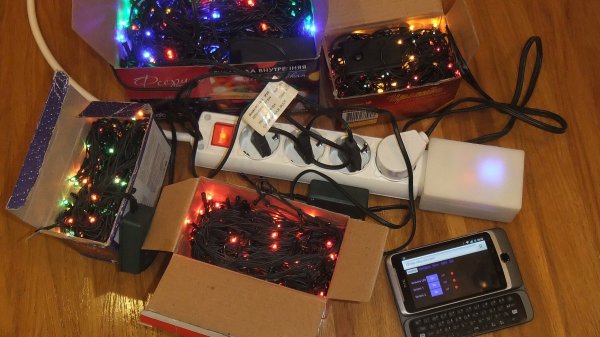
[Dev-Lab] came up with this project which allows him to control several outlets with his phone. What we really like about it is that he designed a 3D printed housing that fits on the end of the power-strip. This keeps all messy wires out of sight, and it looks like it was designed to be there!

The beauty with an IoT device like this is that it doesn’t require any infrastructure besides a WiFi enabled device with an HTTP browser — the ESP8266 module means no server is necessary. An Arduino was used in the project just because it was quick an easy to do. But it really boils down to being a glorified pin expander. This could very easily be fixed by upgrading from an ESP01 to and ESP03 module to get more IO broken out on the carrier board. If you do this, let us know!

Continue reading “IoT Power Strip Lets You Control All Your Holiday Lights”
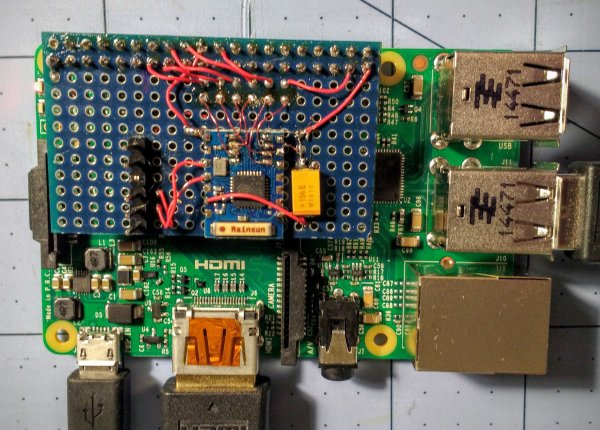
Raspberry Pi $2 WiFi Through Epic SDIO Hack

These are the times that we live in: the Raspberry Pi Zero comes out — a full freaking Linux computer on a chip for $5 — and people complain that it doesn’t have this or that. Top place on the list of desiderata is probably a tie between audio out and WiFi connectivity. USB is a solution for both of these, but with one USB port it’s going to be a scarce commodity, so any help is welcome.

Hackaday.io hacker [ajlitt] is looking for a way out of the WiFi bind. His solution? The Raspberry Pi series of chips has a special function on a bunch of the GPIO pins that make it easier to talk to SDIO devices. SDIO is an extension of the SPI-like protocol that’s used with SD memory cards. The idea with SDIO was that you could plug a GPS or something into your PDA’s SD card slot. We don’t have PDAs anymore, but the SDIO spec remains.

[ajlitt] dug up an SDIO driver for the ESP8089 chip, and found that you can liberate the ESP8266’s SPI bus by removing a flash memory chip that’s taking up the SPI lines. Connect the SPI lines on the ESP8266 to the SDIO lines on the Raspberry Pi, and the rest is taken care of by the drivers. “The rest”, by the way, includes bringing the ESP’s processor up, dumping new firmware into it over the SPI/SDIO lines to convince it to act as an SDIO WiFi adapter, and all the rest of the hardware communication stuff that drivers do.

The result is WiFi connectivity without USB, requiring only some reasonably fine-pitch soldering, and unlike this hack you don’t have to worry about USB bus contention. So now you can add a $2 WiFi board to you $5 computer and you’ve still got the USB free. It’s not as fast as a dedicated WiFi dongle, but it gets the job done. Take that, Hackaday’s own [Rud Merriam]!

Thanks [J0z0r] for the tip!

Hairband Lights Up Depending On Your Mood

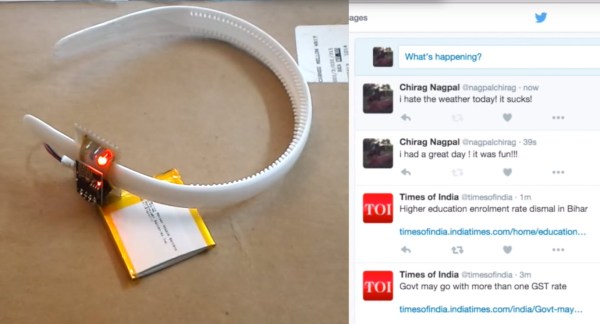
After learning how to use the ESP8266, [Chirag Nagpal] decided to do a fun project to experiment that polls data from Twitter. He calls it the Sentiband, and it analyses your last tweet’s sentiment and changes color accordingly.

There is an API available called Sentiment140 (Formerly ‘Twitter Sentiment’) which is capable of determining the emotional content of a tweet on Twitter. It uses classifiers built from machine learning, and was developed at Stanford by a few CS graduates. We’ve seen it used before on a Christmas tree ornament on a much larger scale, analyzing all holiday tweets to light up your tree.

[Chirag’s] version allows you to set a username and display the latest sentiment of that user’s tweets hidden in the subtext. Three LEDs light up; green for a positive tweet, red for negativity, and blue for neutral.

Continue reading “Hairband Lights Up Depending On Your Mood”

Light Up Your Day With This LED Clock

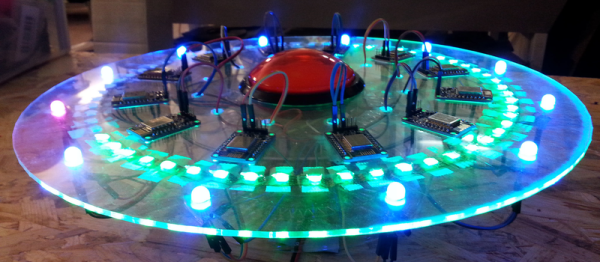
We love clocks, and [Chris] got our attention with the internet enabled Light Clock. Time is displayed via RGB LED strip in a number of different ways around a 3D printed white disk. All the modes are based on two selectable colors to indicate hours and minutes, either in a gradient fashion or a hard stop.

Light is provided by a 144 LED neopixel strip and is powered by a beefy 4 amp 5 volt power supply, which also powers the controller. Brains are provided by a ESP8266 powered NodeMCU-12E board, and software is written using ESP8266 for Arduino core.

Being a WiFi enabled micro controller it is a simple matter of connecting to the clock using WiFi and using the embedded web pages to select your local timezone, color palette, and display mode. The correct time is set by network and will never be wrong. While there is a Kickstarter for selling the finished project, instructions and software are provided for making your own if you wish.

Join us after the break for the promotional Kickstarter and demonstration video

Continue reading “Light Up Your Day With This LED Clock”

ESP8266 BASIC WiFi Thermostat Is Child’s Play

If you’ve read any of our posts in the last couple years, you’ll have noted that our community is stoked about bringing the Internet to their devices on the cheap with the ESP8266 modules. Why? This forum post that details making a WiFi thermostat really brings the point home: it’s so easy and cheap to build Internet-enabled devices that you almost can’t resist.

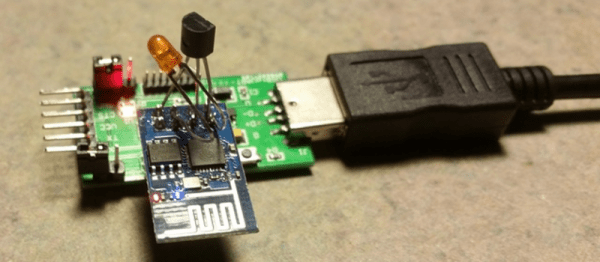
When the ESP8266 first came out, there very little documentation, much less code support. Since then Espressif’s SDK has improved, the NodeMCU project brought Lua support, and there’s even Arduino support. Most recently, BASIC has been added to the ESP stable, and that really lowers the barriers to creating a simple WiFi widget, like the thermostat example here that uses a Dallas DS18B20 temperature sensor and an LED as a stand-in for the heater element.

The hardware for this project, a re-build of this demo code from the ESP8266 BASIC docs, is nothing more than a few off-the-shelf parts soldered together. No schematic required.

What makes the project work behind the scenes is some clever code-reuse by [Rotohammer] on the ESP8266 forums. Essentially, he wrapped the Arduino’s one-wire library, giving it simple BASIC bindings. Then all that’s left for the BASIC coder is to read the value and print it out to a webpage.

There’s all sorts of details swept under the rug here, and those of you out there who are used to bare-metal programming will surely huff and puff. But there’s a time for building your own injection-molder to make DIY Lego bricks, and there’s a time to just put blocks together. This project, and the BASIC interpreter that made it possible, demonstrate how much joy someone can get from just putting the parts together.

Absurd Clock Uses Twelve ESP8266 Modules

Quick quiz: How many ESP8266 modules do you need to make an LED clock? Hint: a clock displays 12 hours.

Nope! Twelve is not the answer. But that didn’t stop Hackaday.io user [tamberg] from building a 12-ESP clock during the Bilbao, Spain Maker Faire. The “advantage” of using so many ESP8266s is that each one can independently control one hour LED and its associated slice of five minute-marker LEDs. Each ESP fetches the time over the Internet, but only lights up when it’s time.

It’s like parallel processing or something. Or maybe it’s redundant and failsafe. Or maybe it’s just an attempt to put the maximum Internet into one Thing. Maybe they had a team of twelve people and wanted to split up the load evenly. (We couldn’t think of a real reason you’d want to do this.)

All snark aside, the project looks great as you can see in this Flickr gallery, and all of the design files are available if you’d like to re-use any parts of this project. We’re thinking that the clock face is pretty cool.

Continue reading “Absurd Clock Uses Twelve ESP8266 Modules”

Hackaday Links: November 22, 2015

There’s a new documentary series on Al Jazeera called Rebel Geeks that looks at the people who make the stuff everyone uses. The latest 25-minute part of the series is with [Massimo], chief of the arduino.cc camp. Upcoming episodes include Twitter co-creator [Evan Henshaw-Plath] and people in the Madrid government who are trying to build a direct democracy for the city on the Internet.

Despite being a WiFi device, the ESP8266 is surprisingly great at being an Internet of Thing. The only problem is the range. No worries; you can use the ESP as a WiFi repeater that will get you about 0.5km further for each additional repeater node. Power is of course required, but you can stuff everything inside a cell phone charger.

I’ve said it before and I’ll say it again: the most common use for the Raspberry Pi is a vintage console emulator. Now there’s a Kickstarter for a dedicated tabletop Raspi emulation case that actually looks good.

Pogo pins are the go-to solution for putting firmware on hundreds of boards. These tiny spring-loaded pins give you a programming rig that’s easy to attach and detach without any soldering whatsoever. [Tom] needed to program a few dozen boards in a short amount of time, didn’t have any pogo pins, and didn’t want to solder a header to each board. The solution? Pull the pins out of a female header. It works in a pinch, but you probably want a better solution for a more permanent setup.

Half of building a PCB is getting parts and pinouts right. [Josef] is working on a tool to at least semi-automate the importing of pinout tables from datasheets into KiCad. This is a very, very hard problem, and if it’s half right half the time, that’s a tremendous accomplishment.

Last summer, [Voja] wrote something for the blog on building enclosures from FR4. Over on Hackaday.io he’s working on a project, and it’s time for that project to get an enclosure. The results are amazing and leave us wondering why we don’t see this technique more often.