IPhone Screengrab Issues

This is unfortunately another story we missed out on while we were trying to keep things from burning down. We told you that [Jonathan Zdziarski] was going to demonstrate iPhone lock code bypassing in a webcast. The real surprise came when he pointed out that the iPhone takes a screenshot every time you use the home button. It does this so it can do the scaling animation. The image files are presumably deleted immediately, but as we’ve seen before it’s nearly impossible to guarantee deletion on a solid state device. There’s currently no way to disable this behavior. So, even privacy conscious people have no way to prevent their iPhone from filling up storage with screenshots of all their text message, email, and browsing activities. Hopefully Apple will address this problem just like they did with the previous secure erase issue. O’Reilly promises to publish the full webcast soon.

[via Gizmodo]

IPhone 2.1 Firmware Jailbroken

The iphone-dev team seems to still be on top of their game. Only a day after the iPhone 2.1 firmware update was released, they’ve updated both the PwnageTool and QuickPwn to deal with the release. They haven’t begun work on the iPod Touch 2G yet, since no one on the team has one yet.

We tend to agree with Engadget; jailbreaking is becoming less and less important to casual users. Now average users can buy an iPhone in their own country and run apps from the official store. A much different place than we were only a year ago. We know most of our audience are power users though and definitely want out of Apple’s walled garden, but that’s only a small percentage of iPhone users.

EFiX USB Dongle Off To A Rocky Start

According to InsanelyMac forum member [qbattersby] the EFiX USB dongle he just received doesn’t seem to live up to expectations. We covered the EFiX when it was announced back in June. It’s designed to let you install OSX unmodified on commodity hardware. While using a MSI G965M motherboard, instead of installing OSX [qbattersby] was greeted with a flashing cursor with no option to continue onward.

A quick glance at the EFiX hardware compatibility chart does not list the MSI G965M as a board verified to work with the dongle and could explain [qbattersby] results. To his defense, he does explain that he will be testing it on a supported motherboard along with a retail copy of Leopard in the future. Hopefully, he will be able to post back that it works and his experience with the installation of Leopard.

While the EFiX seems to be shipping in some countries, enthusiasts in the US will have to wait a bit longer till distribution channels can be worked out.

One thing is for sure, if you do plan on going the EFiX route, make sure that the hardware you plan on using is listed on their site.

[via Engadget]

Bypassing The IPhone Passcode Lock In Live Webcast

[Jonathan Zdziarski], a data forensics expert and iPhone hacker, will demonstrate in a live O’Reilly webcast on September 11, 2008, how to bypass the iPhone passcode lock security. Although the presentation is targeted towards law enforcement, it will probably viewed by a lot of hackers and geeks, who could use the information for good or evil. It also doesn’t strike us as very good security if the iPhone passcode is easily bypassed. Then what’s the point of having one?

[via Gizmodo]

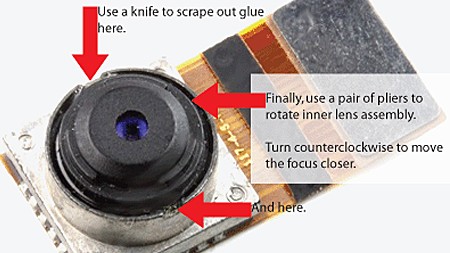
Macro Photography With An IPhone


The camera lens on the iPhone is much like any other cameraphone lens in the fact that the lens has a fixed minimum and maximum focus length. If you want to get a little closer to your subject, you just might want to give [eastrain’s] macro camera mod a try.

According to [eastrain] both first and second generation iPhone cameras have a screw type focus ring that has been glued to infinity from the factory. This was probably set so that 99% of your photos were roughly in focus.

Gaining access to the camera lens requires the disassembly of your phone and will undoubtedly void any type of warranty you may have had. Once the lens is in view you will need to break the 2 glue points that hold the lens at its current position.

Using needle nose pliers you can then rotate the lens counter clockwise to increase the zoom or clockwise to decrease it. Enabling the built in camera app allows you to see in real time your changes. When you’re satisfied, just put everything back together. Of course the next step should be an externally mounted ring to allow manual zooming on the fly.

Security Flaw Allows Full Access To Locked IPhones

[greenmymac] on the MacRumors forums recently exposed a security flaw that allows anyone full access to a locked iPhone running firmware version 2.0.2. The flaw works by entering the emergency call menu of a locked iPhone, and double tapping the home button. This opens the iPhone’s Favorites menu, allowing anyone in your Favorites to be called. From here, an attacker has access to your SMS messages and potentially your email or Safari browser. While we are sure that Apple has a patch for this flaw on the way in the next firmware update, there is a temporary way to secure your locked iPhone. Simply enter the Settings menu on your iPhone and enter General > Home Button and select “Home” or “iPod”. Now when you double tap your home button, it will navigate to either your home screen or the iPod screen. While this fix might be annoying for some, as of right now it seems like the only way to secure your locked iPhone.

[photo: Refracted Moments™]

[via Gizmodo]

Waterproof IPod Touch Video Boombox


Popular Mechanics contributor [Anthony Veducci] wanted a virtually indestructible video player that he could use anywhere. Not finding a commercial solution, he decided to build his own. He already had a large waterproof case and another for the iPod Touch. The 8″ display came from an iPod accessory. Unfortunately it was developed before Apple implemented their stupid accessory locking, so he had to use an Apple approved video cable through several adapters to get it to work. The speakers were also salvaged parts. The case was assembled using a jigsaw and a whole lot of epoxy. The speaker openings are covered with latex from a pair of gloves and everything is sealed with silicone. We’re usually trying to escape technology when we head outside, but we’ll be looking back at this the next time we need to ruggedize something.

[via Gizmodo]