Measuring The Capacities Of Different Battery Brands

Being the smart consumer he is, [Denis] usually looks at the price per pound when comparing similar products at the grocery store. When it came time to buy a few AA batteries, he didn’t have any data to go on. To solve his little conundrum, [Denis] decided he would test several brands of batteries and see which one gives him the most bang for the buck.

After bringing home a haul of a dozen different brands of AA cells, [Denis] broke out the Arduino and starting designing a circuit. To test how much energy each brand provides, the Arduino measures the voltage across a load every second until the battery reaches 0.2V. The elapsed time, as well as the voltage, Watt hours, Joules, and ambient temperature are logged on an attached LCD screen and sent over a USB serial link to automate the data collection process.

What’s the verdict? Unsurprisingly, words like ‘super,’ ‘max,’ and ‘ultra’ didn’t connotate a better battery. The best bang for the buck came from an off-brand called RS Power Ultra. The worst battery was the Panasonic Evolta cells that came in at about $1.50 USD per watt-hour.

If you’d like to verify [Denis]’ work, all the code is up on Github along with the schematic.
Displaying Bubbles In Mineral Oil

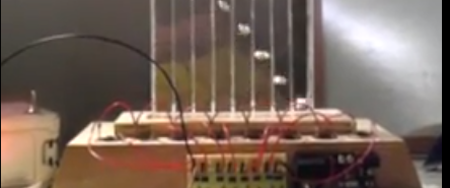
After he saw a ‘falling water display,’ [Matt] figured he could turn that idea on its head. He built a display that uses bubbles for pixels. Even though the build isn’t complete, we love the results so far.

[Matt] began his build constructing a tall, thin water tank out of acrylic. Eight solenoids were mounted in the base of the tank, attached to an aquarium air supply, plastic tubing, and one way valves. The first run of the bubble display didn’t go too well, but after adding dividers between each column the display started working.

With the dividers, [Matt] no longer had to worry about bubbles colliding or moving any direction but up. The bubbles weren’t moving consistently, so he replaced the water with mineral oil. Oil made a huge improvement, but the bubbles still float up at different speeds. [Matt] ascribes this to the unregulated air supply, but we’re thinking this problem could be mitigated with glycerine like the previous bubble display we saw.

It may still have some problems, but we love the result. Check out the video of bubbles in mineral oil after the break.

Continue reading “Displaying Bubbles In Mineral Oil”

A Simple Project To Get You Started With The Android ADK

simple-adk-exercise

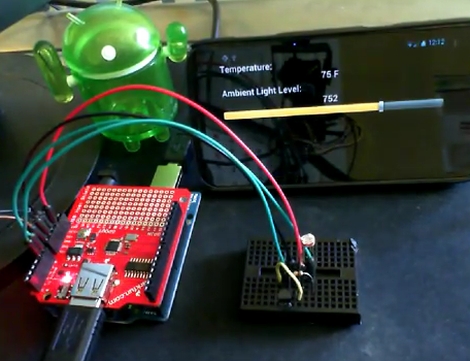
If you just got your hands on a shiny new Android phone and are looking for a fun project to try out, you might want to check out this simple Arduino exercise that [Mike Mitchel] put together. Everyone needs a starting off point for hacking, and [Mike] thought that combining and Arduino and Android handset together for the purpose of temperature sensing and light metering would be a great place to begin.

The prerequisites for this project are a bit beyond a simple breadboard and a few ICs, requiring an $80 Android ADK board to go along with your phone and Arduino. If your focus is going to be on interfacing your phone with microcontrollers however, it’s purchase you’ll make sooner than later anyhow.

The setup is pretty simple as you might expect. A photocell and TMP36 temperature sensor are connected to the Arduino, then with a bit of code and USB host magic, the Android app shows the temp and amount ambient light present in the room.

[Mike] has made all of his easy to read and well commented code available online, so be sure to check it out if you have been thinking about (but putting off) playing around with the Android ADK.

Digital Speedometer With An Arduino

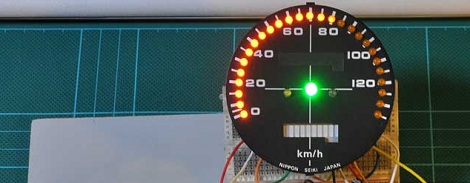
[Martyn] is restoring a 32-year-old Honda motorcycle, so when the ancient speedometer broke last year he thought it was prime time to start of a digital speedometer project. We’re loving the results so far, and would love seeing it on a nicely restored bike.

Instead of the relative horror of driving 40 LEDs with a single Arduino, [Martyn] bit the bullet and got a Maxim 7221 LED driver. Controlling 64 LEDs  over a three-wire interface simplified the board design somewhat, allowing [Martyn] to etch his own PCB with the toner transfer & HCl/H2O2 method. To actually power and control the entire circuit, [Martyn] used an Arduino loaded up with a program based  LedControl library makes programming the spedometer a snap.

Although the speedo works, [Martyn] says he isn’t proud of how it looks. We don’t mind – the candy colored jumpers add a nice flair to the project, and they’re hidden behind the face plate of the speedometer. We’re sure once he gets the neutral, high-beam, and warning indicators working with the LED bar array / tachometer, everything will look awesome.

via reddit

Quick And Easy Arduino-powered Theremin

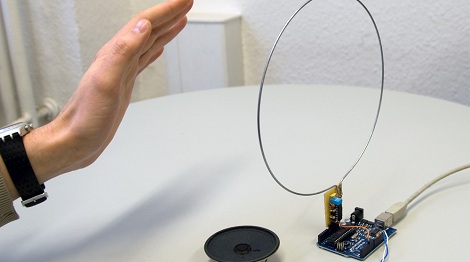
[Martin] sent in a great guide to a simple Arduino based theremin. It’s a very small build – just a single common IC and some passive components – and easy enough to build in an afternoon.

The theremin is based on a simple LC oscillator built around a 7400 quad NAND gate IC, a wire antenna, and a few caps and resistors. When a hand moves closer to the antenna, the frequency of the oscillator increases; when a hand moves away, the frequency decreases. On the software side, the oscillator is connected to the internal hardware counter of the Arduino. Every time there’s a change in the voltage output by the oscillator (all the time, varying slightly with the distance from a hand to the antenna), the counter increases by one. This counter is tallied up over 1/10th of a second, and the distance from the instrumentalist to the theremin can be determined. From there, it’s just outputting a frequency to a speaker.

All the code, schematics, and board layouts are available on [Martin]’s guide, and most of our readers probably have the parts to build this lying around their workbench. You can check out a video of [Martin]’s theremin in action on his guide.

Hackaday Links April 5, 2012

A Remote Sphero-Control Trackball

sphero drives car

Sphero is a cool little ball that can roll around under the control of a smartphone.  Although super-cool by itself, in this application it’s been hacked into a sort of trackball to drive a remote control car!

Arduino Voice Control

Arduino voice control

[Sebastian] Wrote in to tell us about this article about using the Arduino EasyVR shield to add voice control to your project. Worth a look if it your application calls for voice-control.

OpenBeam Tiny 80/20-Like Extrusion

openbeam extrusion

Openbeam is a Kickstarter project designed to produce an aluminium extrusion for building stuff.  Although we’ve seen lots of this kind of thing, the small 15mm profile is quite interesting, and it’s designed to use off-the-shelf hardware, which should save on costs!

Hexapod + iPad = Fun for All

hexapod-ipad

There’s not a lot of information on this hack, and the price or this hexapod device isn’t even listed, so we’ll assume it’s quite expensive.  On the other hand, it’s got a cool video of it being controlled by an iPad, so maybe it will give you some hacking inspiration!

USB Sound Card Write-Up

usb sound card

[George] wrote in to tell us about his USB sound card write-up. Before you think that this is a dupe of this post, he freely admits to building it nearly identically to the one previously posted. Imitation may be the sincerest form of flattery, but [George] is also requesting some feedback on his blog and the aforementioned post. feel free to let him know what you think in the comments.  Please be polite!

Make Your RC Car Drive Itself With This Simple Brain Swap

arduino-rc-conversion

If the kids have lost interest in that RC car or truck you bought them over the holidays, [Randy Sarafan] from Instructables has a few ideas that might help make the toys fun again, while teaching your kids a bit about electronics in the process. In his writeup, he shows how to swap out the brains of your run of the mill RC truck, enabling it to do far more than was originally intended. The procedure is pretty simple, and something that you can easily involve your kids in, if you’d like.

He uses an Arduino and a motor shield to keep the conversion simple, but this can be done with just about any capable microcontroller you might have on hand. [Randy] added a Parallax Ping sensor to the front of the truck enabling it to avoid objects as it drives itself, but since he cut out the truck’s original control board we’re assuming that there’s no way to override the truck’s actions at present.

[Randy] calls the conversion a “robot” though it seems like more of a semi-autonomous rover if you ask us. Regardless, revamping an old RC car is certainly far better than letting it collect dust on a shelf, or worse, tossing it out during spring cleaning.

Continue reading to see a short video of [Randy’s] RC truck in action.

[via HackedGadgets]

Continue reading “Make Your RC Car Drive Itself With This Simple Brain Swap”