Building Your Own Replacement Refrigerator Thermostat

refrigerator_thermostat_repair

[Ron’s] refrigerator broke shortly after he came home from his weekly grocery trip, and since this was his second dead fridge in three years, he wanted to fix it rather than buy a new one…again. It turns out that the thermostat was toast, and a replacement would cost him $80. That was well more than he was willing to pay, but his groceries were starting to get warm, so he had to do something.

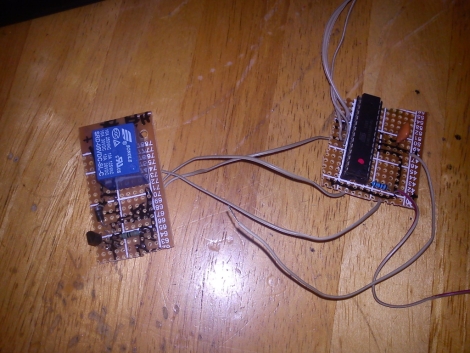
Being the tinkerer he is, he figured he could rig up his own thermostat that would work at least as well as the one that died on him. He scavenged an ATmega328 from a failed project, and after digging around online, put together the most barebones Arduino setup he could find. The microcontroller is tucked away in the back of the refrigerator where the old thermostat used to live, and takes input from a TMP36 temperature sensor, triggering a relay to start the refrigerator’s compressor whenever the the temp goes above 4°C.

[Ron] says his fix is just about the “worst kludge ever”, but as he saved $80 in parts and $150 in labor, we’re inclined to think it’s a job well done.

Build A Binary Wall Clock For Just A Few Bucks

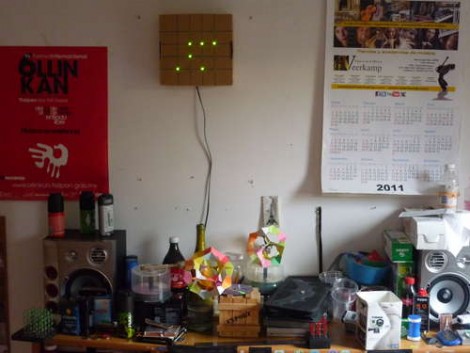
The weekend is almost here and if you’re looking for an afternoon project consider building your own binary wall clock. [Emihackr97] built the one you see above using parts on hand, but even if you put in an order for everything, it won’t cost you much.

He used a cardboard box as the housing for the clock, marking a grid for the LEDs on the face and drilling holes to house them. Two columns for hours and another two for minutes let the clock display 24-hour time with alternate firmware for 12 hour time. Since there are two buttons – one to set hours, the other to set minutes – a little coding would make it possible to select between the two either by clicking both buttons at once, or holding down one button.

[Emihackr97] is driving the display with an ATmega48, which is a pin-compatible replacement for the ATmega168/328. Those chips are the type most commonly found on Arduino boards an indeed this project is running the Arduino bootloader, but uses an ISP programmer and breadboarded circuit to keep the costs low. There are plenty of pins to drive the 13 LEDs directly, making the soldering quick and painless. Check out a demo clip after the break.

If you’re successful at this build and get the itch for something with more style, there’s a ton of ways to spice up the look of a binary clock.

Continue reading “Build A Binary Wall Clock For Just A Few Bucks”

Simple Hack Reuses An Air Freshener PIR Sensor

pir_sensor_room_greeter

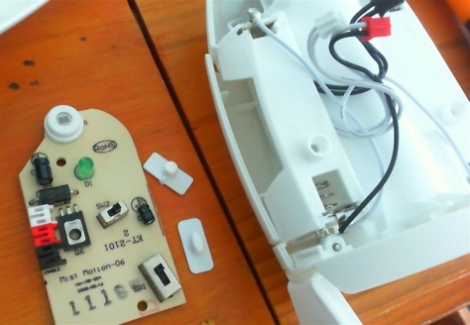
A year ago [Lochie] bought an Airwick automatic air freshener, and while he thought it was a cool gadget, the freshening spray and the novelty ran out in short order. The device collected dust in his room for some a while until he recently unearthed it, and noticed that a perfectly good PIR sensor was looking him in the face all this time.

He disassembled the air freshener, then set out to figure out how he could interface with the PIR sensor. After finding a helpful Instructable on the topic, he had full access to the sensor’s signals, allowing him to easily wire it up to an Arduino. He decided it would be fun to trigger some simple music any time someone entered his room, so he encoded a short bit of the Super Mario Brothers theme in RTTTL, as he explains in the video below.

It’s a simple little hack, but [Lochie] is pleased with it, and we imagine that he likely has a long list of other creative ideas in mind for his newly discovered PIR sensor.

Continue reading “Simple Hack Reuses An Air Freshener PIR Sensor”

Electric Mountain Board With Glove Control

Last summer, we saw [Andres Guzman]’s electric mountain board tearing around the University of Illinois campus. He’s back again, only this time the board isn’t controlled with a PlayStation controller. [Andres] built a wireless glove to control his mountain board.

An Arduino and power supply is mounted to the glove. A 2.4GHz transceiver serves as the comm link between the glove and board. The speed control is handled by this flex sensor from Sparkfun. With the flex sensor held between the middle and ring fingers, all [Andres] needs to do to apply power is slightly bend his fingers.

There’s also a number of safety features built into the board. To enable power to the boards motor, there’s a dead man switch on the glove underneath the thumb. If [Andres] were to take a nasty spill, he would release the switch and the board would come to a stop. [Andres] also made sure the board would shut down if the wireless link was interrupted. The build seems pretty safe, even if he is tearing around his campus in the video below.

Continue reading “Electric Mountain Board With Glove Control”

Open-source Sprinkler Controller Keeps Your Lawn Looking Great

open_source_sprinkler_controller

[Ray] wrote in to share a great project he just recently wrapped up, an open-source sprinkler valve controller. Built in collaboration with Wired Magazine’s editor-in-chief [Chris Anderson], the sprinkler controller is designed to replace the limited commercial sprinkler timers that typically come with a new home sprinkler setup.

Their system greatly expands on the idea of a standard sprinkler timer, adding Ethernet connectivity, web-based scheduling, and 8 separate controllable zones. At the heart of the controller is an ATmega328 running the Arduino bootloader, which means that the system is easily tweakable to fit your specific needs. The controller works off a standard 24V AC sprinkler transformer, which means that the controller can easily act as a drop-in replacement for your existing system.

The pair sells kits through the web site, but you can always simply download the schematics, PCB layout files, and BoM to build one yourself. Whichever path you choose, be sure to swing by [Ray’s] site and take a good look around – there is an incredibly detailed assembly and programming guide there that will be a great resource as you go along.

Continue reading to see a video of the sprinkler controller in action.

Continue reading “Open-source Sprinkler Controller Keeps Your Lawn Looking Great”

The Zigroller Balance Bot

The Zigroller is a Zigbee remote-controlled balance bot.  Although balance bots have been featured on [HAD] before, the Zigroller appears to be well-built and the project is well documented.  Besides a section on hardware, the software for this build is documented here.  The theory behind a balancing bot like this is given in this [MIT] paper if you’d like some more background.

The roller itself was conceived as a project for a UW class this summer.  The class was about control theory, so the electronics and mechanical setup was copied off of the [ArduRoller] project.  In order to keep this project from influencing the control code of this ‘bot, it’s claimed that the code was not looked at while writing the new software. The process for building the remote control assembly is nicely documented and is an original creation for this project. Check out a video of it in action after the break! Continue reading “The Zigroller Balance Bot”

DIY Amplifier Minder Turns Off Your Stereo When You Forget

arduino_receiver_minder

[zmashiah] has a nice Nova tube amplifier in his living room, and he often forgets to turn it off once he’s done listening to music. He feels guilty when this happens, as it not only shortens the lifespan of his stereo, but it’s not exactly the greenest behavior either. Rather than let his receiver idle any longer, he built a simple device that automatically turns it off when he forgets.

He wired an Arduino to the line level output of the receiver, sampling the audio every two seconds. When five minutes pass without an audio signal, the Arduino sends an IR command to the receiver, turning it off.

He says he’s aware that it might be overkill to use an Arduino for this application, but that he would rather fork out an extra dollar or two instead of spending hours poring over AVR assembly code. While we’re all for efficiency, we can’t exactly argue with that logic – time is money!

[zmashiah] is kind enough to include his schematics as well as the code for his project, so be sure to check it out if you occasionally forget to turn off your IR-enabled appliances.