Easy DIY Stroboscope

stroboscope_output

Looking for something to do in his downtime, [Mista Sparkle] decided that building a simple stroboscope was in order. He already had a set of six LEDs connected to his Arduino from a previous project, so he added a potentiometer to control the rate at which the LEDs flashed, and dug into the IDE.

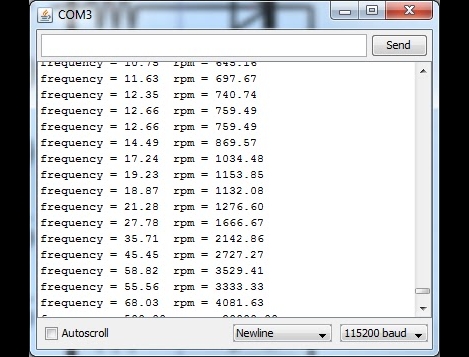
During his build he discovered that using the Arduino millis() function at high speeds provides terrible resolution, while using the micros() function exclusively limits his low end measuring capabilities. He desired a better range of measurement, so his program was broken into main functions: One which measures the LED flashing frequency in milliseconds and another that measures the LED flashing frequency in microseconds. This allowed him to gauge rotational frequencies from 577 to 30,000 RPM.

[Mista Sparkle] admits that he is not yet well-versed in driving displays with the Arduino, so he views his readings over a serial connection on his PC. Hopefully we’ll see an updated version with those features in the near future.

MIDI Controller Fit For An Arcade

arcade_midi_controller

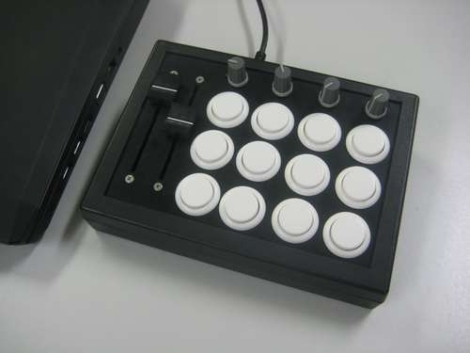
MIDI controllers can be relatively expensive depending on feature sets and requirements, so Instructables user [fraganator] went about building one on his own for just under $100. He originally wanted to replicate a commercially available MIDI controller, which used arcade buttons in lieu of the more common rubberized buttons, since they are large and have a better feel when pressed. Once he drew up plans for his MIDI clone, he realized he wanted more features in his controller than were available in the commercial version, so he started revising.

His final plan included three rows of four arcade buttons as well as four rotary and two sliding potentiometers. All of the components were mounted in a small keyboard enclosure, then wired to an Arduino clone, which manages all of the controller’s functions. The controller is connected to a PC via USB and can perform any number of operations once the buttons are mapped in MIDI-compatible software.

There are no videos of the controller in action just yet, though [fraganator] says one is forthcoming.

KiwiDrive HouseBot

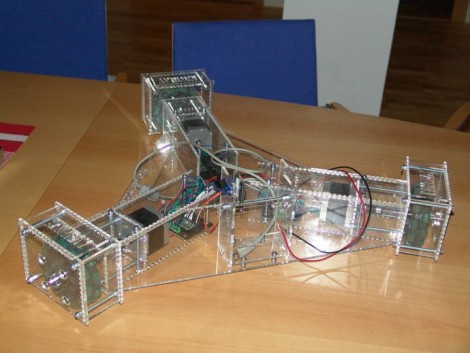
Forskningsavdelningen, a Swedish hackerspace, had a hackathon last weekend and the KiwiDrive HouseBot is one of the items that resulted from the group effort. They set a goal to use standard, easy to obtain parts, so that the robotic platform would be accessible for reproduction by individuals or at other hackerspaces. The three-limbed device rolls around on a triad of omni-directional wheels -which are probably the hardest part to source but you can always print your own. An Arduino Uno was used as the hardware interface, driving the three stepper motors for locomotion.

It’s not pictured above, but the fourth generation of the little guy also includes a webcam. The camera rides in the center of the body and is mounted on a servo. This makes it possible to turn the camera, meaning there’s no real front or back to this design. Future plans include adding an on-board computer (this is larger than it appears) and implementing emoticons on an 8×8 LED matrix, presumably so you can tell how the bot is feeling today.

[Thanks KiwiRay]

Light Sensitive MIDI Glove

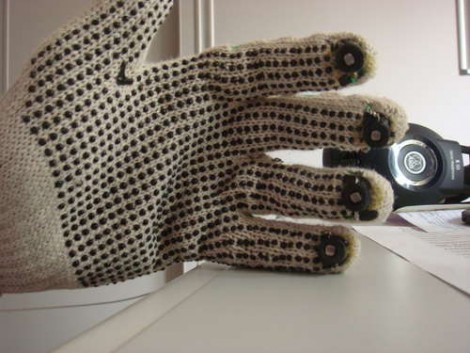
The latest offering in glove-based noisemakers forsakes commonly used flex sensors in favor or photoresistors. [Bruno Ratnieks] is responsible for this musical glove and his methods will be very easy to recreate. He used an Arduino to interface with it while providing a USB connection to your audio software. The sensors themselves couldn’t be easier to throw together, with each photoresistor creating a voltage divider when combined with a fixed-value resistor. That’s all the hardware you need, and with some creative coding you can making it do much more than the effects heard in the video after the break.

Some will say that [Bruno] simply didn’t used enough duct tape with his project design. Be we liked how he wove the wiring into the mesh of these knit gloves to keep it firmly in place.

Continue reading “Light Sensitive MIDI Glove”

Interfacing An Arduino With A TFT LCD

tft_lcd

Seven-segment displays and monochrome LCDs are fine for most projects, but some things simply look better in color. [John] over at the Little Bird Electronics blog recently wrote up a tutorial demonstrating the use of a TFT LCD panel with an Arduino. The specific panel he chose was a 4D Systems 1.44” TFT LCD that happened to feature a dedicated graphics processor, which should allow for some fantastic visuals when used to its fullest potential.

The LCD takes its commands over a serial interface, making it a simple five-wire display solution for your projects. The display can be programmed manually by sending hex commands over the serial interface, but there are also some user-developed libraries available that will allow you to use the majority of the most popular functions without the learning curve. One thing to note is that the LCD must be flashed with a particular flavor of firmware before it can communicate over the serial interface, a process for which [John] provides a walk through.

The LCD panel can be used with any Arduino-compatible board, so it can be useful in a whole host of projects.

Stick around to see a simple demo of the board in use.

Continue reading “Interfacing An Arduino With A TFT LCD”

Ultrasmall Arduino

[Fabio Varesano’s] new Arduino compatible board packs a full power punch in a ultra compact layout, measuring at 20.7×15.2 mm, the Femtoduino is probably the smallest 328 based Arduino compatible board around. Most of the staples are present, an QFN atmega328, an MIC5205 low dropout regulator good for a couple hundred milli amps, 16MHz ceramic resonator, reset, power indicator and pin 13 LEDs, but you will need to provide your own serial connection (FTDI, MAX232 etc) and another AVR programmer to get the Arduino boot loader onto the chip.

Since the board is small (smaller than a pro mini) it is not directly breadboard friendly. Even though the hole spacing is 0.05 inch, the size is large enough for “normal” wire to fit into fine, if you wish to use 0.1 inch spacing there is a handy break out board you can make where the Femtoduino just snaps in.

Everything needed to make one of your own is provided on the website, schematics, kicad files, bill of materials, Gerbers for both the board and the breakout board, though we would like to see this as a pre-made board soon, join us after the break for a video and see why.

Continue reading “Ultrasmall Arduino”

The Wandering Arduinobot

You almost have to love this Arduino based robot just because of the wheels and third leg support. Look closely, do you recognize them? Yep, they’re Capsela parts! That’s a blast from the past and we wonder why we don’t see the strange building toys of yore used in more hacks?

But we digress, this little bugger guy uses continuous rotation servos for locomotion. Perched atop the body is a third servo which scans an IR range finder back and forth to look out for obstacles in its path. The body itself is a Black and Decker rechargeable battery pack called Pocket Power which includes a USB port for a regulated 5V supply. One thing’s for sure, this little guy is fantastic at avoiding pizza and beer… you’ll just have to see for yourself after the break.

Continue reading “The Wandering Arduinobot”