Pedal-powered 32-core ARM Linux Server

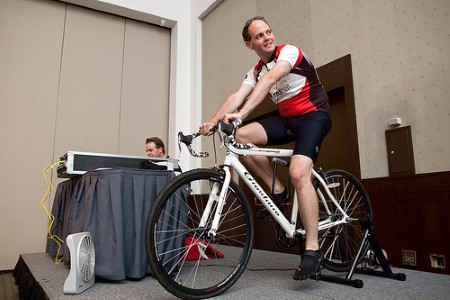
Sure, it’s probably a gimmick to [Jon Masters], but we absolutely love the pedal-powered server he built using a group of ARM chips. [Jon] is an engineer at Red Hat and put together  the project in order to show off the potential of the low-power ARM offerings.

The platform is a quad-core Calxeda EnergyCore ARM SoC. Each chip draws only 5 Watts at full load, with eight chips weighing in at just 40 Watts. The circuit to power the server started as a solar charger, which was easy to convert just by transitioning from panels to a generator that works just like a bicycle trainer (the rear wheel presses against a spin wheel which drives the generator shaft).

So, the bicycle generator powers the solar charger, which is connected to an inverter that feeds a UPS. After reading the article and watching the video after the break we’re a bit confused on the actual setup. We would think that the inverter would feed the charger but that doesn’t seem to be the case here. If you can provide some clarity on how the system is connected please feel free to do so in the comments.

Continue reading “Pedal-powered 32-core ARM Linux Server”

Gooseberry Is The Latest ARM Linux Board

It looks like we’re finally seeing the proliferation of single board computers take off. The latest is called the Gooseberry. While it will cost about £40/$62 USD at release, it greatly outperforms the current crop of tiny Linux boards.

As the latest in what will be a long line of these ARM-ified single board computers, the Gooseberry hugely outperforms the VIA APC and Raspberry Pi with a Allwinner A10 CPU running at 1.2 GHz, 512 MB of RAM, and built-in WiFi. Basically, the Gooseberry has all the features you would expect from an Android tablet; the reason for this is because the Gooseberry actually is the board found in a few Chinese tablets.

There’s a few very nice features like an LVDS output to add LCD displays without hogging the HDMI output, and the form factor is incredibly thin making it perfect for building a small portable device.

After the break you can check out a walkthrough of the Gooseberry board along with evidence of it running Ubuntu.

Continue reading “Gooseberry Is The Latest ARM Linux Board”

Cheap ARM Netbooks Have Linux Forced Upon Them

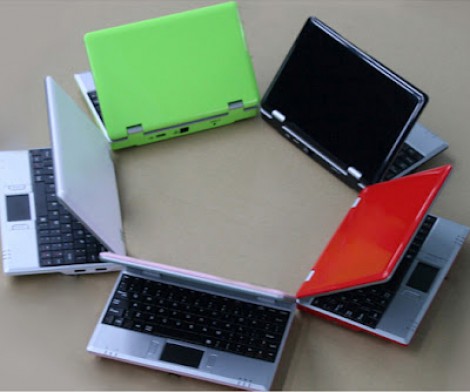
[Doragasu] got his hands on one of these WM8650 Netbooks for around 50 euros (~$63.50) delivered. They come with a version of Android preinstalled, but he wanted to use them more like a computer and less like an Android device. So he set out to load Arch Linux on the ARM-based Netbook.

This is possible because the hardware inside is actually pretty good. The 800 MHz SoC is accompanied by 256 megs of RAM. There’s 2 gigs of internal storage, a 7″ display, USB, Ethernet, WiFi, and an audio system. This is comparable to what you’d get with a Raspberry Pi (without video acceleration) but also includes all of those peripherals, a case, a touchpad and keyboard… you get the point. There are several patches that need to be applied to the kernel to get it working with the hardware. [Doragasu] covers each of them in the post linked above. You can also hear his presentation in the video after the break.

Continue reading “Cheap ARM Netbooks Have Linux Forced Upon Them”

Template For Building STM32F0-Discovery Project In GCC

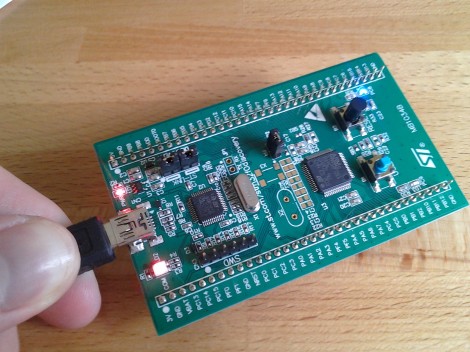
Yep, that blue light is blinking and I made it happen. I’ve been hard at work since I got my free STM32F0-Discovery board in the mail. Most recently I put together a starting template for building STM32F05x project on Linux. You’ll still need to install your own tool chain (I’m using the Code Sourcery G++: Lite Edition), but this makes it a snap to compile your projects with support for STM’s peripheral libraries.

As for programming, you may remember that I added support for writing to RAM in the stlink project. I’ve wasted spent a ton of time trying to get support for writing to Flash into that project. It’s just less of a hassle to use stlink than it is to work with OpenOCD. But I’ve really hit a wall getting the flash loader code to work. If you want to check out what I’ve done so far in that area I committed a very messy branch (see the commits for what code changes I’ve made).

In the mean time you can use OpenOCD to write images compiled with the template to your device. I included the ‘make program’ option in the Makefile to do this from command line. If you need help compiling OpenOCD check the readme in the template repository.

The First Step To Running IPhone Apps In Linux

[Christina] has been working on a project she calls Magenta to put Darwin/BSD on top of Linux. What does that mean? Well, hopefully it’s the first step towards running iPhone/iPad apps on a Linux machine.

Before you get too excited, there are a few caveats; Magenta only works on ARMv7 platforms, none of the fancy iOS frameworks are included, and it’s currently impossible to run iOS apps with this build. Think of this project as a very, very early version of Wine. If you’d like to take Magenta for a spin, [Christina] put the source up here.

Although [Christina]’s project is entirely useless for anyone wanting Siri on their Android phone, it’s possible to add all those fancy iOS frameworks to Magenta and create an open source OS able to run iPhone apps.

We really have to admire [Christina]’s work on this. It’s an amazingly impressive project, and her final goal of recreating the iOS stack would be a boon to the jailbreaking scene. Cue the sound of millions of iPhone clones marching out of China…

via [OleRazzleDazzle] on the reddits

Video Review: STM32F0-Discovery Board

The STM32 Discovery boards are nothing new, we’ve looked at them several times. But the newest sibling in the line might be just the thing to make the leap from your steadfast 8-bit projects. We got our hands on it and recorded a video review.

The STM32F0-Discovery gives you a programmer and ARM Cortex-M0 chip all on one convenient board. The top portion is the ST-Link V2 programmer, and includes jumpers and a programming header which let it easily program off-board chips.

The included microcontroller is an STM32F051R8T6 which includes 64kb of program memory and 8kb of RAM. Coming in at $1.80-3.77 in single units and in a hand-solderable LQFP package this raises an eyebrow for our future projects. It has an 8 MHz internal oscillator with 6x PLL which means you can run at 48 MHz without an external crystal (check out [Kenneth Finnegan’s] PLL primer if you don’t know what this is).

The only thing holding us back is the development environment. ST provides everything you need if you’re on Windows, but we want a Linux friendly solution. We know other Discovery boards have worked under Linux thanks to this project. This uses the same ST-LINK V2 so it should work as well. If you want one of your own head over the ST page to see if they’re still giving away samples. There should be a button labeled “Register for your FREE KIT”.

CalTech’s Manipulator-arm Equipped Robot

[Justin] wrote in to tell us about the rover which his CalTech team has entered in NASA’s Exploration Robo-Ops Competition. Their time to shine is later this week, but you can see some of the test footage after the break.

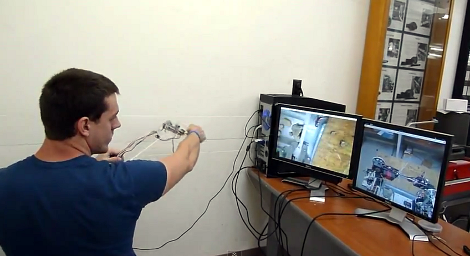
The operator pictured above is using a controller which is a scale model of the manipulator arm, with two cameras giving feedback. One of those monitors shows a feed from the arm itself, providing a view of the gripper. The other feed is a wide shot of the working area from the body of the robot. The arm has six degrees of freedom actuated by servo motors. The controller is a replica of the arm laser cut from acrylic. At each joint there’s a potentiometer whose value is used to establish the position of the frame.

At first we thought that this would be more fatiguing and less convenient than using a gaming controller. But as we look at the dexterity of the arm it becomes obvious that joysticks and buttons would just make things more difficult.

Continue reading “CalTech’s Manipulator-arm Equipped Robot”