Raspberry Pi Runs XBMC; Reliably Decodes 1080p

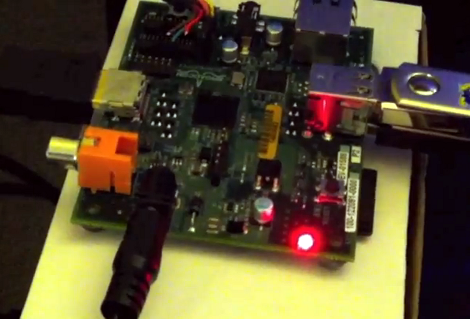
This is the Raspberry Pi board, an ARM based GNU-Linux computer. We’ve heard a little bit about it, but it recently garnered our attention when the machine was shown running XBMC at 1080p. That’s a lot of decoding to be done with the small package, and it’s taken care of at the hardware level.

Regular readers will know we’re fans of the XBMC project and have been looking for a small form factor that can be stuck on the back of a television. We had hoped it would be the BeagleBaord but that never really came to fruition. But this really looks like it has potential, and with a price tag of $35 (that’s for the larger 256MB RAM option) it’s a no-brainer.

Now there’s still a lot of rumors out there. We came across one thread that speculated the device will not decode video formats other than h.264 very well since it uses hardware decoding for that codec only. We’ll reserve judgement until there’s more reliable info. But you can dig through this forum thread where the XMBC dev who’s been working with the hardware is participating in the discussion.

Don’t forget to peek at the demo clip after the break too.

Continue reading “Raspberry Pi Runs XBMC; Reliably Decodes 1080p”
[Scot] Whips Up Breakout Board For His ARM Breakout Board

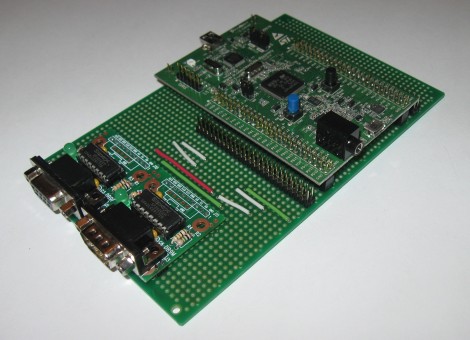
[Scot Kornak] got his hands on the new STM32 Discovery Board. He got his as a free giveaway, but at only $18 he probably would have picked one up anyway. His one complaint about the device is that he dual pin-headers which break out the ARM processor’s pins are not the most convenient for hooking up external components. He decided to make his own breakout board which would give him a more robust solution for the components he uses all the time.

The protoboard that he chose as a base is quite interesting. It’s made for interfacing DIL pin headers just like the ones on the STM32F4 Discovery board. Each row of the dual header is carried down the board perpendicular to those headers. [Scot] cut the traces underneath the STM32 board to isolate the right and left sides. He then added RS232 hardware to one side, while including another pair of DIL headers to break out the rest of the unused pins.

This is all he’s got so far, but there’s plenty of room on the base board to add more as the need arises.

Pyxis 3 Hits Beta; Rebranded As Gadgetos

The beta version of Pyxis 3 is now available. Skewworks continues to develop the ARM operating system, and with the transition to version 3 they’ve given it a new name: Gadgetos. One big difference from Pyxis 2 is that the new kernal is closed source. But they’ve taken steps to ensure that the OS is still hardware independent. This is done by reworking the kernel to allow driver loading at run time from an SD card.

The user interface has also changed a bit. Gadgetos relies entirely on a context-based menu system. The minimum input hardware requires a touchscreen LCD and one tactile button. By holding that button, a menu pops up in the center of the screen. This menu is different based on where it is called (this is where context comes in). If you’re at the desktop screen, you get options to load programs, etc. If you pull up the menu while running an application you’ll see the options available for that app. To see more about the new navigation system check out the video after the break.

Continue reading “Pyxis 3 Hits Beta; Rebranded As Gadgetos”

ARM Programming Primer; Getting The USART Running

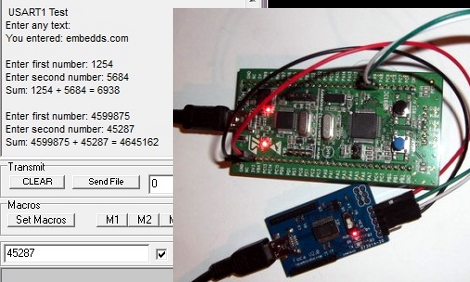
We find it interesting that PIC and AVR programming is very common in hobby electronics but ARM doesn’t have nearly the same foothold. This is partly because there’s a knowledge barrier involved with making the transition (the other part is probably the lack of DIP packaged chips). But if you’ve worked with 8-bit microcontrollers you can certainly make the jump into the 32-bit realm. Here’s a great opportunity to get your feet wet. This guide will show you how to get the USART on an STM32 Discovery Board working, which makes it easy to get feedback about what’s going on in your program.

One difference you’ll notice when moving to ARM microcontrollers is that there is almost always a library bundle available from the manufacturer which includes all of the functions you need for hardware control (USART, USB, Ethernet, ADC, etc.). That’s the case here, so simply including the USART library makes it a snap to finish the rest of the program. Once you hook up your communications hardware (an FTDI cable in this case) just use the library initialization functions, followed by the send and receive commands and you’ll be pushing messages to a computer terminal in no time.

If you’re trying to use the STM32 Discovery Board with a Linux box here’s a shove in the right direction.

This Dongle Makes Any Screen An Android Device

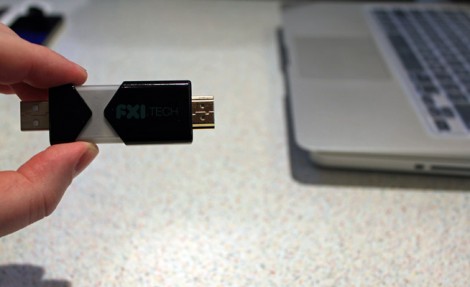
Want that 70″ LCD television in your living room to be an Android device? This little guy can make it happen. With an HDMI port on one end, and a USB plug on the other for power, just plug in FXI Technologies’ Cotton Candy dongle to create a 1080p Android television.

The price isn’t set for the device, but it’s expected to be available at less than $200. Considering what’s inside that’s pretty reasonable. There’s a dual-core 1.2 GHz ARM processor, 1 gig of RAM, 64 gigs of storage, Bluetooth, WiFi, and a microSD card slot. Wow!

So is it hackable? Absolutely. Well, kind of? The company doesn’t intend to bring Cotton Candy to the retail market. Instead, they will sell the device to developers who may do what they wish. From there, said developers have the option to license the technology for their own products. This begs the question, will the development kit come in under $200? Hard to say.

Check out the video after the break to hear an interview with the company’s CEO. It certainly sounds fascinating, and like the Chumby NeTV, we can’t wait to see what comes of this. Continue reading “This Dongle Makes Any Screen An Android Device”

Pushing FPGA Config Files Via Serial Using ‘cat’

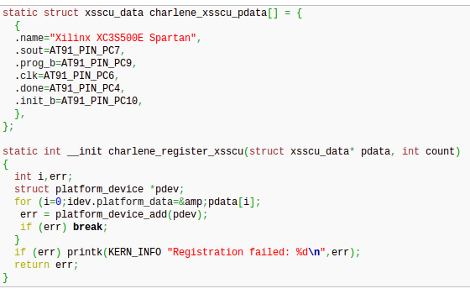
[Andrew] is trying to buckle down and hammer out his PhD project but was surprised by the sorry state of the configuration options for his FPGA/ARM dev board. Using JTAG was painfully slow, so he studied the datasheet to see if there was another way. It turns out the Xilinx FPGA he’s using does have a slave serial mode so he came up with a way to push configuration from the ARM to the FPGA serially.

Four of the connects he needed were already mapped to PortC pins on the AT91SAM9260 ARM System on a Chip. He ended up using the EN_GSM pin on the FPGA, since there is no GSM module on this board; connecting it to the microcontroller with a piece of wire. Now he can SSH into the ARM processor, grabbing information on the FPGA from /dev/fpga0. When it comes time to program, it’s as easy as using the cat command on the binary file and redirecting the output to the same hook.

Strap Yourself In And Let This Robot Arm Shake The Bejesus Out Of You

This man is strapped onto the business end of a huge robotic arm. If you’ve seen videos of industrial robots on automobile assembly lines and the like, you know how fast and strong these machines are. But this isn’t headed for the factory floor, it’s a new flight simulator built do train Australian fighter pilots.

Researchers at Deakin University were looking for a way to give a fighter pilot a more realistic simulator experience. What they ended up with is an apparatus that can spin continuously on two axes. This lets the pilot feel what it might be like to stall and have the aircraft spinning out of control.

The video after the break is not to be missed. You’ll see the test pilot (read: guinea pig) flung this way and that to the point that we almost decided this should be a “Real or Fake” post. But we’re confident that this actually exists. We expect that future renditions will include the front portion of the aircraft and be completely enclosed in a projection dome, just like the Lexus driving simulator.

Continue reading “Strap Yourself In And Let This Robot Arm Shake The Bejesus Out Of You”