ARM Programming Primer; Getting The USART Running

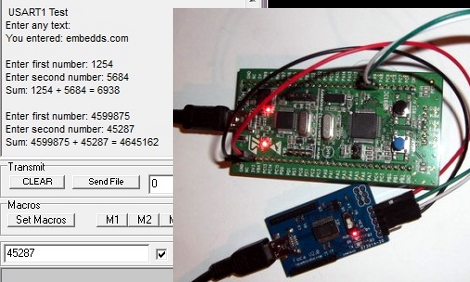
We find it interesting that PIC and AVR programming is very common in hobby electronics but ARM doesn’t have nearly the same foothold. This is partly because there’s a knowledge barrier involved with making the transition (the other part is probably the lack of DIP packaged chips). But if you’ve worked with 8-bit microcontrollers you can certainly make the jump into the 32-bit realm. Here’s a great opportunity to get your feet wet. This guide will show you how to get the USART on an STM32 Discovery Board working, which makes it easy to get feedback about what’s going on in your program.

One difference you’ll notice when moving to ARM microcontrollers is that there is almost always a library bundle available from the manufacturer which includes all of the functions you need for hardware control (USART, USB, Ethernet, ADC, etc.). That’s the case here, so simply including the USART library makes it a snap to finish the rest of the program. Once you hook up your communications hardware (an FTDI cable in this case) just use the library initialization functions, followed by the send and receive commands and you’ll be pushing messages to a computer terminal in no time.

If you’re trying to use the STM32 Discovery Board with a Linux box here’s a shove in the right direction.

This Dongle Makes Any Screen An Android Device

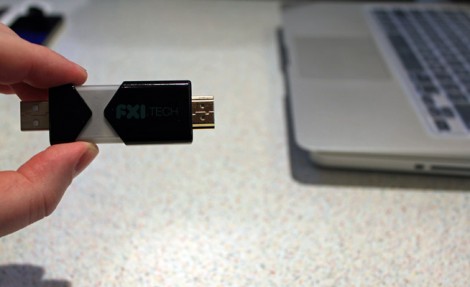
Want that 70″ LCD television in your living room to be an Android device? This little guy can make it happen. With an HDMI port on one end, and a USB plug on the other for power, just plug in FXI Technologies’ Cotton Candy dongle to create a 1080p Android television.

The price isn’t set for the device, but it’s expected to be available at less than $200. Considering what’s inside that’s pretty reasonable. There’s a dual-core 1.2 GHz ARM processor, 1 gig of RAM, 64 gigs of storage, Bluetooth, WiFi, and a microSD card slot. Wow!

So is it hackable? Absolutely. Well, kind of? The company doesn’t intend to bring Cotton Candy to the retail market. Instead, they will sell the device to developers who may do what they wish. From there, said developers have the option to license the technology for their own products. This begs the question, will the development kit come in under $200? Hard to say.

Check out the video after the break to hear an interview with the company’s CEO. It certainly sounds fascinating, and like the Chumby NeTV, we can’t wait to see what comes of this. Continue reading “This Dongle Makes Any Screen An Android Device”

Pushing FPGA Config Files Via Serial Using ‘cat’

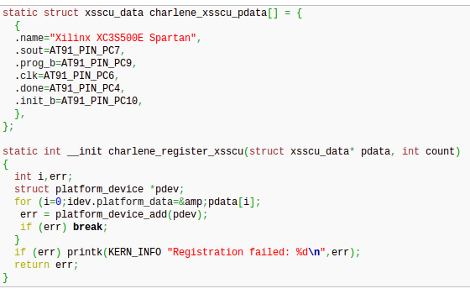
[Andrew] is trying to buckle down and hammer out his PhD project but was surprised by the sorry state of the configuration options for his FPGA/ARM dev board. Using JTAG was painfully slow, so he studied the datasheet to see if there was another way. It turns out the Xilinx FPGA he’s using does have a slave serial mode so he came up with a way to push configuration from the ARM to the FPGA serially.

Four of the connects he needed were already mapped to PortC pins on the AT91SAM9260 ARM System on a Chip. He ended up using the EN_GSM pin on the FPGA, since there is no GSM module on this board; connecting it to the microcontroller with a piece of wire. Now he can SSH into the ARM processor, grabbing information on the FPGA from /dev/fpga0. When it comes time to program, it’s as easy as using the cat command on the binary file and redirecting the output to the same hook.

Strap Yourself In And Let This Robot Arm Shake The Bejesus Out Of You

This man is strapped onto the business end of a huge robotic arm. If you’ve seen videos of industrial robots on automobile assembly lines and the like, you know how fast and strong these machines are. But this isn’t headed for the factory floor, it’s a new flight simulator built do train Australian fighter pilots.

Researchers at Deakin University were looking for a way to give a fighter pilot a more realistic simulator experience. What they ended up with is an apparatus that can spin continuously on two axes. This lets the pilot feel what it might be like to stall and have the aircraft spinning out of control.

The video after the break is not to be missed. You’ll see the test pilot (read: guinea pig) flung this way and that to the point that we almost decided this should be a “Real or Fake” post. But we’re confident that this actually exists. We expect that future renditions will include the front portion of the aircraft and be completely enclosed in a projection dome, just like the Lexus driving simulator.

Continue reading “Strap Yourself In And Let This Robot Arm Shake The Bejesus Out Of You”

LUFA Open Source USB Stack Now For NXP ARM Processors

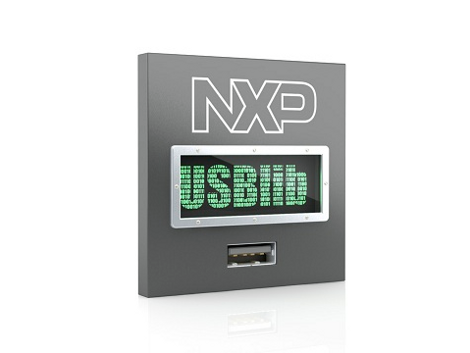
Looks like the Lightweight USB Framework for AVRs (LUFA) has just been ported for ARM microcontrollers. NXP recently released a package for their LPC Cortex M3 family of ARM controllers. You won’t find a reference to LUFA on their nxpUSBlib description page (which we think is kind of sad), but if you grab a copy of the beta code the Version.h header file shows that it is indeed a port of the project. This is further backed up by the LUFA creator, [Dean Camera], who consulted with the NXP team doing the work.

The package provides an open-source USB stack that you can use in your projects as a USB host or USB device. We’re advocates of open source packages like this one as it makes it much easier for hobbyists to get help using the tools, and it allows the community to give back through bug fixes and feature additions.

We’ve highlighted a few LUFA projects, like this keyboard remapper and this AVR programmer. We’re looking to seeing the first set of NXP LUFA projects roll through!

[Thanks Johnny]

Say Hello To Our Little Friend, The BeagleBone

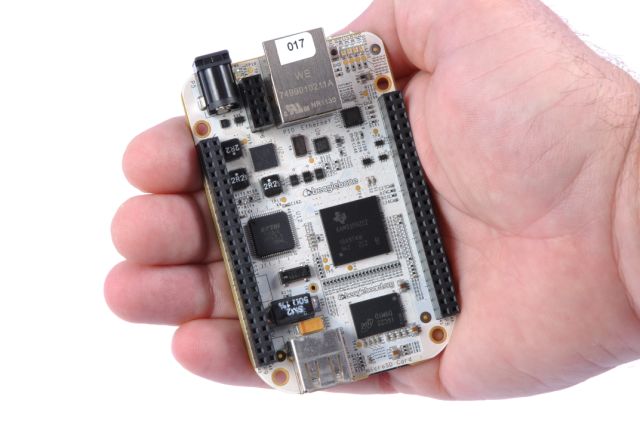
Small and more powerful… what more can you want? This is the newest BeagleBoard offering, called the BeagleBone. It’s packed with some pretty intriguing features, but let’s take a tour of the hardware first.

Like its predecessors, the BeagleBone sports an ARM processor. This time around it’s a TI AM3358 ARM Cortex-A8. It will ship with a 2 GB microSD card and has an Ethernet port and USB connection. The dual pin headers on either side of the board are designed to receive ‘Capes’ for expansion. Currently a DVI cape is in the works, with HDMI and others to follow.

Linux is running on board and one of the best features we see in the video after the break is the browser-based programming interface. When connected to a network, the BeagleBone serves HTML5 web pages. One of these is an IDE that lets you write and execute code directly from your browser.

Now, can we finally have our open-hardware set top box (hopefully running XBMC)?? At an MSRP of $89 this should be able to give AppleTV 2 a run for its money as an easy way to get your television some network connectivity. Continue reading “Say Hello To Our Little Friend, The BeagleBone”

How To Develop For STM32 Discovery Boards Using Linux

Some hard work has gone into making it possible to develop for the STM32 Discovery board using a Linux system. The board boasts an ARM Cortex-M3 processor, which can be programmed via the mini-USB port on the side. But the company only supports development through their IDE’s which don’t run natively on Linux. The stlink project aims to solve this, providing a toolchain, and making it possible to flash the microcontroller via the USB connection.

The github project linked above also includes a tutorial to get you started (pdf). In addition to a walk through on compiling the software packages, it includes a simple blink program that you can use to test out your hardware. GDB, the familiar open-source debugger, is used to flash the chip. This is a bare-bones tutorial so if you end up posting about your experiences using this toolchain with the Discovery boards we’d love to hear about it.

[Thanks Texane]