SmartLCD Makes Video For Microcontrollers Easy

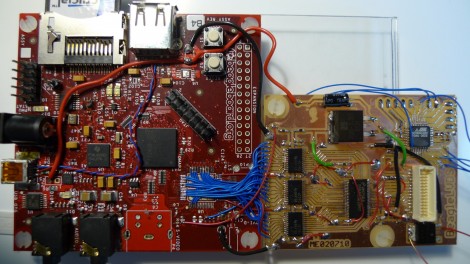
[Rossum] developed a host board that makes it easy to drive a TFT screen using an inexpensive microcontroller. He’s looked around at a bunch of LCD’s that are easy to get your hands on and decided that the iPod Nano 2G screens are the right balance of performance (176×132 TFT) and low cost ($1-$5). They’re not particularly difficult to talk to, but with 22 pins they’re a bit hardware hungry.

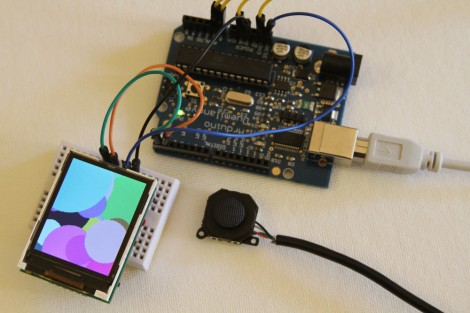
He takes us through the signal sniffing he used to figure out the communications process. From there he harness the power of an ARM Cortex M0 processor, which he’s worked with in the past, to drive the screen. His implementation results in a driver board called the SmartLCD that takes care of the screen’s parallel protocol, power, and backlight. From there it’s just four connections and you can use a small microcontroller like the Arduino seen above with ease. See what it can do after the break.

Continue reading “SmartLCD Makes Video For Microcontrollers Easy”

Moving A Resistor For EvalBot Power When Programming

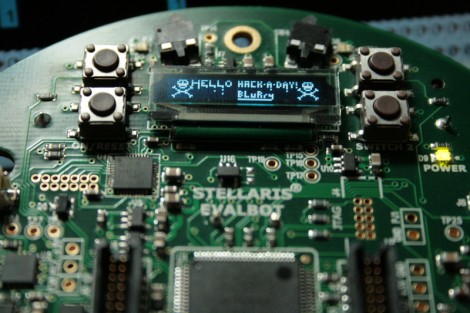
[Riley Porter] posted a picture of his EvalBot USB power hack. In the photo above we’ve put a box around D6 and D7. The development board ships with a 0 Ohm resistor in the D7 location, patching in power from the USB-B connector labeled USB DEVICE. He found that by moving that resistor to D6 he can power the board from the USB-B connector labeled ICDI.

That connector is the In-Circuit Debug Interface. TI sent us an EvalBot bundle so we pulled it out and tried it ourselves. If you plug in the ICDI it doesn’t power the board, and no USB devices register. Shorting the D6 pads changes this and the following USB device registers:

Bus 002 Device 062: ID 0403:bcd9 Future Technology Devices International, Ltd Stellaris Evaluation Board

So it looks like you need to have two USB connections or be using batteries in order to program the board via USB. The uC/OS-III hardcover book that ships with the EvalBot bundle includes board schematics. We took a look and were surprised to see that they show diodes installed on both pads. Rev A of the online schematics have been corrected, showing an omitted diode on D6 and the 0 Ohm resistor on D7. Images of both schematics are included after the break.

It would have been nice to see a selector switch installed here to give you a little more flexibility when prototyping.

Continue reading “Moving A Resistor For EvalBot Power When Programming”

Mac SE Reborn As A Server And Mac Emulator

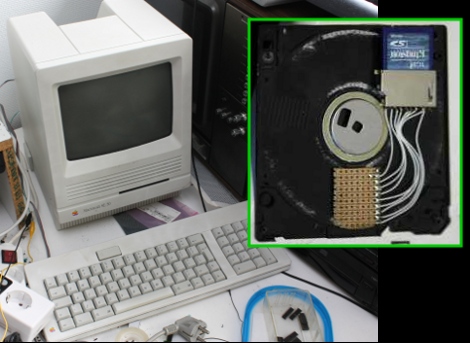
[Sprite_TM] cooked up an amazing hack by resurrecting a Mac SE using a Dockstar and ARM processor. The retro hardware had a bad mainboard thanks to the corrosive properties of a failed backup-battery. He had been wanting to do something with the Seagate Dockstar and decided it would find a nice home in the Mac. But what fun is a dead machine housing a headless server? To add to the fun he included an ARM processor running a Mac emulator, along with all the bits to make the screen, keyboard, and peripherals work. When the Mac is off the Dockstar still runs as a server.

But one of the best parts is the floppy drive. It still takes floppies, but there’s no magnetic media inside of them anymore. Instead, he’s added an SD card slot and some protoboard in the space for the read head. The drive itself has had the read head transplanted for some pogo pins (hey, we saw those earlier today). When you insert the floppy, the pogo-pins raise up and contact the protoboard, connecting the SD card to a Teensy microcontroller.

There’s so much going on with this project we just can’t cover it all here. Things like a chemical cleaning to return the original color of the classic case, and building a converter so that the peripherals are USB compatible are just some of the pleasures awaiting you in [Sprite_TM’s] post. He’s also filmed a demo video that we’ve embedded after the break.

Continue reading “Mac SE Reborn As A Server And Mac Emulator”

Robot Bicep Curl Accompanied By Too Much Fanfare

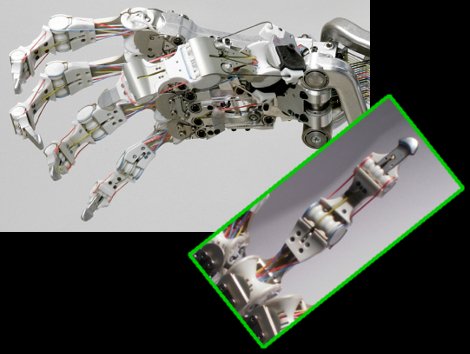
So this is the world’s strongest robot arm. Great… no really, that’s wonderful. We think lifting a 1000 kilogram dumbbell is a good way to show it off to the public. But with great power came the world’s most over-the top marketing. Well, maybe not as bad as the shake weight but it’s getting there. In the video after the break you’ll see that there is plenty of adrenaline-pumping music and they’ve hired an acrobat to pull a sheet off of the thing. We’ve pointed her out in the image above. [Caleb] noticed that they seem to have programmed in human kinetic to make it bounce and strain as a human lifting a heavy load would. And then there’s the fog machine. Classic. We also enjoy the use of a tap light (which we’ve seen around here before) to activate the demo.

But now we’re getting carried away. The article linked at the top covers a new development for the arm; a motorized base that can move it around. Looks like the base, which uses mecanum wheels, just slips under a stationary frame for the robot and lifts enough to truck it around.

Continue reading “Robot Bicep Curl Accompanied By Too Much Fanfare”

Smallest Gaming Console Ever. EVER!

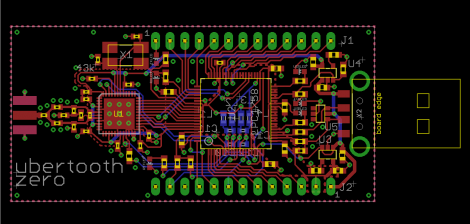
That’s it… the controller and the video game system all in one. This is the standalone version of [Rossum’s] RBox. We looked in on the prototype in June but that was using a bulky development board. You can see the CR1632 button battery, which powers the device for about four hours, sandwiched in between the joystick and the mainboard. Exiting the image on the right are cables used to connect mono-audio and video to a TV via RCA connectors. There’s no port for interchangeable cartridges which means that all game data must be programmed into the ARM Cortex M0 processors. See [Rossum’s] demo video after the break.

Continue reading “Smallest Gaming Console Ever. EVER!”

Robot Gripper Uses Coffee To Pick Up Anything

Picking up a raw egg is not something we’d think a robot gripper would be good at. But this model uses a bulbous tip instead of claw, which makes crushing the object less of a concern.

That tip is kind of like a balloon. It is stretched full with coffee grounds but air can also be pumped in and sucked out. When it comes time to grip an object, a bit of air is pumped in and the bulb is pressed down on its target. Once in place all of the air is sucked out, locking the coffee grounds around the object. Take a look after the break to see just how many things can be gripped with this technique.

Now the real question, can it bring me a beer?

Continue reading “Robot Gripper Uses Coffee To Pick Up Anything”

ARM Prototyping On-the-cheap With STM32 Discovery

STMicroelectronics has another inexpensive development board out; the STM32 Discovery is an ARM Cortex-M3 prototyping platform. Coming in under $10 puts it right along the lines of their 8-bit offering, but this one is 32-bits with 5 KB of RAM and 128 KB of programming memory. It runs a bootloader and has on-board USB for easy programming. They’ve even got a trio of crippled IDE’s to get you started.

Unfortunately this is following a growing trend with the exclusion of Linux support. [Gordon] wrote in to let us know that there is hope in a couple of forms (but not using the USB functionality). The first is a serial programmer using the RS232 that [Paul] came up with (there’s a lot more on his blog so spend some time there). But you can also use the serial debug protocol to program the board.

Either way you’ll still need a method of compiling the code. We’ve had great success rolling our own GNU ARM cross compiler using this guide. Or you can grab a pre-built package by downloading Sourcery G++ lite.