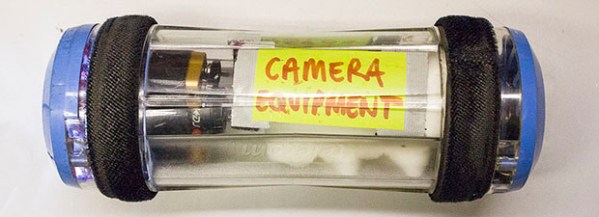
What The Inside Of A Pneumatic Transport System Looks Like

While most of us are familiar with pneumatic transport systems by their use at drive-up bank windows, these systems are also commonly found in hospitals ferrying samples around. When [Aidan] was in the hospital, he asked how this series of tubes routed samples from many different floors to the lab and back again. Well, give him an old tube to play around with and he’ll eventually come up with a way to record the inside of one of these pneumatic tubes, giving some insight into how this system actually works.

When asked, a tech that uses this system on a daily basis described it as a very basic physical Ethernet that sucks and blows through rotary junctions and physical hubs to route packets to different areas of the building. [Aidan] wanted to record a tube’s travels, so he wired up a small HD camera, a bunch of LEDs, and a few batteries. Sending this recording sample container revealed some of how this pneumatic system works; the containers will travel forward and stop before reversing through one of the rotary switches. You can check out the flight of the container in the video below.

Of course there are other glimpses of how stuff travels through the unseen world of getting from point A to point B. Here’s a time lapse camera going on a trip via DHL just for kicks.

Continue reading “What The Inside Of A Pneumatic Transport System Looks Like” →
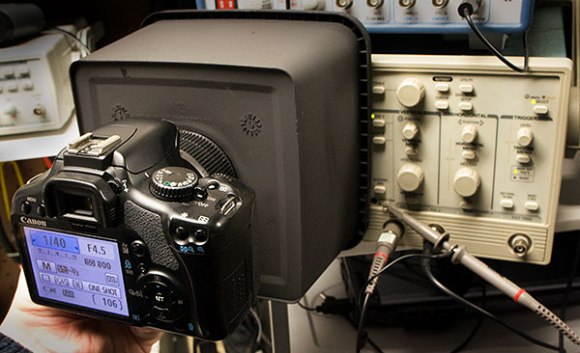
Bench Equipment Tip: Screenshot Of Old Oscilloscopes

oscillocam-oscilloscope-camera-accessory

Here’s a quick tip on capturing the output of oscilloscopes that don’t have that native feature. [Paulo Renato] used a cookie tin as a camera cowl for capturing CRT oscilloscope screenshots.

We figure if you’ve got any kind of functioning oscilloscope you’re lucky. And although it’s nice to pull down the measurements to your PC on the newer models, the results [Paul] gets with this rig are still satisfactory. The plastic cookie box he used blocks out ambient light while holding the camera at a consistent focal length. He used some flat black spray paint to make sure the obnoxious yellow plastic didn’t interfere with the image, then drilled a hole which fits tightly around his camera lens.

You’ll need to monkey with the exposure settings to get the best image. But once you’ve got it dialed in it should be the same every time you want to take a picture of the screen.

Raspberry Pi Camera Built As Part Of Advertising Campaign

the-rpi-camera

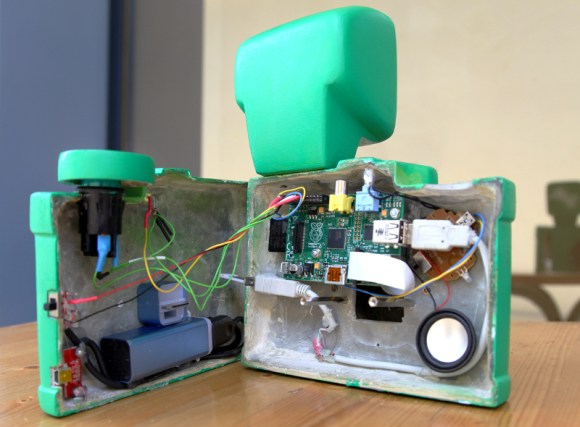
Here’s yet another example of well targeted advertising. This camera built around a Raspberry Pi is a giveaway from Sprite. The “lucky” winner of the camera will have the pleasure of seeing the Sprite logo as a watermark on all of the images they snap with it. But in the right hands it’s a simple hack to remove that “feature” (they published the Python script that adds the watermark) or to just scrap the parts for another project. Either way, Sprite got us to say their name three times in this paragraph so the campaign worked.

The most obvious part of this build is the custom cast resin case that they came up with which is a gaudy cartoon-like monstrosity. It protects the case-less Raspberry Pi board, and mounts the Pi Camera board so that the lens is positioned correctly. The lipstick-sized module mounted in the lower back half of the case is a 2400 mAh portable power supply with a USB charging port sticking out the side. This makes us wonder, do you have to wait for the RPi to power up before snapping a picture? If the size and color didn’t get you noticed by everyone the shutter sound will. it shouts the name of the soda company whenever you press the shutter release button.

If you’re more of a high-end photography enthusiast this DSLR wedded with an RPi will be of more interest.

Ghostly Images Captured Only On Camera

is that a logo

A while back our good buddy [Ch00f] built a QR code clock, unreadable to both humans and computers. A human couldn’t read the clock because of the digital nature of a QR code, and because the clock used persistence of vision in driving the LEDs, a digital camera can’t capture all the pixels in the QR code at the same time. It’s a highly useless but impressive art piece. Now, [Ch00f] is turning that build on its head. He created a rudimentary display that is invisible to the human eye, but easily detected with a digital camera.

This build exploits a basic property of CMOS digital cameras – the rolling shutter. Because it takes time to get pixels off a modern digital image sensor, each picture is actual a composite of many different strips, each taken slightly out of sequence. You can see this for yourself by taking a picture of something rotating very fast with your camera phone; a picture of an airplane propeller will make the blades appear curved, or look like [Dr. Seuss] has an aeronautical engineering degree.

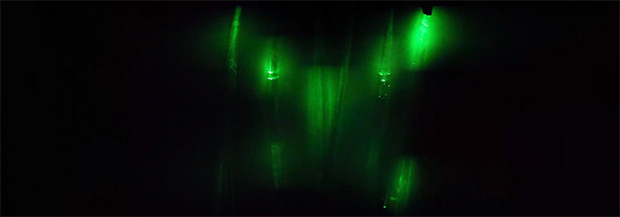
To create his display, [Ch00f] found a few inexpensive fiber optic lights. By aligning a few of these into columns and lighting them up in a precise sequence, he can exploit the rolling shutter and make an image appear. To the human eye, it looks like a solid wall of illuminated fiber optics.

As for how practical this build is, [Ch00f] says not much. For cell phone cameras, you’d need to have a very, very short exposure time for this to work. The only way to do that is to make this display unbelievably bright, or just put it out in the sun. We can’t see that being practical for any potential use case, but we’d be more than happy to see a large-scale attempt at displaying images with this technique.

Showing Off A High-performance Brushless Motor Camera Gimbal

gopro-brushless-motor-gimbal

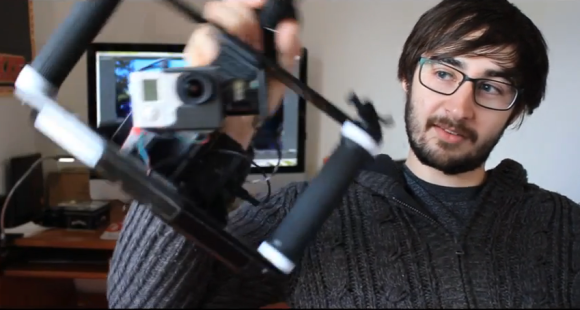
Here’s [Tom Parker] showing off a brushless motor gimbal stabilizer for his GoPro camera. We saw a similar project a couple of weeks back that featured a 3d printed quadcopter mount. This offering is meant to be held in your hands. It keeps the subject in frame even if the cameraman’s hands pitch and roll (we figured aeronautical terms were best here). This image shows him demonstrating a level camera as he quickly rolls the frame from one side to the other. It doesn’t compensate for yaw, which is something he may change in the next iteration. We already like the results he’s getting with it.

About 3:15 into the video demo below we get a very quick description of the build itself. He started it as a project at University. Fabrication included work on a 3D printer, laser cutter, and vacuum forming machine. The grips are bicycle handlebar components. To overcome the stabilization system the operator has access to a joystick. Without this you’d never be able to aim the camera up or down because of auto-leveling.

Continue reading “Showing Off A High-performance Brushless Motor Camera Gimbal” →

Nikkor Optical Glass

Glass work is always a feast for the eyes, especially when it is hot glass. Watch as a Nikkor lens is made from beginning to end. It is wonderful to see the care taken to search by eye for defects, refraction issues, clarity etc. It may just be for the video, but it seems that the workers truly do take pride in their product.

What I found somewhat surprising was the amount of work that went into refining the glass BEFORE it was even put into a lens mold. I would have assumed that much of the work would have come after.

Submersible Camera Snaps Pics Of Ocean Going Predators

RPi-submersible-camera-rig
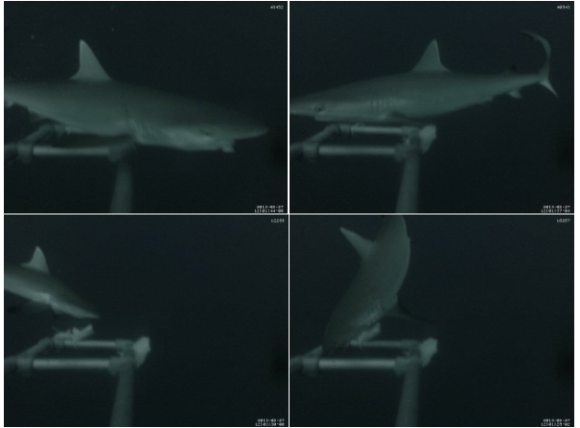
This camera rig uses a Raspberry Pi to send a camera down fifty meters (mirror on RPi blog) in order to spy on sharks. We got really excited at first thinking that it might be using the camera module from the Raspberry Pi Foundation but that isn’t the case. Do keep reading though, there’s a lot of cool stuff involved in this one.

The project used a collection of camera units spread over a large area to monitor shark activity. Each is mounted on an anchored buoy, using solar panels and a lead acid gel battery for power. The RPi itself remains topside in a waterproof box. It connects to the camera using a 50-foot Ethernet patch cable.

We figure the challenge of building the hardware parallels that of designing an underwater ROV. The camera needs an enclosure that can stand up to the pressure at that depth while allowing the cable to pass through it. There is also an interesting note in the project log about getting the camera exposure settings to behave.