Solar-powered CNC Woodburning

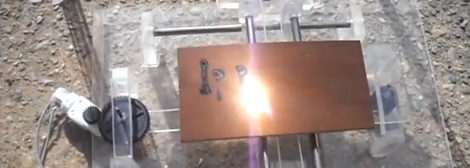
[Johnie] built himself a CNC woodburner powered by the sun. Like the solar 3D printer we saw last summer, [Johnie]’s build uses a giant Fresnel lens to focus sunlight onto a piece of wood. To get some control out of his build, a 2-axis bed was made from scrounged and junked parts.

The lens in [Johnie]’s build looks to be about a foot square – more than hot enough to burn a few holes in things from our experience. The bed (hopefully) gets around this problem by being built entirely out of clear acrylic. The idea behind the acrylic bed is that the focused light will pass through harmlessly, and not melt the entire thing.

Now that we think about it, we couldn’t come up with a better project to enter in the Buildlounge laser cutter contest. For everybody else working on their laser cutter projects, the deadline is January 1st. Better get those wrenches out and irons hot, because we’ve seen a few awesome projects for the Buildlounge build off already.

Repairing A Commercial-grade Pick And Place Machine

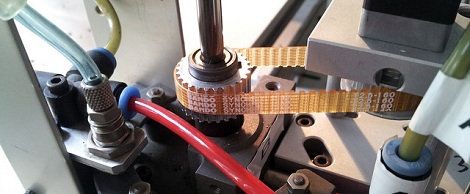
It looks like Null Space Labs has a new pick and place machine. This immense repair job began when [Charliex] and [Gleep] found a JukiPlacemat 360 pick and place machine. The idea of having their very own pick and place machine proved intoxicating, possibly too much so because the didn’t return the machine when they found out it wasn’t working.

After a ton of work that involved adding a camera, [Charliex] and the rest of the builders at Null Space Labs finally have their own pick and place machine that works. This was a complete rebuild from the ground up. So many things didn’t work on the machine, they might have been better off building one from scratch. Aside from the massive effort that went into turning the shell of a machine into a working unit, we really have to commend everyone who worked on it.

The team added a nice GUI to control the machine. The guys have already run a successful test and ovened a few boards, so everything works as it should have at purchase. It’ll be great for making next year’s LayerOne conference badges.

MAMEing A CNC Router

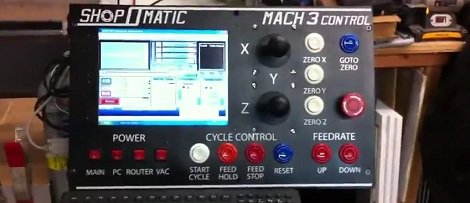
[Ed] is pretty old school. He loves the functionality of old industrial shop tools that have their own dedicated systems. With huge candy-like buttons, who wouldn’t? [Ed] decided to replicate this aesthetic by building a MAME controller for his Mach3 controlled router.

[Ed] had a bunch of MAME buttons and joysticks sitting around from a forgotten project. With his vinyl plotter, it was relatively easy to make a very nice looking control panel. To connect the buttons to the Mach3 computer, a disused I-Pac was brought into the mix. The I-Pac reads the state of the buttons and sends keyboard codes over USB to the computer.

Because the very popular Mach3 CNC software responds to hotkeys, it was very simple to make the buttons do as they say. [Ed] has full control over the X, Y, and Z axes as well as the spindle speed. It seems like this would be interesting to do some ‘free form’ CNC work on [Ed]’s router.

Continue reading “MAMEing A CNC Router”

Motorized Camera Mount Unexpectedly Popular For CNC-aimed Hardware

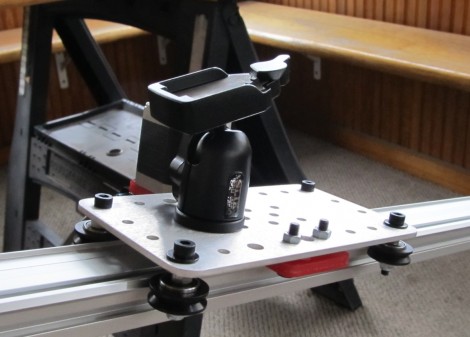
Here’s a camera mount that moves smoothly along a motorized sled. [Bart Dring] created the system and was surprised by it’s popularity, having received several sales requests from photographers. He originally designed the linear bearing system, called the MakerSlide as an inexpensive alternative to other CNC machine solutions. Allowing a computer to map out timed movements for video shots wasn’t on his radar then, but as you can see in the clip after the break, the MakerSlide does an amazing job at it.

The modular track system makes it easy to attach to a base. In this case, a couple of pieces of acrylic let him support both ends of the track on standard camera tripods. [Bart] mentions the knowledge gap between people who work with CNC milling hardware and photographers as an issue in deciding how to control the system. Since photographers aren’t likely to be proficient in EMC2, he designed a control application with an Arduino. It uses a stepper motor controller shield, and does some fancy math to make sure there is smooth acceleration, etc.

Continue reading “Motorized Camera Mount Unexpectedly Popular For CNC-aimed Hardware”

Lighted Acrylic Christmas Ornaments

If you’ve gone to the trouble of building your own CNC mill we know you’re always on the lookout for things to use it for. [Boris Landoni] wrote in with just the thing for the holiday season; a set of lighted acrylic Christmas ornaments.

One of the interesting properties of acrylic is how it reacts when edge-lit. The material pipes the light, until it bounces off of a disturbance in the surface. The first step is to design the outline of the ornament as all cut edges will glow. Next, [Boris] uses artCAM to design the internal parts to be cut. This application translates the relief cuts necessary to really make your design shine (sorry, we couldn’t resist). The best examples of this are the angel and candle seen above.

Each of these acrylic pieces has a slot cut on the bottom to hug an LED. [Boris] used small project boxes with a PCB for that diode, as well as a button battery for power.

A Solar Clock That Isn’t A Sundial

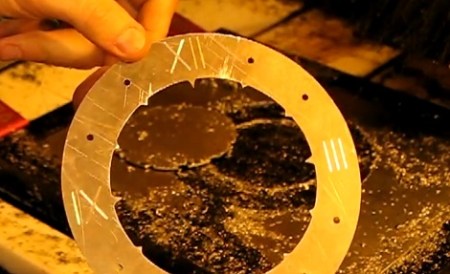
Hack a Day’s very own [Jack Buffington] is throwing his hat into the ring for the Buildlounge laser cutter giveaway with his solar clock that isn’t a sundial.

The theory behind [Jack]’s clock is pretty simple. The light from the sun will be captured by a camera obscura/pinhole camera. The sun’s rays shine on dozens of optical fibers that lead indoors and up to the clock. These glass fibers go to pinholes in the face of the clock which light up, showing the time.

[Jack] already cut out the face of the clock on his (awesome) home-made CNC router. He hasn’t gotten around to cutting out the mechanics of the clock face so the clock can be adjusted throughout the year. We’re okay with that, because we’re really not ready to see [Jack] fiddle with his gnomon. At least before [Jack] gets his hand on the Buildlounge laser.

The next major hurdle of the build is the solar collector that collects light into different optical fibers. That’s going to involve a lot of math using the equatorial coordinate system. Help is available, though.

Check out [Jack] cutting the clock face on his router after the break.

Continue reading “A Solar Clock That Isn’t A Sundial”

Extreme Finger Painting With A Router

Most of the time, CNC machines are used for very precise and exacting. There is another way that allows for a more “hands on” approach to routers and mills that allows for a lot more creativity and freedom. The touchCNC these guys whipped up allows anyone to finger paint with a friggin router.

From the forum post the guys sent in, they wrote a simple Android app for a tablet that allows for router control via a touch interface. There are three parts to the software. An Android app sends finger positions to a java server running on the CNC computer. This server dumps gcode into a text file. A vbscript inside the router software keeps reading from the specified file. With all this, finger movements are translated directly into machine movements.

The controls are fairly simple, like a real-life representation of Microsoft Paint. Of course there’s a ‘tap GOTO’ command that moves the router to a specified position. The router bit is lowered onto the work piece with a ‘long tap’ and stays lowered until the finger is released.

You can check out the code for touchCNC, but the guys are working on a few additional features like converting the tablets gyro output to gcode. Until then, enjoy the videos the guys posted after the break.

Continue reading “Extreme Finger Painting With A Router”