Linux Fu: Upcycling An Old Router

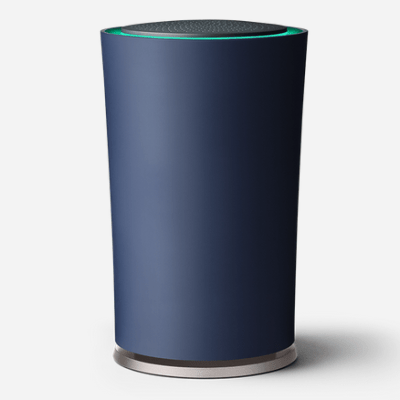
You’re wandering through a thrift store and spot an old router for ten bucks. Worthless, right? But in this case, it was a Google OnHub, which, at the time, was pretty premium and still isn’t anything to sneeze at. Of course, Google abandoned it long ago, and it runs Chrome, so pass, right? Of course I didn’t. In fact, I bought two for less than $20. The question is always the same: what do you do with it?

OpenWrt will run on the device. That’s a good start, but merely replacing the firmware isn’t much of a project. The more interesting question is whether the hardware can still do something useful. I had a specific need: connect a wired workstation to a reasonably distant WiFi network without running cable and without suffering the usual double-NAT headaches that come from turning the router into yet another subnet. For this, the OnHub turned out to be nearly perfect.

The Hardware

The OnHub was Google’s first Wi-Fi router, built by TP-Link and ASUS in different versions. Mine was the TP-Link model, and one was missing a bit of plastic cowl trim. Under the hood, it has a Qualcomm IPQ8064 dual-core processor — a dual-core ARMv7 — multiple radios, gigabit Ethernet, and enough memory to run OpenWrt comfortably: 1 GB of RAM and 4 GB of flash. The processor also has two network offload processors, but it isn’t clear to me that the stock OpenWrt build uses them.

These devices were expensive when new, but now show up regularly at thrift stores and surplus sales. Installing OpenWrt was straightforward. You do need to remove a screw that covers the magic switch at the bottom, but that’s not a big problem. You can just peel the rubber foot back if you don’t want to remove it. However, the interesting part came afterward.


Continue reading “Linux Fu: Upcycling An Old Router”

Google OnHub Can Has Root

It’s always nice to get down to the root directory of a device, especially if the device in question is one that you own. It’s no huge surprise that a Google product allows access to the root directory but the OnHub requires locating the hidden “developer mode” switch which [Maximus64] has done. The Google engineers have been sneaky with this button, locating it at the bottom of a threaded screw hole. Has anyone seen this implemented on other hardware before?

There isn’t a blog post regarding this, however [Maximus64] shared a video on YouTube walking us through the steps to root and un-root Google’s OnHub, which is embedded after the break. He also states “wiki coming soon” in the description of the video, so we’ll keep eye on it for an update.

We covered the product announcement back in August and have heard a few reviews/opinions about the device but not enough to make an opinionated assumption. Rooting the device doesn’t seem to increase the OnHub’s number of LAN ports but we think it’s still worth the effort.

Continue reading “Google OnHub Can Has Root”

Google’s OnHub Goes Toe To Toe With Amazon Echo

Yesterday Google announced preorders for a new device called OnHub. Their marketing, and most of the coverage I’ve seen so far, touts OnHub as a better WiFi router than you are used to including improved signal, ease of setup, and a better system to get your friends onto your AP (using the ultrasonic communication technique we’ve also seen on the Amazon Dash buttons). Why would Google care about this? I don’t think they do, at least not enough to develop and manufacture a $199.99 cylindrical monolith. Nope, this is all about the Internet of Things, as much as it pains me to use the term.

google-onhub-iot-router-thumbOnHub boasts an array of “smart antennas” connected to its various radios. It has the 2.4 and 5 Gigahertz WiFi bands in all the flavors you would expect. The specs also show an AUX Wireless for 802.11 whose purpose is not entirely clear to me but may be the network congestion sensing built into the system (leave a comment if you think otherwise). Rounding out the communications array is support for ZigBee and Bluetooth 4.0.



I have long looked at Google’s acquisition of Nest and assumed that at some point Nest would become the Router for your Internet of Things, collecting data from your exercise equipment and bathroom scale which would then be sold to your health insurance provider so they may adjust your rates. I know, that’s a juicy piece of Orwellian hyperbole but it gets the point across rather quickly. The OnHub is a much more eloquent attempt at the same thing. Some people were turned off by the Nest because it “watches” you to learn your heating preferences. The same issue has arisen with the Amazon Echo which is “always listening”.

Google has foregone those built-in futuristic features and chosen a device to which almost  everyone has already grown accustom: the WiFi router. They promise better WiFi and I’m sure it will deliver. What’s the average age of a home WiFi AP at this point anyway? Any new hardware would be an improvement. Oh, and when you start buying those smart bulbs, fridges, bathroom scales, egg trays, and whatever else it’ll work for them as well.

As far as hacking and home automation, it’s hard to beat the voice-activated commands we’ve seen with Echo lately, like forcing it to control Nest or operate your Roku. Who wants to bet that we’ll see a Google-Now based IoT standalone device quickly following the shipment of OnHub?

Continue reading “Google’s OnHub Goes Toe To Toe With Amazon Echo”