Modding An Inkjet For PCB Production

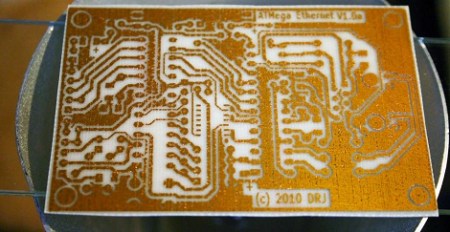
Like all of us, [Ryan] is tired of waiting for board production houses. To reduce some of that turnaround time, he modded an Epson inkjet into a PCB printer. The Instructable of his build is extremely thorough and it looks like he’s getting some quality boards out of his project

The build started off by disassembling an Epson C86 printer he had lying around the house. Going with an Epson printer is important – Epsons have a piezo print head accepts ink that would clog other printers. After tearing all the plastic off his printer, [Ryan] set to work raising the printer (or lowering the bed, whatever) and was off to the races.

The cartridges were filled with etch-resistant yellow ink and a piece of copper clad put onto the printer. After printing, [Ryan] etched his board in ferric chloride. Sadly, he’s getting small pinholes in his traces where a bit of the ink was eaten during etching. He’s tried HCl and Peroxide, but those turn his boards into green junk.

If you’ve got any tips to help [Ryan] out, leave them in the comments. Before that, check out the printing demo [Ryan] put up.
Continue reading “Modding An Inkjet For PCB Production”

PCB Drill From R/C Car Parts

[Sid] makes a few PCBs a month and the hardest part of his fabrication process is always drilling the through-holes. He has a PCB hand drill that usually results in a sore index finger. After a few unsuccessful attempts of using a full-size electric drill and not wanting to invest in a commercial solution, [Sid] made a PCB drill from a broken R/C car.

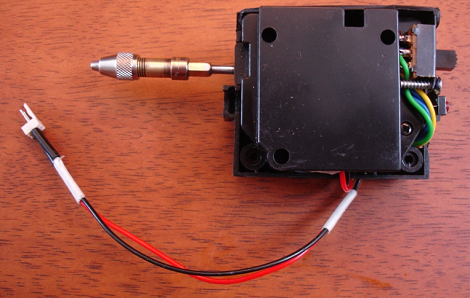
The toy car was donated by [Sid]’s 4-year-old after a terrible crash. [Sid] took the gearbox from the car and added a small circuit to control the direction of the drill. After attaching the drill chuck to the former R/C car axle and adding the power leads to a 5 Volt adapter, a PCB drill press was born.

Most of the parts for this build were salvaged from the toy car’s radio control circuit. Except for the chuck from [Sid]’s hand drill and a few switches, everything on this build was pulled from a broken remote control car. While the build is a lot simpler than this semi-automatic PCB drill, [Sid]’s drill seems to work well. Check out the demo video after the break.

Continue reading “PCB Drill From R/C Car Parts”

Laser Etched PCB Production

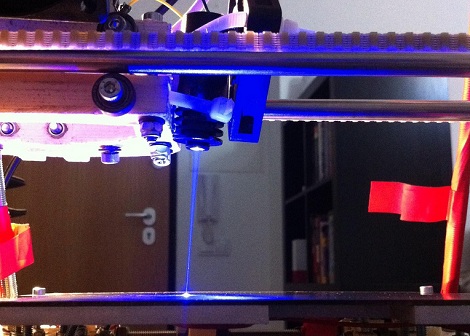
Like most of us, [reonarudo] isn’t satisfied with the current methods of homebrew PCBs, so he put a laser on a reprap and started burning some boards.

The basic procedure is to cover a copper clad board with matte black spray paint. A laser was installed on the X carriage of the reprap. [reonarudo] used cad.py to convert the board files into g-code and fired up his laser. The quality of the boards is highly dependent on the accuracy of the laser so after working through some mechanical problems [reonarudo] managed to make some passable boards.

We’ve seen just about every manufacturing method imaginable applied to PCB production. Etch resist and toner transfer do the job and a reprap milling machine is pretty neat, but lasers are so much cooler. While it may not be perfect (yet), printing PCBs with a laser shows a lot of potential. Check out a video of [reonarudo]’s bot burning some copper after the break.

Continue reading “Laser Etched PCB Production”

This Marriage Proposal Is The Best PCB Design Ever

best_pcb_design_ever

While you will often see hacks on this site that feature high voltage, fire, and metal, that doesn’t mean that hackers, makers, and electronics geeks don’t have a soft side. In fact, we find the opposite to be true the vast majority of the time.

Take for instance [Bill Porter].

You may have seen his projects and tutorials featured here a time or two, and though I have never met him, he seems like a great guy whose heart is in the right place.

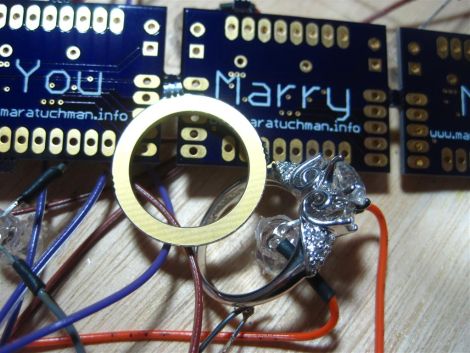
He recently decided that his college sweetheart was “the one” and had to think of a clever and surprising way to pop the question to a girl who is always one step ahead of the curve. [Mara (soon to be) Porter] was working on a project that required a custom PCB, and having never ordered one before, [Bill] was happy to help her get things in order. After sending the schematics off to [Laen] at DorkbotPDX, [Bill] fired off another email asking to have his proposal silk screened on the boards. [Laen] said he was happy to help, and so the wait began.

The boards arrived a few weeks later, and the rest, they say, was history.

How did it go? We’re guessing you’ve figured it out by now, but be sure to swing by [Bill’s] site to see how it all went down.

You know you want to…you big softie!

One-man SMD Assembly Line Shares A Lot Of Tips About Doing It Right

Need to use that antiquated hardware that can only be connected via a parallel port? It might take you some time to find a computer that still has one of those, or you could try out this USB to Parallel port converter. It’s not limited to working with printers, as the driver builds a virtual parallel port that you should be able to use for any purpose. But what we’re really interested in here isn’t the converter itself, but the build process. [Henrik Haftmann] posted a three-part series of videos on the assembly process, which you can watch after the break.

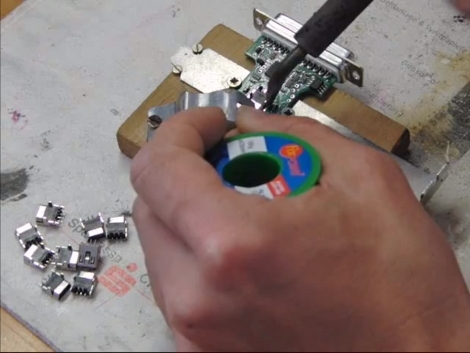
The build is mostly surface mount soldering with just a handful of components that need to be hand soldered. The first of his videos shows him stenciling solder paste onto the boards. From what we can see it looks like he built a nice jig for this using scrap pieces of copper-clad which match the thickness of the PCB, and hold it and the stencil securely in place. There’s a bunch of other tips you can glean from the videos, like the image seen above. It’s a clamp that holds the PCB and USB jack together while they are soldered.

If you’re ever thinking of assembling a bunch of boards you should set aside thirty minutes to watch them all.

Continue reading “One-man SMD Assembly Line Shares A Lot Of Tips About Doing It Right”

A Stackable Motor Driver Shield For The Arduino

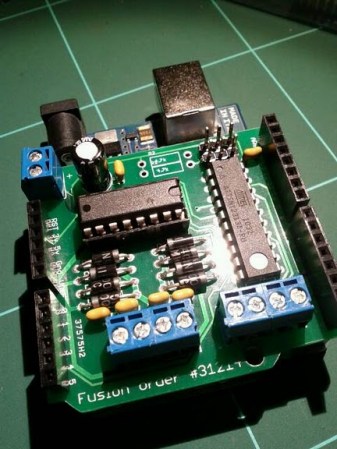
The Arduino has been used for many purposes, and  “shields” are available to make many common tasks easier.  However, [Nick] wanted a stackable motor driver shield, so he build one himself!. There are many motor driver shields available for the Arduino, however, there aren’t any that allow one to drive as many motors as were needed for his project, and none that were stackable.

[Nick] had no experience designing and fabricating a custom board, but decided to try his hand at it anyway. Armed with a free version of [Eagle] PCB design software, he designed the board that he needed then sent it to [Seeed] to be manufactured. According to his article, a quantity of 10 Arduino-sized boards can be purchased for the price of $25. At that price point, some hobbyists may want to consider this option rather than manually creating their own circuit.

According to [Nick], he was able to manufacture his first board with no errors on his first run! Not bad for his first try at something like this.

DIY PCB Exposure Box Looks Professionally Made

diy_double_sided_exposure_box

[Stynus] was frustrated with the fact that he would have to flip his PCBs over mid way through the exposure process, so he decided the best course of action would be to build his own double-sided PCB exposure box.

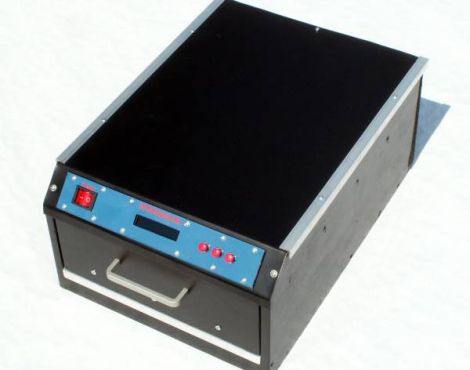
He scored some UV LEDs on eBay, and after waiting a few weeks for PCBs to arrive, he was ready to start construction. The box contains a sliding glass shelf, which is positioned between two sets of LED panels. The setup lets him simultaneously etch both sides of any PCB, up to 20cm x 30cm in size. The exposure box is run by a PIC 16F628P and features an LCD status panel as well as a small handful of controls. [Stynus] programmed the box to retain the length of the last exposure, making it easy to replicate his results time after time.

Towards the end of the build log he shows off some pictures of the completed exposure box, which looks very professionally done. It’s a great job all around, and we would gladly take one for our workshop in a heartbeat.