Adding MIDI To A Very Old Drum Machine

Long before drum machines played samples from an SD card or EPROM, drum sounds were analog – just filtered waveforms and noise. To the modern eye, these are very primitive machines, but for [Andrew], they’re the inspiration for this brilliant hack.

[Andrew] took a Roland CR-68 drum machine from 1978 and added MIDI input with the help of a PIC microcontroller. Not wanting to modify the look of the machine, [Andrew] programmed the PIC to watch the START/STOP button when the the unit is powered on. If the button is held down, the PIC enters it’s programming mode, where the sounds from the CR-68 can be mapped to an individual note on a MIDI controller. There’s no mention if the TRIGGER IN is queried by the PIC to modify the tempo of the preset patterns, but we assume that would be a relatively trivial implementation. Still, very impressive for a machine made 4 years before MIDI.

We love [Andrew]’s work, and we’re happy for any future owner that he documented how to use his device (and cleverly taped that to the bottom of the drum machine). It’s very nice to see old drum machines being used for more than doorstops after their samples have been recorded. Check out the video of [Andrew]’s walk through after the break.
Continue reading “Adding MIDI To A Very Old Drum Machine”

Improve Charlieplexing Performance With Interrupts

single_chip_led_matrix

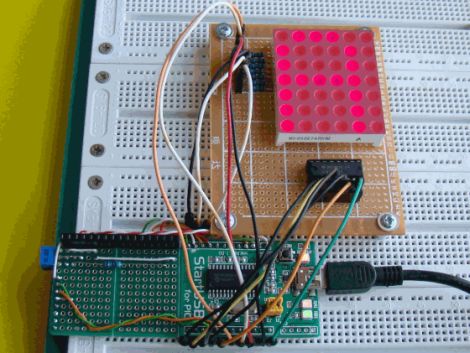
[Dmitry] was shopping for LEDs and accidentally pulled the trigger on the wrong type. Since he didn’t want to be wasteful, he figured he should at least take the time to build something with them.

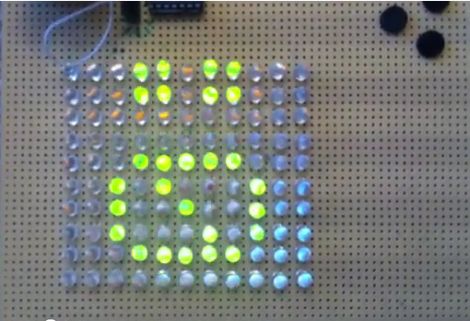
A LED matrix display was the obvious project choice, but he only had a PIC16F688 at his disposal. Since the micro controller only has 11 output pins, charlieplexing was the only way he would be able to light the entire matrix.

While testing his LED array, he found charlieplexing to be a bit disappointing. The fact that the LEDs can get relatively dim, depending on the number of units lit at any particular time struck him as annoying.

In order to improve the performance of his charlieplexed array, he first decided to scan through all of the LEDs rather than just those that needed to be lit. This ensured that all of his LEDs had the same 1/110 duty cycle and were always as bright as possible. He also chose to use interrupts when lighting the LEDs. This meant that his code does not need to take into consideration any specific timing requirements to maintain persistence of vision. He also double-buffers the display to help reduce flicker.

He says that he ran into certain constraints with the PIC chip he chose, so he used a handful of lookup tables to ensure smooth operation of his display. He was quite satisfied with the results, and we think that the interrupt-driven display looks like it works just fine from where we’re standing as well.

Be sure to stick around for a quick video explaining and demonstrating his single-chip LED matrix.

Continue reading “Improve Charlieplexing Performance With Interrupts”

A Beginner’s Guide To LED Matrices

led_tutorial

[Rajendra Bhatt] wrote in to share a tutorial he put together demonstrating the basics of using LED dot matrix displays. While this subject might be old hat to many out there, his helpful walkthroughs are geared more towards beginners who are exploring various electronics concepts for the first time.

He explains the theory behind LED displays using a PIC-driven 5×7 matrix as an example. He discusses persistence of vision and how tricking the human eye can save you quite a bit of time and a whole lot of pins. Multiplexing is broken down into its most basic steps, which [Rajendra] illustrates by showing how a letter would be drawn on the LED display one column at a time. The use of a ULN2803A Darlington Array is also discussed, and he details why it is used when pulling the five columns of LEDs to ground.

The only portion of the tutorial we thought could be expanded upon was the programming section. While he does show how each letter of the alphabet can be displayed via a series of five hex values, he does not cover the “why” part of the process. Obviously while anyone familiar with binary and hex can figure it out in pretty short order, we think that it would be a great place to pause and expand the readers’ knowledge even more.

Overall it’s a useful tutorial, and most beginners would likely find it quite helpful.

Single-chip Digital Audio Player

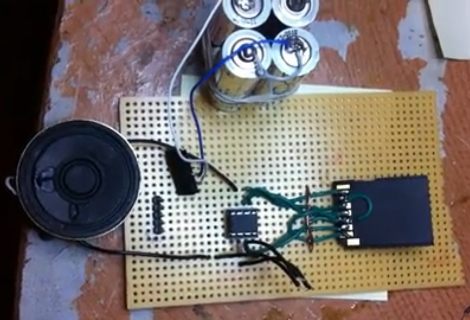
[Dmitry Gr.] built a simple circuit to playback digital audio. At the center you can see an 8-pin PIC 12F1840 microcontroller. It’s pulling audio data from a microSD card which is read through a full-sized SD card adapter to which he soldered jumper wires for all of the necessary connections. There is one additional semiconductor, a FET which is used to drive the speaker seen to the left. Unregulated power is provided by a pair of AA batteries (four are seen in the picture above but only two are actually connected to the circuit). He’s planning to post his code package soon, but for now you’ll have to be satisfied with a couple of demo videos and a schematic. Both videos are embedded after the break, and we’ve also included a screenshot of the schematic which is shown in the second video.

This is very similar to the 1-Bit Symphony CD we saw almost a year ago in a links post. That one used a jewel case instead of the protoboard seen here, and had a headphone jack instead of the speaker.

Continue reading “Single-chip Digital Audio Player”

Build A Spinning POV In A Day

We love spinning POV displays but have yet to build one to call our very own. This project might be the one that we end up building. It’s looks good and it’s the only persistence of vision display that comes to mind which can be built in twelve hours.

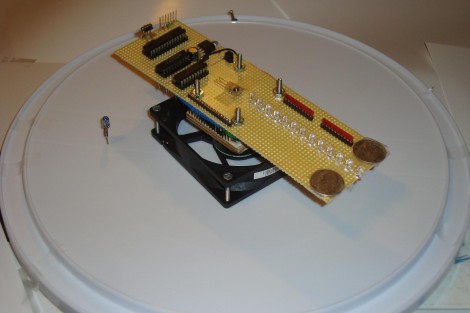
The spinning is taken care of by a PC fan. This actually helps with some of the calculations as this fan spins at a know RPM. That information, along with a bit of geometry, can be used to calculate the timer interrupts for syncing the display. A reference point for this device is provided by an IR receiver/emitter pair which is easy to wire up since you already need a voltage source for the fan itself. The rest of the hardware is pretty common: a battery holder is centered on the axis for proper weight distribution and protoboard houses the components such as a PIC 18F252, 74LS373 data latches, and the LEDs themselves. The circuit is wire-wrapped, and works like a charm as evidenced in the clip after the break.

Continue reading “Build A Spinning POV In A Day”

Laser Tripwire Alarm System Uses Mirrors To Increase Coverage

laser_tripwire_alarm

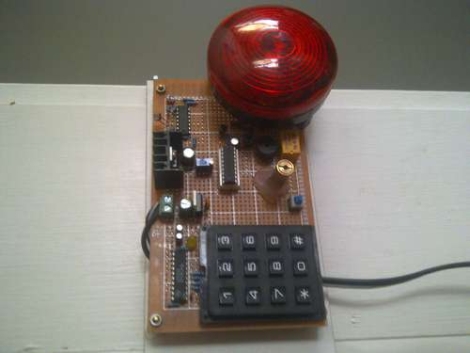
Instructables user [EngineeringShock] has been hard at work building a laser trip wire security system, complete with a combination lock. The security system works just like you see in the movies, employing an array of mirrors to bounce the laser across an opening several times in order to secure the space.

A PIC18F1220 micro controller sits at the center of the alarm and handles the majority of its functions. It takes input from the laser detection circuit, triggers the buzzer, as well as arms and disarms the entire alarm system. An LS7222 digital lock handles the passcode verification side of things, taking input from a 16-button matrix keypad, and telling the PIC when the proper code has been entered.

As you can see in the video below, the alarm system works and the buzzer is quite loud. There is one small problem however – the alarm only arms itself after the proper code has been entered and the lights have been turned off. The light sensing circuit he uses is too sensitive and can only operate in darkness, though he discusses the ability to add a more accurate sensing solution.

If you are interested in reading more about laser tripwire security systems, check out this similar passcode-based system, this alarm system built into a toy, and this Arduino-based alarm system.

Continue reading “Laser Tripwire Alarm System Uses Mirrors To Increase Coverage”

HsNet: Node Communications For Feature-limited Microcontrollers

[Diego Spinola] wrote in to tell us about a node communication system he’s been working on called HsNet. The aim is to build a system of nodes that can be made up of small and inexpensive microcontrollers. The problem is that the least expensive controllers often don’t have a hardware UART. HsNet implements the RS485 protocol using a software UART along with a slim and sleek addressing scheme.

The first module developed, seen in the image above and video after the break, is a single channel pulse-width-modulation node using a PIC 12F683. It can be sent commands in the payload of the HsNet packet format. The PWM modules accept three different commands; one is a desired PWM value, another is a delay between steps for the PWM, and the last toggles a blink function.

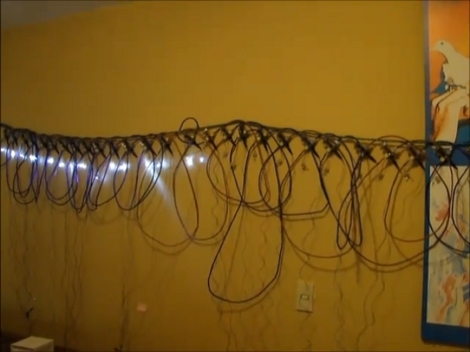
He has also developed an analog sensor module and an Arduino-based TCP/IC gateway module. Now that the packet communications have been established, it will be rather simple to add nodes based on that groundwork. [Diego] brought these components together to build an interactive wall which can also be seen after the break.

Continue reading “HsNet: Node Communications For Feature-limited Microcontrollers”