PIC Spectrum Analyzer Uses Fast Fourier Transform Routine

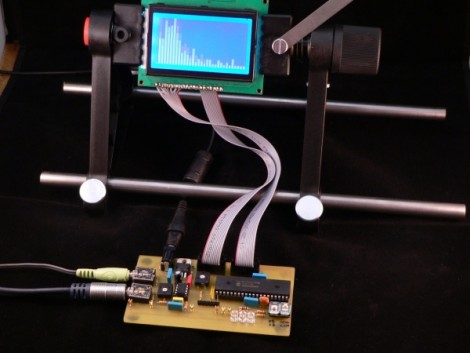
[Simon Inns] just rolled out his latest project, a PIC based spectrum analyzer. He’s using a Fast Fourier Transform routine crafted in C to run as efficiently as possible on the 8-bit chip. The video after the break shows that the results are quite pleasing, with just a bit of noticeable lag between the sound and the waveform representation on the graphic LCD. We found his notes about using an audio amplifier chip to be interesting. He utilizes the properties of an LM386 to move the input signals from a range of -0.5V to +0.5V into a very ADC friendly range of 0-5V.

Continue reading “PIC Spectrum Analyzer Uses Fast Fourier Transform Routine”
Driving An 8-digit Split Flap Display

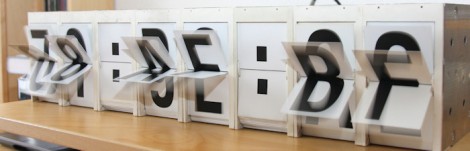
[Markus] got his hands on a split-flap display and built a controller for it. These sometimes can be found on really old alarm clocks, but [Markus] was a lucky-duck and managed to acquire this large 8-digit display which previously made its home in a railroad station. They work like a Rolodex, mounting flaps around a cylinder for a full alpha-numeric font set.

A PIC 12F683 was selected to control the display, using optoisolation to separate the 42V display motors from the driver circuit. From the video after the break we think he did a wonderful job of getting this working. It only takes six I/O pins to control and the sound and look of the digits scrolling leaves us quite jealous.

So what’s he got in store for it? The first thing he did was use it to count down to the New Year.

Continue reading “Driving An 8-digit Split Flap Display”

Bi-color LED Matrix Clock Uses Point-to-point Construction

[Daniel] wanted his child to stay in bed until a semi-decent time each morning. The problem is the kid doesn’t know how to read a clock, so [Daniel] built him a clock. Yeah, doesn’t make much sense to us either, but we’ve used our own shaky premises for projects so who are we do judge?

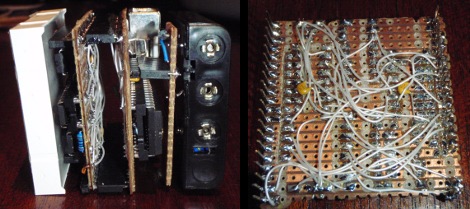
He used a bi-color 8×8 LED matrix as the clock display. What caught our eye is the point-to-point soldering he used for the three strip boards that make up the device. Note the use of a drill-bit to break the traces when needed. Each board has its own purpose; the matrix drive, the logic board, and the power board. A PIC 18F4550 lets [Daniel] control the clock via USB, and takes care of lighting up the hour as a red number when it’s time to sleep, and a green one when it’s okay to arise. There’s a flashing pixel for seconds, and a binary readout of minutes along the bottom.

We’ve asked [Daniel] to post a schematic and an image of the clock face when displaying the time. No word yet but we’ll keep our eye on it. In the mean-time, check out this clock that uses an RGB 8×8 LED matrix.

Adding Auto-fire To A Computer Mouse

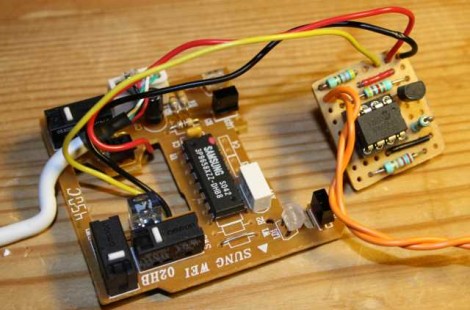
[Peter Skaarup’s] been re-living the past by playing old-school games in DOSBox. He’s using a mouse as the controller but longed for the auto-fire button that many joysticks used to have. Instead of looking around for a gamepad with this feature he decided to add an auto-fire button to the mouse. He incorporated a PIC 10F200, along with a momentary push switch and a transistor. The push switch enables the autofire feature, causing the transistor to short the left mouse button about seventeen times a second. Problem solved, and with a couple of other pins on the microcontroller there’s room for this project to grow.

Interested in an auto-fire feature for your gaming console? Perhaps this Xbox 360 rapid fire mod will give you some inspiration.

MP3 Player Barely Larger Than An SD Card

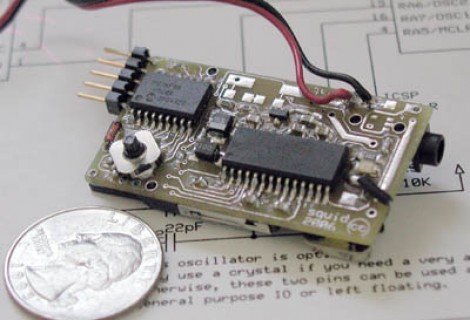
If your board fabrication and soldering skills are up to it, you can make your own tiny MP3 player. This rendition is just about half again as large as a standard SD card, whose slot is on the bottom of the board seen above. The heavy lifting is taken care of by a VS1011 MP3 decoder which also has its own stereo headphone driver on-chip. There’s no display and it seems that most of the 4k of program memory on the PIC 18LF88 is being used. Too bad, we’d love to take this to the next level, attaching it to the head unit in a car and spoofing the communications as if this were a CD changer.

[via Hacked Gadgets]

Bluetooth Temperature Module

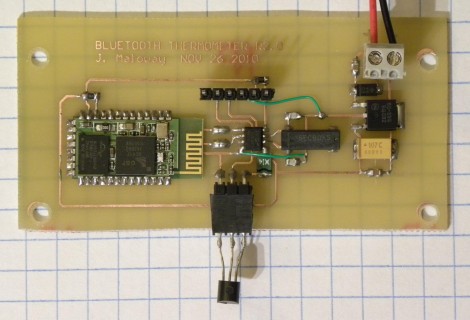
Wanting to know the outside temperature, [Jamie Maloway] built his own temperature sensor that can be read with a Bluetooth device. Let’s take a tour of the hardware above from right to left. There’s a linear voltage regulator with two filtering caps and a terminal block to attach a 9V battery or other power source. Next there’s an 8 MHz crystal and it’s capacitors, followed by a programming header on top and a 1-wire temperature IC, the DS18B20 we’re all familiar with hanging off the bottom. These both connect to the 8-pin PIC 12F675 that drives the system, and transmits using a Bluetooth module from Sure Electronics. Since this is using a serial protocol and transmitting ASCII data, it can be read using an automated script, or simply by using a terminal program.

Now, who’s going to be the first to get rid of the battery and leech off of the mains through inductance?

In-button Display For Your Car’s Dashboard

OLED display in a dashboard button

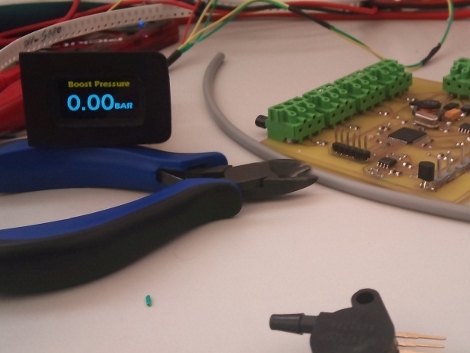
Here’s an interesting take on augmenting a car’s dashboard. [Daniel] is using a button blank to house a 1″ OLED display in his Jetta. It shows auxiliary data such as boost pressure and several sets of temperature readings. The display itself has a tiny little circuit board with a PIC 24 to drive it. A larger board, seen above, collects the temperature data from some sensors that [Daniel] added as part of the hack. There are some pictures of the installed display inside of the dark car and it looks really easy to read. It also sounds like there’s some dimming functionality built into the firmware. This is the easiest way we’ve seen to add a display to your dashboard as it just requires you to pop out a button blank, rather than disassembling the entire console or patching into what’s already there.