Think Your Laptop Is Anemic? Try An MSDOS One

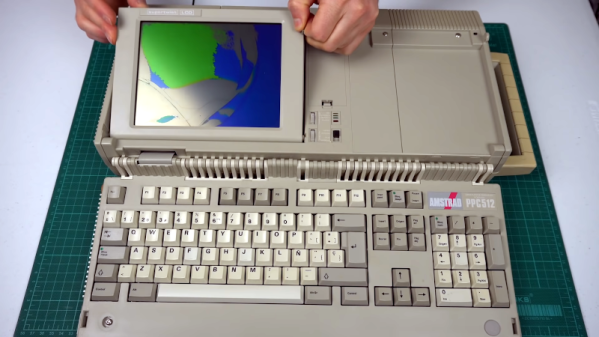
If someone gifted you a cheap laptop this holiday season, you might be a little put out by the 2GB of RAM and the 400 MHz CPU. However, you might appreciate it more once you look at [Noel’s Retro Lab’s] 4.8 Kg Amstrad PPC512 He shows it off inside and out in the video below.

Unlike a modern laptop, this oldie but goodie has a full keyboard that swings out of the main body. The space below the keyboard contains the LCD screen, which [Noel] is going to have to replace with an LCD from another unit that was in worse shape but had a good-looking screen. In this video, he gets as far as getting video output to an external monitor, but neither LCD shows any sign of life. But he’s planning more videos soon.

Continue reading “Think Your Laptop Is Anemic? Try An MSDOS One”

Retrocomputing With Modern Hardware, No Emulation Required

The x86 processor family is for the time being, the most ubiquitous type of processor in the PC world, and has been since the 1980s when the IBM PC came on the scene. Emulating these older devices is easy enough if you want to play an old LucasArts game or experience Windows 3.1 again, but the true experience is found on original hardware. And, thanks to industrial equipment compatibility needs, you can build a brand new 486 machine with new hardware that will run this retro software as though it was new itself.

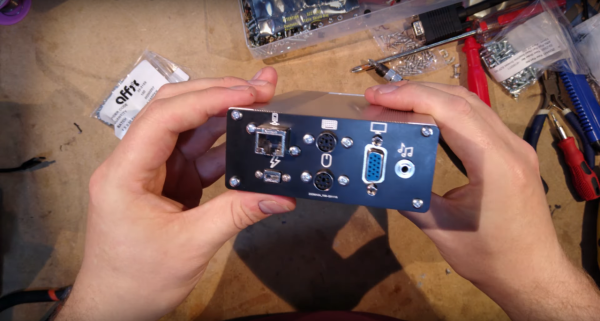
[The Rasteri] masterminded this build which is reminiscent of the NES classic and other nostalgic console re-releases. It’s based on the PC/104 standard which was introduced in the early 90s, mostly for industrial controls applications. The platform is remarkably small, and the board chosen for this build hosts a 486 processor running at 300 MHz. It has on-board VGA-compatible graphics but no Sound Blaster card, so he designed and built his own ISA-compatible sound card that fits in the PC/104’s available expansion port.

After adding some more tiny peripherals to the build and installing it in a custom case, [The Rasteri] has a working DOS machine on new, bare-metal 486 hardware which can play DOOM as it was originally intended. It can also run early versions of  Windows to play games from the Microsoft Entertainment Pack if you feel like being eaten by a snow monster while skiing. [The Rasteri] is no stranger to intense retro computing like this either, as he was the one who got DOOM to run on original NES hardware.

Continue reading “Retrocomputing With Modern Hardware, No Emulation Required”

The First Real Palmtop

Back before COVID-19, I was walking through the airport towards the gate when suddenly I remembered a document I wanted to read on the flight but had forgotten to bring along. No worry, I paused for a bit on the concourse, reached into my pocket and proceeded to download the document from the Internet. Once comfortably seated on the plane, I relaxed and began reading. Afterwards, I did a little programming in C on a shareware program I was developing.
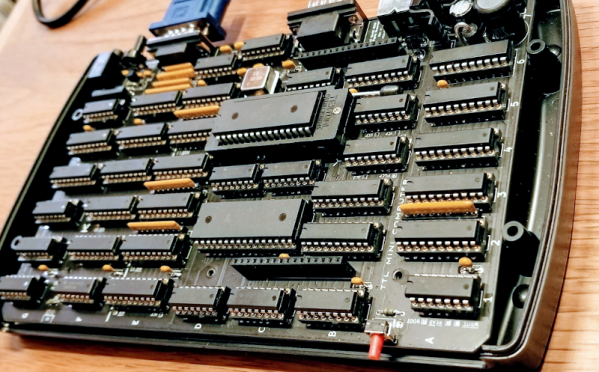


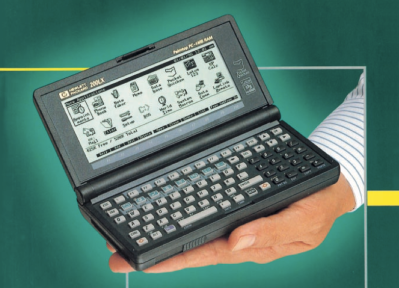
Today this would be an ordinary if not boring recollection, except for one thing: this happened in the 1990s, and what I pulled out of my pocket was a fully functional MS-DOS computer:

Introducing the HP-200LX, the first real palmtop computer. I used one of these daily up until the mid-2000s, and still have an operational one in my desk drawer. Let’s step back in time and see how this powerful pocket computer began its life. Continue reading “The First Real Palmtop”

Surfing The Web With 7400 Logic

We see more computers built from logic gates than you might expect. However, most of them are really more demonstration computers and can’t do much of what you’d consider essential today. No so with [Alastair Hewitt’s] Novasaur. Although built using 34 TLL chips (and a few memory and analog chips, too, along with one PAL), it boasts some impressive features:

  • Dual Processor CPU/GPU (Harvard Architecture).
  • 33 MHz dot clock, 16.5 MHz data path, 8.25 MHz per processor (~3.5 CPU MIPs)
  • 256k ROM: 96k ALU, 64k native program, 64k cold storage, 32k fonts.
  • 128/512k RAM: 1-7 banks of 64k user, 60k display, 4k system.
  • 76 ALU functions including multiply/divide, system, and math functions.
  • Bitmapped Graphics: Hi-res mode up to 416×240 with 8 colors and 4 dithering patterns. Lo-res mode up to 208×160 with 256 colors, double-buffered.
  • Text Mode: 8 colors FG/BG, 256 line buffer, up to 104×60 using 8×8 glyphs, 80×36, and 64×48 rows using  8×16 glyphs.
  • Audio: 4 voice wavetable synthesis, ADSR, 8-bit DAC, 8Hz-4.8kHz.
  • PS2 Keyboard: Native interface built-in.
  • RS232 Serial Port: Full duplex, RTS/CTS flow control, 9600 baud.
  • Expansion Port: 7 addressable 8-bit register ports, 4 interrupt flags

Continue reading “Surfing The Web With 7400 Logic”

PET 2001 Emulator On $2 Of Hardware

Since the late 60s, Moore’s law has predicted with precision that the number of semiconductors that will fit on a chip about doubles every two years. While this means more and more powerful computers, every year, it also means that old computers can be built on smaller and cheaper hardware. This project from [Bjoern] shows just how small, too, as he squeezes a PET 2001 onto the STM32 Blue Pill.

While the PET 2001 was an interesting computer built by Commodore this project wasn’t meant to be a faithful recreation, but rather to test the video output of the Blue Pill, with the PET emulation a secondary goal. It outputs a composite video signal which takes up a good bit of processing power, but the PET emulation still works, although it is slightly slow and isn’t optimized perfectly. [Bjoern] also wired up a working keyboard matrix as well although missed a few wire placements and made up for it in the software.

With his own home-brew software running on the $2 board, he has something interesting to display over his composite video output. While we can’t say we’d emulate an entire PC just to get experience with composite video, we’re happy to see someone did. If you’d like to see a more faithful recreation of this quirky piece of computing history, we’ve got that covered as well.

Continue reading “PET 2001 Emulator On $2 Of Hardware”

Sinclair QL Repairs And Restoration

[Noel] was in possession of two non-working Sinclair QLs and made a series of videos about his attempts to repair and restore them. If you don’t remember the QL, it was a computer by the famous Clive Sinclair and while it was ahead of its time in some ways, it didn’t become as ubiquitous as some of its siblings or the IBM PC. It did, however, develop an almost cult-like following. You can see the trilogy of videos, below.

The machine was sophisticated for its day–after all, the QL was for quantum leap. Based on a Motorola 68008 processor running at 7.5 MHz, the QL included 128 KB of RAM and could handle up to 896 KB, a respectable amount for 1984. It even had a proprietary network interface. However, it was especially well known for having a pair of microtape drives. These were nicer than cassette tapes but perhaps not as handy as floppy disks. They were, however, cheaper to put into a computer. While there was an official operating system, it wasn’t long before most QL users switched to Minerva, a better OS.

Continue reading “Sinclair QL Repairs And Restoration”

Proper Cassettes For Your FPGA Retrocomputer

You can tell the age of someone in our community with a simple question: what were the first removable data storage media you used? Punched cards for the venerable, cassettes for the middle-aged, floppies for the thirtysomethings, Flash cards for the twentysomethings, and maybe even “What’s a removable storage medium?” for the kids brought up on cloud services.  Even with refreshed interest in retrocomputing the cassette hasn’t made a comeback, but maybe that owes something to the hardware. Createing a cassette interface for an FPGA is a task that’s often overlooked, and that’s a project [zpekic] has tackled.

Cassette data recordings are frequency shift keyed, with the 0 and 1 of the binary information represented by different tones. An expected solution to detect these might be to use a Fourier transform, but instead he opts for a simpler solution of counting zero crossings and timing their interval. The resulting stream of data is fed into a UART from which the data itself can be reconstructed. All this is implemented on a Mercury FPGA board which contains a Xilinx Spartan 3A FPGA, but it’s a technique that could be used on other devices too.

So your FPGA retrocomputer deserves an authentic cassette interface, and now it can have one. We’d be especially impressed if all this 2020s wizardry could produce a more stable chuntey field, but we guess that might take a bit more work.

As a final aside, the project is dedicated to the memory of the pioneering Yugoslavian broadcaster [Zoran Modli], whose innovative 1980s radio show featured broadcasts of tape software for the computers of the time including our Hackaday colleague [Voja Antonić]’s Galaksija. Broadcasting software over the radio? That’s a cool hack.