Have A Baby? Build Another One!

Ever since his daughter was born, [Markus] has been keeping logs full of observations of human behavior. Despite how it sounds, this sort of occurrence isn’t terribly odd; the field of developmental psychology is filled with research of this sort. It’s what [Markus] is doing with this data that makes his project unique. He’s attempting to use stochastic learning to model the behavior of his daughter and put her mind in a robot. Basically, [Markus] is building a robotic version of his newborn daughter.

The basics of stochastic learning (PDF with more info) is that a control system is modeled on an existing system – in this case, a baby – by telling a robot if it is doing a good or bad job. Think of it as classical conditioning for automatons that can only respond to a 1 or 0.

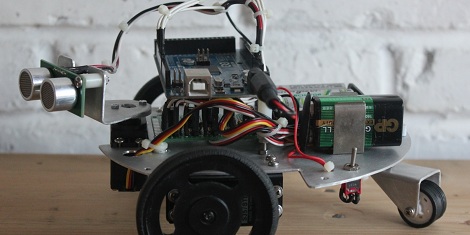
[Markus] built a robotic platform based on an Arduino Mega and a few ultrasonic distance sensors. By looking at its surrounding environment, the robot makes judgments as to what it should do next. In the video after the break, [Markus] shows off his robot finding its way around an obstacle course – really just a pair of couch cushions.

It’s a long way from crawling around on all fours, paying attention to shiny things, and making a complete mess of everything, but we’re loving [Markus]’ analytical approach to creating a rudimentary artificial intelligence.

Continue reading “Have A Baby? Build Another One!”

200 Pound, WiFi Deploying Robot Ran Over My Foot

[Adam Bercu] and [Dan Landers] from Artisan’s Asylum in Somerville, MA brought a very, very cool toy to Maker Faire this year. It’s a two hundred pound WiFi repeater deploying robot able to amble across unforgiving terrain and my foot.

The robot is controlled through a web interface with the help of a front-mounted web cam with pan and tilt controls. All the signals are sent through a WiFi connection to a node.js web server; not the best way to communicate with a robot over long distances, but [Adam] and [Dan] have a few tricks up their sleeve.

On the back of the robot are two Pelican cases loaded up with a battery and a Linksys WRT54G wireless router. When the robot reaches the limits of its range, it activates a solenoid, dropping a WiFi repeater. This repeater has enough battery juice to stay powered for about a day and a half, meaning the robot can make multiple trips to deploy a wireless network through some very hostile terrain. Perfect for disaster and search and rescue operations.

There are two videos after the break: the first is [Dan] going over the capabilities of his tank bot and the second is a short demo of the bot tearing up the grass at Maker Faire.

Continue reading “200 Pound, WiFi Deploying Robot Ran Over My Foot”

Intelligent Autonomous Vehicle Makes It To Maker Faire

A few guys from Rutgers showed up at Maker Faire with Navi, their vehicle for the 2012 Intelligent Ground Vehicle Competition. Powered by two huge lead acid batteries, Navi features enough high-end hardware to hopefully make it through or around just about any terrain.

Loaded up with a laser range finder, a stereo camera setup, compass, GPS receiver, and a pair of motors capable of pulling 40A, Navi has the all the hardware sensors required to make it around a track with no human intervention. Everything is controlled by a small netbook underneath the control panel, itself loaded up with enough switches and an 8×32 LED matrix to be utterly incomprehensible.

In the videos after the break, the guys from Rutgers show off the systems that went into Navi. There’s also a video showing off Navi’s suspension, an impressive custom-built wishbone setup that will hopefully keep Navi on an even keel throughout the competition.

Also of note: A PDF design report for Navi and Navi’s own blog.

Continue reading “Intelligent Autonomous Vehicle Makes It To Maker Faire”

Hand Cranked Electric Toy Has No Batteries Or Power Supply

We think this hand cranked robot design is nothing short of absolute brilliance. The toy is remote-controlled through a short section of wire. It can drive forward and turn, but not at the same time. Still that’s impressive considering it uses no battery or power supply and, of the two servo motors, only one is actually in the robot itself.

The second servo, which is visible to the right, acts as a dynamo. When you crank it electricity is generated. The inputs of that servo are connected to the inputs of the one in the robot to power it. If you crank in one direction the colorful toy will drive forward. But there is a one-way catch on one of the side wheels so when the servo is cranked backward the little guy actually executes a reverse turn. The magic of building a project like this is perfect for a weekend activity with the kids. Don’t miss the demo embedded after the jump.

Continue reading “Hand Cranked Electric Toy Has No Batteries Or Power Supply”

Astounding Papercraft Skills Result In This Working Robot

It would have been very hard to believe this is made from paper if we hadn’t seen all the parts being built. As a still image it looks neat, but the speed at which those paper gears turn in the video after the break will certainly leave you slack-jawed. It really is a walking robot made using papercraft (translated).

These are actually being sold as kits, but there’s not much in the way of materials. You’ll get six sheets of paper, some skewers which act as the axles, and a bit of elastic band which stores potential energy when winding-up the model. The genius is in the design, which is printed on those sheets of paper. The build process involves plenty of delicate work. Dozens of cuts lead into hundreds of folds, and that’s before assembly even starts. We’ve never considered building a ship in a bottle, but this might be right up our alley. If you need to give a gift to a tinkerer this should show up high on the idea list.

Continue reading “Astounding Papercraft Skills Result In This Working Robot”

Robotic Odometry From An Optical Mouse

One of the problems future engineers spend a lot of class time solving is the issue of odometry for robots. It’s actually kind of hard to tell how far a robot has traveled after applying power to its wheels, but [John] has a pretty nifty solution to this problem. He converted an optical mouse into an odometry sensor, making for a very easy way to tell how far a robot has traveled  regardless of wheels slipping or motors stalling.

The build began with a very old PS/2 optical mouse he had lying around. Inside this mouse was a MCS-12085 optical sensor connected to a small, useless microcontroller via a serial interface.

After dremeling the PCB and discarding the microcontroller, [John] was left with an optical sensor that recorded distance at a resolution of 1000dpi. It does this by passing a value from -128 to 127, rolling over every time the sensor moves more than 3.2 mm.

As far as detecting how far a robot has moved, [John] now has the basis for a very simple way to measure odometry without having to deal with wheels slipping or motors stalling. We can’t wait to see this operate inside a proper robot.

Bits And Pieces Robotic Arm

[V0R73X], who is 17  has been working on a project, to build A robotic arm. This project started out as a challenge put forward from one of his school teachers to build a robotic arm for $200.  [VoR73X] accepted, and the challenge began.

He came up with a robotic arm that can be controlled from his mobile phone and other bluetooth enabled devices. He also designed it so that he can control it from the infrared remote control of an old tv set. [VoR73X] decided to kept the design simple, to make it easy for others to build.  [VoR73X] has shared the code and a step by step process of how to build in the hopes that others would also like to take up the challenge.  Watch the video after the break for further details on his project.

via[Instructables]

Continue reading “Bits And Pieces Robotic Arm”