Simple Telepresence Hack Lets Remote User Rotate This Laptop

[Kris] wanted to make the telecommuting employees at his office feel a little more in control of their virtual presence in the office. He gave them a way to look around without needing to go into full-blown robotics. This laptop stand has a Lazy Susan connected to a servo motor to give the user control of where the computer is pointed.

We’ve certainly seen our share of really complicated surrogate builds like this balancing robot. There have been simpler options too, such as this smartphone-carrying motorized base. But when you get right down to it, the ability to pan the camera is probably good enough for most situations. [Kris’] solution can be built in an afternoon, using simple materials. The box is made out of MDF with a base for the laptop connected by the ball-bearing hardware that supports the weight and makes sure the servo is able spin it freely. It is driven by an Arduino which connects to the computer via USB; making it easy to control remotely. Check out a quick clip of the laptop going round and round after the break.

Continue reading “Simple Telepresence Hack Lets Remote User Rotate This Laptop”

4Track Robot Gets Around With Ease

4track-robot

[Jon] has been developing a slick little RC robot in bits and pieces over the last year or so, which can constructed by anyone with access to a 3D printer. Servos and electronics aside, the entire thing can be put together in short order using the plans he posted on Thingiverse.

The robot makes use of four “caterpillar” type bots, which are all connected via a central frame. Once [Jon] had the general design for a single caterpillar bot down, he moved forward to create the robot you see above. His friend [Julián] lent a hand in the form of electronics and code, which allows the robot to be driven using a standard USB gamepad.

As you can see in the video below, the robot gets around nicely, climbing over obstacles with relative ease. While it is a bit loud, [Jon] says that’s due to the undersized servos they happen to be using at the moment. We think it looks great so far, but [Jon] already has plans to beef up the motors and add wireless control in the near future – we can’t wait to see it then!

Continue reading “4Track Robot Gets Around With Ease”

Amazingly Realistic Skeleton Prop

[Cjmekeel] spent weeks getting his Halloween display ready this year. The centerpiece of his offering is this full-sized motorized skeleton. But there’s a few other gems that he worked on to compliment it. There’s an old-fashioned radio whose dial moves mysteriously and plays a news flash warning of an escaped mental patient. He also spent a couple of dollars to outfit a crow with some glowing red eyes and a servo motor.

But the creepiness of the skeleton means you might not even notice those other props. He started with a rather boring looking plain plastic head and did some real magic to build up the rotting flesh and gaping wounds. Those penetrating eyes don’t hurt either. The head moves on a few servo motors which use random values and sleep periods for disturbingly jerky movements. Check out the video after the break to get a glimpse at what kept kids away from his house on Halloween.

This is just a build log and unfortunately there’s no post yet showing the finished product. If we can get enough information together we’ll try to run a follow-up.

Continue reading “Amazingly Realistic Skeleton Prop”

Halloween Hacks: Simple Robotic Skull Is A Perfect Last Minute Decoration

Halloween Hacks Banner

simple_talking_skull

If you haven’t taken the time to put your decorations together it’s time to get a move on. With Halloween just around the corner big elaborate displays are pretty much out of the question, but [Boris] and the team over at Open Electronics have a simple project that’s sure to be a hit with the Trick or Treaters.

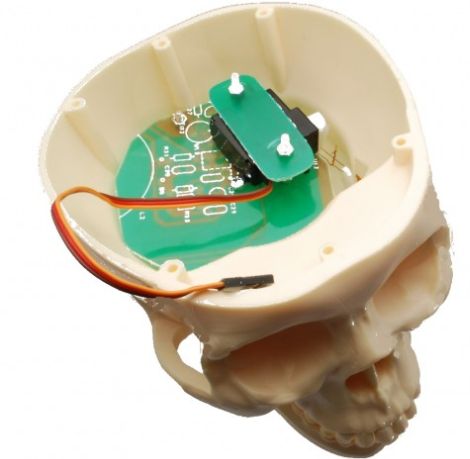
Using a cheap plastic prop that you can likely find at any Halloween store, they have put together a simple talking skull that moves along with whatever music or sound is being piped through it. The skull’s mouth is moved by a single servo mounted inside the brain cavity, which is controlled by an Arduino. The Arduino monitors the sound level of the source audio being played, actuating the servo accordingly.

It’s quick, simple, and effective – perfect for a last minute decorating project. If you are a little more ambitious, you could always put together a whole chorus of skulls without too much additional effort – just a few extra skulls and some servos would do the trick nicely.

Check out a quick video of the skull in action below, along with another short clip showing how the servo is rigged up to move its mouth.

Continue reading “Halloween Hacks: Simple Robotic Skull Is A Perfect Last Minute Decoration”

Animatronics In A Box

[Knife141] built an impressive animatronic head. He uses it mostly for volunteer activities, like getting school children excited about technology. He built a carrying trunk that fits the puppet just right, making it easy to store and to transport.

He started by making the parts for the head out of cardboard to make sure they would fit together and operate properly. These were then used as templates to cut the pieces out of half-inch plywood. A series of servos, connected either directly or with linking rods, move the mouth, eyes, eyelids, eyebrows and neck via a servo controller board.

Sound is played by a single-board computer called a RAPU via a pair of computer speakers. This board is also what sends commands to the servo controller. When [Knife141] wants to create a new act for the animatronics, he starts by writing the dialog and having a text-to-speech program turn it into an MP3. He then goes through the tedious process of choreographing the puppet to the dialog, a process that generally takes him an hour for each minute of run-time. It’s worth it though, see for yourself by watching one of his acts in the video after the break.

Looking for something a little bit more your speed? Check out this animatronic head which you can build in no time.

Continue reading “Animatronics In A Box”

Robotic Arm Follows The Movements Of Your Own Limbs

[Alejandro] and his friends recently finished a first prototype of scratch-built robotic arm. They’ve got some nice electronics bench equipment for use with a project like this, but for the actual fabrication work it’s off to the kitchen.

As you can see in the video after the break, they’re using PVC as the stock material in this build. Flat sheets are produced by slitting a PVC pipe down the middle, warming it in oven until soft, then compressing it between two floor tiles with a big jug of water used as a weight for the makeshift press. Mounting holes for the servo motors that make up the joints are drilled with a hand drill, and the assembly was affixed to an old CD as a base.

Once assembled they wired it to the control circuitry and build a set of sensors that you wear on your arm. Now your elbow, wrist, and pointer finger are in control of the servos. A demonstration of this functionality starts around two minutes into the video.

We’ve seen other examples of robot arms built without the use of machine tools. This arm made out of ShapeLock plastic is one of the most interesting examples.

Continue reading “Robotic Arm Follows The Movements Of Your Own Limbs”

ATtiny Hacks: ATtiny45/85 Servo Library

ATtiny Hacks Theme Banner

Servo8bit is a library for AVR microcontrollers that allows you to drive servo motors without the need for a 16-bit timer. Obviously, this is quite useful for smaller chips that only have 8-bit timers and it is specifically targeted at the ATtiny45 and ATtiny85 microcontrollers. The library offers 256 steps of resolution, and can drive up to five servos at one time. Servo control pulses can be generated between 512 and 2560 microseconds and if you don’t mind increasing the time between these pulses [Liya] says it would be possible to increase the 5-servo limit.

The library is quite easy to use, but in its current state it would take just a bit of work to port to another device. It’s been written for an 8 Mhz clock signal with PortB used to drive the motors. Using find-and-replace to change the PORTB keywords to use a DEFINE variable should be easy enough, but we don’t know how hard it would be to change the clock frequency.

We wonder if it’s possible to make this a slave device, perhaps implementing a 1-wire protocol?