Who Knew Thinkpad Batteries Require A Jump Start?

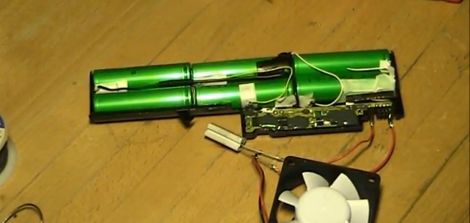
Lithium battery packs reaching the end of their life usually have a lot of kick left in them. That’s because they’re made up of multiple cells and it only takes the failure of one to bork the entire battery. One of the most interesting examples we’ve heard of this is in the Toyota Prius, but that’s a story for another time. In this case, [Mika] wanted to resurrect the battery from his IBM Thinkpad T40. He identified the offending cell and replaced it, but couldn’t get any juice out of the battery after the repair.

He was measuring 0V on the output, but could measure the cells instead of the control circuitry and was getting over 11V. Clearly, the control circuit wasn’t allowing an output. We completely understand the concept here (think about that really bad press about exploding laptop batteries). It seems there’s a lockout mechanism when the control circuit loses power. [Mika] managed to get past this by shorting voltage into the control circuit, a method he likes in the video after the break to jump starting a car.

We’ve seen similar cell replacement for power tools, like a Dremel or a Makita drill.

Continue reading “Who Knew Thinkpad Batteries Require A Jump Start?”
Thinkpad Dock-Picking

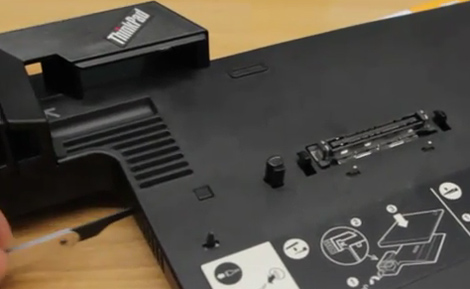
Hackers at the “RaumZeitLabor” hackerspace in Mannheim Germany have noticed that the locking mechanism on the thinkpad mini dock is extremely easy to circumvent. Sold as an additional layer of security, the mechanism itself is not really secured in any way. The button that actuates it is locked by a key, but the latch isn’t secured and can be accessed via a vent on the side. They are using a lockpicking tool in the video, but they say that even a long paperclip would suffice.

We know that no security device is perfect, and if someone really really wants it, they’ll take it, but this seems a bit too easy. Maybe the next version will have a little plastic wall protecting the latch from being actuated manually.  Hopefully if security is your main concern you are using something a little more robust that a dock-lock.

[via the RaumZeitLabor hackerspace (google translated)]

Continue reading “Thinkpad Dock-Picking”

Speeding Up A ThinkPad X41 Via A SATA SSD Conversion

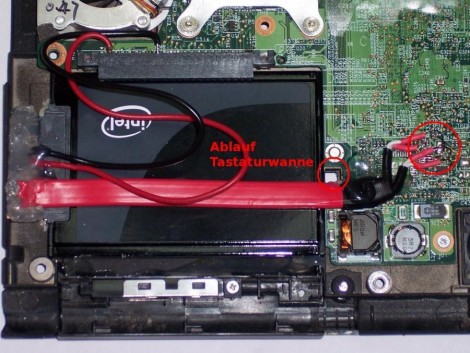
[Marek Walther] uses a ThinkPad x41 tablet for business on a daily basis. Since he’s on the go with the device he figures that hardware failure is eventually going to strike and with that in mind he purchased a second unit – slightly broken – to fix as a backup. He had never been excited about the speed of the tablet so he set out to find improvements. One of the options was to replace the traditional hard drive with a solid state model (translated). But simply dropping in an SSD isn’t going to make things faster. That’s because the stock drive uses a PATA interface. After a bit of snooping [Marek] discovered that the motherboard has a SATA interface that has a bridge connecting to the PATA plug. By removing the bridge and soldering a SATA cable to the board he was able to improve performance while increasing storage capacity at the same time.

25C3: Solar-powering Your Gear

solar

The 25th Chaos Communication Congress is underway in Berlin. One of the first talks we dropped in on was [script]’s Solar-powering your Geek Gear. While there are quite a few portable solar products on the market, we haven’t seen much in the way of real world experience until now.

Continue reading “25C3: Solar-powering Your Gear”

Pong Clock

[funnypolynomial] saw this Pong clock years ago and had been planning on building his own version. With a move looming he decided it was finally time to finish up his Pong clock since completed projects take far less room than incomplete ones. The core of the system is a ThinkPad. He separated the hinge and bolted the keyboard to the back of the screen. The display ribbon was long enough, but he had to extend the wires for the backlight. The power button was also extended and the battery removed. The software is a Windows screen saver that uses the two mouse buttons for navigation similar to how you set a two button watch. Every minute the the left player misses the ball and the right player’s score increases. You can see a video of the clock below. In the past, he also turned a digital multimeter into a clock. Continue reading “Pong Clock”