oscope-reverse-engineering

Reverse Engineering An Oscilloscope Circumvents Vendor Crippleware

The crew over at the Hungarian Autonomous Center for Knowledge (H.A.C.K.) say they aren’t the most well-funded organization out there, so they were stoked when they found they could afford to bring a slightly used UNI-T UT2025B digital oscilloscope into the shop. As they started to tinker with it, the scope revealed one major shortcoming – screenshots were only accessible via a USB connection to a Windows computer.

Since they didn’t have any Windows boxes in house, [András Veres-Szentkirályi] decided he would try reverse-engineering the protocol so they could get access to this useful feature.

He set up a Windows VM, and using Wireshark on the host Linux box, [András] sniffed the data passing over the scope’s USB interface. He was able to identify what looked like image packets being sent to the VM, which he was able to decode using a small Python script. The resultant images were monochrome and they didn’t look quite right, but it was a start. As he dug further [András] found that he was overlooking some of the color data packed into the images, and after a bit of fiddling he got the sharp, colorful image you see above.

It turns out that while the scope has a monochrome LCD, it sends 16-bit color images over the USB interface – images that the Windows’ client degrades before displaying them on the screen. So in the end, he was not only able to get the scope working on any OS with the ability to run Python, he was able to grab far better images than the manufacturer ever intended – A very nice hack if we do say so.

Be sure to swing by the H.A.C.K. wiki as well as the project’s github repository if you have one of these scopes and are looking to wring some better images out of the hardware.

USB Slingshot Controller Is For The Birds

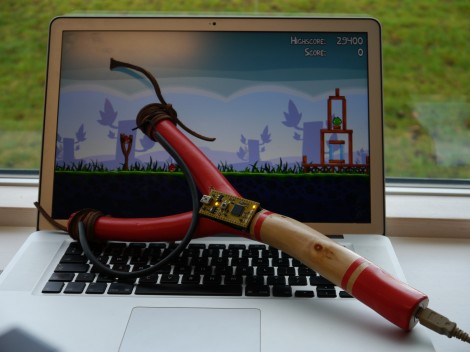
This USB slingshot controller really brought a smile to our faces. Part of it is the delightfully silly promo video you’ll find after the break. [Simon Ford] combined nature and technology to bring this USB-enabled slingshot into existence.

The frame itself is from a branch he found in the Epping Forrest of London. He whittled away the bark, and hollowed out an opening in at the base of the ‘Y’ to receive an accelerometer board. It has a pair of female pin headers to interface with the mbed seen in the image above. But the real hack here is the code he wrote to translate accelerometer data into appropriate mouse movements. His success in the area makes this translate the virtual world of Angry Birds in a visceral experience of killing things with a slingshot.

We’re suckers for this type of project. Two examples that pop into mind are these musical instrument hacks for Rock Band 2.

Continue reading “USB Slingshot Controller Is For The Birds”

Overbuilding An ITunes Rating System

Even though iTunes and it’s song rating system has been around for over a decade now, [Steve] still hasn’t gotten around to assigning ratings to his vast library of MP3s. We can’t blame him – who wants to pull up iTunes every four minutes and assign a star rating to each song individually? To solve this interface problem, [Steve] set out to design a hardware song rating interface that fell down the rabbit hole into development hell.

The build started off simply enough – just an Arduino attached to a few buttons that sends data to a Cocoa app which rates the current song. Everything was working wonderfully until [Steve] restarted his mac and the COM ports went to pot. Wanting a ‘plug-and-play’ solution, he did away with the Arduino-based build and started designing a USB device that would display the current iTunes track and provide hardware buttons for rating the current song.

The current build is based around a very capable PIC 18F4550 micro. After looking up the USB HID protocol, [Steve] had some boards fabricated. He’s keeping us waiting on a final build report, but with the amount of work that went into this project, we’re sure it’ll be a winner.

Learning To Use The V-USB (AVR USB Firmware) Library

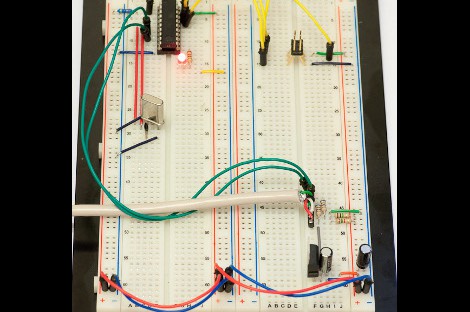
The V-USB library is a pretty handy piece of code that lets you add USB connectivity to ATtiny microcontrollers (it was previously named tinyUSB). But if you’ve ever looked into adding the library to your own projects you may have been stymied by the complexity of the code. There are many examples, but there’s a lack of a concise quick-start for the uninitiated. [Joonas Pihlajamaa] has been working to correct that shortfall with his four-part V-USB tutorial series. It’s not for the absolute newbie; you should already be comfortable working with AVR chips but that’s the only real prerequisite we can see.

He starts the series with a look into the hardware considerations. USB provides a 5V power rail but the data lines expect 3.3V logic so this must be accounted for. With the test rig built on a breadboard he moves on to pick apart the code, covering various user-defined variables that you’ll need to set based on your project’s needs. We’re going to keep this on the back burner and hopefully the Troll Sniffing Rat will get a makeover (although we must say comments have been a lot nicer as of late… keep it up!).

We’ve embedded links to all four tutorial parts after the break.

Continue reading “Learning To Use The V-USB (AVR USB Firmware) Library”

A USB-controlled Solder Reflow Oven

[Joel] of [Helion Microsystems] is at it again with his USB controlled solder reflow oven.  You may remember him from his crazy twitter-enabled Ewok model. Although these two projects are quite different, they both use the HU-320 USB breakout board that he’s in the process of getting funding for via [Pozible], or Australian Kickstarter for Yanks.

The reflow oven works using a thermocouple-enabled RS-232 voltmeter to output the temperature to the HU-320 board. [Joel] has been nice enough to provide us with the C# code to interface with many multimeters if you want to implement a similar project.  Temperature is controlled with a mechanical relay for what would appear to be a poor man’s PID controller.

Sadly, Fluke meters don’t seem to be listed, but your place of work probably wants their meter back anyway!  For another toaster reflow oven implementation, check out this [HAD] article.  Be sure to check out the video after the break for a video of the setup! (heat treat engineers may find the “recipe” format humorous).

Continue reading “A USB-controlled Solder Reflow Oven”

Modular Controllers You Can’t Wait To Show Off To Your Friends

Let’s get this straight, [Alex] is going to show us how to make controllers like this one? Where do we sign up? Even without seeing it in action we want one, but the urge to build is even greater after he shows it off (check the clip after the break). He’s a design student who made an open source project aimed at making it easier to build hardware controllers that pair with just about any software application.

The need for external controllers is on the rise, starting with music-based applications like DJ tools, and Midi controllers for musicians (we’re thinking Monome clones). But anything that can take input from a USB HID can be controlled with something like this. That’s because [Alex] is using the Teensy controller board as an interface. Just select the input types you want – sliders, potentiometers, buttons, switches – then wire them up to the microcontroller pins. If you start to run out of inputs he also discusses some add-on chips to use as port expanders.

Of course there’s a lot to be said for the physical appearance as well. Even though he used point-to-point connections for all of the controls, that wiring is hidden behind the aesthetically pleasing laser-cut dashboard. Follow his advice for layout and find a friend with access to a sweet laser cutter and you’re in business. Continue reading “Modular Controllers You Can’t Wait To Show Off To Your Friends”

Shove A Hub Into That Keyboard

As masters of technology, our desks are often cluttered with odds and ends. We have cables spewing out of every nook, and our computer ports full. The last thing we really want is more stuff getting in the way or buried under piles of technical documentation when adding something like a USB hub. That is where [Michael] comes in, shoving a small USB hub into his Logitech keyboard.

The keyboard is already USB, and the hub has 3 forward facing ports and a fourth single port in the rear. Taking the 2 devices apart he used the already there USB cord from the keyboard replacing the input cord of the hub. Then he removed the rear port and directly wired his keyboard onto the hub.

From there, its just a matter of figuring out where he wanted the hub, and cutting out the plastic. He used a knife, and had fond memories of some minor cuts, which leads us to recommend being (more) careful. A little application of fire to blade goes a long way.

Once the keyboard is back together he has a convenient 3 port hub on the back of his keyboard that looks factory and saves clutter.