Building An EEPROM Programmer

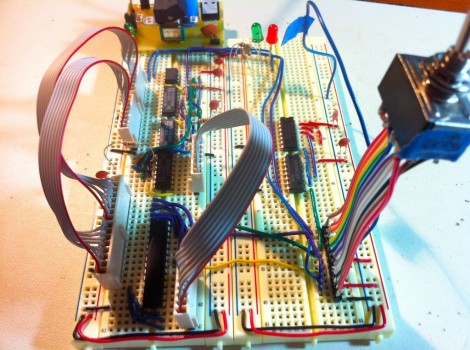
Behold this ATtiny85 based EEPROM programmer. It seems like a roundabout way of doing things, but [Quinn Dunki] wanted to build to her specifications using tools she had on hand. What she came up with is an ATtinyISP USB programmer, pushing data to an ATtiny85, which then programs an EEPROM chip with said data.

The hardware is the next module for her Veronica 6502 computer build. When we last saw that project [Quinn] was planning to add persistent storage for the operating firmware. This will be in the form of an EEPROM programmed with this device. Using ISP and an ATtiny as a go-between means that she should have no problems reflashing the OS without removing the chip. But it all depends on how she designs the interface.

For example, she blew a whole bunch of time troubleshooting the device because garbage data was being written to the chip. In the end, having her manual bus programmer hooked up during the flashing operation was the culprit. Lesson learned, it’s onward and upward with the build.

We’ve been featuring [Quinn’s] projects a lot lately. That’s in part because they’re really interesting, but also because she does such a great job of documenting her experience.

Running The Numbers On A Cheap PSU

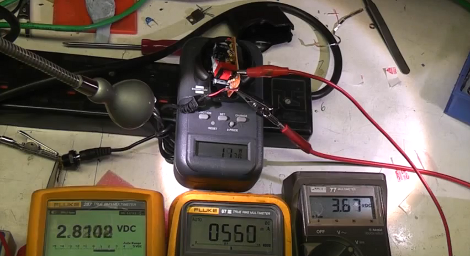
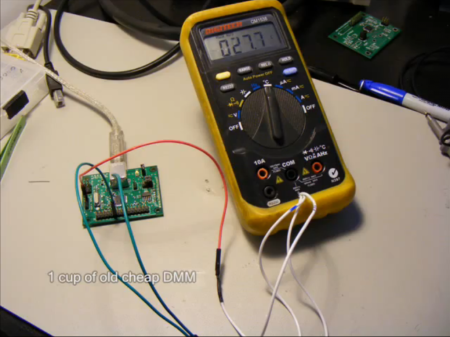
[Mike] picked up a cheap USB hub for four pounds (about $6) including delivery. He wanted to know how it’s possible to get quality electronics for that price, and as you may have guessed it’s not possible. He cracked open the power supply that shipped with the hub and hooked it up for some testing.

The wall wart has a sticker on it that claims a rating of 1 Amp at 5 volts. It’s pretty easy to see that this hardware cannot meet that spec just by looking at the circuit board. It’s a low-end single sided board that has some really disappointing isolation between the mains and regulated side of the circuit. As far as we can tell there’s really no reliable regulation circuit on the low side of the transformer, and the tests that [Mike] runs in the clip after the break show this. From left to right in the picture above you can see voltage at the hub-side of the power cord, current on the load, and voltage leaving the circuit board. At just 560 mA the voltage the USB hub is receiving has fallen below 3 volts!

The link to this project was sent in by [Paul] after reading about that fake Canon camera PSU. We love this kind of stuff so keep the tips coming as you find them!

Continue reading “Running The Numbers On A Cheap PSU”

A Little Tweeting “Ewok”

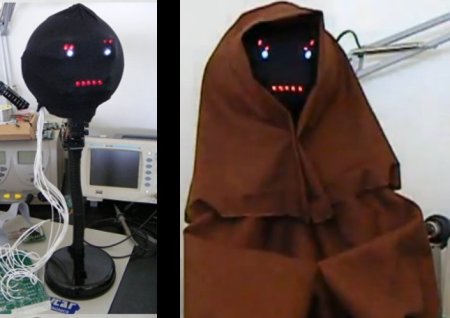
Tweet Receiving, that is. This Ewok model, named “Ewen the Cheerlight,” is able to rotate its head left and right as well as show expressions. The most interesting feature of this hack, however, is that the little Ewok actually wakes up each time one tweets a “colour” to @cheerlights and lets it’s owner [Joel] know what he thinks of the “color” you’ve chosen. [Joel] insists that he’s like this featured on [HAD], although it remains to be seen if it will soon be turned off after the tweets start rolling in…

As far as how the device works, the head is turned with a simple hobby servo motor, and the expressions are shown on a LED matrix. The model itself is built from a polystyrene ball and an old table lamp. The build really looks awesome.

All of this is controlled by an Easy USB Interface Board which is listed on [Pozible], the Australian version of [Kickstarter]. Be sure to check out the video of “Ewen” in action after the break! Continue reading “A Little Tweeting “Ewok””

LED Sconces Spice Up Dorm Room Parties

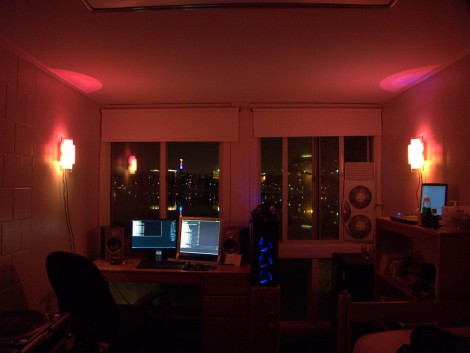
This dorm room is ready to entertain, thanks in part to the LED wall sconces that [Joseph] hacked together. Inside each fixture you’ll find three 3-Watt LED modules. For proper heat dissipation he mounted them on sheet metal which he cut out, including some fingers for additional surface area. The shape for the heat sink was chosen to fit behind the diffuser of the sconce, which is an incandescent light fixture with the socket removed.

[Joseph] designed his own control boards for the base station and LED modules. They communicate with each other via RS485, which lets him run CAT-5 cable to each, but the lights do require external power as well. The controller itself is a USB dongle which takes the serial commands from a computer and pushes them out over the RS485 protocol. In the video after the break you can get a good look at the hardware and the overall performance of the system.

Continue reading “LED Sconces Spice Up Dorm Room Parties”

TI Launchpad Adds Computer Control To A Robot Arm

[Eric Gregori] had an OWI535 toy robotic arm. Although cheap (coming it at around $30) the arm is only set up to be used via a wired control box. [Eric] knew he could do better by adding computer control via a TI Launchpad and motor driver peripheral.

The arm has shoulder, elbow, and wrist joints, a rotating base, and a gripper. All of these are actuated by 3V DC motors and have just two control wires. [Eric’s] motor driver add-on for the Launchpad works great in this case. It’s got three FAN8200 dual motor driver chips on board so it can control up to six motors. Once he made the hardware connections it’s just a matter of sending the commands to the Launchpad via its USB interface, but you will also need to use a larger microcontroller than comes with the Launchpad. Here he’s chosen an MSP430G2553.

In order to make things a little bit more fun he also wrote a GUI for controlling the arm from the computer. He used RobotSee, a programming language that lets you use an image of the hardware, and overlay the controls on top of it. Now he just needs to make this into a web interface and he can have a smartphone controlled crane game.

Don’t forget to check out the video after the break. Continue reading “TI Launchpad Adds Computer Control To A Robot Arm”

Stylophone 5 – Modernizing The Best Of The 1968 Hardware

We love looking in on [Simon Inns’] projects, and this must be one of his very best. This is the fifth version of his MIDI-capable stylophone. The gist of the control system is that a conductive keyboard (made of a tinned PCB) is played by making a connection with the tip of a wired stylus — hence the name. The idea comes from the original 1968 Dubreq Stylophone hardware, but [Simon’s] not just using the idea. He has his own working original and used it to reverse engineer the circuit design.

When it first came out, the Stylophone had three flavors for Bass, Standard, and Treble audio ranges. They differed only in the choices of passive components used in the circuit. [Simon] built the variations into his design so that they are selectable on one unit. This most recent version connects via USB, allowing you to control MIDI software. But unlike his first four iterations, this also offers MIDI-In capabilities. This makes it possible to control tuning, vibrato, and to drive the Stylophone circuitry from the computer interface. Get a good look at that, and a nostalgic Portal moment, by watching the clip after the break.

If you’re looking for an easier build, you might try this analog standalone version of the Stylophone.

Continue reading “Stylophone 5 – Modernizing The Best Of The 1968 Hardware”

NES Controller Is A Slick Way To Carry Around Your Portable OS

nes-controller-linux-drive

[Oliver] had an old NES controller laying around, and without any other use for it, he decided to repurpose it as a portable storage device.

He gutted most of the controller, removing the plastic standoffs, leaving the D-pad and remaining buttons intact. He crammed a 32 GB flash drive inside, along with the guts from an SD card reader. Using a Dremel he cut several openings into the controller, one for the flash drive and SD card reader’s USB ports, as well as for the SD card itself. When the physical modifications were finished, he installed a small Linux distro on the flash drive, which can be run by any PC that supports booting from USB.

While some might argue, we think it’s a neat way to reuse an old gaming peripheral that he might have otherwise thrown out. The portable OS is something that would certainly come in handy, though we can’t wait until the Raspberry Pi is finished – it would be awesome to have a complete computer packed in there too.