posted Oct 25th 2011 11:57am by
Mike Nathan
filed under:
pcs hacks,
repair hacks

[Jeremy] had an ASUS EEE PC 1000HE netbook on his hands which had succumbed to a corrupted BIOS. In most situations, people replace a motherboard when the BIOS is damaged beyond repair, but considering the price of motherboards, especially those built for portable devices, he simply refused to go that route.
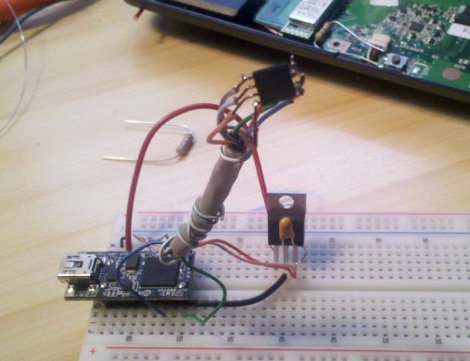
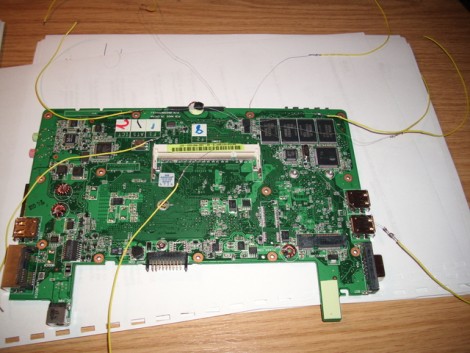
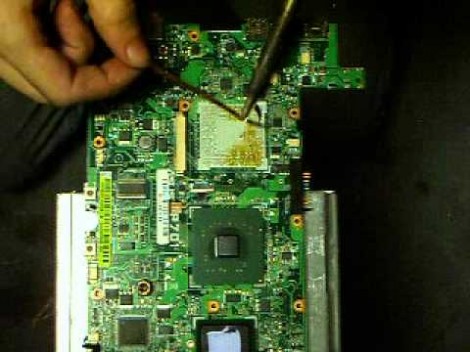
Instead, he took it apart and did a little investigation to find out what SPI flash chip ASUS used in the netbook. With that information in hand, he put together an SPI flash programmer using a breadboard and a DLP-USB1232H USB to UART module. He couldn’t program the flash chip in-circuit, so he had to desolder it and deadbugged it onto his programmer. Using a few Linux-based flashing tools, he was able to reprogram the chip with a functioning BIOS in short order, saving him from a costly motherboard replacement.
While some motherboard manufacturers have built in secondary BIOS chips to prevent the need for this sort of recovery, it’s nice to know that the process is relatively straightforward, provided you have some basic soldering and Linux skills.
This also isn’t the first time we’ve seen someone recover an EEE PC from the brink – if you’re looking for an Arduino-based alternative, be sure to check this out.
posted Jun 14th 2010 3:00pm by
Mike Szczys
filed under:
arduino hacks
A
This bricked Eee PC came to [Janzo] for about $50. Everything was fine with it, except for the failed bios update that rendered it useless to the last owner. [Janzo] set to work with an Arduino on a quest to repair the bios. He looked up the datasheet for the EEPROM that stores the bios and did some delicate soldering to gain access to the power and data pins on the device. A bit of trial and error and he was able to read the registers. Some comparisons between the output file and the official Eee PC bios file in a HEX editor confirmed that the first 80 bytes were fine but after that something went wrong. After coding a quick Python script [Janzo] reflashed the chip and had the computer up and running again.
We’ve seen Eee PC bios recovery before. This is a very simple method because it makes use of the simplicity we find in the Arduino. Nice job.
posted Sep 25th 2009 12:25pm by
Mike Szczys
filed under:
repair hacks

Hot on the heels of our post about reading passwords from EEPROM, [n0th1n6] tipped us off about a similar hack used to resurrect an Eee PC from a bad bios flash. After discovering that a factory repair for a dead bios costs about $200, [CutenaCute_7] took on the challenge herself. She disassembled the computer and desoldered the bios chip from the board. After writing a program to flash the chip using C#, she temporarily soldered jumpers to make sure the flash worked. Looks like this is a zero cost hack, plus the time savings from not having to ship her computer somewhere. Bravo.
posted Sep 21st 2009 10:08am by
James Munns
filed under:
home hacks,
netbook hacks

Hack a Day reader [The_Glu] shared with us a project of his. He used an Eee PC 701 he had lying around with a broken LCD, along with three 1TB SATA drives to create a custom NAS server for his house. The server features a number of other interesting components, including USB2SATA converters to connect the hard drives, as well as a 2 line LCD to display RAID information and server status. The entire project is wrapped up in a custom made Plexiglas enclosure with case fans to keep the whole thing cool. While this may not be the first Eee PC NAS, or the fastest, this is a wonderful way to repurpose a broken netbook. We also love the idea of netbooks being used more and more in projects like these as the first generation reaches its end of usefulness age. More pictures after the break.
Thanks [The_Glu]
Read the rest of this entry »
posted Feb 3rd 2009 7:01pm by
Eliot
filed under:
HackIt,
laptops hacks,
macs hacks,
netbook hacks

AppleDifferent decided to run some benchmarks on their MSI Wind hackintosh to see how it stacked up to real Apple hardware. It comes in under the MacBook Air in most cases and they conclude that it performs about as well as a four year old G4. Being so small and inexpensive, you can’t really expect much better. As a counterpoint, Obsessable posted a video demoing just how slow a first generation Eee PC can be (embedded below). Boing Boing Gadgets is maintaining an OSX netbook compatibility chart. It shows that the MSI Wind is probably the best case for OSX usability. If we were buying today, we’d probably pick up a Dell Mini 9 even though it requires an SSD upgrade before it will sleep properly.
Are any of you running OSX as the primary OS on your netbooks? What has your experience been?
Read the rest of this entry »
posted Oct 31st 2008 8:48am by
Caleb Kraft
filed under:
netbook hacks,
news

Promises, promises, promises. The $200 Eee PC is supposedly coming in 2009, according to chairman Johnny Shih. No word on whether it will be a 10 inch screen, but it seems possible as they have stated they are phasing out the smaller models. Other interesting facts were divulged, such as 70% of them are now loaded with Windows XP and hard drives.
[via Engadget]
posted Oct 16th 2008 11:15am by
Caleb Kraft
filed under:
classic hacks,
laptops hacks,
netbook hacks

[strider_mt2k] sent in this new Dell Mini 9 hack. After seeing the recent GPS in a Dell Mini9 project, he decided to jump in and do some hacking of his own. His idea was to integrate his Logitech wireless mouse receiver internally. He basically added an internal usb port, allowing for future replacements if the mouse should it get broken or upgraded. The final result is completely hidden. There was plenty of space in the case, so there’s no bulge at all.
posted Sep 6th 2008 10:59am by
Joey Celis
filed under:
laptops hacks,
netbook hacks,
pcs hacks

One of the things that made the original Asus Eee PC such a big success was the ability to add almost anything you wanted to it. While this might not have anything to do with Dell releasing a service manual showing you how to disassemble your brand new Mini 9, we’re not gonna fault them for making one available.
The service manuals show the proper way to gain access to the various parts of the Mini 9 right down to the motherboard itself. It’s nice to know that the Mini 9 isn’t locked down where simple things like replacing the RAM or upgrading to a larger SSD won’t void your warranty.
[via jkkmobile]