Add A Train Horn To Your Hoopty (earplugs Not Included)

[TheChadster] was kind enough to explain that the air horn he attached to his bicycle is not actually as loud as a train horn. This one can only be heard from a half a mile away. But we’re sure the ringing in your ears will seem the same… the video after the break proves this thing is way too loud.

You don’t need much for this, just a pair of air horns and a source of compressed air. [Chad] has a ten gallon air tank strapped onto the luggage rack on the back. We’d bet he can lay on the horn for quite a while before depleting that reservoir. The hardest part of the build (other than sourcing the parts without breaking the bank) is going to be attaching everything to the bike. This is why he recommends using a cruiser bicycle because they often already have a rack on the back. For the horn holder [Chad] found a leather cup holder worked almost perfectly.

We think he needs to turn this around and add some compressed combustibles for a fiery and noisy flame boost.

Continue reading “Add A Train Horn To Your Hoopty (earplugs Not Included)”
Arduino MIDI Sequencer Displays A Lot Of Data

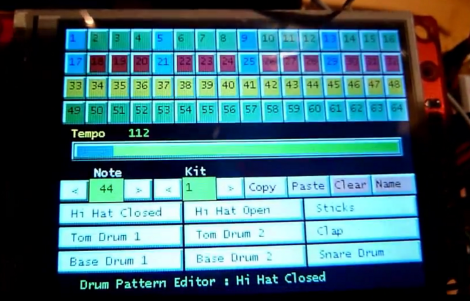
This Arduino MIDI sequencer has no shortage of ways to display loop info. The screen above is a touch-sensitive interface that acts as the user input. But if this screen is not visible, you can still see which tracks have activated samples for each beat and what effects are being used. That’s thanks to the collection of display boards which are shown in the video after the break.

The setup acts as the MIDI front end, relying on other hardware to generate the samples. It presents all of the options through several pages on the 320×240 touch screen display. The Ardunio Mega is responsible for monitoring the UI data, crafting and sending the MIDI commands, as well as updating the LED-based display boards. These include bar graphs for the various effects, a four row by sixteen pixel beat pattern display, and 7-segment displays to track the current location within the loop. All in that’s 368 LEDs driven by 18 shift registers.

Update: Link to a gallery can be found after the break as well.

Continue reading “Arduino MIDI Sequencer Displays A Lot Of Data”

Using Diodes And Transistors As Solar Cells

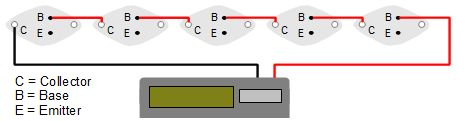
When you get down to it, solar cells aren’t much different from the diodes and transistors in your parts drawers or inside your beloved electronics. They’re both made of silicon or some other semiconductor, and surprisingly can produce electricity in the presence of light. Here’s two semiconductors-as-solar panel projects that rolled into the tip line over the past few days.

[Steven Dufresne] cut open a 2N3055 power transistor to expose the semiconductor material to light. In full sunlight, he was able to produce 500 millivolts and 5.5 milliamps. In other words, he’d need around 5000 of these transistors wired up to turn on a compact fluorescent light bulb. A small calculator has a much lower power requirement, so after opening up five transistors he was able to make a solar-powered calculator with a handful of transistors.

[Sarang] was studying solar cells and realized a standard silicon diode is very similar; both are p-n junctions and the only real difference is the surface area. He connected a 1N4148 to a multimeter and to his surprise it worked. [Sarang] is able to get about 150 millivolts out of his diode with the help of a magnifying glass. While he doubts his diode is more efficient than a normal solar cell, he thinks it could be useful in low-cost, low power applications. We’re thinking this might be useful as a high-intensity light detector for a solar cooker or similar.

After the break, you can check out the videos [Steven] and [Sarang] put up demonstrating their solar cells.

Continue reading “Using Diodes And Transistors As Solar Cells”

QArt Codes, The Better Way To Put Picture In A QR Code

[Russ Cox], current Googler and formerly of Bell Labs, posted an awesome guide to putting images in a QR code. Unlike this terrible attempt I wrote last August, [Russ]’s method does much more than simply paste an image into a QR code and hope the error correction passes. This new method generates a unique URL to be encoded for each QR code. In other words, the embedded image is actually part of the QR code and not just a copy and paste attempt.

The basis of [Russ]’ hack is the ability to change the message contained in a QR code to be made of either ASCII/UTF-8 or decimal numbers coded as binary. By appending an anchor tag (i.e. http://swtch.com/pjw/#123456789...) to the URL that will be encoded, [Russ] can change a whole bunch of pixels in a QR code to make just about any image.

With a few tricks like building new Reed-Solomon encoded blocks, [Russ] can change where in the pixels required by the QR code are placed. This allows for the full-width image of PJW’s binary likeness to be displayed in the QR code.

[Russ] put up a QArt coder that allows anyone to put a pixelated image in any QR code. [Luke Shumaker] (thanks for sending this in, [Luke]) took this tool and put the ‘ol skull ‘n wrenches inside a QR code pointing to hackaday.com. Very nice work from [Russ], and puts my work to shame. I’ll go cry in a corner now.

This LED Table Really Ties The Room Together

led-matrix-table

Along with quadrotors, and portable game consoles, one of the hacks we never get tired of seeing is an LED matrix table. [Christian Enchelmaier] wrote in to share his take on the ever popular pixelated furniture, which we think came out pretty well (Translation).

Instead of going for a full-sized coffee table, [Christian] decided to keep things on the smaller scale his first time out, opting for an ottoman/end table nstead. He constructed a 16×16 matrix using RGB LEDs, encapsulating each one in its own “pixel”, as is common with these builds. [Christian] uses an Atmega 128 to run the show, displaying the current time and date, temperature, music visualizations, games, images, along with short videos. He also outfitted the table with an IR receiver so that he can control the table’s display from afar.

As of right now, [Christian] doesn’t have any video of the table in action, but there’s plenty in the way of pictures scattered throughout his build log to keep you busy in the meantime.

Autonomous Time Lapse With A Video Camera Throwie

When [Matt] came across a small video camera made to fit onto a keychain, the first thing that came to mind is a time-lapse video throwie. Like the LED + coin cell battery + magnet we’ve seen we’ve seen before (and deployed…), [Matt]’s video throwie would be deployed in interesting spots for a few days and shoot a time-lapse video until the battery ran out.

The camera [Matt] picked up has the capability of shooting video or still pictures and writing them to a microSD card. To make his camera film a time-lapse video, [Matt] connected an ATtiny45 to the camera shutter and power buttons and uploaded a short bit of code that would snap a picture ever 15 seconds.

Right now, [Matt] is having a few problems with his video throwie. When the camera is turned on, it iterates through the SD card to find the next unused file name. This eats up a few seconds, so the current setup will slowly speed up the time-lapse video. This isn’t an insurmountable problem, so we’re looking forward to the very interesting videos these tough little cameras will film.

Check out [Matt]’s video of ice melting after the break.

Continue reading “Autonomous Time Lapse With A Video Camera Throwie”

Open Sourcing Everything… There’s An App For That

What happens if you’re a prolific developer and decide to release all of the source code from your work? Well, you should get a huge pat on the back from all interested parties. And so we say thank you to [Hunter Davis] for releasing the source code for his 70+ Android apps. But just making the decision isn’t the end of things, you’ve got actually get the code out there. And herein lies the hack. Instead of archiving and posting all of those projects he wrote a script to crawl, init, and push his projects to Github automatically.

This process is made pretty easy because of the Github API. Looks like he used version 2 for his script but you’ll want to check out version 3 if you’re looking to write your own script. His script takes the API key and username as command line arguments, then traverses his local source tree. Along the way it uses some text manipulation to sanitize the directories for use as the name of the repository. Once that’s established it steps into the directory, creates a repository, adds and commits all the files, then pushes them to Github.

Following [Hunter’s] example makes it really easy to share your code. We hope more will follow suit, putting their work out there for others to learn from and build upon.

We’ve seen some hardware hacks from [Hunter] as well. He did a bunch involving the ZipIt, as well as some work with playing games with a Dockstar.

[via Reddit]