Conway’s Game Of Life In HD

We’re going to have to take [Mike’s] word for it that he built Conway’s Game of Life with high-definition video output. That’s because this screenshot is his only proof and it looks a bit fuzzy to us. But we are interested in the project which used an FPGA to generate a 1080p VGA output of the classic programming challenge.

One of the biggest benefits of using an FPGA for this application is the hardware’s parallel processing ability. For every frame of the game, the area around each living cell must be analyzed to produce the next evolutionary step. Most of the time this means processing all of the pixels in the playing area, which is the case here. [Mike] is using VHDL to program a Papilio Plus which has a Spartan 6 chip on it. He separated his code into the different components when writing about it. This makes it easy to find the chunks relating to the game if that’s what you’re interested in. If you just want to see how he implemented the VGA interface that’s well documented as well.

If you’re not familiar, Conway’s Game of Life has simple rules regarding when a cell will live, die, or be reborn. As [Mike] points out, every programmer should give it a shot at some point. We’ve seen many iterations from the very large to the very small.
Poking At The Femtocell Hardware In An AT&T Microcell

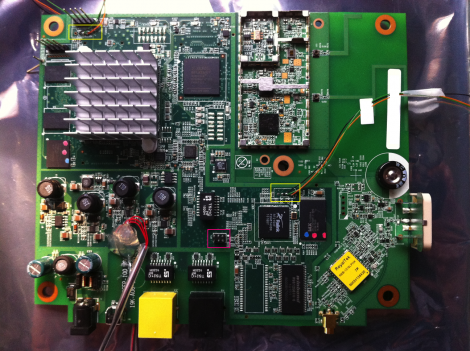
Here’s a picture of the internals of an AT&T Microcell. This hardware extends the cellular network by acting as its own cell tower and connecting to the network via a broadband connection. So if you don’t get service in your home, you can get one of these and hook it up to your cable modem or DSL and poof, you’re cellphone works again. [C1de0x] decided to crack one open and see what secrets it holds.

On the board there are two System-0n-Chips, an FPGA, the radio chip, and a GPS module. There is some tamper detection circuitry which [C1de0x] got around, but he’s saving that info for a future post. In poking and prodding at the hardware he found the UART connections which let him tap into each of the SoCs which dump data as they boot. It’s running a Linux kernel with BusyBox and there are SSH and ROOT accounts which share the same password. About five days of automated cracking and the password was discovered.

But things really start to get interesting when he stumbles upon something he calls the “wizard”. It’s a backdoor which allow full access to the device. Now it looks like the developers must have missed something, because this is just sitting out there on the WAN waiting for someone to monkey with it. Responses are sent to a hard-coded IP address, but a bit of work with the iptables will fix that. Wondering what kind of mischief can be caused by this security flaw? Take a look at the Vodafone femtocell hacking to find out.

Infrared Hides Code Combination On Geocache Puzzle

[AJ] and [Brian] are making sure the geocache challenges they set up take some ingenuity to solve. They’ve just rolled out a two-part cache which uses a code hidden in infrared light.  (Editor’s note from the far future: link wend dead.  Have a look in the Wayback Machine.)

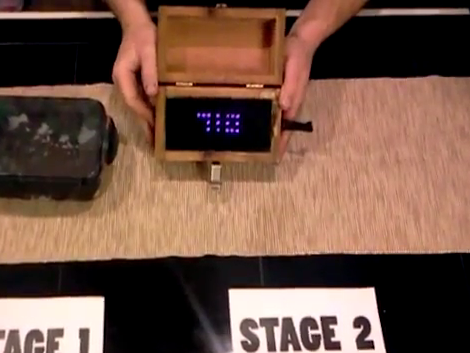
The first part of the cache is a box (the black one on the left) which contains a mysterious hand crank and a smaller box that has a combination lock on it. The second stage is the wooden box on the right. It’s got a hole in the side to receive the hand crank. This connects to the dynamo inside, letting you build up some electricity as it spins. Inside the case you’ll see two red lights blink as the crank is turned, but when you push the button on the outside of the box nothing will happen. That is, unless you’re looking through a camera which can pick up infrared light. The code (710 in this case) is displayed in an array of IR LEDs, and is used to open that combination lock. We wonder if there’s any clues about using a camera or if you have to figure this out on your own.

Don’t miss the video after the break for a full demo of the system.

Continue reading “Infrared Hides Code Combination On Geocache Puzzle”

Floppy Drive As An Audio Sampler

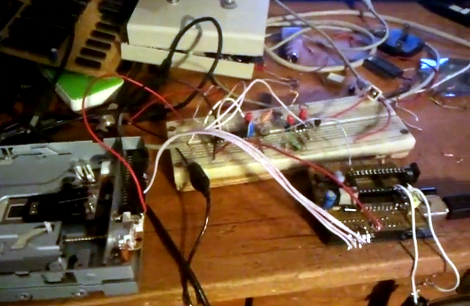
Here’s a floppy drive which is being used as an audio sampler. At first glance we thought this was another offering which drives the stepper motor at a specific frequency to generate that characteristic sound at a target pitch. But that’s not what’s happening at all. The floppy is actually being used as a storage device (go figure).

From what we can tell, it’s being used almost like an 8-track tape. A PWM signal is stored on one circular slice of the disk, then the head can be moved back to that same “track” to play back the wave form. The head doesn’t move during playback, but just keeps reading the same track of bits. To the right you can see an Arduino board. This allows for MIDI control of the track selection. [Alexis] shows off some keyboard control in the video after the break. There’s a buffer chip on the breadboard which allows the audio output to be quickly switched off as the floppy drive head is moved. This keeps garbage out of the sound until the new track can be read.

Continue reading “Floppy Drive As An Audio Sampler”

Putting QR Codes In Copper

Former Hackaday contributor [mikeysklar] has been trying to etch a QR code into a sheet of copper. Although his phone can’t read the CuR codes he’s made so far, he’s still made an impressive piece of milled copper.

The biggest problem [mikey] ran into is getting Inkscape to generate proper cnc tool paths instead of just tracing a bitmap image. He’s got the CNC part of his build under control, but he still can’t find a QR code reader that will register his work.

We’re no stranger to QR codes here at Hack a Day, and it’s very possible the only thing that could be stopping [mikey]’s QR code from being read by a phone is the contrast of the image. We’re thinking a little bit of printer’s ink forced into the non-copper part of the PCB would make the QR code register. Since [mikey] already has a very nice negative etching of his QR code, he could easily use his new board as a printing plate, making infinite paper copies of his copper-based QR code.

If you’ve got any ideas on how [mikey] can get his QR code working, post them in the comments.

Using GPS To Stay Aware Of Red Light Cameras

red-light-camera-alerter

Depending on how you view them, red light cameras are a great way to get people to drive carefully, or an utter nuisance. We agree with the latter opinion, as does [Dave], so he built a handy little device that alerts him when he’s about to approach one of these intersections.

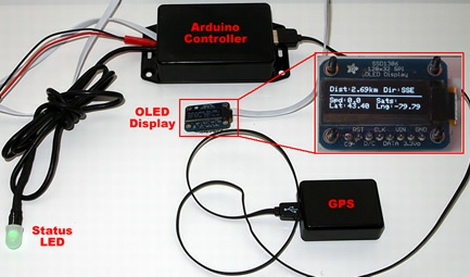
His Red Light Camera Alerter is based around an Atmega 328P sporting the Arduino bootloader. The micro obtains GPS coordinates while [Dave] is driving, comparing his current location with a table of all known red light intersections in the area. As he nears a red light camera, the status LED changes colors from blue to yellow to red as he gets closer, making it easy to keep aware of his situation. He also included an Adafruit OLED display in his device, which relays his speed, GPS coordinates, heading, and actual distance from the red light in real time.

While [Dave] admits that he doesn’t really have a need for the alerter as there are only a couple located in his immediate vicinity, he says it was a fun and easy way to get some experience with using GPS sensors in his projects. He doesn’t have any video of it in action, but you can find the code he uses to drive the alerter on his blog.

DIY “Project Glass” Clone Looks Almost Too Good To Be True

vuzix-project-glass

By now we’re assuming you are all familiar with Google’s “Project Glass”, an ambitious augmented reality project for which they revealed a promotional video last week. [Will Powell] saw the promo vid and was so inspired that he attempted to rig up a demo of Project Glass for himself at home.

While it might seem like a daunting project to take on, [Will] does a lot of work with Kinect-based augmented reality, so his Vuzix/HD webcam/Dragon Naturally Speaking mashup wasn’t a huge step beyond what he does at work. As you can see in the video below, the interface he implemented looks very much like the one Google showed off in their demo, responding to his voice commands in a similar fashion.

He says that the video was recorded in “real time”, though there are plenty of people who debate that claim. We’re guessing that he recorded the video stream fed into the Vuzix glasses rather than recording what was being shown in the glasses, which would make the most sense.

We’d hate to think that the video was faked, mostly because we would love to see Google encounter some healthy competition, but you can decide for yourself.

Continue reading “DIY “Project Glass” Clone Looks Almost Too Good To Be True”