Playing Video Games For A College Application

As a senior in high school, [Owen] has been waiting to hear from the colleges he applied to for months now. Some of his applications wanted a mid-year report to see if he didn’t come down with senioritis. [Owen] realized these colleges allowed additional materials beyond a high school transcript, so he built a tiny video game that shows his electrical and programming skills.

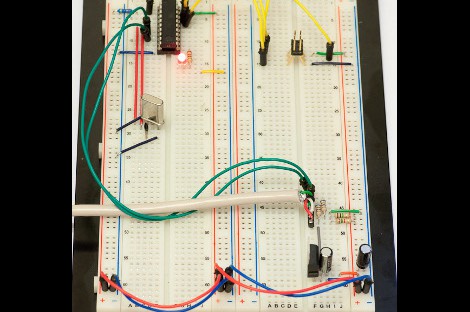
The Demomite, as [Owen] calls his build, is an amazing piece of work. The entire system is based around an ATtiny2313 with a measly 2kB of program memory. Aside from a graphic LCD from Sparkfun and a repurposed NES controller, there isn’t much else to the build. As a study in minimalism and simplicity, [Owen] gets a big congrats from us.

The entire game fits in the 2kB of flash on the ATtiny, mostly due to coding the entire thing in assembly. You can check out [Owen]’s time-lapse construction video, software demo, and the video he sent to colleges after the break.

Continue reading “Playing Video Games For A College Application”
MIDI Controlled Speak-and-Spell

We all love the Arduino, but does the Arduino love us back? There used to be a time when the Arduino couldn’t express it’s deepest emotions, but now that [Nick] hooked up a speech synthesis chip from a Speak & Spell, it can finally whisper sweet robotic nothings to us.

The original 1980s Speak & Spell contained a fabulously high-tech speech synthesizer from Texas Instruments. This innovative chip predated [Stephen Hawking]’s voice and went on to be featured in the numerous speech add-ons for 80s microcomputers like the Apple II, BBC Micro, and a number of Atari arcade games.

[Nick] has been working on his Speak & Spell project for several months now, and he’s getting around to testing the PCBs he made. By his own admission, connecting an Arduino to a Speak & Spell is a little difficult, but he’s got a few tricks up his sleeve to get around the limitations of the hardware. The final goal of [Nick]’s project is a MIDI-controllable Speak & Sound speech synth for the Arduino. This has been done before, but never from a reverse-engineered Speak & Spell.

You can check out [Nick]’s progress in interfacing the Speak & Spell speech chip after the break. There’s still work to do, but it’s still very impressive.

Continue reading “MIDI Controlled Speak-and-Spell”

Learning To Use The V-USB (AVR USB Firmware) Library

The V-USB library is a pretty handy piece of code that lets you add USB connectivity to ATtiny microcontrollers (it was previously named tinyUSB). But if you’ve ever looked into adding the library to your own projects you may have been stymied by the complexity of the code. There are many examples, but there’s a lack of a concise quick-start for the uninitiated. [Joonas Pihlajamaa] has been working to correct that shortfall with his four-part V-USB tutorial series. It’s not for the absolute newbie; you should already be comfortable working with AVR chips but that’s the only real prerequisite we can see.

He starts the series with a look into the hardware considerations. USB provides a 5V power rail but the data lines expect 3.3V logic so this must be accounted for. With the test rig built on a breadboard he moves on to pick apart the code, covering various user-defined variables that you’ll need to set based on your project’s needs. We’re going to keep this on the back burner and hopefully the Troll Sniffing Rat will get a makeover (although we must say comments have been a lot nicer as of late… keep it up!).

We’ve embedded links to all four tutorial parts after the break.

Continue reading “Learning To Use The V-USB (AVR USB Firmware) Library”

RFID Reader Gets User Inputs And Smart Card Write Capability

[Navic] added a slew of abilities to his RFID reader. It’s now a full-featured RFID reader and smart card writer with extras. When we looked at it last time the unit was just an RFID and smart card reader in a project enclosure. You could see the RFID code of a tag displayed on the LCD screen, but there wasn’t a lot more to it than that.

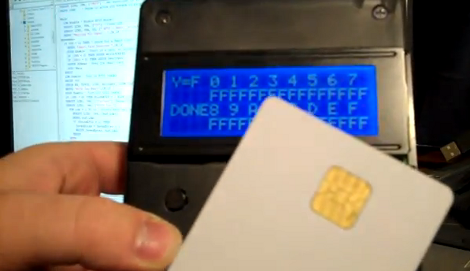
The upgrade uses the same project enclosure but he’s added four buttons below the display. These allow him to access the different features that he’s implemented. The first one, which is shown in the video after the break, allows him to store up to six tags in the EEPROM of the Basic Stamp which drives the unit. He can dump these tag codes to a smart card (pictured above), but also has the option of interfacing with a PC to read from and write to that card.

We don’t think you can directly write RFID tags with the device, but we could be wrong.

Continue reading “RFID Reader Gets User Inputs And Smart Card Write Capability”

Make A Wind Turbine From 55 Gallon Drums

vertical axis wind turbine

Although there are several vertical axis wind turbines listed on greenterrafirma’s page, the one built with 55 gallon drums was especially interesting to us.  Although the spouse approval factor of any of these designs is debatable, at $100, the 55 gallon drum design could provide a very good return on investment.  The tools required to make one of these are relatively simple, so this could make this experiment accessible to those without a vast arsenal of equipment.

If large blue barrels aren’t your thing, the post also features several other turbine designs, including one made with wood and aluminium foil, and one constructed out of PVC pipe.  The video after the break does a good job of explaining the “blue barrel” construction process, but if you’d rather just see this [VAWT] in action, fast forward to 5:25.

Continue reading “Make A Wind Turbine From 55 Gallon Drums”

Attiny25 Based Function Generator Causes A Wave

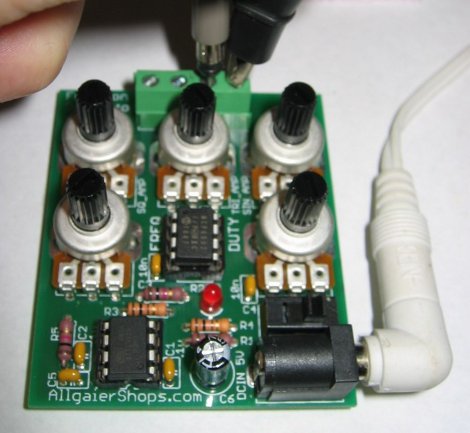
Function generators are a handy bench tool to have around, and while you can usually cobble something together that works, it is much more handy to grab a device when you need it. Thats where this function generator sent to us by [Mohonri]comes in. Based around a ATTiny25 and a rail to rail op amp which is able to replicate frequencies from 1Hz to about 40KHz, in square, triangle, and sinewaves simultaneously.

The function generator also features independent amplitude control on each output. And it’s all on one palm-sized, single-sided PCB. The main part of the code is split into two parts: the main loop gets the inputs and constructs a waveform table in SRAM, and then an ISR reads that table and outputs it to one of the timers, which produces a PWM output, which is low-pass-filtered and then passes through a potentiometer (for amplitude control) and then to an op-amp before landing on a set of terminals.

Though its not 100% perfect, trading speed for a 6 bit resolution, it should be more than enough for most electronic projects. You can pick it up in kit form from the on-line shop, but schematics, software and PCB layouts are also available for download.

Designing A Smarter RF Transceiver

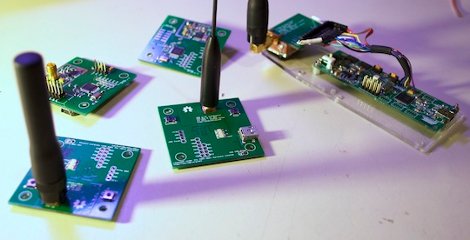
Two  months ago we featured a transceiver based on the Microchip MRF49XA, and a lot of feedback was sent to [hpux735] requesting that some brains be added onto the system. [hpux735] decided that if he was going to do it, might as well go the distance and make a make a native USB transceiver.

The prototype model is designed for use with the Atmel AT90USBKey, and uses the LUFA USB framework. The protocol and packet format was revised, and a Hamming Code implementation was built using look-up tables to give error control. Finally once the prototype was ready to go [hpux735] created some awesome little PCB’s that contain the AVR, radio, antenna hookups, and blinky lights (no project is complete without blinky lights) are all ready to go when you are.

This project has come quite a long way, covers 3 blog pages, uses a fair bit of ribbon cable, but you just got to love when a plan comes together.