It’s The Speech Synthesiser You Wanted, For The Computer You Had

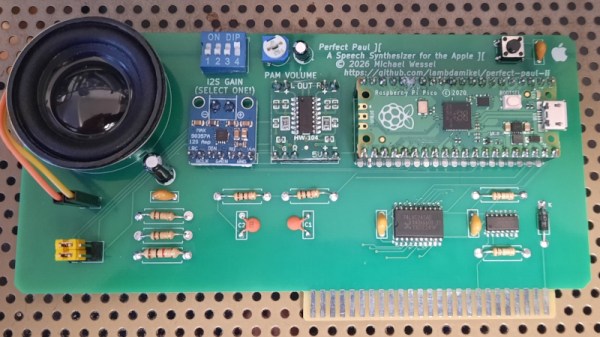
If you had an 8-bit computer in the 1980s and bought a speech synthesiser for it, what you got was invariably an alophone-based synthesiser using the SP0256 or similar. You definitely couldn’t afford DEC’s DECtalk, a high-end standalone speech synthesiser made famous to the masses as the unit used by Stephen Hawking. But now those two worlds can come together, thanks to [Michael Wessel], whose Perfect Paul ][ is a drop-in DECtalk emulator card for the Apple ][.

The PCB includes an RP2040-based Raspberry Pi Pico Zero, plus an I2S DAC and amplifier, speaker, and bus-interface logic. It appears at a set of memory addresses, and interfacing to it is as simple as POKEing DECtalk commands to those addresses. Looking at it, we are guessing this would be easy to bring to other 8-bit era machines.

You can see and hear it sing in the video below the break, and it certainly has the feel of the real thing. We can say with certainty that this would have been a sensation had it appeared back in the early 1980s. This one may be a modern reproduction, but it’s not the first time DECtalk has appeared here; we’ve even brought you a real one.

Continue reading “It’s The Speech Synthesiser You Wanted, For The Computer You Had” →
Speech Synthesis On A 10 Cent Microcontroller

Speech synthesis has been around since roughly the middle of the 20th century. Once upon a time, it took remarkably advanced hardware just to even choke out a few words. But as [atomic14] shows with this project, these days it only takes some open source software and 10-cent microcontroller

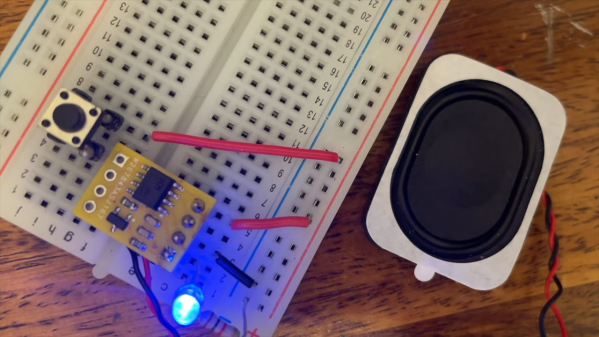
The speech synth is implemented on a CH32V003 microcontroller, known for its remarkably low unit cost when ordered in quantity. It’s a speedy little RISC-V chip running at 48 MHz, albeit with the limitation of just 16 KB of Flash and 2 KB of SRAM on board.

The microcontroller is hooked up to a speaker via a simple single-transistor circuit, which allows for audio output. [atomic14] first demonstrates this by having the chip play back six seconds of low quality audio with some nifty space-saving techniques to squeeze it into the limited flash available. Then, [atomic14] shows how he implemented the Talkie library on the chip, which is a softwarehttps://www.youtube.com/watch?v=RZvX95aXSdM implementation of Texas Instruments’ LPC speech synthesis architecture—which you probably know from the famous Speak & Spell toys. It’s got a ton of built in vocabulary out of the box, and you can even encode your own words with some freely available tools.

We’ve seen [atomic14] tinker with these chips before, too.

Continue reading “Speech Synthesis On A 10 Cent Microcontroller” →

How To Train A New Voice For Piper With Only A Single Phrase

[Cal Bryant] hacked together a home automation system years ago, which more recently utilizes Piper TTS (text-to-speech) voices for various undisclosed purposes. Not satisfied with the robotic-sounding standard voices available, [Cal] set about an experiment to fine-tune the Piper TTS AI voice model using a clone of a single phrase created by a commercial TTS voice as a starting point.

Before the release of Piper TTS in 2023, existing free-to-use TTS systems such as espeak and Festival sounded robotic and flat. Piper delivered much more natural-sounding output, without requiring massive resources to run. To change the voice style, the Piper AI model can be either retrained from scratch or fine-tuned with less effort. In the latter case, the problem to be solved first was how to generate the necessary volume of training phrases to run the fine-tuning of Piper’s AI model. This was solved using a heavyweight AI model, ChatterBox, which is capable of so-called zero-shot training. Check out the Chatterbox demo here.

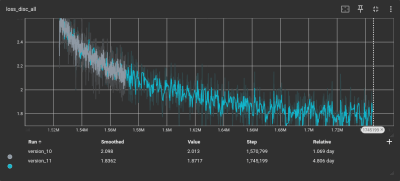
As the loss function gets smaller, the model’s accuracy gets better

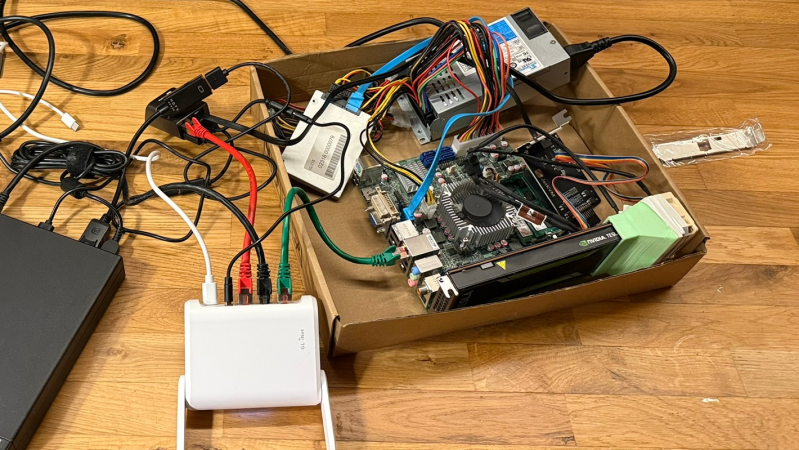
Training began with a corpus of test phrases in text format to ensure decent coverage of everyday English. [Cal] used ChatterBox to clone audio from a single test phrase generated by a ‘mystery TTS system’ and created 1,300 test phrases from this new voice. This audio set served as training data to fine-tune the Piper AI model on the lashed-up GPU rig.

To verify accuracy, [Cal] used OpenAI’s Whisper software to transcribe the audio back to text, in order to compare with the original text corpus. To overcome issues with punctuation and differences between US and UK English, the text was converted into phonemes using espeak-ng, resulting in a 98% phrase matching accuracy.

After down-sampling the training set using SoX, it was ready for the Piper TTS training system. Despite all the preparation, running the software felt anticlimactic. A few inconsistencies in the dataset necessitated the removal of some data points. After five days of training parked outside in the shade due to concerns about heat, TensorBoard indicated that the model’s loss function was converging. That’s AI-speak for: the model was tuned and ready for action! We think it sounds pretty slick.

If all this new-fangled AI speech synthesis is too complex and, well, a bit creepy for you, may we offer a more 1980s solution to making stuff talk? Finally, most people take the ability to speak for granted, until they can no longer do so. Here’s a team using cutting-edge AI to give people back that ability.

Convert Any Book To A DIY Audiobook?

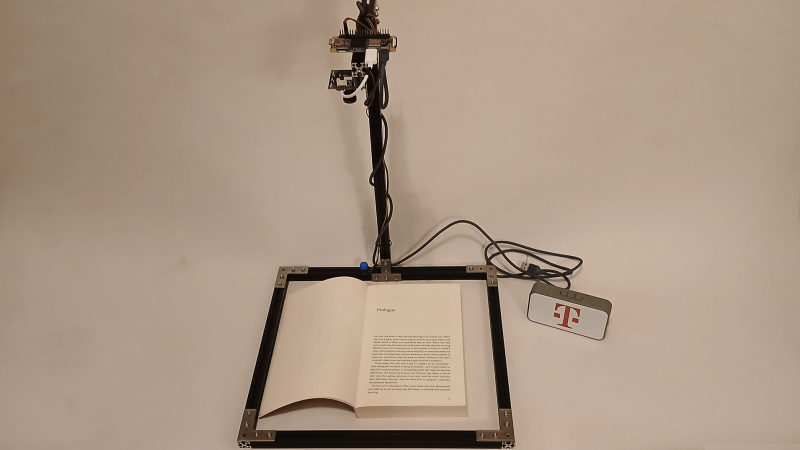
If the idea of reading a physical book sounds like hard work, [Nick Bild’s] latest project, the PageParrot, might be for you. While AI gets a lot of flak these days, one thing modern multimodal models do exceptionally well is image interpretation, and PageParrot demonstrates just how accessible that’s become.

[Nick] demonstrates quite clearly how little code is needed to get from those cryptic black and white glyphs to sounds the average human can understand, specifically a paltry 80 lines of Python. Admittedly, many of those lines are pulling in libraries, and some are just blank, so functionally speaking, it’s even shorter than that. Of course, the whole application is mostly glue code, stitching together other people’s hard work, but it’s still instructive and fun to play with.

The hardware required is a Raspberry Pi Zero 2 W, a camera (in this case, a USB webcam), and something to hold it above the book. Any Pi with the ability to connect to a camera should also work, however, with just a little configuration.

On the software side, [Nick] pulls in the CV2 library (which is the interface to OpenCV) to handle the camera interfacing, programming it to full HD resolution. Google’s GenAI is used to interface the Gemini 2.5 Flash LLM via an API endpoint. This takes a captured image and a trivial prompt, and returns the whole page of text, quick as a flash.

Finally, the script hands that text over to Piper, which turns that into a speech file in WAV format. This can then be played to an audio device with a call out to the console aplay tool. It’s all very simple at this level of abstraction.

Continue reading “Convert Any Book To A DIY Audiobook?” →

Christmas Comes Early With AI Santa Demo

With only two hundred odd days ’til Christmas, you just know we’re already feeling the season’s magic. Well, maybe not, but [Sean Dubois] has decided to give us a head start with this WebRTC demo built into a Santa stuffie.

The details are a little bit sparse (hopefully he finishes the documentation on GitHub by the time this goes out) but the project is really neat. Hardware-wise, it’s an audio-enabled ESP32-S3 dev board living inside Santa, running the OpenAI’s OpenRealtime Embedded SDK (as implemented by ExpressIf), with some customization by [Sean]. Looks like the audio is going through the newest version of LibPeer and the heavy lifting is all happening in the cloud, as you’d expect with this SDK. (A key is required, but hey! It’s all open source; if you have an AI that can do the job locally-hosted, you can probably figure out how to connect to it instead.)

This speech-to-speech AI doesn’t need to emulate Santa Claus, of course; you can prime the AI with any instructions you’d like. If you want to delight children, though, its hard to beat the Jolly Old Elf, and you certainly have time to get it ready for Christmas. Thanks to [Sean] for sending in the tip.

If you like this project but want to avoid paying OpenAI API fees, here’s a speech-to-text model to get you started.We covered this AI speech generator last year to handle the talky bit. If you put them together and make your own Santa Claus (or perhaps something more seasonal to this time of year), don’t forget to drop us a tip!

“Glasses” That Transcribe Text To Audio

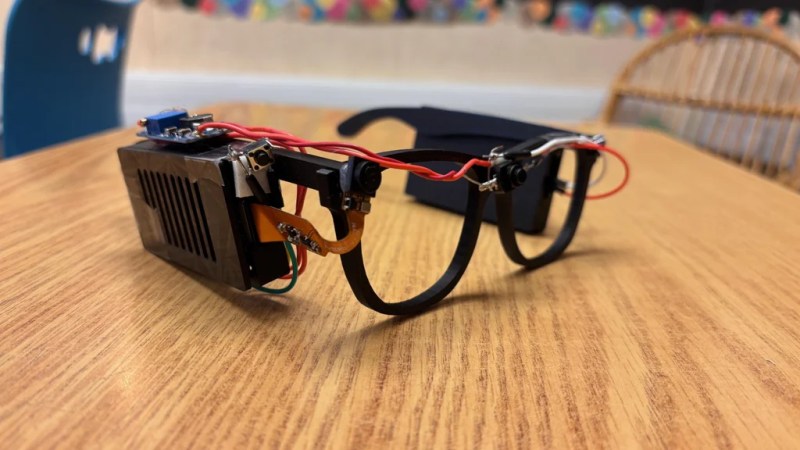
Glasses for the blind might sound like an odd idea, given the traditional purpose of glasses and the issue of vision impairment. However, eighth-grade student [Akhil Nagori] built these glasses with an alternate purpose in mind. They’re not really for seeing. Instead, they’re outfitted with hardware to capture text and read it aloud.

Yes, we’re talking about real-time text-to-audio transcription, built into a head-worn format. The hardware is pretty straightforward: a Raspberry Pi Zero 2W runs off a battery and is outfitted with the usual first-party camera. The camera is mounted on a set of eyeglass frames so that it points at whatever the wearer might be “looking” at. At the push of a button, the camera captures an image, and then passes it to an API which does the optical character recognition. The text can then be passed to a speech synthesizer so it can be read aloud to the wearer.

It’s funny to think about how advanced this project really is. Jump back to the dawn of the microcomputer era, and such a device would have been a total flight of fancy—something a researcher might make a PhD and career out of. Indeed, OCR and speech synthesis alone were challenge enough. Today, you can stand on the shoulders of giants and include such mighty capability in a homebrewed device that cost less than $50 to assemble. It’s a neat project, too, and one that we’re sure taught [Akhil] many valuable skills along the way.

Continue reading ““Glasses” That Transcribe Text To Audio” →

Speaking Computers From The 1970s

Talking computers are nothing these days. But in the old days, a computer that could speak was quite the novelty. Many computers from the 1970s and 1980s used an AY-3-8910 chip and [InazumaDenki] has been playing with one of these venerable chips. You can see (and hear) the results in the video below.

The chip uses PCM, and there are different ways to store and play sounds. The video shows how different they are and even looks at the output on the oscilloscope. The chip has three voices and was produced by General Instruments, the company that initially made PIC microcontrollers. It found its way into many classic arcade games, home computers, and games like Intellivision, Vectrex, the MSX, and ZX Spectrum. Soundcards for the TRS-80 Color Computer and the Apple II used these chips. The Atari ST used a variant from Yamaha, the YM2149F.

There’s some code for an ATmega, and the video says it is part one, so we expect to see more videos on this chip soon.

General instruments had other speech chips, and some of them are still around in emulated form. In fact, you can emulate the AY-3-8910 with little more than a Raspberry Pi.

Continue reading “Speaking Computers From The 1970s” →