Supercap Lights Your Way In Times Of Need

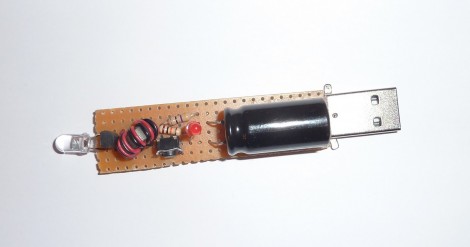
You won’t find [Antoine] stumbling around in the dark. He just finished working on this LED flashlight which draws power from a super-capacitor (translated). He realized that lighting a high-efficiency LED takes so little power that there are many benefits in play when deciding to move away from batteries. When compared to a super capacitor, batteries have a shorter life span, are heavier, and take up more space.

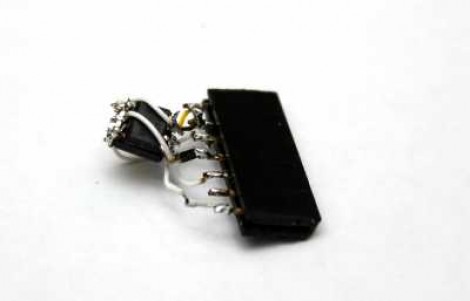
The biggest drawback of a super capacitor in this situation is the low voltage operation. The output will start at 2.7V and drop as the current is discharged. [Antoine] used one of our favorite simple circuits to overcome this issue, the Joule Thief. That circuit is commonly seen paired with an LED in order to boost input voltage to a usable level. That’s precisely what’s going on here.

The final hack in his circuit is the addition of that red LED which you can see in the middle of the board. This takes the place of a Zener diode and drops the charging voltage to a safe level. That indicator light will not come on until the cap is fully topped off. This way it tells you when the device is done charging.
Cockroft-Walton Multiplier Can Output Positive Or Negative Voltage

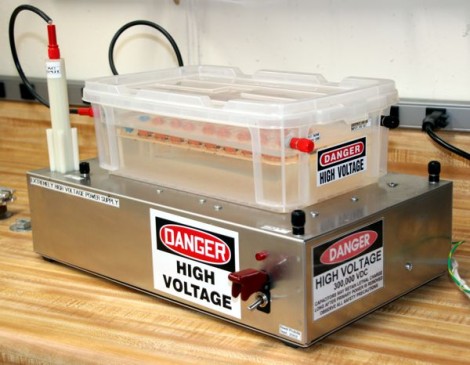
If you’ve already dipped your toes into high-voltage power supply pool you may be thirsty for a bit more knowledge. Here’s a neat illustration of how to build a voltage multiplier that can output a positive or negative supply. It is based on a design known as the Cockroft-Walton Multiplier. It’s the add-on housed in the plastic box seen in the image above. It uses diodes and capacitors in an orientation very common for generating high voltages. In fact, the same thing can be found in that high-voltage bulletin board. The place this differs is when it comes to connecting the multiplier to the PSU.

If you look closely you can see one red and one black banana plug jack poking out the end of the plastic container. There is also a pair of these on the other end. The multiplier has been designed so that reconfiguring the inputs and outputs changes how it works. Each jack has been labeled with one possible input and one output. Choose the desired output (DC+ or DC-) and then follow the labels for the rest of the connections.

What can you do with this setup? Check out the clip after the break that shows it powering a lifter.

Continue reading “Cockroft-Walton Multiplier Can Output Positive Or Negative Voltage”

JTAG Dongle Pushes Code To FPGA After Bootup

This gnarly beast has near-magical qualities. [Sprite_TM] patched it together as a dongle which attaches to a JTAG header (we’re fairly certain this is not a standard footprint for that interface though). He uses it to push code to an FPGA after that device boots. Why? Well, there’s several reason, but the most generic answer is that some boards will not boot unless there is a chain of trust that validates the code which will be running.

In this case, [Sprite_TM] is using a knock-off board he acquired from a Chinese supplier. It’s a hardware network terminal (thin client), and as you can see in the video after the break, it works just fine. But that’s pretty boring and he wanted to use it for his own purposes. When he plugs in the dongle and powers up the board the network terminal is nowhere to be found, replaced with the code to play Pac-Man as if were a full arcade cabinet.

The dongle is simply a female DIL header, an ATtiny85, and a flash memory chip. The AVR has a software UART that speaks XSVF, the protocol used to push data to the FPGA. The data to be written is stored in the memory chip, and with that header in place reprogramming the AVR is just a matter of connecting an ISP programmer. Brilliant!

Continue reading “JTAG Dongle Pushes Code To FPGA After Bootup”

Using A Cheap Accelerometer With Arduino Comes With A Catch

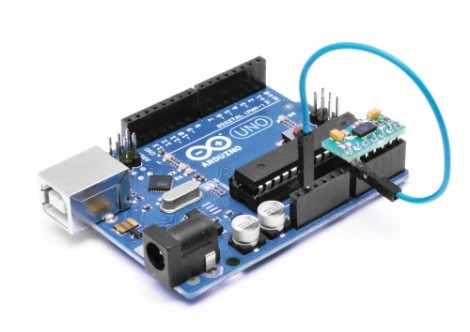
[Boris Landoni] put together a guide to using an inexpensive 3-axis accelerometer with Arduino. The chip that he chose for the exercise is an MMA7455L made by Freescale. It’s got a lot of nice features packed into it, using hardware to do some of the things you’d need software for with other chips like reporting in which direction the chip is moving, detecting when movement has stopped, and few others. It’s an I2C device, so the examples he provides will be super simple to port to your uC of choice.

But as the title says, there’s a catch. The chip is extremely versatile and you can get your hands on one for under $2. But check out the size of it. That’s a DFN (dual flat no-lead) package which means there are no pins on it. The package has solder contacts on the bottom which do not protrude out the sides. If you want to do some at-home prototyping with the chip you’ll need a hot air pencil or reflow gear as hand soldering is unlikely to be successful. We’re not saying it’s impossible, but it is quite tricky.

Of course, if you’ve got the secret to getting this done with a quality soldering iron we’d like to hear about it.

ultimate-breadboard

The Ultimate Breadboard – A Prototyping Station That Has It All

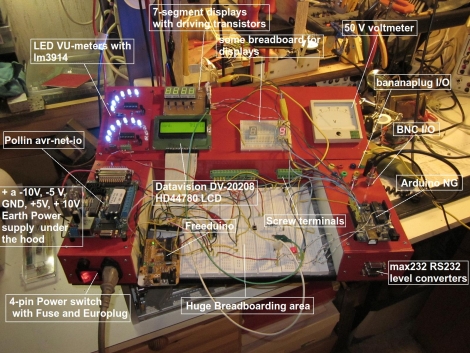
[Claudio] was working on a homebrew oscilloscope project when he started thinking about how unsuitable a standard breadboard is for a large-scale project. Rather than adding components on top of components until they became what he lovingly calls a “fragile, unforgiving crapstack”, he decided to build himself the Ultimate Breadboard.

He packed so much into his design, that it’s honestly hard to know where to begin describing it. Aside from an appropriately large breadboarding surface embedded in the center of the console, he added a power supply to the left hand side, which sits just below an Avr-Net-IO board. The right side of the console features an Arduino NG, and a pair of level converters. He also added some LED-based VU meters, a couple of 7-segment displays, an LCD display, an analog voltmeter, along with plenty of I/O connectors.

The Ultimate Breadboard might look a bit daunting at first, but it seems like an awesome setup on which to do any sort of prototyping. Be sure to check out the video below for more details and to see [Claudio] give a tour of the device.

Continue reading “The Ultimate Breadboard – A Prototyping Station That Has It All”

Dice Gauntlet Joins Cosplay With D&D Gaming

If you needed a reason to dress up for your next Dungeons & Dragons adventure this is surely it. Not only will this attractive wrist adornment go right along with your medieval theme, but the gauntlet doubles as a multi-sided digital die.

Sparkfun whipped up this tutorial which details the build. Yep, they’re hawking their own goods but we must say this is one of the few projects using sewable electronics which we thoroughly enjoy. It calls for several Lilypad modules, including an Arduino board, accelerometer, and slide switches. The switches let you select the number of sides for the die you are about to roll. The accelerometer starts the fun when you shake your wrist back and forth (that’s what she said). The project is powered by a rechargeable battery, which we always like to see, and uses a four-digit seven segment display located where the face of a wristwatch is normally found.

Of course, you could get the shaking action and use no batteries at all if you wish.

Suzuki V-Strom Current Gear Indicator

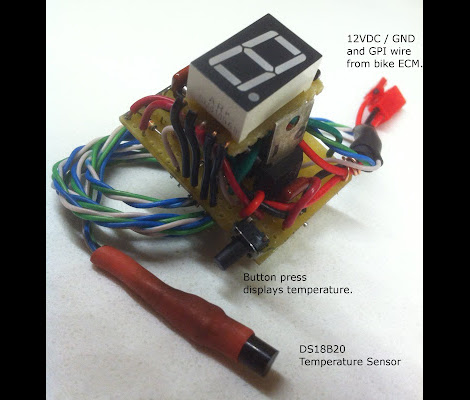
[Iron Jungle] just finished building this gear indicator for his motorcycle. It uses a red 7-segment display to show the rider what gear is currently engaged. This hack is pretty common and makes us wonder why all motorcycles don’t come standard with the feature? But then again, if they did you wouldn’t have a reason to hack them.

The motorcycle does have a gear sensor; apparently it only lacks a way to display this data. The sensor outputs a signal between 0 and 5V which [Iron Jungle] reads using a PICAXE 18M2 microcontroller. Patching into that signal wasn’t hard at all. Once he found the correct wire he simply removed a portion of the insulation and soldered a lead to the conductor. This should stand up to the vibrations encountered in an automotive application like this one. Since the computing power is already there, he also included a DS18B20 to take ambient air temperature readings. Check out the quick demo after the break.

This is not the first time we’ve seen the V-Storm get a custom gear indicator. But if you really want to go all out, perhaps you need to build an interface for your tablet or smart phone. Continue reading “Suzuki V-Strom Current Gear Indicator”