
What Have We Dumped On The Moon?

If you read a headline that signs of intelligent life were found on the moon, you might suspect a hoax. But they are there! Humans have dumped a lot of stuff on the moon, both in person and via uncrewed rockets. So after the apocalypse, what strange things will some alien exo-archaeologist find on our only natural satellite?

The Obvious

Of course, we’ve left parts of rockets, probes, and rovers. Only the top part of the Apollo Lunar Excursion Module left the moon. (See for yourself in the Apollo 17 ascent video below.) The bottoms are still there, along with the lunar rovers and a bunch of other science instruments and tools. There are boots and cameras, as you might expect.

But what about the strange things? As of 2012, NASA compiled a list of all known lunar junk that originated on Earth. The list starts with material from the non-Apollo US programs like the Surveyor and Lunar Prospector missions. Next up is the Apollo stuff, which is actually quite a bit: an estimated 400,000 pounds, we’ve heard. This ranges from the entire descent stage and lunar overshoes to urine bags. There are even commemorative patches and a gold olive branch.

After that, the list shows what’s known to be on the surface from the Russian space program, along with objects of Chinese, Indian, Japanese, and European origin.
Continue reading “What Have We Dumped On The Moon?”

ESP32 Hosts A Public Website

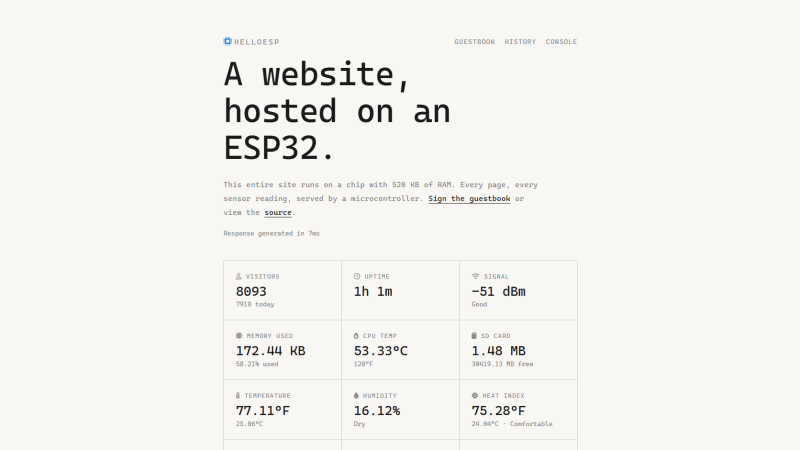
If you wanted to host a website, you could use any one of a number of online services, or spin up a server on a spare computer at home. If you’re a bit more daring, you could also do what [Tech1k] did, and run one on an ESP32 microcontroller.

The site in question is available (or at least, should be) at HelloESP.com. The first revision ran entirely on an ESP32, serving pages from a SPIFFS filesystem. The device was also fitted with a BME280 environment sensor and an OLED screen. It had an uptime of 500 days before the board failed.

The site has since been relaunched, running on a board that is framed on [Tech1k]’s wall. It runs on an ESP32-WROOM-32D, paired with a BME280 again, along with a CCS811 CO2 and air quality sensor and a DS3231 RTC for accurate timekeeping. The ESP32 is setup to hold an outbound WebSocket to a Cloudflare worker, with the Worker routing HTTP requests to the site via that route. This avoids the need for port forwarding for the ESP32 to be visible to the outside world, and the Cloudflare Worker will also serve a static version of the page in the case of WiFi dropouts or other temporary failures.

It’s true that this isn’t a completely unheard of project—microcontrollers have been working as simple web servers for a long time now. Still, [Tech1k] did a great job of making this as robust as possible and more like a real functional webserver rather than just something that runs on a local network to serve up a config page. That’s worthy of note.

You can run webservers on all kinds of chips these days, even the Raspberry Pi Pico. If you’re doing web stuff on something weird, you know we always wanna hear about it on the tipsline!

DIY Smart Button Gets Surprisingly Complicated

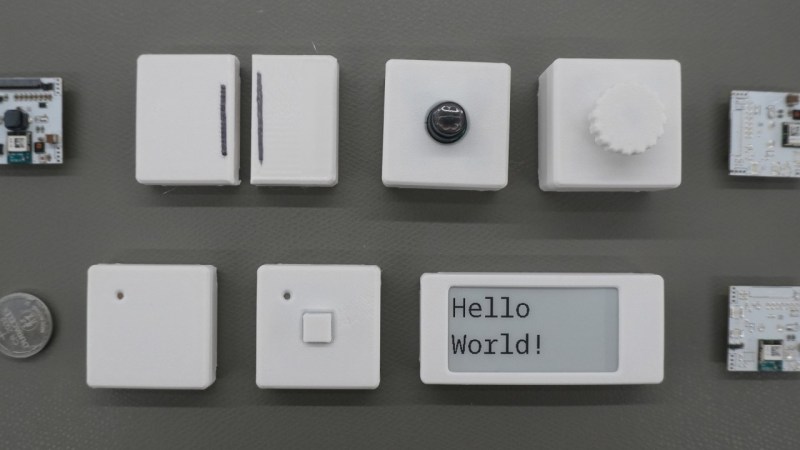
There’s a reason that the standards specifications for various wireless communications protocols are extremely long and detailed. [Made by Dennis] found this out first hand when he decided to build a wireless button from scratch.

The major issues with wireless devices is one of power consumption. If reliable power is available from a wall plug or solar panel, this isn’t as serious of a concern. But [Dennis] is using batteries for his buttons, so minimizing power consumption is a priority. He’s going with the nRF52, a microcontroller designed for low power and which has a built in wireless radio, and configuring it in a way that uses the least amount of energy possible.

From there, [Dennis] turns to the wireless communication. He goes into detail about how the microcontroller is woken up, how it sends its data packets to another wireless-enabled microcontroller, and how they handle handshakes and acknowledgements of data. For something as simple as a button press, it gets quickly more complicated especially when adding some basic encryption and security to the communications protocol.

With all the design decisions out of the way, the system can be built. [Dennis] has created custom PCBs for his devices, and also included some expansion I/O for other sensors and peripherals beyond just a pushbutton. All of the schematics and code are available on the project’s GitHub page and the STL files can be found at Printables.

For those new to offline home automation or who are turning away from cloud-based services lately, there are some easy entry points that don’t require much extra hardware or expenditure.

Continue reading “DIY Smart Button Gets Surprisingly Complicated”









