Maker Faire NY: Chipsetter, The Pick And Place For Your Production

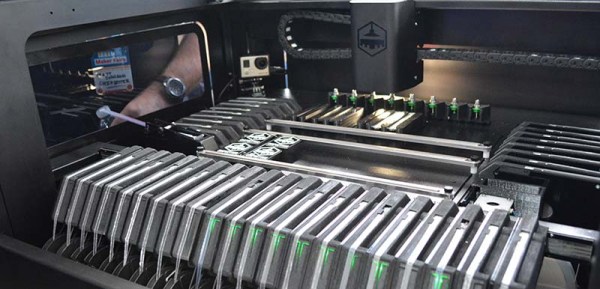
This weekend at Maker Faire, Chipsetter showed off their pick and place machine. It is, in my opinion, the first pick and place machine designed for hackerspaces, design labs, engineering departments, and prototypers in mind. It’s not designed to do everything, but it is designed to everything these places would need, and is much more affordable than the standard, low-end Chinese pick and place machine.

Inexpensive and DIY pick and place machines are familiar territory for us. A few years ago, we saw the Carbide Labs pick and place machine, a machine that allows you to put a board anywhere, pull chips out of tape, and place them on pasted pads. The Retro Populator is a pick and place machine that retrofits onto a 3d printer. The Firepick Delta, another Hackaday Prize project, takes a mini-factory to its logical conclusion and is capable of 3D printing, populating boards, dispensing paste, and creating its own circuit boards. All of these machines have one peculiarity: they are entirely unlike normal, standard, industrial pick and place machines.
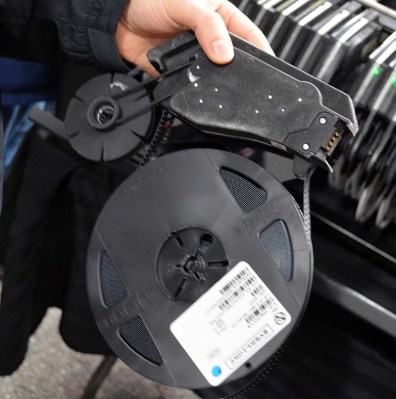
The Chipmaker feeder. Production versions of this feeder will be injection-molded plastic. This one is SLA nylon.

The idea of any startup is to build a minimum product, and the idea behind Chipsetter is to build a minimally viable tool. For their market, that means being able to place 0402 components (although it can do 0201, the team says the reliability of very small packages isn’t up to their standards), it means being able to shoot 1250 components per hour, and it must have inexpensive feeders to accept standard tape.

This is a complete departure from the spec sheet of a machine from Manncorp. For the ‘professional’ machines, a single feeder can cost hundreds of dollars. According to Chipsetter founder Alan Sawula, the feeders for this machine will hopefully, eventually cost about $50. That’s almost cheap enough to keep your parts on the feeder. A pro machine can handle 01005 components, but 0402 is good enough for most projects and products.

This is the closest I’ve seen to a pick and place machine designed to bridge the gap between contract manufacturers and hackerspaces. Most of the audience of Hackaday – at least as far as we’re aware – doesn’t have the funds to outsource all their manufacturing to a contract manufacturer. Most of the audience of Hackaday, though, or any hackerspace, could conceivably buy a Chipsetter. The Chipsetter isn’t designed to be the best, but when it comes to placing parts on paste, the best is overkill by a large margin.

The Chipsetter has a Kickstarter going right now. They’re about halfway funded, with a little more than three weeks to go. Right now, if you’re looking at pick and place machines, I’d highly suggest checking out the Chipsetter. It works, and with forty feeders it’s cheaper and more capable than the lowest priced ‘pro’ machines.

 

Hackaday Prize Entry: Crowdsourced Tactile Interfaces

Your microwave, your TV, and almost the entire inventory of Best Buy have one thing in common: they all uses membrane switches for user interaction, and that means these devices are inaccessible for the blind. This project for the Hackaday Prize is going to change that by building a crowdsourced effort to design Braille keypads for thousands of appliances.

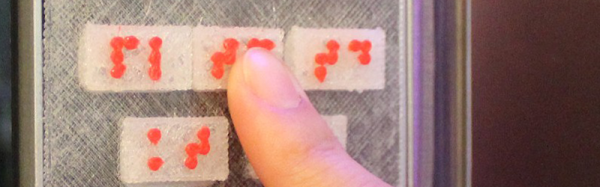
There are two aspects of this project that are exceptionally interesting, the least of which is how to make Braille keypads for a microwave. This is done with a 3D printer using a flexible or semi-flexible filament. These keypads are designed to overlay the membrane keypad on consumer electronic devices, and the initial testing reveals these keypads are robust and useful enough for blind users.

A 3D printed overlay for a microwave is simple, though. The big question is how these overlays are designed. For this, the project suggests a crowdsourced effort of hundreds of designers turning photographs of keypads into Braille overlays. The process begins with a few pictures of a keypad with a reference object – for example, a dollar bill. These photographs are scaled to the correct dimensions, a few outlines are made, and the buttons with Braille text are designed. It’s a brilliant use of people who have just enough experience in Photoshop to be useful, and since this is a crowdsourced effort, work isn’t duplicated. The keypad overlays for one specific make and model of microwave can be printed over and over again, bootstrapping an effort to make membrane keypads useful for all blind people.

Very, Very Tiny X86 Systems

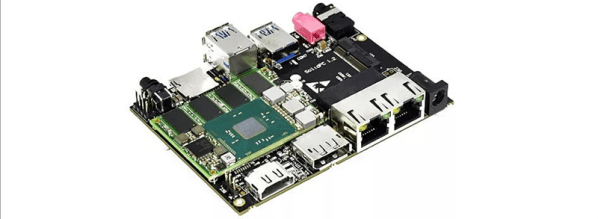
The most interesting market for Intel in recent years has been very, very small form factor PCs. ARM is eating them alive, of course, but there are still places where very small and very low power x86 boards make sense. The latest release from SolidRun is the smallest we’ve seen yet. The SolidPC Q4 is one of the smallest x86 implementation you can find. It’s based around the MicroSoM, a module even smaller than a Raspberry Pi, and built around a carrier board that has all the ports you could ever want from the tiniest PC ever.

The SolidPC Q4 is technically only a carrier board featuring a microSD slot, Displayport, HDMI 1.4B, two RJ45 ports with the option for PoE, three USB 3.0 Host ports, jacks for mic and stereo sound, and an M.2 2230 connector for a wireless module. The interesting part of this launch is the MicroSoM, a System on Module based on Intel’s Braswell architecture. Two models are offered, based on the quad-core Atom E8000 and the Pentium N3710. Both modules feature up to 8GB of DDR3L RAM and 4GB of eMMC Flash.

The interesting part of this launch is the MicroSoM, a System on Module based on Intel’s Braswell architecture. Two models are offered, based on the quad-core Atom E8000 and the Pentium N3710. Both modules feature up to 8GB of DDR3L RAM and 4GB of eMMC Flash. The size of these modules is 52.8mm by 40mm, or just a shade larger than the stick-of-gum-sized Raspberry Pi Zero.

The SolidPC isn’t intended to be a Raspberry Pi competitor. While those cheap ARM boards are finding a lot of great uses in industry, they’re no replacement for a small, x86 single board computer. The pricing for this module starts at $157 according to the product literature, with a topped out configuration running somewhere between $300 and $350, depending on options like a heatsink, enclosure, or power adapter. If you want a small single board computer with drivers for everything, there aren’t many other options: you certainly wouldn’t pick a no-name Allwinner board.

Amazon Offers $2.5M To Make Alexa Your Friend

Amazon has unveiled the Alexa Prize, a $2.5 Million purse for the first team to turn Alexa, the voice service that powers the Amazon Echo, into a ‘socialbot’ capable of, “conversing coherently and engagingly with humans on popular topics for 20 minutes”.

The Alexa Prize is only open to teams from colleges or universities, with the winning team taking home $500,000 USD, with $1M awarded to the team’s college or university in the form of a research grant. Of course, the Alexa Prize grants Amazon a perpetual, irrevocable, worldwide, royalty-free license to make use of the winning socialbot.

It may be argued the Alexa Prize is a competition to have a chat bot pass a Turning Test. This is a false equivalency; the Turing Test, as originally formulated, requires a human evaluator to judge between two conversation partners, one of which is a human, one of which is a computer. Additionally, the method of communication is text-only, whereas the Alexa Prize will make use of Alexa’s Text to Speech functionality. The Alexa Prize is not a Turing Test, but only because of semantics. If you generalize the phrase, ‘Turing Test’ to mean a test of natural language conversation, the Alexa Prize is a Turing Test.

This is not the first prize offered for a computer program that is able to communicate with a human in real time using natural language. Since 1990, the Loebner Prize, cosponsored by AI god Marvin Minsky, has offered a cash prize of $100,000 (and a gold medal) to the first computer that is indistinguishable from a human in conversation. Since 1991, yearly prizes have been awarded to the computer that is most like a human as part of the competition.

For any team attempting the enormous task of developing a theory of mind and consciousness, here are a few tips: don’t use Twitter as a dataset. Microsoft tried that, and their chatbot predictably turned racist. A better idea would be to copy Hackaday and our article-generating algorithm. Just use Markov chains and raspberry pi your way to arduino this drone.

Creating A PCB In Everything: Eagle DRC And Gerber Files

For the next post in the Creating A PCB series, we’re going to continue our explorations of Eagle. In Part 1,  I went over how to create a part from scratch in Eagle. In Part 2, we used this part to create the small example board from the Introduction.

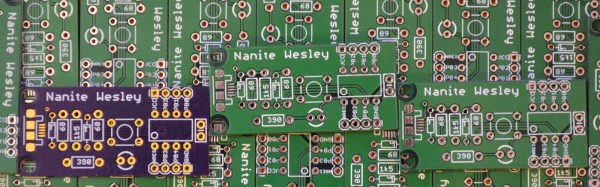
This time around I’ll be going over Design Rule Check (DRC) — or making sure your board house can actually fabricate what you’ve designed. I’ll also be covering the creation of Gerber files (so you can get the PCB fabbed anywhere you want), and putting real art into the silkscreen and soldermask layers of your boards.

The idea behind this series is to explore different EDA suites and PCB design tools by designing the same circuit in each. You can check out the rest of the posts in this series right here.

Continue reading “Creating A PCB In Everything: Eagle DRC And Gerber Files”

Prusa Releases 4-Extruder Upgrade

Let’s talk multi-material printing on desktop 3D printers. There are a lot of problems when printing in more than one color. The easiest way to do this is simply to add another extruder and hotend to a printer, but this reduces the build volume, adds more mass to the part of the printer that doesn’t need any more mass, and making sure each nozzle is at the correct Z-height is difficult. The best solution for multi-material printing is some sort of mixing hotend that only squirts plastic from one nozzle, fed by a Bowden system.

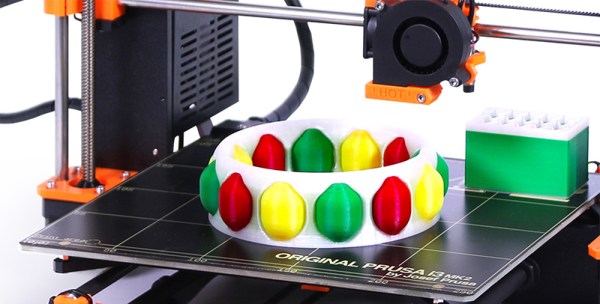
[Prusa], the man, not the printer, has just released a multi-material upgrade for the Prusa i3 mk2. This upgrade allows the i3 mk2 to print in four colors using only one hotend, and does it in a way that allows anyone to turn their printer into a multi-material powerhouse.

The basic idea behind this multi-material upgrade is a four-way Y-shaped filament path. Each color of filament is loaded into a separate extruder, and when the material is changed the currently ‘active’ filament is retracted out of the heater block to just before where the filament paths cross. After the filament is swapped in the hotend, the remainder of the previous color of filament is squirted out onto a small (3x5cm) tower.

Because this is an upgrade to the i3 mk2, Prusa needed a way to add three additional stepper motors to the build without having to replace the printer’s electronics board. He’s doing this with an SSR-based multiplexer that allows one stepper motor output and a few GPIOs to control four motors.

If you have an i3 mk2, a four- material upgrade for your printer will be available for $249 USD in a few months. That means a full color, four-extruder i3 mk 2 costs less than $1000 USD, a price no other multi-material printer can touch.

You can check out [Prusa’s] video of the multi-material upgrade below. The printer and the man will be touring the US for Maker Faire and Open Hardware Summit, and you can bet we’re going to get some video of this multi-material printer in action.

Continue reading “Prusa Releases 4-Extruder Upgrade”

Ask Hackaday: How Do You Make A Hotplate?

Greetings fellow nerds. The Internet’s favorite artificial baritone chemist has a problem. His hotplates burn up too fast. He needs your help to fix this problem.

[NurdRage] is famous around these parts for his very in-depth explorations of chemistry including the best ways to etch a PCB, building a thermometer probe with no instructions, and chemical synthesis that shouldn’t be performed by anyone without years of experience in a lab. Over the past few years, he’s had a problem: hotplates suck. The heating element is usually poorly constructed, and right now he has two broken hotplates on his bench. These things aren’t cheap, either: a bare-bones hotplate with a magnetic stirrer runs about $600.

Now, [NurdRage] is asking for help. He’s contacted a few manufacturers in China to get a hundred or so of these hotplate heating elements made. Right now, the cost for a mica and metal foil hotplate is about $30 / piece, with a minimum order quantity of 100. That’s $3,000 that could be better spent on something a bit more interesting than a heating element, and this is where you come in: how do you build the heating element for a hotplate, and do it cheaply?

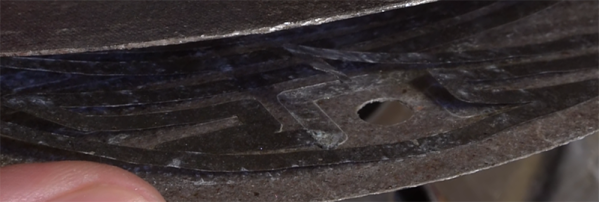
If you buy a hotplate from the usual lab equipment supplier, you’ll get a few pieces of mica and a thin trace of metal foil. Eventually, the metal foil will oxidize, and the entire hotplate will stop working. Repairs can be done with copper tape, but by the time that repair is needed, the heating element is already on its way out.

The requirements for this heating element include a maximum temperature of around 350 ºC. That’s a fair bit hotter than any PCB-based heat bed from a 3D printer gets, so consider that line of reasoning a dead end. This temperature is also above what most resins, thermoplastics, and composites can handle, which is why these hotplates use mica as an insulator.

Right now, [NurdRage] will probably end up spending $3,000 for a group buy of these heating elements. That’s really not that bad – for the price of five hotplates, he’ll have enough heating elements to last through the rest of his YouTube career. There must be a better way, though, so if you have an idea of how to make a high-temperature heating element the DIY way, leave a note in the comments.