Man Proposes To Girlfriend With An Arc Reactor

arc

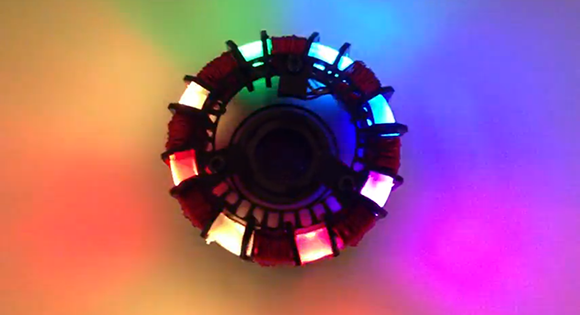
Thinking long and hard about how to propose to his girlfriend, [Ed] hit upon a great idea: use an arc reactor as the ring box, with enough LED lights to outshine all but their love, and servos to present the ring and tug at the heartstrings.

[Ed] set about giving his now-fiancé from his arc reactor heart by building a simple circular arrangement of adafruit RGB LED strip and an Arduino. There are two modes for this arc reactor: a light up mode that simply looks awesome, and a ‘ring mode’ that uses two servos to open the front cover and bring the engagement ring into view.

After [Ed]’s fiancé said yes, the cover in the center of the arc reactor closes for its continued use as a desk ornament. You can check out [Ed]’s proposal contraption in action after the break.

Continue reading “Man Proposes To Girlfriend With An Arc Reactor”

Building Pong For An 8-pin Micro

pong

For playing around with video signals and trying to create a an interesting microcontroller project, you can’t do better than the classic Pong. We’ve seen our share of microcontroller-based pong builds, but rarely have we seen an 8-pin microcontroller recreate every part of the first video game.

[Tim] started his PIC12F1840-based Pong build with just a few buttons for controls and a video output. This in itself is somewhat of an achievement, as [Tim] used all the data memory and every GPIO pin on this small microcontroller.

He had time to optimize his build and ended up adding the bleeps and bloops of the original Pong to his build. He’s got an interesting design on his hands, and also what is probably the smallest Pong clone in existence.

Manuel The Scottish Moose Speaks Your Tweets

tod1

The folks over at Torchbox needed a Christmas card this year. Previously, the most poplar holiday card was a web page that gave their visitors a chance to activate a ‘snow machine’ and spray confetti on a random employee, all while being streamed online. They wanted to replicate this bridge between virtual and real life interactions this year, and Manuel the talking moose was born.

Manuel needed a personality and interaction from random people on the Internet so the Torchbox team decided to make the fake moose head speak tweets in real-time with the help of a Raspberry Pi. The code running on the Raspi gets tweets with a #tbxmoose hashtag, sends that through a node.js script, and finally sent to the Festival speech synthesis system.

A few modifications needed to be done to Manuel before he was presented to the Internet. His jaw was chopped in half and a servo and animatronic controller were added for a proper presentation on Torchbox’s stream of Manuel’s random musings.

Build A $360 Synthetic Aperture Radar With MIT’s OpenCourseware

A few profs from MIT’s Lincoln Lab are giving those poor MIT undergrads something to do over winter break: they’re teaching a three-week course on building a laptop-powered radar system capable of radar ranging, doppler, and synthetic aperture imaging. Interestingly, the radar system that teams will build for the class has a BOM totaling $360, and they’re also putting the entire class online if you’d like to follow along and build your own.

From the lecture notes from the course, the radio system is made out of an off-the-shelf  LNA, oscillator, and  splitter. By connecting two coffee can ‘cantennas’, it’s possible to record a .WAV file from the signal coming from the radar and use MATLAB to turn that audio signal into a doppler radar.

It’s a very ambitious project that goes deep down the rabbit hole of RF and analog design. One of the lecturers made a YouTube demo of the radar in ranging mode; you can check that out after the break.

Continue reading “Build A $360 Synthetic Aperture Radar With MIT’s OpenCourseware”

Tindie Gets Fundraisers For Kickstarting And Group Buys

tindie

The etsy of electronics project, Tindie, has a brand new feature: It’s a Kickstarter-esque endeavor called a Fundraiser that allows you to sell your projects to other electron enthusiasts.

Of course the new Tindie Fundraisers may soon be just another Kickstarter clone for “exciting,” “new,” and “innovative” Arduino dev boards, something we’ve lamented before. We’re really interested in seeing Tindie used as a platform for group buys; a solution to a maker’s special hell where buying one component costs $100, but ten cost $200.

Already there are a few really cool projects up on the Tindie Fundraisers including a breadboardable Parallax Propeller dev board. Yes, someone finally made one that doesn’t cost an arm and a leg.

In addition to the new Fundraisers, [emile] also closed on $500k of seed funding for Tindie. It’s wonderful news for something that is sorely needed by the maker community. Tindie is also hiring, so if you’re a Django/Python wizard go drop everyone’s second favorite robotic dog a line.

Automated PCB Panelization

panel

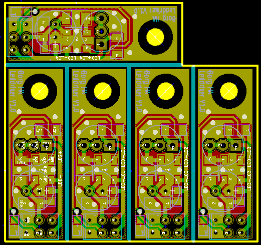
Some PCB production houses – Seeed Studio and itead studio, especially – allow you to upload a gerber file and receive a printed circuit board very inexpensively. The pricing structure for these board houses is based on predesignated board sizes – 5cm square or 5×10 cm – and sometimes a project is just too small to justify buying a full 25 square centimeters of board. This is where panelizing comes in: by putting multiple copies of a circuit board on one of the available sizes you can get more boards for the same amount of money. But how to panelize your boards without the (sometimes) hassle of cutting and pasting?

[Martin] came up with a way of panelizing PCBs with just a Python script. By creating one copy of a circuit board in KiCAD, he can fire up his script and tell the computer exactly how to duplicate his circuit to fit any size board.

By his own admission, [Martin]’s script is still a little clunky, but it does allow him to edit the panelized board in KiCAD and also copies the nets so the ratsnest doesn’t go between boards.

Custom Desk Is A Custom Computer Case

desk

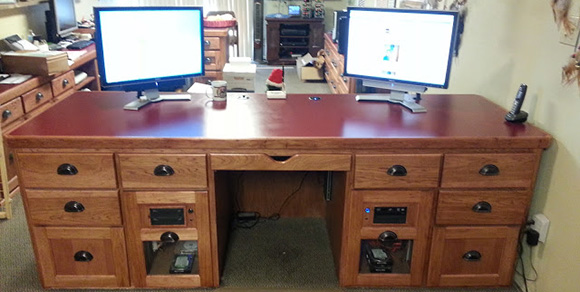
[Paul] had been kicking around his idea of a perfect computer desk for some time, and when given the opportunity to remodel his office decided it was time to build his dream computer case.

The desk itself is made of hickory with a formica top to match the other workbenches in [Paul]’s workspace, The two largest drawers house an ATX motherboard, power supply, disk drives, and a pair of CD drives. On top of the desk are two 24″ monitors – one for each computer – and a built-in powered USB hub that allows [Paul] to charge his phone or use an external drive.

As a computer tech, [Paul] needed a way to connect customer’s drives. He did this by putting two Startech UniDock2U USB to SATA and IDE converters in the top right drawer. It’s one of his most used features and very handy for duplicating bare drives.

Also included in [Paul]’s desk is a large UPC, and a pair of 120mm case fans venting to the front of the desk. It’s a wonderful piece of workmanship, and the removable computer cases make cleaning and upgrading a breeze.