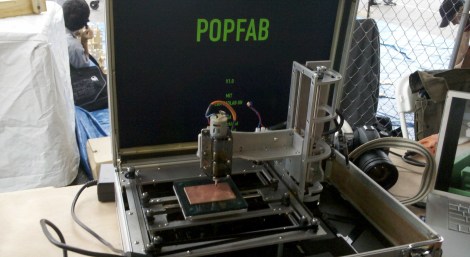
Fitting A CNC Machine, 3D Printer, And Vinyl Cutter In A Suitcase

Maker Faire NY is awash with new and interesting computer controlled tools, but the most unusual so far appears to be Popfab, a combination router, 3D printer, and vinyl cutter able to collapse down into a suitcase.

Popfab is the brainchild of [Nadya Peek] and [Ilan Moyer] of the MIT CADLAB. With interchangeable heads for routing PCBs, 3D printing, and vinyl cutting. A conventional machine of this capabilities would have motors all over the place, but [Ilan] used a CoreXY system to make the stepper motors stationary relative to the frame of the machine.

The electronics are standard Printrboard and Pronterface fare, but it’s still a remarkable build that also fits into a suitcase.

Pictures of the machine, the XY system (good luck wrapping your head around that, but I can tell you it relies on the differential movement of the two motors) and the lovely [Nadya] holding up the plastic extrusion head. We’ll get a video up tomorrow. after the break

Continue reading “Fitting A CNC Machine, 3D Printer, And Vinyl Cutter In A Suitcase”

Wearable Raspberry Pi Turns You Into The Borg

The Hoboken hackerspace, MakerBar, recently hosted a very special guest – [Rob Bishop] from the Raspberry Pi Foundation. Wanting to impress [Rob], [Zach] and a few others from MakerBar put together a wearable computer based on the Raspberry Pi in just a few hours.

Putting a Raspi, small Bluetooth keyboard and mouse combo, and a USB charger equipped with lithium-ion battery wasn’t that hard. The tricky part was finding a wearable display. Luckily, [Zach] had a pair of MyVu Crystal video glasses lying around and after a tricky bit of dissassembly, the folks at MakerBar had a completely wearable computer.

Apart from the RCA cable connecting the Raspi to the glasses, the project is completely wireless; with a small webcam also mounted to the display, the Pi in the Face could easily be a platform for figuring out what to do with Google Glass.

[Zach] said the entire setup could be reconstructed for about $100, a fair price for being turned in to [Locutus] of Borg

Making Logic Gates Out Of Crabs

Building logic gates out of silicon is old hat, as is building them from discrete transistors, 555 chips, LEGO, and even gears. [Yukio-Pegio Gunji] and [Yuta Nishiyama] from Kobe University, along with [Andrew Adamatzky] from the aptly named Unconventional Computing Centre at the University of the West of England decided they needed a new way to build logic gates using crabs (PDF warning). Yes, the team successfully built functional logic gates using Mictyris guinotae, a species of soldier crab native to the South Seas.

The colonies of soldier crabs that inhabit the lagoons of Pacific atolls display a unique swarming behavior in their native habitat. When in a swarm of hundreds of individuals, the front of the swarm is driven by random turbulence in the group, while the back end of the swarm simply follows the leaders. Somehow, this is a successful evolutionary strategy, but it can also be exploited to build logic gates using only crabs.

The team constructed a Y-shaped maze for a pair of crabs to act as an OR gate. When two soldier crabs are placed at the top of the ‘Y’, they move forward until they meet and exit the maze through the output. This idea can be expanded to a slightly more complex AND gate, functionally identical to the electron-powered AND gate in a 7408 logic chip.

While the team has only made OR and AND gates – nothing functionally complete yet – there’s no reason to believe this crab-based system of computation couldn’t be expanded to a (very) basic calculator.

Massively Parallel Computer Costs $99

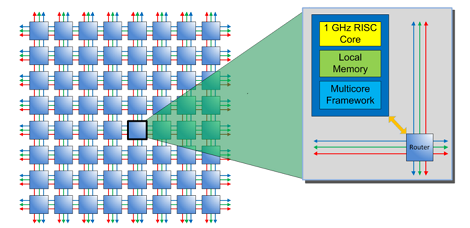
Even though dual, quad, and octo-core CPUs have been around for a while, it’s a far cry from truly massive parallel computing platforms. The chip manufacturer Adapteva is looking to put dozens of CPUs in a small package with their Parallella project. As a bonus, they’re looking for funding on Kickstarter, and plan to open source their 16 and 64-core CPUs after funding is complete.

The Parallella computer is based on the ARM architecture, and will be able to run Ubuntu with 1 Gig of RAM, a dual-core ARM A9 CPU, Ethernet, USB, and HDMI output. What makes the Parallella special is it’s Epiphany Multicore Accelerator – a coprocessor containing up to 64 parallel cores.

Adapteva is turning to Kickstarter for their Parallella computer to get the funding to take their Epiphany multicore daughterboard and shrink it down into a single chip. Once that’s complete, Adapteva will start shipping an ARM-powered Linux supercomputer that’s about the size of a credit card, or a Raspberry Pi under the new system of dev board measurements.

With any luck, the Parallella multicore computer will be available for $99, much less than a comparable x86 multicore computer. It’ll certainly be interesting to see what the Parallella can do in the future.

Turning 3D Prints Into Aluminum Castings

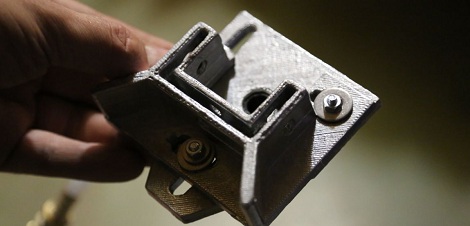
[Jeshua] needed a laser head attachment for a 5×10 foot CNC machine he’s working on. Because he has a 3D printer, [Jeshua] could easily print a laser mount and attach it to his CNC gantry, but that wouldn’t look very professional. Instead of decorating his gigantic machine with brightly colored plastic, he decided for a more industrial look by casting a laser head in aluminum using a 3D printed master.

[Jeshua] designed two parts for his laser cutter in OpenSCAD and printed them out on his 3D printer. A few bits of foam insulation were glued on to act as sprues, and an investment mold was made out of 1 part Plaster of Paris and 1 part playground sand.

After the mold had cured, [Jeshua] put is mold in a coffee can furnace to burn out the wax and foam. These hollow molds were placed in sand and the crucible loaded up with aluminum scrap.

The finished laser head fit his CNC machine perfectly – no small feat, considering [Jeshua] needed to take in to account how much the aluminum would contract after cooling. Not bad for one day’s work.

UV LEDs Expose PCBs, Gives You A Tan

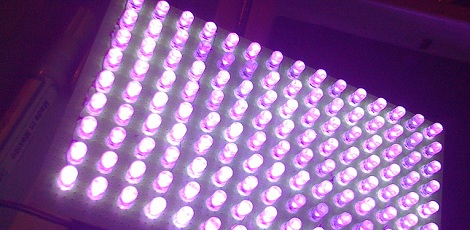
Among the projects that define electronic design, a UV exposure box is right up at the top of the list. These boxes shine UV light on a work piece and are used for everything from exposing photosensitive PCBs to erasing EPROMs. [carlolog] decided to build his own and ended up with a fairly impressive array of ultraviolet LEDs perfect for making PCBs or tanning the back of your hand.

One important thing to remember when making large arrays of LEDs is current consumption and power needed to light the device up. [carlolog] naive assessment of how much power would be required used a 12 volt supply with 135 LEDs and 135 resistors, wasting a lot of energy and producing 24 Watts of heat.

Of course this power consumption can be reduced by putting a few LEDs in series, so [carlolog] wired 3 LEDs together with a 150Ω resistor. This array requires just over 11 Watts and consumes less than 1 Amp; perfect for a desktop UV box.

The enclosure for the box was crafted out of three Ikea photo frames, and a small timer circuit powered by an ATmega8 was added. Now whenever [carlolog] needs to wipe an EPROM, he can put the chip in the box, set the timer, and walk away.

A very nice build, but when dealing with a lot of UV we must remind our readers: do not look into the UV array with your remaining eye.

Adding Digital Readout To A Non-CNC Mill

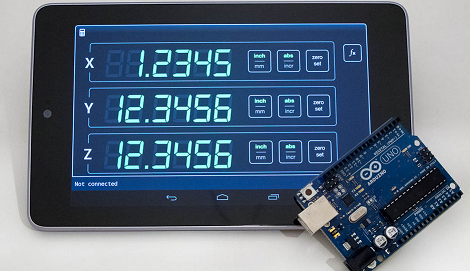
In the quest to add a digital readout to his mill, [Yuriy] has done a lot of homework. He’s sourced a trio of very capable scales, researched what kind of hardware his DRO should be based on, and even built a very cool display using seven-segment LEDs. After nearly a year of work, [Yuriy] finally hit upon something that works well: an Arduino and an Android tablet, perfectly matched for one of the prettiest machine shop displays we’ve ever seen.

[Yuriy] based his build off a trio of digital scales he bought from Grizzly. These scales bolt on to the frame of his mill and send data to their own display. An Arduino was used to pull the data off these scales and sent via Bluetooth to a Nexus 7 Android tablet.

Considering a DRO solely based on an Arduino and a character LCD would look a little chintzy – and the fact Arduinos can’t do floating point arithmetic – we’re really impressed with [Yuriy]’s very elegant solution.

Thanks [Lee] for sending this one in.