Embed With Elliot: Multiplexing SPI Uses Few Pins

[Ralph Doncaster], aka Nerdralph, seems to be absolutely driven to see how few resources he can use on a microcontroller to get the job done. In this post on his blog, [Ralph] writes some custom bit-banged SPI code to cut the number of SPI lines necessary to drive an nRF24L01+ radio module from four down to two. That really helps if you’re using a micro with only six free pins, like an ATtiny85.

If you’re going to say, “why don’t you just buy a bigger microcontroller?”, you’re missing the point. This exercise strikes us as optimization for optimization’s sake and a dirty hack, both of which are points in its favor.  There are also a couple of techniques here for your mental toolbox. We thought it was interesting enough to look at in depth.

Continue reading “Embed With Elliot: Multiplexing SPI Uses Few Pins”

Model House Models House, Vice-Versa

[Eric Tsai] is on a home-automation rampage. Not content with the usual smartphone-based GUIs, [Eric] built a cardboard model house that models his house. Open the garage door, and the model house’s garage door opens. Open the real front door, and a tiny servo motor opens the cardboard front door.

The model house also comes with a power meter that represents his current power usage, which is certainly useful for figuring out if something electronic has gone grossly wrong. You should watch the video (found after the break) all the way through, here’s the spot where he turns on an electric leaf blower. Despite a little big of lag that’s pretty cool!

But the system doesn’t stop there. Since he can control the garage door and some lights remotely via WiFi, the next logical step is to add a couple of buttons so that the model house can control the real house.

We’ve covered [Eric]’s home before. He set up simple, Arduino-based sensor packages all around his house, connected them together through the pub/sub framework MQTT and added in the open-source OpenHAB software interface. The door sensors connect to a hacked Wink hub. From whether or not his dog is barking to whether his laundry is done, [Eric]’s system knows it all.

Continue reading “Model House Models House, Vice-Versa”

Mimimalist Arduino Gaming Platform

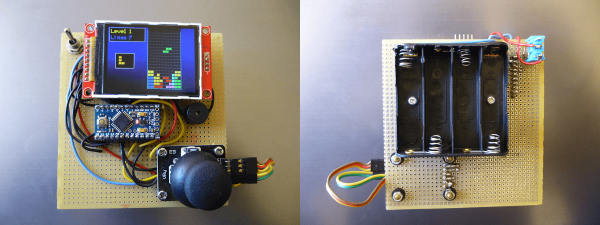
A pretty color LCD screen, an Arduino, a buzzer and a joystick is all you need for a minimalist gaming console for under $20. At least, that’s all [João Vilaça] needed to get this sweet version of Tetris up and running. He’s working on Breakout right now. His Breakout looks even better. See the postscript below for details.

It’s a testament to the current state of the hardware hacking scene that [João] could put this device together in an afternoon for so cheap, presumably after waiting a while for shipments from China. The 320×240 SPI color TFT LCD screen used to cost twice as much as this whole project did. And wiring it up is a simple matter of connecting this pin to that pin. Almost child’s play.

Equally impressive is the state of open source software. A TFT library from Seeed Studios makes the screen interface a piece of cake. [João] wrote his own sound and joystick code, and of course the Tetris gameplay itself, but it’d be much more than a few weeks’ work without standing on the shoulders of giants. Check out [João]’s Github for the project code and stick with us after the break for a demo video and some of our other favorite Arduino gaming hacks.

Continue reading “Mimimalist Arduino Gaming Platform”

Tiny Robot Jazz

Microcontroller-based projects don’t have to be fancy to be fantastic. Case in point: [r0d0t]’s “Musicomatic: the random jazz machine“. Clever programming and a nice case can transform a few servos and a microcontroller into something delightful.

musicomat_schematicsHardware-wise, there’s really nothing to see here; a speaker and some servos are hooked up to an ATmega328. We think it’s cute to have the microcontroller control its own power supply through a relay, but honestly a MOSFET in place of the relay or better still using the AVR’s shutdown sleep mode would be the way to go.

Nope, where this project shines is the programming. Technically, it might make some of you cringe — full of blocking delays and other coding “taboos”. But none of that matters, because [r0d0t] put his work in where it counts: the music. You simply must hear it for yourself in the clip after the break.

The basis of making music that humans like is rhythm, so [r0d0t] doesn’t leave this entirely to chance. The array “rhythms” has seven beat patterns that get randomly selected. The other thing humans like is predictability and repetition, so choruses and “improvs” repeat as well. All of the random notes are constrained to the pentatonic scale, which keeps it from ever sounding too bad. (The secret sauce of Kenny G.)

In short, [r0d0t] packs a lot of basic music theory into a very basic device, and comes up with something transcendent. We’re a bit reminded of the Yellow Drum Machine robot, and that’s high praise. Both projects are testaments to building something simple and then investing the time and effort into the code to make the project awesome.

For another slice of [r0d0t]’s excellent minimalist pie, check out his take on the classic Snake game: Twisted Snake.

Continue reading “Tiny Robot Jazz”

Foldable Quadrotor Is Origamilicious

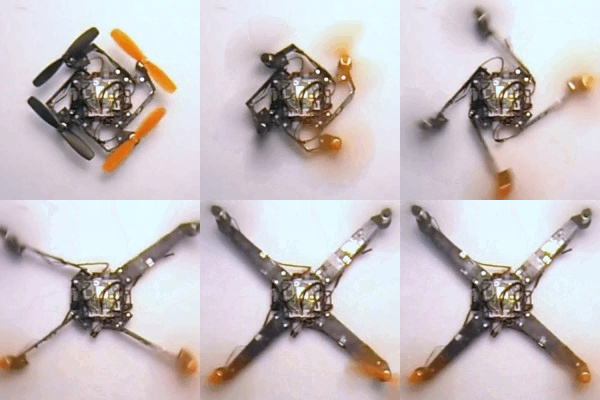
A team at the École Polytechnique Fédéral de Lausanne has developed and built a quadcopter with arms that unfold just before takeoff. The idea is that you can fold the device back up when you’re done with it, making it possible to store a bunch more of the quads in your backpack for instance.

The unfolding mechanism relies on the torque of the rotors spinning up to swing the arms into place. Once fully extended, a spring-loaded flap folds up, catches on some magnets, and forms an L-shaped structure that won’t re-fold without human intervention.

quadcopter_animUnder normal flying conditions, quads have a two left-handed propellers and two right-handed ones and the motors spin in opposite directions. In order to do the unfolding, two of the motors need to run essentially in reverse until the frame has clicked into place. They use a sensor (Hall effect?) to detect the arm locking, and then the rotors quickly switch back to their normal rotation before the quad hits the floor. In the video, they demonstrate that they’ve got this so well tuned that they can throw it up into the air to launch. Wow.

Everything’s still in prototype phase, and one of the next goals is “strengthening the arms so they can withstand crashes”, so don’t expect to see these in your local hobby store too soon. In the mean time, you’ll be able to see them in the flesh if you head up to the IEEE International Conference on Robotics and Automation in Seattle that started today and runs through Friday. If anyone goes, take more video and post in the comments?

Continue reading “Foldable Quadrotor Is Origamilicious”

Covert Remote Protest Transmitters

As a piece of protest art, “Covert Remote Protest Transmitters” ticks all the boxes. An outdoor covert projector that displayed anti-globalization messages at a G20 summit is protest. To disguise it inside a surveillance camera body housing — sticking it to the man from inside one of his own tools — is art. And a nice hack.

However you feel about the politics of globalization (and frankly, we’re stoked to be able to get cheap tech from anywhere in the world) the open-source DIY guidebook to building the rig (PDF) makes up for it all.

They installed the camera/projector long before the summit, where it sat dormant on a wall. A cell phone inside turned on the projector’s light with each ring because they attached a relay to the cell phone’s speaker circuit. In the instructions there’s an example of using a light-dependent resistor (CdS cell) to do the same thing, relying on the phone’s backlight functionality instead. There are a lot of ways to go here.

The optics consist of a couple of lenses aligned by trial and error, then fixed in place to a balsa wood frame with hot glue. A big fat Cree LED and driver provide the photons.

The video documentation of the piece is great. It’s mostly the news media reacting to the art piece as a “security breach”. A security breach would be a gun or a bomb. This was an overhead projector displaying messages that were out of the organizers’ control. Equating security with the supression of dissent is double-plus-ungood. Touché, CRPT.

Anyway, while you’re getting prepped for your next protest, have a look at the Image Fulgurator.

Need Timing Diagrams? Try Wavedrom

When working with anything digital, you’re going to end up reading or writing a timing diagram before long. For us, that’s meant keeping (text) notes, drawing something on a napkin, or using a tool like Inkscape. None of these are ideal.

An afternoon’s search for a better tool ended up with Wavedrom.

Just so you know where we’re coming from, here’s our list of desiderata for a timing diagram drawing solution:

  • Diagrams have a text-based representation, so their generation can be easily scripted and the results versioned and tracked throughout project development
  • Command-line rendering of images, because we like to automate everything
  • Looks good
  • Simple to use for common cases, but flexible enough to do some strange stuff when needed
  • Output modifiable when absolutely necessary: SVG would be nice

Basically, what we want is graphviz for timing diagrams.

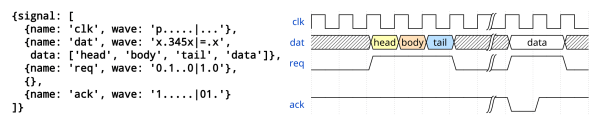
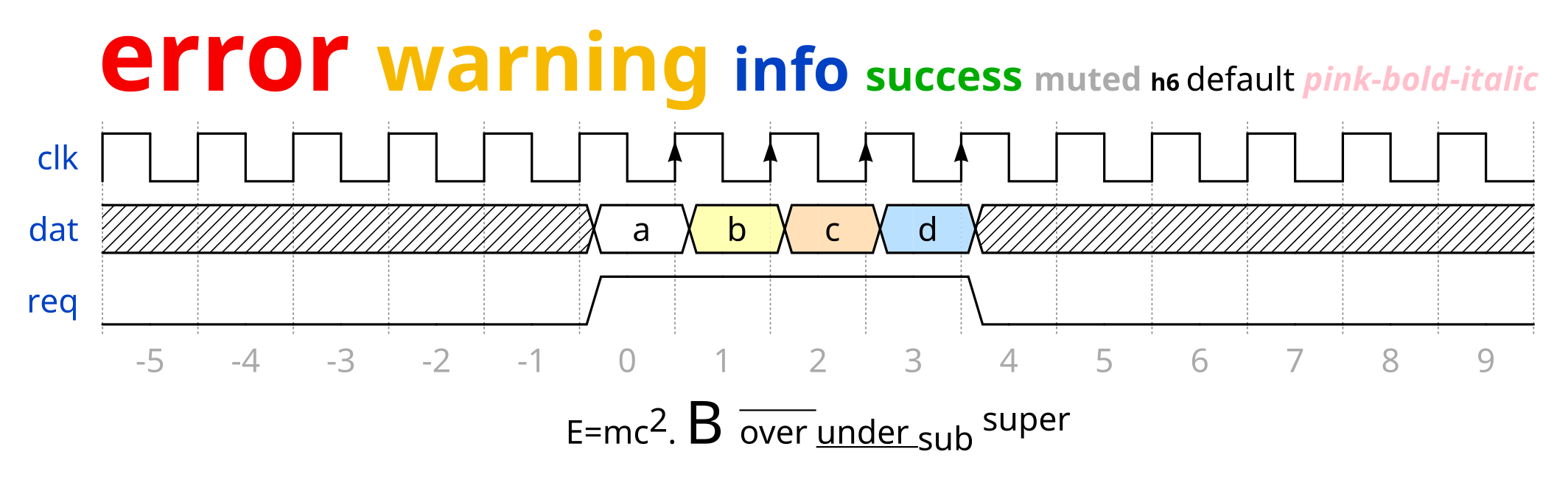
Wavedrom nails four out of these five at the moment, and has promise to cover all of the bases. Give the online editor demo a try. We found it intuitive enough that we could make simple diagrams without even reading the fine manual. The tutorial has got you covered for more esoteric use cases.
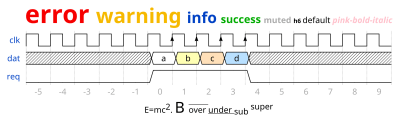
foo

Clearly, some good thought has been put into the waveform description language, WaveJSON; it’s mostly readable and makes the essentials quick and easy. Because you can also enter straight SVG, it leaves the door open for full-fledged lunacy.

Wavedrom is written in JavaScript, and built for embedding in webpages; that’s the way they intend us to use it. On the other hand, if you want to run your own local version of the online editor, you can download it and install it locally if you’d like.

Our only quibble is that the standalone, command-line application wouldn’t generate images without the GUI on our Arch system. (Looks like there are some Google Chrome dependencies?) Otherwise, we think we’ve found our solution.

There are other applications out there. Drawtiming looks good, but we can’t quite get our head around the file format and the graphic output isn’t as flexible as we’d like: it only outputs GIF and we’re more into SVG because it can be edited easily after the fact.

There are font-based solutions that let you “type” the timing diagrams. We found Xwave and “Timing Diagram Font“. These work but aren’t particularly flexible; if you want something to happen at odd times, you’re out of luck. Plus, it just feels like a dirty hack, as if that were a bad thing.

Latex users can use tikz-timing, which makes sketching out your timing diagrams as much fun as laying out a very complex table in Latex (that is: not fun at all). On the other hand, it looks good, is ultimately flexible, outputs PDF, and would be scriptable if someone put the time in to write a nice frontend.

So for the next little while, we’re trying out Wavedrom.

What do you use for making timing diagrams?