Apple’s Satellite Emergency Texts, How Do They Work?

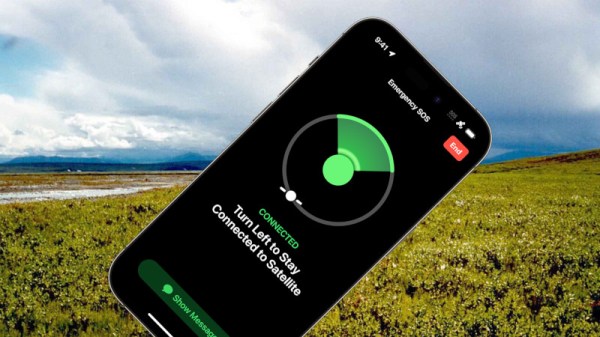
There is always some hype surrounding an Apple product announcement, and while maybe it’s not in the same league as those for the original iPod or iPhone, their iPhone 14 model will include emergency texting by satellite has generated quite a bit of coverage. It’s easy to find a lot about the system from the software end in terms of its interface and even Apple’s use of compression, but what about the radio side? Whose satellite constellation are they using, and how does it work?

As has been widely reported, their communication partner for the service is Globalstar, a provider of satellite data services that like their competitor Iridium have their origins in the 1990s when satellite phones were briefly seen as the Next Big Thing. They have a 24-satellite constellation, and they sell a range of off-the-grid voice, data, paging, tracking, and IoT connectivity services. The Apple emergency texting looks a lot like Globalstar’s Spot texting service. It’s only available in North America for now, we’re guessing because the satellites aren’t smart relays but straightforward transponders, and the network lacks sufficient ground station coverage outside that region.

With all the talk about low-earth-orbit connectivity surrounding services such as SpaceX’s Starlink it’s a bit unexpected to find ourselves back with a satellite constellation using 1990s technology. But we can see that as well as a major win for Globalstar as their service begins to look outdated by comparison to Starlink, it’s a perfect match for Apple in not requiring a complex ground station for low-bandwidth text messages. We expect that there will be some form of exclusivity in the deal, so it will be interesting to see how the larger Android vendors respond.

It’s worth noting, we’ve looked at satellite IoT services before.

Wilderness image: U.S. Fish and Wildlife Service, Public Domain.
Your Car Gets Hot When Left In The Sun. Hot Enough To Cook?

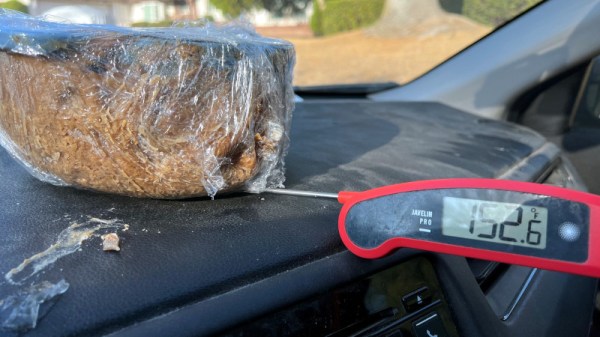
In hot weather, those of us who drive are familiar with the sensation of getting into the car and having it feel like an oven inside. A car is a essentially sealed metal box with large windows, thus on a sunny summer day it has more in common with a greenhouse, and in a heatwave this can become unbearable. But does it get hot enough for cooking? [Julian Lozos] aimed to find out, by cooking Icelandic rúgbrauð using only a 2016 Honda and the California sunshine.

Rúgbrauð is a traditional Icelandic rye bread that’s traditionally cooked by geothermal energy buried in the ground for around a day in proximity to a hot spring. A car dashboard gets pretty hot in a California heatwave, so it’s not unreasonable to expect that it might replicate this environment. He parked the Honda on a street in the sun, placed a pot full of dough on the dashboard, and waited.

The maximum temperature measured was 86.5 C (187 F), but unfortunately the sun didn’t stay high enough to maintain that temperature for the required time. After two days in the car the crust was cooked but the interior was still gooey, so the experiment can’t be said to have been successful. He does make the point though that a less traditional and much thinner loaf using a wide and flat tray might have delivered a better result.

We’re intrigued by this experiment, almost enough to try something like it ourselves were the summer not beginning to wane in these more northerly climes. Have any of you tried cooking in a hot car, or would we need a solar oven? Give us your views in the comments.

The MOS 7600 Video Game Chip Gives Up Its Secrets

A good chip decapping and reverse engineering is always going to capture our interest, and when it comes from [Ken Shirriff] we know it’s going to be a particularly good one. This time he’s directed his attention to the MOS 7600 all-in-one video game chip (Nitter), a mostly forgotten device from the 6502 chipmaker which we featured a few weeks ago when it was the subject of a blogger’s curiosity. The question then was whether it contained a microprocessor or not and even whether it was another 6502 variant, and the answer revealed in the decapping answers that but will disappoint the 6502 camp.

On the chip is a mixture of analog and digital circuitry, with some elements of a more traditional game chip alongside a ROM, a PLA, and a serial CPU core. The PLA stores pixel data while the ROM stores the CPU code, and the CPU serves to perform calculations necessary to the games themselves. He hasn’t fully reverse-engineered either, but the two areas of the chip are mask-programmed to produce the different games with which the chip could be found.

So the answer to the original question is that there is a CPU on board, but it’s not a 6502 and the operation is a hybrid between dedicated game chip and CPU-controlled chip. What we find interesting is that this serial CPU core might have as we mused in the previous piece made the heart of a usable 1970s microcontroller, was this a missed opportunity on the part of MOS? We’ll never know, but at least another piece of early video game history has been uncovered.

“The Era Of Distributed, Independent Email Servers Is Over”

Imagine the Internet had begun its life as a proprietary network from a major software vendor rather than evolved as a distributed network shared by researchers. It’s a future that almost came to pass for consumers in the 1990s when walled gardens such as AOL or the original incarnation of MSN were all the rage, but thankfully the world took the Internet course.

Though there are many continuing threats to Internet freedom we can still mostly use the network our way, but with sadness we note that one piece of Internet freedom may have drawn to a close. [Carlos Fenollosa] has written a lament about how the outlook for anyone running their own mail server now looks bleak.

At its heart is spam, or indeed the heavy-handed measures taken by large email providers to combat it. Spotting and canning spam is computationally expensive, so the easiest way to stop a spammer is to recognize their activity and block it at the network level. Thus a large email provider will instantly block large IP ranges when it detects they hold a spammer, with the collateral damage of also blocking any legitimate email servers in the same range such that their mail just doesn’t get through. Since spam is such a widespread problem, as [Carlos] points out it’s less of a case of if your server has this problem, but when. This functions essentially as something of a racket, in which large email providers have the power to ensure that any email not generated from amongst themselves is unlikely to reach any of the millions of addresses under their care, and the only recourse an operator of a small email domain has is to use the services of one of them.

He has something of a manifesto as to how this problem can be addressed, and we think that it’s important enough that you should take a look. Maintaining email as something beyond the control of large providers is too important not to.

Thanks [Thomas Steen Rasmussen] for the tip.

Header image: RRZE, CC BY-SA 3.0.

The Coolest 1990s Film Scanner To Work With Windows 11

Unless you happen to be a retro enthusiast, it’s fair to say that any photography you do (whether on your phone or a dedicated camera) is going to be digital. The world of photography has all but completely moved away from film, but the transition was not instantaneous. Instead there was a period of about ten years from the mid-90s when film and digital existed side-by-side in some form. A profitable sideline for photography shops was providing scans of film, and there were a series of high-end scanners aimed at that market.

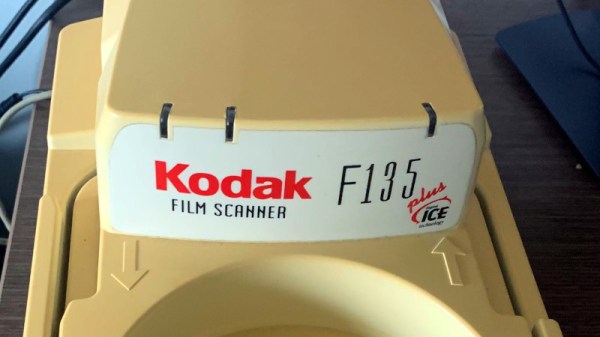
[Kai Kaufman] shares the experience of making one of these work with a modern Windows version, and it’s interesting both because of the scanner itself and the epic tale of software detective work required to bring it up to date. The scanner in question is a Pakon F135, the product of a Kodak acquisition, and an all-in-one device that simply spools in a roll of film and does all the hard work of identifying the frames, cropping the images, and reading any other data from the film.

You may never have seen one of these machines, but if you ever had your photos on a CD as well as printed back in the day you’ve probably had its output. The problem in 2022 is that these machines have drivers which only work with relatively ancient 32-bit Windows versions, so most of the write-up involves some significant detective work into the drivers.

Not every reader will be an expert on Windows driver de-compilation, but perhaps the most interesting pieces of the puzzle come from his detective work in finding the origin of some components. Example code from Microsoft and from a chip design company both make the job much easier, and the final result is a fully functioning 64-bit driver for the device. Not many people will have a Pakon film scanner, but for those who do it seems life may just have become a bit easier.

Thanks [adilosa] for the tip!

Electromagnetic Field Drops 2022 Talk Videos

Earlier this year we made the journey to a field in the West of England for the Electromagnetic Field hacker camp. It was the usual few days of fun in the open air, but due to a few technical difficulties we were unable to point you to any of the talks. We’re happy to note that now the dust has settled they are uploading talks, and there are a decent number up on YouTube with more to come.

Paging through the talks uploaded so far, and there’s plenty to get your teeth into. We’ll start with a couple that should be viewed as a pair,  [Robin Wilson] on UK railway signalling, and [Anthony Williams] giving us a crash course in railway safety, and then while we’re on a railway theme continue to [Hugh Wells] on hacking the train ticket system. Those first two amply demonstrate the best in our community, in that here are professionals sharing knowledge with us we’d never hear without working in that field.

Another esoteric talk that’s typical of a hacker camp schedule and which should be of interest to anyone who has wrestled with time synchronization comes from [John Dalziel], who gives us a brief history of time zones and daylight saving time. A talk that had me riveted during a train journey though came from [Cybergibbons], who describes penetration testing at a cruise ship scale.

These are just a few of the ones uploaded thus far, and as this is being written there are more appearing. So keep checking and you’ll see some really good ones. Meanwhile, have a read of our report from the event.

An Amstrad Portable You Won’t Have Seen

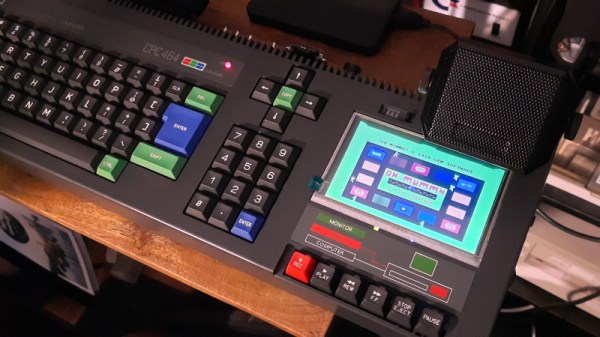
Of all the players in the home computer world in the 1980s, Alan Sugar’s Amstrad was a step ahead in ease of use over its competitors. The Amstrad CPC series of computers came with their own monitors that also had a built-in power supply, and featured built-in data recorders or disk drives as standard. Despite having a line of business computers and an eventual move into PC territory that included portable machines, Amstrad never produced a CPC which wasn’t anchored to the desktop. [Michael Wessel] has taken that challenge on himself with a CPC464 that had a broken cassette recorder, and come up with a creditable take on a portable computer that never was.

Starting with an ethos of not modifying the CPC case more than necessary, the defective tape drive has gone to be replaced with an HDMI TFT screen and a video converter board. In went a 512K RAM expansion, an SD card disk expansion, and a stereo amplifier. A small power supply board also takes power for the unit via USB-C, such that it can operate from a power bank.

The result is a fully functional and hugely expanded CPC that’s as much cyberdeck as it is retrocomputer, and given that if we remember correctly that these machines were CP/M capable it could be of greater use than simply gaming. [Michael] hasn’t entered his creation into our ongoing Cyberdeck Contest, but we think it would make a strong contender.

This isn’t the first Amstrac CPC we’ve shown you, here’s a very different take on a modernized machine.

Continue reading “An Amstrad Portable You Won’t Have Seen”