It’s MIDI For The TRS-80!

The Radio Shack TRS-80 was a much-loved machine across America. However, one thing it lacked was MIDI. That’s not so strange given the era it was released in, of course. Nevertheless, [Michael Wessel] has seen fit to correct this by creating the MIDI/80—a soundcard and MIDI interface for this old-school beast.

The core of the build is a BluePill STM32F103C8T6 microcontroller, running at a mighty 75 MHz. Plugged into the TRS-80s expansion port, the microcontroller is responsible for talking to the computer and translating incoming and outgoing MIDI signals as needed. Naturally, you can equip it with full-size classic DIN sockets for MIDI IN and MIDI OUT using an Adafruit breakout module. None of that MIDI Thru nonsense, though, that just makes people uncomfortable. The card is fully capable of reproducing General MIDI sounds, too, either via plugging in a Waveblaster sound module to the relevant header, or by hooking up a Roland Sound Canvas or similar to the MIDI/80s MIDI Out socket. Software-wise, there’s already a whole MIDI ecosystem developing around this new hardware. There’s a TRS-80 drum tracker and a synthesizer program, all with demo songs included. Compatibility wise, The MIDI/80 works with the TRS-80 Model I, III, and 4.

Does this mean the TRS-80 will become a new darling of the tracker and chiptune communities? We can only hope so! Meanwhile, if you want more background on this famous machine, we’ve looked into that, too. Video after the break.
Continue reading “It’s MIDI For The TRS-80!”

Making The Codec Communicator From Metal Gear Solid

[3DSage] likes building replicas of hardware from movies and video games, often with a functional twist. His latest build aimed to bring the Codec from Metal Gear Solid to life.

If you haven’t played the Metal Gear games, the Codec has been modelled somewhat like an advanced walkie talkie at times, but has often been kept off-screen. Thus, [3DSage] had a great deal of creative latitude to create a realistic-feeling Codec device that provided voice communications and some simple imagery display.

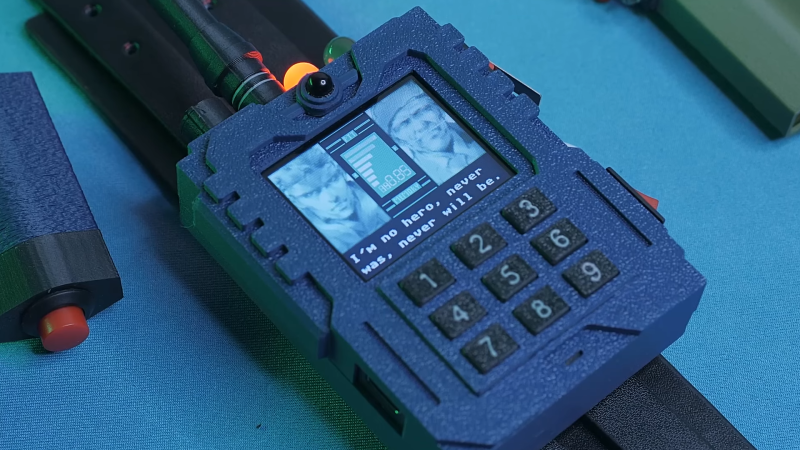
The resulting build relies on an RP2040 microcontroller to run the show. It’s paired with an MPU6050 3-axis gyroscope and accelerometer for motion control of the device’s functionality, and features a small LCD screen to mimic the display in the games. A kids walkie-talkie kit was leveraged for audio communication, but kitted out with a better microphone than standard. Power is via a rechargeable 9V battery, which is really a lithium-ion and USB charging board packed into the familiar 9V form factor.

Where the build really shines, though, is the aesthetic. [3DSage] managed to capture the military-like look and feel as well as authentically recreate the graphics from the games on the screen. The simulated noise on the display is particularly charming. Beyond that, the 3D-printed enclosures leverage texture and multi-color printing really well to nail the fit and finish.

Ultimately, the Codec isn’t much more than a glorified walkie talkie. Even still, [3DSage] was able to create an impressive prop that actually does most of what the device can do in game. If you’ve ever coveted a PipBoy or tricorder, this is one project you’ll be able to appreciate.

Continue reading “Making The Codec Communicator From Metal Gear Solid”

Portal 2 Becomes An Impressively Capable Web Server

Portal 2 is mostly known as the successful sequel to Valve’s weird physics platformer, Portal. It’s not really known for being a webserver. That might change, though, given the hard work of [PortalRunner].

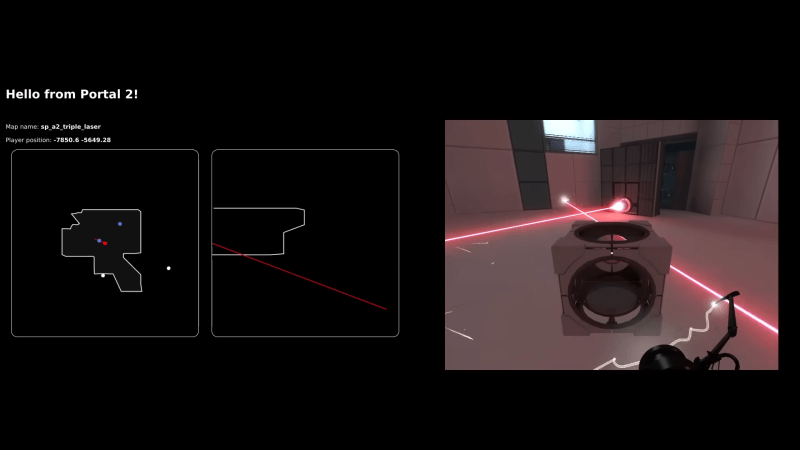
Quite literally, [PortalRunner] hacked the Source engine and Portal 2 to actually run a working HTTP web server. That required setting up the code to implement a TCP network socket that was suitable for web traffic, since the engine primarily functions with UDP sockets for multiplayer use. This was achieved with a feature initially put in the Source engine for server management in the Left 4 Dead games. From there, the game engine just had to be set up to reply to HTTP requests on that socket with the proper responses a visiting browser expects. If the game engine responds to a browser’s connection request with a bunch of HTML, that’s what the browser will display. Bam! You’ve got a web server running in Portal 2.

From there, [PortalRunner] went further, setting things up so that the status of in-game objects effects the HTML served up to visiting web browsers. Move objects in the game, and the served web page changes. It’s pretty fun, and the complexity and features [PortalRunner] implements only get more advanced from there. When he gets into stacking companion cubes to write HTML in visual form, you’ll want to applaud the Minecraftian glory of it all.

The devil is really in the details on this one, and it’s a great watch. In reality, making Portal 2 into a simple web server is far easier than you might have thought possible. Valve’s physics masterpiece really is popular with hackers; we see it popping up around here all the time. Video after the break.

Continue reading “Portal 2 Becomes An Impressively Capable Web Server”

Building A Wireless Motorized Fader For Lighting Control

Motorized faders are very cool, and you can find them in everything from expensive mixing desks to high-end video editing decks. If you want to build your own wireless motorized fader controls for your own projects, you might like this project from [Ian Peterson].

Faders are useful controls, but they’re usually very one-way devices—you set them to what you want, and that’s it. However, motorized faders are a little fancier. You can move them yourself, or they can be moved under the command of other hardware or software—making a control change automatically that is still visible to the human in front of the control panel.

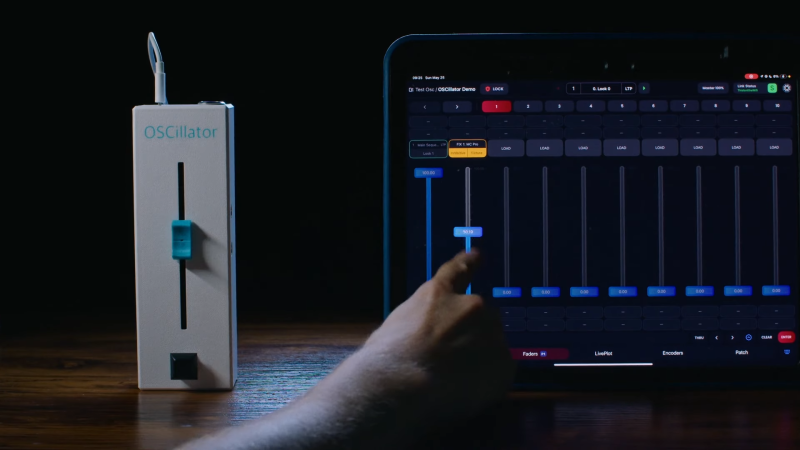
[Ian Peterson] built his OSCillator motorized fader for his work with lighting consoles in theater contexts. Its name references the Open Sound Control (OSC) platform which is commonly used across various lighting consoles. His build relies on an ESP32 to run the show, which communicates with other lighting hardware via WiFi. The microcontroller is responsible for reading the position of the fader and built-in button, and sending the relevant commands to other lighting devices on the network. At the same time, it must also listen to commands from lighting consoles on the network and update the motorized fader’s position in turn if the relevant control it’s mapped to has been changed elsewhere.

If you’re working in theater or film and you’re wanting to control lighting cues wirelessly, a tool like this can really come in handy. We don’t see a lot of motorized faders in DIY projects, but they pop up now and then.

Continue reading “Building A Wireless Motorized Fader For Lighting Control”

Making A Treadmill Into A 3D Printer

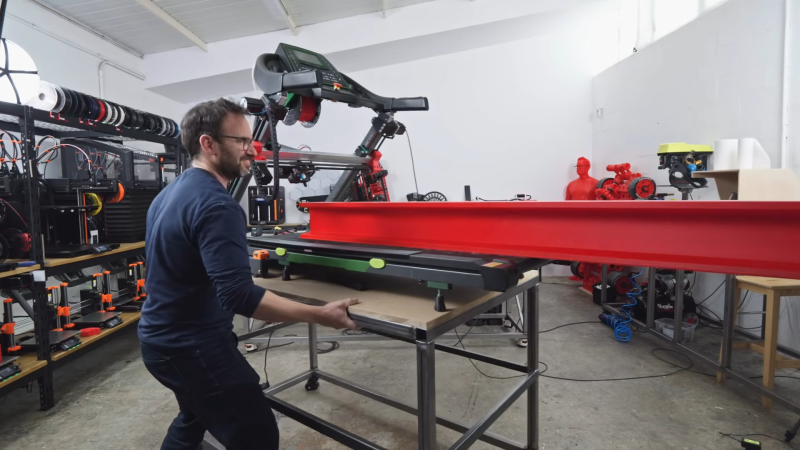
A treadmill-style bed can be a great addition to a 3D printer. It allows prints to be shifted out of the build volume as printing continues, greatly increasing the size and flexibility of what you can print. But [Ivan Miranda] and [Jón Schone] had a question. Instead of making a treadmill to suit a 3D printer, what if you just built a 3D printer on top of a full-size treadmill?

The duo sourced a piece of real gym equipment for this build. They then set about building a large-scale 3D printer on top of this platform. The linear rails were first mounted on to the treadmill’s frame, followed by a gantry for the print head itself and mounts for the necessary stepper motors. The printer also gained a custom extra-large extruder to ensure a satisfactory print speed that was suitable for the scale of the machine. From there, it was largely a case of fitting modules and running cables to complete the printer.

Soon enough, the machine was printing hot plastic on the treadmill surface, thereby greatly expanding the usable print volume. It’s a little tricky to wrap your head around at first, but when you see it in action, it’s easy to see the utility of a build like this, particularly at large scale. [Ivan] demonstrated this by printing a massive girder over two meters long.

We started seeing attempts at building a belt-equipped “infinite build volume” printer back in 2017, and it took awhile before the concept matured enough to be practical. Even today, they remain fairly uncommon.

Continue reading “Making A Treadmill Into A 3D Printer”

Tidy LED Matrix Displays GIFs On Demand

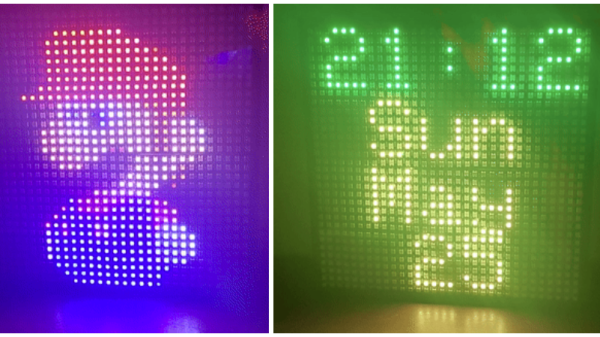
When it comes to LED matrixes, building one is just the first step. Then you have to decide what to display on it. [panjanek] came up with a relatively flexible answer to this question, building an RGB LED matrix that can display the GIFs of your choice.

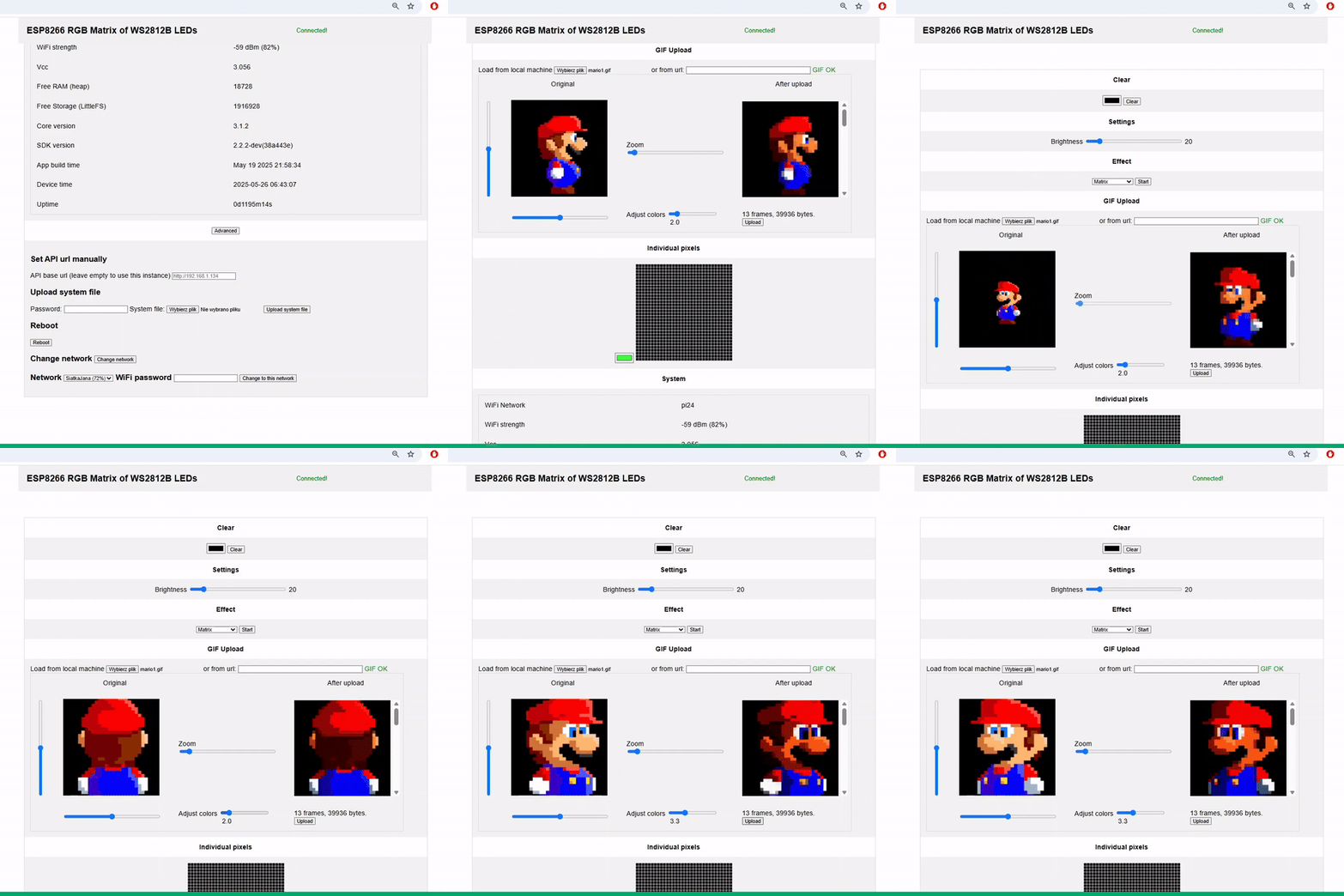
The web interface accepts GIFs for display.

[panjanek] grabbed WS2812B addressable LEDs for this project, assembling them into a 32 x 32 matrix that fits perfectly inside an off-the-shelf Ikea picture frame. The matrix is hooked up to an ESP8266 microcontroller, which acts as the brains of the operation. The WiFi-enabled microcontroller hosts its own web interface, with which the project can be controlled. Upon opening the page, it’s possible to upload a GIF file that will be displayed as an animation on the matrix itself. It’s also possible to stream UDP packets of bitmap data to the device to send real-time animations over a network.

It’s a neat build, and one that answers any questions of what you might display on your LED matrix when you’re finished assembling it. Code is on Github if you fancy implementing the GIF features in your own work. We’ve featured some unexpected LED matrix builds of late, like this innovative device for the M.2 slot. Meanwhile, if you’re cooking up your own creative LED builds, don’t hesitate to let us know on the tipsline!

DIY Solar Generator Inspired By James Webb Telescope

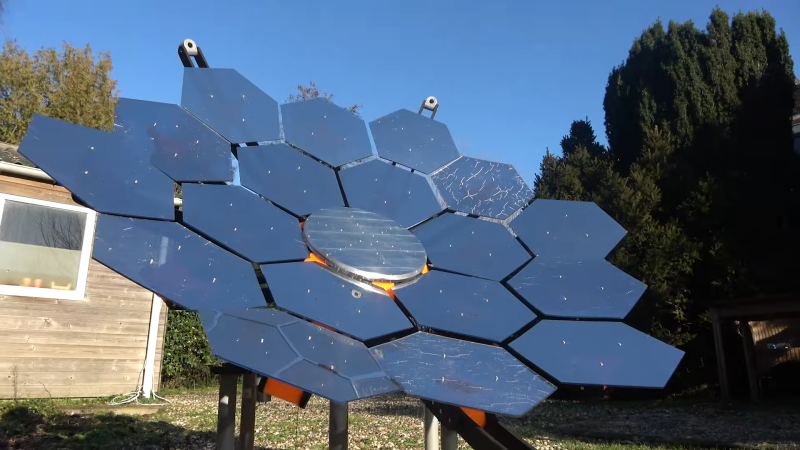
If you look at this solar generator from [Concept Crafted Creations], you might think it’s somehow familiar. That’s because the design was visually inspired by the James Webb Space Telescope, or JWST. Ultimately, though, it’s purpose is quite different—it’s designed to use mirrors to collect and harness solar energy. It’s not quite there yet, but it’s an interesting exploration of an eye-catching solar thermal generator.

To get that JWST look, the build has 18 mirrors assembled on a 3D printed frame to approximate the shape of a larger parabolic reflector. The mirrors focus all the sunlight such that it winds up heating water passing through an aluminum plate. Each mirror was custom made using laser cut acrylic and mirror film. Each mirror’s position and angle can be adjusted delicately with screws and a nifty sprung setup, which is a whole lot simpler than the mechanism used on the real thing. The whole assembly is on a mount that allows it to track the movement of the sun to gain the most sunlight possible. There’s a giant laser-cut wooden gear on the bottom that allows rotation on a big Lazy Susan bearing, as well as a servo-driven tilting mechanism, with an Arduino using light dependent resistors to optimally aim the device.

It’s a cool-looking set up, but how does it compare with photovoltaics? Not so well. The mirror array was able to deliver around 1 kilowatt of heat into the water passing through the system, heating it to a temperature of approximately 44 C after half an hour. The water was warmed, but not to the point of boiling, and there’s no turbines or anything else hooked up to actually take that heat and turn it into electricity yet. Even if there were, it’s unlikely the system would reach the efficiency of a similarly-sized solar panel array. In any case, so far, the job is half done. As explained in the build video, it could benefit from some better mirrors and some structural improvements to help it survive the elements before it’s ready to make any real juice.

Ultimately, if you need solar power fast, your best bet is to buy a photovoltaic array. Still, solar thermal is a concept that has never quite died out.

Continue reading “DIY Solar Generator Inspired By James Webb Telescope”