Digging Into The Twilight Hack That Brought Us Wii Homebrew

With each new game console, there’s an effort to get around whatever restrictions exist to run your own software on it. In the case of the Nintendo Wii, the system was cracked through one of its most popular games — The Legend of Zelda: Twilight Princess. How this hack works was recently covered in detail by [Skawo].

The key for this ‘Twilight Hack‘ is to use a modified game save that allows you to run arbitrary code from an SD card, something which was first patched out of the Wii firmware with version 3.3. As shown in the video using the source code, the basic concept is that the name of Link’s horse in the game is changed in the save file to be longer than the allocated buffer, which leads to a buffer overflow that can be used to reach the application loader code.

Interestingly, while the horse’s name can only be 8 characters long, and the buffer is 16 bytes (due to ShiftJIS two-byte encoding), the save file loading code allocates no less than 100 bytes, for some reason. Since the code uses strcpy() instead of strncpy() (or C11’s strncpy_s()), it will happily keep copying until it finds that magic 0x00 string terminator. Basically the horse can have any name that fits within the save file’s buffer, just with no null-byte until our specially crafted payload has been copied over.

Although it took Nintendo a few months to respond to this hack, eventually it was patched out in a rather brutal fashion by simply searching for and wiping any modified save files. Naturally this didn’t stop hackers from finding ways to circumvent this save file check, which led to more counter-fixes by Nintendo, which led to more exploits, ad nauseam.

Even with firmware update 4.0 finally sunsetting the Twilight Hack, hackers would keep finding more ways to get their previous Homebrew Channel installed, not to mention so that they could keep watching DVDs on a Wii.

Continue reading “Digging Into The Twilight Hack That Brought Us Wii Homebrew”
A Mercury Rover Could Explore The Planet By Sticking To The Terminator

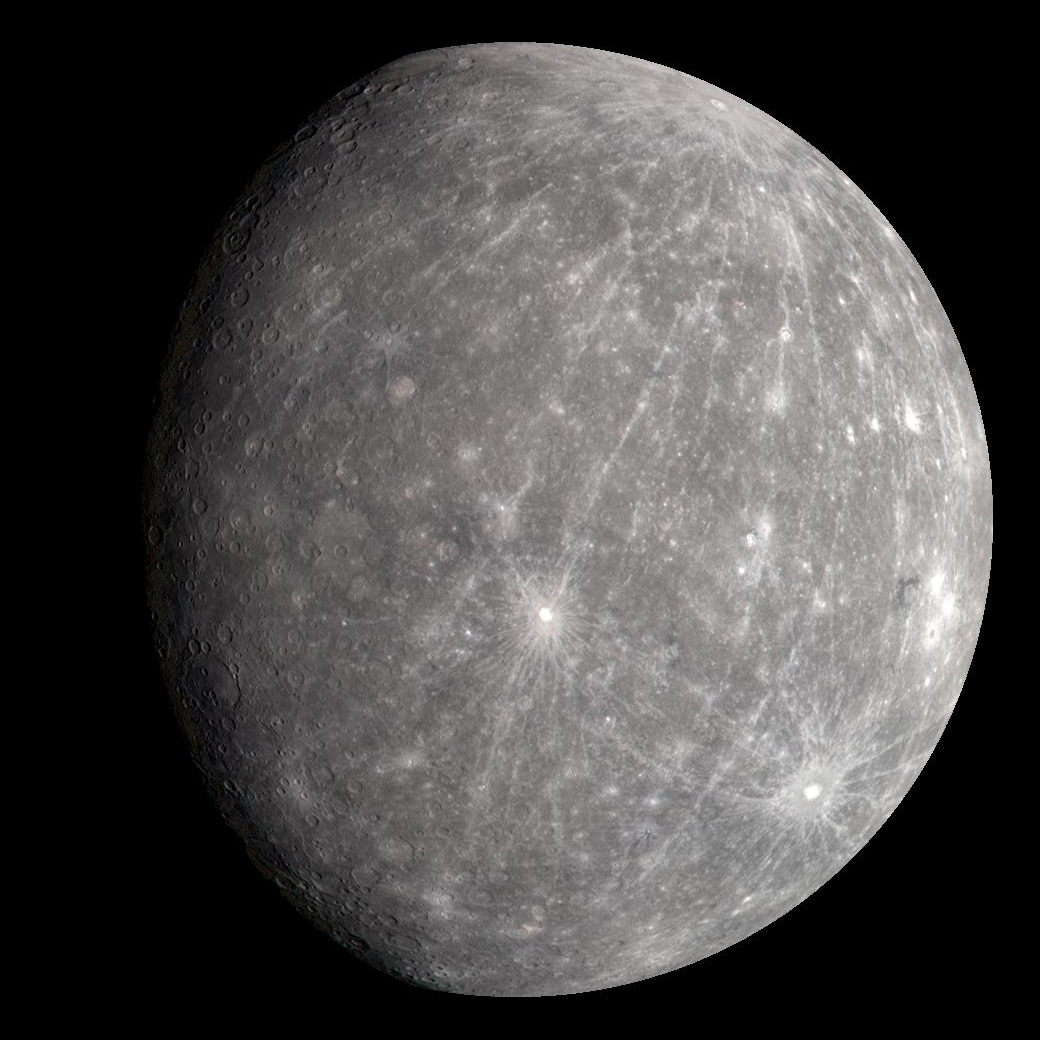
The planet Mercury in true color. (Credit: NASA)

With multiple rovers currently scurrying around on the surface of Mars to continue a decades-long legacy, it can be easy to forget sometimes that repeating this feat on other planets that aren’t Earth or Mars isn’t quite as straightforward. In the case of Earth’s twin – Venus – the surface conditions are too extreme to consider such a mission. Yet Mercury might be a plausible target for a rover, according to a study by [M. Murillo] and [P. G. Lucey], via Universe Today’s coverage.

The advantages of putting a rover’s wheels on a planet’s surface are obvious, as it allows for direct sampling of geological and other features unlike an orbiting or passing space probe. To make this work on Mercury as in some ways a slightly larger version of Earth’s moon that’s been placed right next door to the Sun is challenging to say the least.

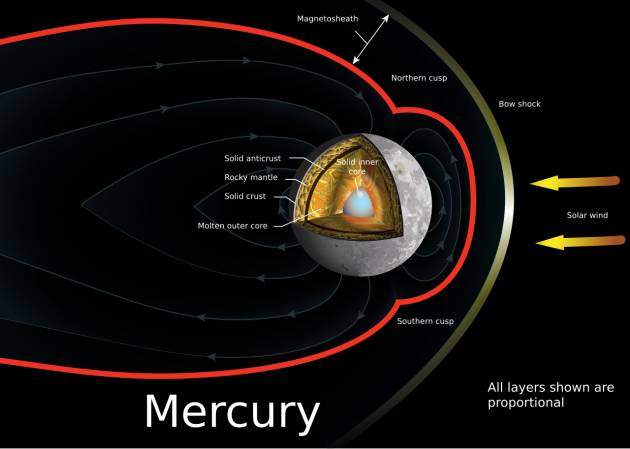
With no atmosphere it’s exposed to some of the worst that the Sun can throw at it, but it does have a magnetic field at 1.1% of Earth’s strength to take some of the edge off ionizing radiation. This just leaves a rover to deal with still very high ionizing radiation levels and extreme temperature swings that at the equator range between −173 °C and 427 °C, with an 88 Earth day day/night cycle. This compares to the constant mean temperature on Venus of 464 °C.

To deal with these extreme conditions, the researchers propose that a rover might be able to thrive if it sticks to the terminator, being the transition between day and night. To survive, the rover would need to be able to gather enough solar power – if solar-powered – due to the Sun being very low in the sky. It would also need to keep up with the terminator velocity being at least 4.25 km/h, as being caught on either the day or night side of Mercury would mean a certain demise. This would leave little time for casual exploration as on Mars, and require a high level of autonomy akin to what is being pioneered today with the Martian rovers.

Top image: the planet Mercury with its magnetic field. (Credit: A loose necktie, Wikimedia)

Battle Born Explains How Its Battery Thermal Safety Works

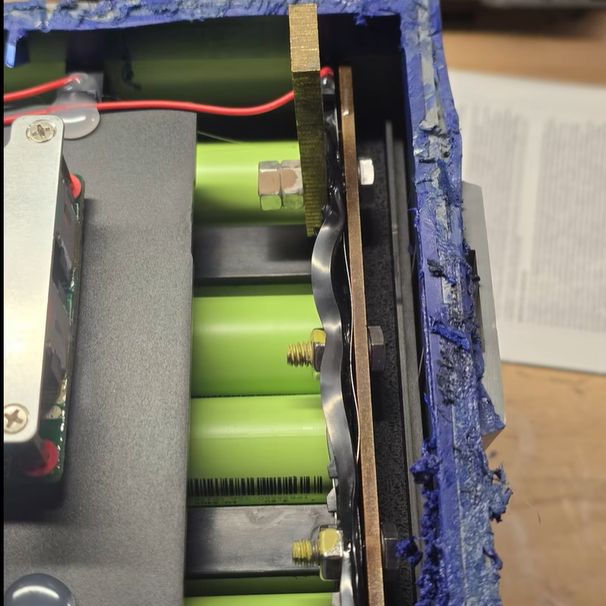
Autopsy of Battle Born LFP battery with the 'thermal safety' on the bus bar. (Credit: Will Prowse)
Autopsy of Battle Born LFP battery with the ‘thermal safety’ on the bus bar. (Credit: Will Prowse)

After users of Battle Born LFP batteries encountered issues such as a heavily discolored positive terminal and other signs of overheating, multiple autopsies showed that the cause appeared to be the insertion of a thermoplastic between the bus bar and the terminal. Over time thermal creep loosened the connections, causing poor contact and melting plastic enclosures. According to Battle Born, this is actually part of an ingenious thermal safety design, and in a recently published article they explain how it works.

The basic theory appears to be that if there’s a thermal event, the ABS thermoplastic will soften and reduce the pressure on the bolted-together copper bus bar and brass terminal. This then allows for an aluminium-oxide layer to form on the aluminium connecting bolt courtesy of the dissimilar copper/aluminium interface. Aluminium-oxide is non-conductive and thus interrupts the flow of current.

Of course, there are countless issues with that theory, least of all the many reports of in-field failures. We recently covered [Will Prowse] studying the death of one of these 100 Ah LFP batteries from brand-new to failure under controlled circumstances. This clearly shows the thermal creep loosening up the connection and causing poor contact between the bus bar, the bolt and the terminal, with poor contact and thermal issues resulting.

Continue reading “Battle Born Explains How Its Battery Thermal Safety Works”

Reflecting On Microsoft Windows Vista In 2026

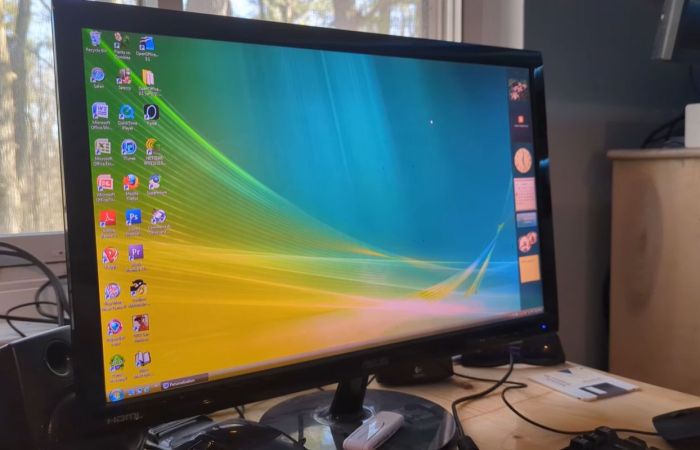
It’s a bit of an understatement that at release Windows Vista rather fell flat. Much of the problem was due to how rushed of a release it was, with incomplete driver support and various glitches in the OS that ought to have been ironed out prior to release. In a retrospective, [SteelsOfLiquid] takes a look at what used to be the most infamous Windows OS until the arrival of first Windows 8 and subsequently the popcorn-fest that is Windows 11.

After a brief re-run of the development history and initial release of Vista, the OS is installed on a Core 2 Duo E8400 with 4 GB of DDR3 and a Geforce 310 card. This being the first NT6-based Windows version (with Microsoft jumping up to version 10 with Windows 10), it’s still got a lot of working software for it in 2026. Some have argued that Windows 7 is basically Vista SE in the vein of Window 98, so it doesn’t face the same software and driver hurdles as e.g. Windows XP does.

Thus the video focuses mostly on the software that was provided with the OS, giving a detailed look at an OS that many of us skipped in favor of sticking to Windows XP to the despair of Microsoft who had to push back that OS’s EOL by a few years as a result. For those of us who joined in the hate-fest against Vista it feels somewhat nostalgic to look back at an experience that in 2026 terms would have been less rough than trying to use Windows 10 or 11 until years of updates made at least the former not entirely terrible to use.

Here’s hoping that Windows 12 will be more of a modern Windows 7, especially in the GUI department, as it’s so nice to have a colorful OS interface with some tasty skeuomorphism rather than monochrome, flat icons.

Continue reading “Reflecting On Microsoft Windows Vista In 2026”

Upgrading A MacBook Neo Using A 1 TB IPhone NAND Flash

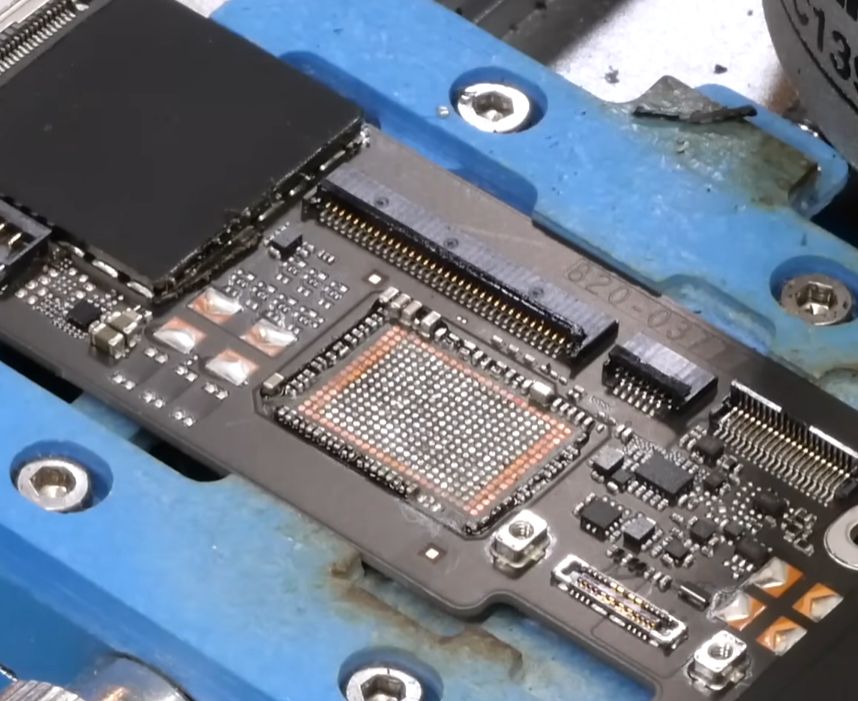
The nekkid Flash footprint with unused pads perimeter. (Credit: dosdude1, YouTube)

For some reason the newly introduced MacBook Neo appears to be the subject of a lot of modding, though a recent mod by [dosdude1] leans into the fact that this laptop has been assembled using what are effectively iPhone 16 parts inside a laptop case. This consequently means that there’s an overlap with certain iPhone 16 components, such as the NAND Flash. Incidentally storage on the Neo is limited to 512 GB when you purchase it from Apple, which is weird since the same SoC in the iPhone 16 Pro happily uses 1 TB.

Even if it was just a price point thing that Apple went for, there’s seemingly nothing standing between a Neo owner with a hot air gun and sheer determination. As long as you’re comfortable soldering a fine-pitched BGA NAND Flash package, natch.

Of course, there was always the possibility that Apple used a different NAND Flash package footprint, but the installed 256 GB model chip that comes installed matches the replacement 1 TB model K8A5 chip as hoped. This just left disassembly and preparing the PCB for a storage replacement. Removal of the BGA underfill and desoldering the old chip without taking out surrounding SMD parts is definitely the hardest part, but handled in the video with the equivalent of an IC spatula and a temporary removal of some capacitors.

Interestingly, the uncovered IC footprint shows a whole perimeter of unused pads that might target other NAND Flash packages. Regardless, the new chip installed fine, giving the Neo 1 TB of storage and a slightly faster read/write performance.

Continue reading “Upgrading A MacBook Neo Using A 1 TB IPhone NAND Flash”

TurboQuant: Reducing LLM Memory Usage With Vector Quantization

Large language models (LLMs) aren’t actually giant computer brains. Instead, they are massive vector spaces in which the probabilities of tokens occurring in a specific order is encoded. Billions of parameters, times N bits per parameter, equals N-billion bits of storage required for a full model. Since increasing the number of parameters makes the models appear smarter, correspondingly the size of these models and their associated caches has been increasing rapidly.

Vector quantization (VQ) is a method that can compress the vectors calculated during inference to take up less space without significant loss of data. Google’s recently published pre-print paper on TurboQuant covers an LLM-oriented VQ algorithm that’s claimed to provide up to a 6x compression level with no negative impact on inference times.

The tokens aren’t directly encoded in the vector space, but their associated key value is, which along with the single token per inference process creates the need for a key-value (KV) cache, the size of which scales with the size of the model. Thus by compressing the KV cache using VQ, it will reduce its size and correspondingly speed up look-ups due to the smaller size in memory. One catch here is that VQ is due to the nature of quantization some accuracy will be lost. The trick here is thus to apply VQ in such a way that it does not affect this accuracy in a noticeable manner.

Other aspects that had to be taken into account by the TurboQuant algorithm was fast computation to keep up with real-time requirements, along with compatibility with so-called ‘AI accelerator’ hardware.

Continue reading “TurboQuant: Reducing LLM Memory Usage With Vector Quantization”

Nissan Shuts Down NissanConnect App For Older Leaf EVs

Back in late February Nissan Leaf owners began to receive messages from Nissan informing them that the remote features in their cars would cease operation as the NissanConnect app would drop support for Leaf EVs produced before 2020 as well as eNV200 vehicles that were produced until 2022. The indicated cut-off date was March 30, giving affected users about a month to come to terms with the fact that their vehicle would soon to losing any and all remote control features.

What this highlights is an increasingly pertinent question when it comes to ‘connected cars’, which feature a built-in wireless modem to provide a range of additional features. These require access to a remote server for even simple remote features like controlling the charging process or turning on the heating. This has left many Leaf users rather dissatisfied.

While for such basic remote features you could make the argument that they’re just silly convenience features that do not affect the car’s functionality, modern cars are increasingly becoming reliant on such remote features, including for things like navigation and checking subscriptions for features like heated seats.

Increasingly it would seem that we’re looking at the Car-as-a-Service (CaaS) model being implemented.