Cooking Up Piezo Crystals At Home

piezo_crystal

[Collin] loves piezos – and why not?

According to him, they are about as close to magic as you can find in the world. We can’t really disagree on that one – there’s something oddly enchanting about piezoelectric materials.

Most commercially used piezoelectric devices that you find today are constructed out of man-made ceramic materials such as Lead zirconate titanate, and can be found in grill starters, gas-powered water heaters, etc. While they are common, it’s not exactly easy to synthesize these sorts of ceramic materials at home.

You can however, create piezoelectric crystals in your kitchen, using just a few simple ingredients. In his video, [Collin] shows us how to create Rochelle Salt, one of the first known materials found to exhibit piezoelectricity. The recipe calls for three ingredients, cream of tartar, sodium carbonate (soda ash), and water – that’s it. The procedure is quite simple, requiring you to heat a solution of water and cream of tartar, adding the soda ash a little at a time once it reaches the proper temperature. The solution is filtered after it turns clear and then left to sit overnight while the crystals form.

Take a look at the video embedded below to see how his Rochelle Crystals turned out, and be sure to try this out with your kids if they are interested in electronics. Making crystals that generate electricity when tapped is far cooler than making rock candy any day, trust us on this.


Continue reading “Cooking Up Piezo Crystals At Home”

Automated Harmonica Plays Simple Tunes

e-sharp_self_playing_harmonica

It seems that nearly everything is automated these days. Everywhere you look, people are being removed from processes in order to make them more efficient and less prone to mistakes. [Jon] however, saw one process that automation has yet to touch in a significant way – playing the harmonica.

He constructed a harmonica-playing machine that can play a handful of simple songs with a few button presses. The machine was constructed using three PIC controllers, an air compressor, and a pair of harmonicas. A master PIC controller manages the whole operation, taking input from the PIC driving LCD, then handing off playing instructions to the PIC that manages the harmonicas.

Once the machine is started and a song is selected, the machine plays away, prompting for a new song once it has finished. The machine doesn’t quite play the harmonica like a human does, however. The reeds of one harmonica were reversed so that the player only needs to blow air, rather than require a vacuum to provide suction for the drawing motion typically used in harmonica playing.

As you can see in this video, the rig works decently, though it probably needs a bit more work to achieve that “human” feel.

[Thanks, Ben]

Electronic Diaper Bag Reminds You To Pack Everything But The Baby

lilypad_diaperbag

[jnorby] knows what it’s like to leave the house with her baby in tow, only to realize that she has left something she needs at home. Instead of relying on a paper checklist, she decided to craft her own diaper bag that alerted her if she had forgotten to pack a particular item.

She built her bag from scratch, wiring small circuits into each of the pockets she created on the inside of the bag. Wires were run to each half of a snap fastener, so that they would complete the circuit when the snaps touch. The LEDs and snaps were then connected to a LilyPad Arduino, which checks the status of the snap circuits, lighting the appropriate LED once the proper item has been packed.

While we like the idea of a bag that uses functional indicators that remind you to pack items, we do think that the use of the Arduino, or any microprocessor for that matter, is massive overkill. We would ditch the LilyPad and snap fasteners for reed switches or perhaps normally closed micro leaf switches that turn the LEDs off once the proper item has been packed, rather than the other way around.

Automatic Ball Launcher Is For The Dogs

automatic_ball_launcher

A while back, [Dino] built an automatic ball launcher for his dogs, but he wanted to revise it to make it smaller and a bit more user-friendly. While watching an episode of “Prototype This”, he came across a great idea to improve his launcher, so off to the workshop he went.

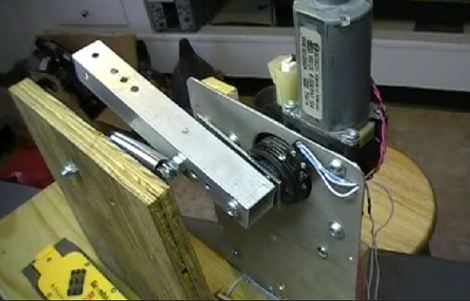
He repurposed a power window motor from a car, and mounted it to some wood-reinforced aluminum sheeting in his garage. He added a piece of aluminum tubing to serve as a spring-loaded launch arm, which is drawn back by a small lever attached to the window motor.

When a ball is dropped onto a switch at the bottom of the launcher, the window motor starts turning, which pulls the launch arm back into place. Once the arm reaches the tipping point, the spring snaps it forward, launching the ball across the yard. The lever attached to the window motor eventually makes its way back under the launch arm, and is stopped by a switch that is also attached to the motor.

After the prototype was finished, he added some more wood to protect the mechanism from his dogs and vice versa. A hopper was added to the top of the structure to allow the dogs to load the launcher themselves, after a bit of training.

Now, some of you might wonder what is wrong with [Dino’s] arm. Truth be told, it works just fine. If you are a frequent Hack-a-Day visitor, you know that he spends plenty of time in the workshop, so this is an easy way to let the dogs entertain themselves until their owner is ready to play.

Check out the video embedded below for a demonstration of the launcher, as well as a detailed walkthrough of how the mechanism works.

Continue reading “Automatic Ball Launcher Is For The Dogs”

Wireless Weather Station Obsessively Reports The Temperature

obsessive_weather_station

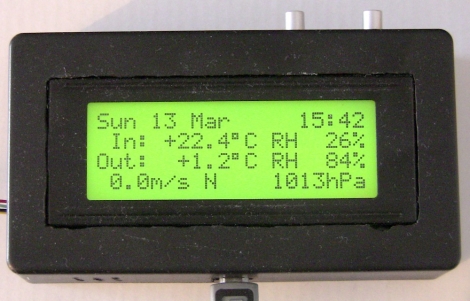
[nuumio] has been hard at work building a Tweeting weather station, which he recently got up and running. The weather station is built from three major components, a Linux PC for data storage and Tweeting, a main weather sensor unit, and a remote unit.

The remote unit sits outside and includes includes both a pressure and humidity/temperature sensor. The sensors are polled every 20 seconds, reporting the data back to the main unit via a 434 MHz RF transceiver. The remote sensor also records the ambient light level and the remaining battery voltage, sending that data to the main unit for good measure.

The main unit sits inside his house and records the same temperature and humidity data as the external unit. The main unit adds its data to the packets sent by the remote unit and transmits them to the PC via USB. The PC calculates the minimum and maximum temperatures for the last 12-hour and 24 -hour periods before sending that data back to the main unit to be displayed on its LCD panel. Every 10 minutes, the computer also posts the weather data on Twitter.

If you are looking to build your own weather station, [nuumio] has provided all of the source code for his project on his web page. However, he does admit that he was too lazy to draw up a schematic, so you are on your own in that department.

Pi Phone Lulls You To Sleep With The Digits Of Pi

As you well know, today is March 14th – aka “Pi Day”.

Celebrated in math classrooms around the country, this truly is a celebration that belongs to the geeks. Here at Hack-a-Day, we too love Pi day, though we might not outwardly celebrate it with as much gusto as expressed by some of our readers.

[Chris Poole] is one Hack-a-Day fan who knows how to make the most of this mathematical holiday. He has put together a neat SIP-based phone service that reads Pi aloud to anyone who calls. He is running Asterisk in combination with Perl to read off the numbers, and is using a free SIP DID number to accept the calls. We gave it a shot earlier today, and were greeted by a gentle synthesized voice reading off the numbers of Pi. We’re not sure how many digits it is programmed to handle, as we stopped after about 20, so give him a call and let us know how many digits you make it through.

As a parting note, no Pi Day would be complete without a few obligatory Pi-related (albeit old) web comics and pastry concoctions, so here you go!

XKCD – Pi Equals…

XKCD – e to the Pi Times i

XKCD – E to the Pi Minus Pi

Spherical Pi Pie

Battery Capacity Tester Lifts The Veil On Manufacturer Capacity Claims

battery_cap_tester

[Nick] was tasked with building a battery capacity tester by one of his teachers in order to test some aftermarket batteries that were purchased for their Vex robotics lab. The batteries were cheaper than the official version, but boasted more than twice the capacity. Fairly skeptical of the rating, he got to work designing his circuit.

He originally planned on discharging the battery through a resistor and measuring the voltage with a PIC microcontroller. After prototyping the circuit, he found that the PIC did not have enough storage space for the data he was collecting, and that there were issues with fluctuating current as the voltage decreased.

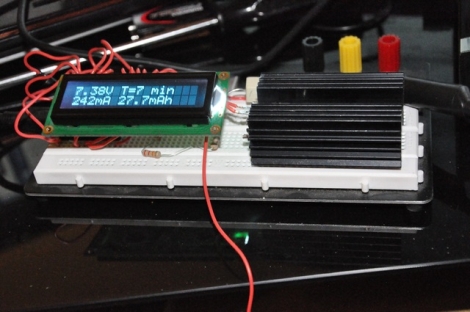
Undeterred, he built a new tester using a Teensy microcontroller and a different discharging circuit using a LM317T. This second version not only included an LCD screen to track the discharging process in real-time, but it also dumps all of the data and calculations to a spreadsheet on the computer connected to the Teensy.

The capacity tester works pretty well, according to [Nick]. He says that most batteries overestimate their capacity, and that his meter is getting readings within an acceptable variance when testing known good batteries. What about those knock-off batteries from China?  He discovered that they can hold about half the charge that they claim – it’s a good thing he decided to test them out!

While he provides the software he used for the tester, there are no schematics to be found. Check out some of the other battery capacity testers we have featured in the past for tips on building one yourself.