Impressive Lighting Console Offers Professional Features For A Fraction Of The Price

diy_dmx_lighting_control_panel

Hackaday reader [Michael] wrote in to share the build details of an impressive lighting console he has been working on for some time. He says that the 36+ channel console is on par with lighting rigs costing upwards of $5,000, but his was constructed for just around $1,000 – quite the substantial savings.

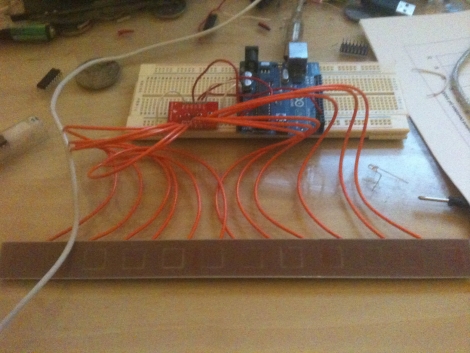
The console was constructed around an old IBM desktop computer, which handles all of the DMX output as well as preset management. An array of 20 ATMega 328Ps running the Arduino bootloader are scattered throughout the device, 18 of which are used to manage the six fader panels, while the remaining two handle management tasks. Aside from the fader banks, the console features a main control board featuring several LCD screens along with 17 capacitive touch buttons used for menu navigation and console control.

While [Michael] is finished building the board, he has just begun the documentation of the construction process. His blog should be updated regularly with more details, so be sure to check back often. Code, as well as hopefully tons of pictures and videos are all forthcoming.

[Edit: Cost comparison update]

Enhance Your Magnetic Silly Putty With Personal Lubricants

better_magnetic_putty_with_personal_lubricant

Instructables user [killbox] seems to have come across a process that actually makes magnetic silly putty “better”, depending on your specific needs. He had tons of fun making a batch of magnetic putty, but thought that the addition of iron oxide made it stiff and a bit slow moving for his tastes.

He tried to find a household item that could act as silly putty thinner, but after trying various oils, gylcerin, and rubbing alcohol, he came up empty handed. Undeterred, he researched how silly putty itself is made, and based on its list of ingredients, decided to seek out some sort of silcone-based lubricant.

He headed out to the local sex shop, and spent some time browsing through the “personal lubricant” section, in hopes of finding what he needed. He settled on ”Gun Oil”, a silicone lubricant that also contained Dimethicone, an item on the ingredient list of the lubricant he initially used to make the batch of magnetic putty.

After adding the lubricant, he found that the putty retained its texture, but flowed far more easily. The thinner putty also consumes rare earth magnets more quickly than its unaltered brethren, as you can see in the picture above.

We’re not sure how far you could push the ferro-putty before it would become a mess, but it’s certainly warrants further experiments.

[Thanks, Mike]

Stretch Your Circuit’s Battery Life By Putting Your PIC To Sleep

pic_power_savings

[Rajendra Bhatt] wrote in to share the latest in a series of PIC tutorials, which covers the microcontroller’s Sleep mode – a very useful tool for limiting current consumption in battery-powered applications.

He discusses how to put the PIC in sleep mode, as well as some common mistakes to watch out for, such as accidentally allowing I/O pins to sink or source current while sleeping. [Rajendra] also walks through the various ways a PIC can be brought out of sleep mode, focusing the majority of his tutorial to the mcu’s watchdog timer.

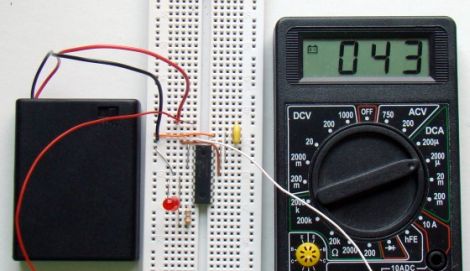
Using a PIC16F628A, he constructs a test circuit which allows him to demonstrate the power savings gained by using sleep mode rather than the microcontroller’s built-in delay function. The circuit simply blinks an LED every 4.3 seconds, using the watchdog timer for the first 2.3 seconds, and a delay() call for the rest of the time.

The power savings are quite substantial, similar to the results we saw using AVR microcontrollers a few weeks ago. [Rajendra] found that using the sleep function limited current consumption to about 4.5% of the current used when calling the mcu’s delay function – a huge savings.

DIY Orb Display Puts The Earth In Your Hands

diy_spherical_projection_globe

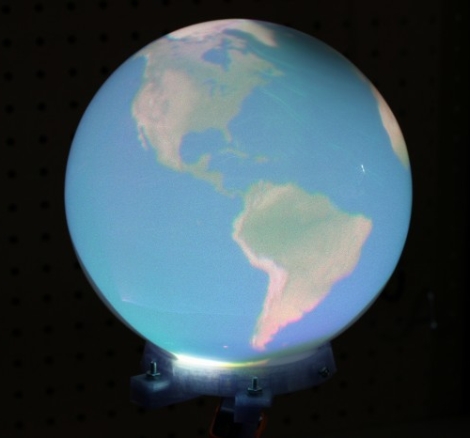
[Nirav] liked the idea of having his own personal Earth at the tip of his fingers, and since that’s not happening any time soon, he decided to build the next best thing. Sure, he could have simply gone out and purchased a globe, but there is no fun in that. Instead, he shows us how he put together an interactive spherical display that won’t break the bank.

The sphere uses a Microvision SHOWWX to drive its display, which projects an image inside of a frosted glass light fixture. The pico projector gets some help from a 180° fisheye lens along the way, enabling the picture to be stretched across the entire inner surface of the globe.

[Nirav] used his 3D extruder to build a base for the globe, which attaches to the projector via a printed mounting plate. A GorillaPod was used to keep things upright while he dusted off his trigonometry skills in order to figure out how to get the image just right.

We think that he did a great job – it definitely looks to be on par (albeit a bit smaller) than the eye of Sauron globe we saw a while back. We can’t wait to see a video of this thing in action once it’s completely finished!

3D Printed Turtle Shell Racers Bring Mario Kart To Life

skimbals_3d_printed_turtle_shell_racers

Every once in awhile a project comes along that makes us say, this is why we want a 3D printer!”

[Skimbal] is pretty well known in 3D printing circles for the incredibly detailed designs he has put out in the past. This time around, his focus is on motoring, Mario Kart style.

His Turtle Shell Racers are ripped right out of the Mario Kart series of games, and are built in the form of the multi-colored turtle shells with which most of us have a love/hate relationship. Constructed atop cheap RC trucks, the Shell Racers require 20-some odd printed parts apiece, but looking at the final results we think the time and money spent would be well worth it.

After watching the videos below, we think you’ll agree that these things look like a blast to play with. The Shell Racers were actually so impressive that they managed to land [Skimbal] a permanent gig with MakerBot Industries.

If you want to try making a set of your own, there are extensively detailed build instructions and all the STL files you can shake a stick at over at Thingiverse.

Continue reading “3D Printed Turtle Shell Racers Bring Mario Kart To Life”

Electrographic Enlarging Sketchifier Does Your Drawing For You

electrographic_enlarging_sketchifier

Back in the 80’s, there used to be a kid’s toy that would allow you to replicate an image by tracing a pre-drawn picture in one panel, while a mechanical arm laid down ink in another. We’d be hard-pressed to remember what the thing was called, but this Electrographic Enlarging Sketchifier would be a wonderful modern day stand-in.

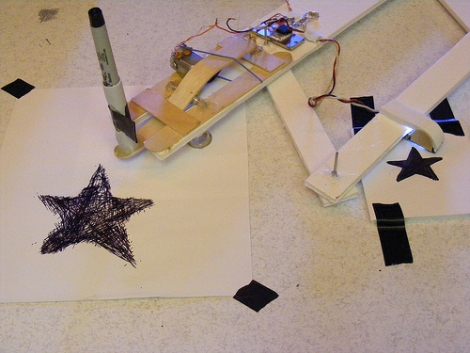
flickr user [Imajilon] constructed this cool motorized pantograph out of tongue depressors, rivets, foam core board, and a handful of electronic components. Despite its bargain basement bill of materials, this thing is pretty darn cool. An optical sensor “views” an image and drives a simple FET circuit, replicating the picture automatically using an electrically driven pen mechanism.

Looking through her flickr stream, we thought the results were quite impressive. She does plan on making a second version of the Sketchifier with a smaller light sensitive area, which should allow her to resolve even smaller features of the source drawing.

[via BuildLounge]

Old Pachinko Game Tweaked To Add A Reward System

restored_gumball_vending_pachinko_machine

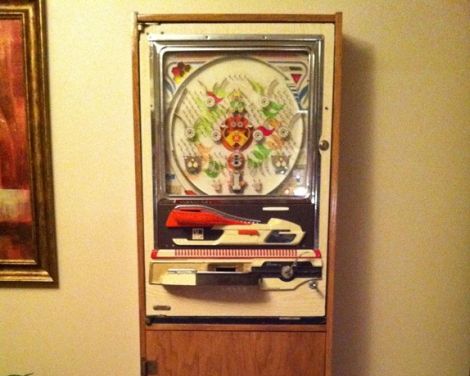
[Tim Higgins] picked up an old pachinko game at a garage sale for his wife, but it ended up sitting unused in the garage for a few years. When he finally dusted it off, he decided that he wanted to restore and build a nice cabinet for it, though he thought the idea was a bit lame.

He says he likes to use some sort of CPU in his projects, and even though it was overkill, he made it his goal to add some sort of microprocessor to the game. He didn’t want to ruin the original aesthetics of the machine, so he decided that he could use an Arduino to drive a rewards system for skilled pachinko players.

Using some PVC pipe, he built a treat hopper which is controlled by the Arduino. When the player wins, the microcontroller triggers a small hobby servo, which dispenses gumballs/candy/etc.

[Tim] says that his wife loved the gift, and he was quite pleased with how it came out as well. Hit up his blog for additional build details and be sure to check out the photo slideshow of the restoration that we have embedded below.

Continue reading “Old Pachinko Game Tweaked To Add A Reward System”