Hackaday Podcast 220: Transparent Ice, Fake Aliens, And Bendy Breadboards

You can join Elliot and Al as they get together to talk about their favorite hacks of the week. There’s news about current contests, fake alien messages, flexible breadboards, hoverboards, low-tech home automation, and even radioactive batteries that could be a device’s best friend.

We have a winner in the What’s that Sound competition last week, which was, apparently, a tough one. You’ll also hear about IC fabrication, FPGAs, and core memory. Lots to talk about, including core memory, hoverboards, and vacuum tubes.

Check out the links below if you want to follow along, and as always, tell us what you think about this episode in the comments!

Or download all the things!

Continue reading “Hackaday Podcast 220: Transparent Ice, Fake Aliens, And Bendy Breadboards”

Linux Fu: Making Progress

The computer world looks different from behind a TeleType or other hardcopy terminal. Things that tend to annoy people about Unix or Linux these days were perfectly great when you were printing everything the computer said to you. Consider the brevity of most basic commands. When you copy a file, for example, it doesn’t really tell you much other than it returns you to the prompt when it is done. If you are on a modern computer working with normal-sized files locally, not a big deal. But if you are over a slow network or with huge files, it would be nice to have a progress bar. Sure, you could write your own version of copy, but wouldn’t it be nice to have some more generic options?

One Way

The pv program can do some of the things you want. It monitors data through a pipe or, at least through its standard output. Think of it as cat with a meter. Suppose you want to write a diskimage to /dev/sdz:

cat diskz.img >/dev/sdz

But you could also do:

pv diskz.img >/dev/sdz

By default, pv will show a progress bar, an elapsed time, an estimated end time, a rate, and a total number of bytes. You can turn any of that off or add things using command line options. You can also specify things like the size of the terminal if it should count lines instead of bytes, and, in the case where the program doesn’t know what it is reading, the expected size of the transfer.

Continue reading “Linux Fu: Making Progress”

New Zealand’s First Microcomputer May Be This 1802

Hardware hackers of a certain age likely got started with microcontrollers via the RCA 1802 — a relatively easy-to-use processor that was the subject of several excellent articles in Popular Electronics magazine back in the late 1970s. [Al’s Geek Lab] has an interview with [Hugh Anderson], who saw the articles and eventually designed the HUG1802, which may be the first microcontroller kit designed and sold in New Zealand.

The 1802 was very attractive at the time since it was inexpensive, static, didn’t require exotic voltages, and had a DMA system that allowed you to load software without complex ROMs. He initially marketed a kit unsuccessfully until an Australian company convinced him to create a proper PC board — the resulting kit was sold to about 100 customers.

The HUG1802 reminded us somewhat of the Quest Super Elf since it had a keypad, a cassette interface, and even a TV output. The 1802 had a DMA-enabled chip that made crude memory-mapped video output. The computer eventually morphed into the ETI 660, which they talk about at the end of the interview.

A lot of people built 1802 computers back in those days. If you don’t have an 1802, but you have an Arduino… ell, there’s always emulation.

Continue reading “New Zealand’s First Microcomputer May Be This 1802”

Simulated ET To Phone Home From Mars This Afternoon

In science fiction movies, communicating with aliens is easy. In real life, though, we think it will be tough. Today, you’ll get your chance to see how tough when a SETI project uses the European Space Agency’s ExoMars Trace Gas Orbiter to send a simulated alien message to the Earth. The transmission is scheduled to happen at 1900 UTC and, of course, the signal will take about 16 minutes to arrive here on planet Earth. You can see a video about the project, A Sign in Space, below.

You don’t need to receive the message yourself. That will be the job of observatories at the SETI Institute, the Green Bank Observatory, and the Italian National Institute for Astrophysics. They’ll make the signal available to everyone, and you can join others on Discord or work solo and submit your interpretation of the message.

Drake’s message properly arranged

There are a host of issues involved in alien communication. What communication medium will they use? How will they encode their message? Will the message even make sense? Imagine an engineer from 1910 trying to find, decode, and understand an ad on FM radio station 107.9. First, they’d have to find the signal. Then figure out FM modulation. Then they’d probably wonder what the phrase “smartphone” could possibly mean.

When [Frank Drake] created a test message to send to aliens via the Arecibo dish, almost no one could decode it unless they already knew how it worked. But even looking at the message in the accompanying image, you probably can only puzzle out some of it. Don’t forget; this message was created by another human.

If you want a foreshadowing of how hard this is, you can try decoding the bitstream yourself. Of course, that page assumes you already figured out that the stream of bits is, in fact, a stream of bits and that it should be set in an image pattern. You also have the advantage of knowing what the right answer looks like. It could easily become an extraterrestrial Rorschach test where you find patterns and meaning in every permutation of bits.

Speaking of the Drake message, it saddens us to think that Arecibo is gone. The closest we think we’ve come to intercepting alien messages is the Wow signal.

Continue reading “Simulated ET To Phone Home From Mars This Afternoon”

Building Circuits Flexibly

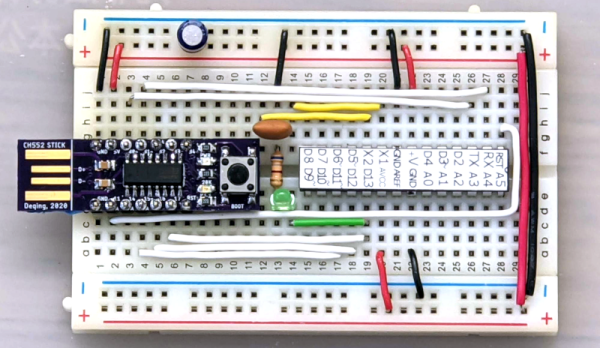
You think of breadboards as being a flexible way to build things — one can easily add components and wires and also rip them up. But MIT researchers want to introduce an actual flexible breadboard called FlexBoard. The system is like a traditional breadboard, but it is literally flexible. If you want to affix your prototype to a glove or a ball, good luck with a traditional breadboard. FlexBoard makes it easy. You can see a short video below and a second video presentation about the system, also.

The breadboard uses a plastic living hinge arrangement and otherwise looks more or less like a conventional breadboard. We can think of about a dozen projects this would make easier.

What’s more, it doesn’t seem like it would be that hard to fabricate using a 3D printer and some sacrificial breadboards. The paper reveals that the structures were printed on an Ender 3 using ePLA and a flexible vinyl or nylon filament. Want to try it yourself? You can!

We know what we will be printing this weekend. If you make any cool prototypes with this, be sure to let us know. Sometimes we breadboard virtually. Our favorite breadboards, though, have more than just the breadboard on them.

Continue reading “Building Circuits Flexibly”

Network Programming

If you want a book on network programming, there are a few classic choices. [Comer’s] TCP/IP books are a great reference but sometimes is too low level. “Unix Networking Programming” by [Stevens] is the usual choice, but it is getting a little long in the tooth, as well. Now we have “Beej’s Guide to Network Programming Using Internet Sockets.” While the title doesn’t exactly roll off the tongue, the content is right on and fresh. Best part? You can read it now in your browser or in PDF format.

All the topics you’d expect are there in ten chapters. Of course, there’s the obligatory description of what a socket is and the types of sockets you commonly encounter. Then there’s coverage of addressing and portability. There’s even a section on IPV6.

Continue reading “Network Programming”

Handheld PC Looks Great

[Bytewelder] fondly remembers the Palm III and Sharp HC-4500, so taking on the design of Decktility, a custom handheld cyberdeck , was a natural next step. The blog post goes into much detail about the design decisions and challenges throughout the project. The end result, though, looks great.

The device uses a Raspberry Pi CM4 and an IPS touchscreen. The bulk of the design work was to get the power system working. There is a custom FET board and an Arduino that manages charging and battery state.

Continue reading “Handheld PC Looks Great”