Current Measurement With Oscilloscopes

What do a Rogowski coil, a magnetic core, and a hall effect sensor have in common? They are all ways you can make oscilloscope probes that measure current. If you think of a scope as a voltage measurement device, you ought to watch the recent video from Keysight Technology (see below). It is true that Keysight would love to sell you a probe, but the video is not a sales pitch, just general technical information about making current measurements with an oscilloscope.

Of course, you can always measure the voltage across a shunt resistor — either one that is naturally in the circuit or one you’ve put inline just for measuring purposes. But if you add a resistor it will change the circuit subtly and it may have to handle a lot of power.

The Keysight video points out that there are different probes for different current measurement regimes. High current, medium current, and low current all use different probes with different technologies. The video is only about 6 minutes long and if you’ve never thought about measuring current with a scope, it is worth watching.

The video shares some high-level details of how the current probes work — that’s where the Rogowski coil comes in, for example. Of course, you can’t expect a vendor to tell you how to build your own current probes. That’s OK, though, because we will. Current probes are often expensive, but you can sometimes pick up a deal on a used one.

Continue reading “Current Measurement With Oscilloscopes”

Gesture Control For Lunch Money

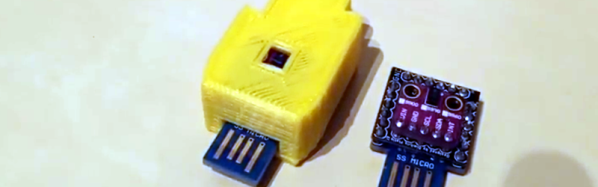
[Dimitris Platis] wanted to add gesture control to his PC. You’d think that would be expensive, but by combining a diminutive Arduino, a breakout board with a gesture controller, and an interconnect PCB, he managed to pull it off for about $7. That doesn’t include the optional 3D-printed case and we think you could omit the interconnect board if you don’t mind some wires and further cut costs. [Dimitris] calls it Nevma, and you can see how the device works in the video below.

The heart of the project is a sensor that measures light and motion. The chip and the breakout board are just a couple of bucks if you order them from China. You can find them in the US if you don’t mind spending a little bit more. The device has an I2C interface, and [Dimitris] uses a tiny Mini SS Micro for the USB interface and the CPU.

Continue reading “Gesture Control For Lunch Money”

Just In Time For The Holidays: Give The Gift Of Cray

The name Cray, as in [Seymour Cray] is synonymous with supercomputing. If you hurry, you can bid on a Cray J90/J916 on eBay. You might want to think about where to put it though. It is mounted on a trailer, requires 480V, and the shipping is $3,000!

First introduced in 1994, the J90 was an “entry level” machine. This particular machine supported up to 16 CPUs (each CPU was actually two chips) running at a blazing 100 MHz. The memory system was more impressive, achieving 48 GB/s.

The Cray T90 computer was much faster (and more expensive) but none of these computers had the performance of a typical PC’s graphics card these days. Even your phone may have more raw computing power, depending on how you choose to measure. Don’t fear, though. Cray Research still makes supercomputers that can eat your phone for lunch.

Still, at the time, this was big iron. The I/O system used SPARC processors that would have been entire workstations in that era. The eBay listing says it might need a little work — we weren’t clear if the seller meant in general or just the cooling system, but you can assume this is a fixer-upper. Apparently, the Retro-Computing Society of Rhode Island restored a similar beast so it can be done.

If your holiday budget doesn’t have room for a real supercomputer, here’s one that is 1/10 the size and much less expensive. Or, you could just pretend.

Lisp In 200 Lines

Contrary to popular belief, LISP does not stand for “lots of irritating spurious parenthesis.” However, it is true that people tend to love or hate this venerable programming language. Whichever side of the fence you’re on, many of the ideas it launched decades ago have become staples of other newer languages. How much C code do you think it takes to make a functional LISP system? If you guessed more than 200, you’ll want to go look at this GitHub repository.

Actually, the code isn’t as good as the (sort of) literate programming white paper on the program, but it gives a good overview of how 200 lines of C code can produce a working LISP-like language good enough to create its own eval loop. It does lack memory handling and error detection, so if you really wanted to use it, you’d probably need to spruce it up a bit.

Continue reading “Lisp In 200 Lines”

Another New Old Computer On An FPGA

How would you sell a computer to a potential buyer? Fast? Reliable? Great graphics and sound? In 1956, you might point out that it was somewhat smaller than a desk. After all, in those days what people thought of as computers were giant behemoths. Thanks to modern FPGAs, you can now have a replica of a 1956 computer — the LGP-30 — that is significantly smaller than a desk. The LittleGP-30 is the brainchild of [Jürgen Müller].

The original also weighed about 740 pounds, or a shade under 336 kg, so the FPGA version wins on mass, as well. The LGP-30 owed its relative svelte footprint to the fact that it only used 113 tubes and of those, only 24 tubes were in the CPU. This was possible, because, like many early computers, the CPU worked on one bit at a time. While a modern computer will add a word all at once, this computer — even the FPGA version — add each operand one bit at a time.

Continue reading “Another New Old Computer On An FPGA”

Arduino Saves Game Boy Camera

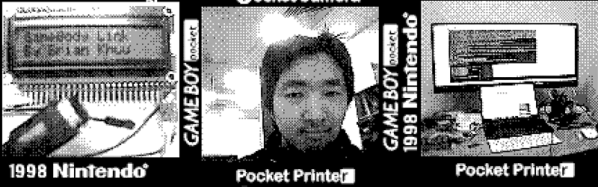
[Brian Khuu] bought a few Game Boy cameras on the Internet and found that they still had pictures on them from the previous owners. The memory in the camera has a backup battery and if that battery dies, the pictures are history, so he decided to mount a rescue operation.

He knew the protocol for how the Game Boy talked to the companion pocket printer was available, so he used an Arduino and a Web browser to extract the photos. The resulting code is on GitHub if you want to save your pictures. Although [Brian] didn’t have to crack the protocol, he does offer a good explanation of it. There’s even some sniffed displays. The Arduino does all the communications and fools the game into thinking it is the companion printer. However, it simply streams the data out and a Javascript decoder handles the actual decoding. In fact, in the blog post, you can enter data, click a button, and see the resulting Game Boy picture.

It works, but [Brian] did run into a few problems. For one thing, the devices don’t seem to use any flow control so he had no choice but to keep up with the Game Boy. Also, there is a CRC he could not correctly decode. However, the pictures look good — well, as good as Game Boy pictures look, at least. So he did get results.

We’ve seen this done with a PC before. If you are more interested in the reverse, by the way, you can use a real Game Boy printer to print from an Arduino.

Rubies Are A 3D Printer’s Best Friend

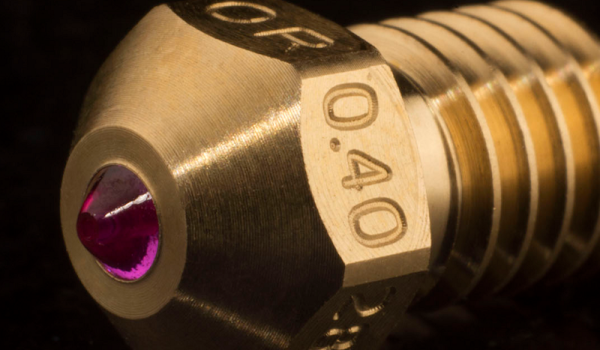
Watching a 3D printer work always reminds us of watching a baker decorate a cake. Gooey icing squeezes out of a nozzle and makes interesting shapes and designs. While hot plastic doesn’t taste as good as icing, it does flow easily through the printer’s nozzle. Well… normal plastic, anyway. These days, advanced 3D printers are using filament with wood, metal, carbon fiber, and other additives. These can provide impressive results, but the bits of hard material in them tend to wear down metallic nozzles. If this is your problem and you are tired of replacing nozzles, you should check out the Olsson Ruby Nozzle.

Ruby, in this case, isn’t just a name. The nozzle has a small bit of ruby with a 0.4mm hole in the center — or they have a few other sizes. We suppose diamond would even be better, but ruby is so much more affordable. We haven’t tried these ourselves, but [3D Printing Nerd] has an interesting video review you can see below.

Continue reading “Rubies Are A 3D Printer’s Best Friend”